Getting Root Access On A Tesla

A growing number of manufacturers are locking perfectly good hardware behind arbitrary software restrictions. While this ought to be a bigger controversy, people seem to keep paying for things like printers with ink subscriptions, cameras with features disabled in firmware, or routers with speed restrictions, ensuring that this practice continues. Perhaps the most blatant is car manufacturers that lock features such as heated seats or even performance upgrades in the hopes of securing a higher price for their vehicles. This might be a thing of the past for Teslas, whose software has been recently unlocked by Berlin IT researchers.

Researchers from Technische Universität Berlin were able to unlock Tesla’s driving assistant by inducing a two-microsecond voltage drop on the processor which allowed root access to the Autopilot software. Referring to this as “Elon mode” since it drops the requirement for the driver to keep their hands on the steering wheel, they were able to access the full self-driving mode allowing autonomous driving without driver input. Although this might be a bad idea based on the performance of “full self-driving” in the real world, the hack at least demonstrates a functional attack point and similar methods could provide free access to other premium features.

While the attack requires physical access to the vehicle’s computer and a well-equipped workbench, in the short term this method might allow for owners of vehicles to use hardware they own however they would like, and in the long term perhaps may make strides towards convincing manufacturers that “features as a service” isn’t a profitable strategy. Perhaps that’s optimistic, but at least for Teslas it’s been shown that they’re not exactly the most secured system on four wheels.

Aqueous Battery Solves Lithium’s Problems

The demand for grid storage ramps up as more renewable energy sources comes online, but existing technology might not be up to the challenge. Lithium is the most popular option for battery storage right now, not just due to the physical properties of the batteries, but also because we’re manufacturing them at a massive scale already. Unfortunately they do have downsides, especially with performance in cold temperatures and a risk of fires, which has researchers looking for alternatives like aqueous batteries which mitigate these issues.

An aqueous battery uses a water-based electrolyte to move ions from one electrode to the other. Compared to lithium, which uses lithium salts for the electrolyte, this reduces energy density somewhat but improves safety since water is much less flammable. The one downside is that during overcharging or over-current situations, hydrogen gas can be produced by electrolysis of the water, which generally needs to be vented out of the battery. This doesn’t necessarily damage the battery but can cause other issues. To avoid this problem, researchers found that adding a manganese oxide to the battery and using palladium as a catalyst caused any hydrogen generated within the battery’s electrolyte to turn back into water and return to the electrolyte solution without issue.

Of course, these batteries likely won’t completely replace lithium ion batteries especially in things like EVs due to their lower energy density. It’s also not yet clear whether this technology, like others we’ve featured, will scale up enough to be used for large-scale applications either, but any solution that solves some of the problems of lithium, like the environmental cost or safety issues, while adding more storage to an increasingly renewable grid, is always welcome.

Telescope Rides On 3D Printed Equatorial Table

In the realm of amateur astronomy, enthusiasts find themselves navigating a cosmos in perpetual motion. Planets revolve around stars, which, in turn, orbit within galaxies. But the axial rotation of the Earth and the fact that its axis is tilted is the thing that tends to get in the way of viewing celestial bodies for any appreciable amount of time.

Amateur astronomy is filled with solutions to problems like these that don’t cost an arm and a leg, though, like this 3D printed equatorial table built by [aeropic]. An equatorial table is a device used to compensate for the Earth’s rotation, enabling telescopes to track celestial objects accurately. It aligns with the Earth’s axis, allowing the telescope to follow the apparent motion of stars and planets across the night sky.

Equatorial tables are specific to a location on the Earth, though, so [aeropic] designed this one to be usable for anyone between around 30° and 50° latitude. An OpenSCAD script generates the parts that are latitude-specific, which can then be 3D printed.

From there, the table is assembled, mounted on ball bearings, and powered by a small stepper motor controlled by an ESP32. The microcontroller allows a telescope, in this case a Newtonian SkyWatcher telescope, to track objects in the sky over long periods of time without any expensive commercially-available mounting systems.

Equatorial tables like these are indispensable for a number of reasons, such as long-exposure astrophotography, time lapse imaging, gathering a large amount of observational detail for scientific purposes, or simply as an educational tool to allow more viewing of objects in the sky and less fussing with the telescope. They’re also comparatively low-cost which is a major key in a hobby whose costs can get high quickly, but not even the telescope needs to be that expensive. A Dobsonian telescope can be put together fairly quickly sometimes using off-the-shelf parts from IKEA.

Sandpaper Alternatives For 3D Prints

A finished 3D print, especially plastic deposition types, often have imperfections in them from the process of laying down each layer of material and from the printer itself. For small batches or one-off parts, we might reach for a few pieces of sandpaper to smooth out these rough edges. While that might work for a small number of parts, it’s not always the best or lowest-effort option for refining these prints. There are a few alternative methods to try out if your fingers are getting sore, though.

Rather than removing material as sandpaper does, most of these methods involve adding material to the print in order to fill in the rough edges of the print. There is a 3D-print-specific product listed called 3D Gloop! which is generally used as a glue to hold plastic parts together, but can also act as a fill in a pinch. Two other similar methods, one using spray paint and polyurethane and the other using epoxy, are more general-purpose ways of finishing the prints with a more natural texture than the printer will produce on its own. They’re not all additive, though; the final (and perhaps, most toxic) method here to achieve a smooth surface on a print uses solvent to remove some of the material instead.

While sandpaper does have its time and place, certain prints may lend themselves more to being finished by one of these other methods especially if they are overly complex, fragile, or an unusual size. Take note of the safety gear you’ll want to have on hand for most of these methods, though, as gloves and a respirator are highly encouraged and possibly helpful even if using only sandpaper. These aren’t the only ways of finishing 3D prints, either. Some of our other favorites are using glazing putty or silver for the finish.

Building A GPS Receiver From The Ground Up

One of the more interesting facets of GPS is that, at least from the receiver’s point-of-view, it’s a fairly passive system. All of the information beamed down from the satellites is out in the ether, all the time, free for anyone on the planet to receive and use as they see fit. Of course you need to go out and buy a receiver or, alternatively, possess a certain amount of knowledge to build a circuit that can take those signals and convert them into something usable. Luckily, [leaning_tower] has the required knowledge and demonstrates it with this DIY GPS receiver.

This receiver consists of five separate circuit boards, all performing their own function. The first, a mixer board, receives the signal via an active antenna and converts it to a lower frequency. From there it goes to a second mixer and correlation board to compare the signal to a local reference, then a signal processing board that looks at this intermediate frequency signal to make sense of the data its seeing. Finally, an FPGA interfacing board ties everything together and decodes the information into a usable form.

Dealing with weak signals like this has its own set of challenges, as [leaning_tower] found out. The crystal oscillator had to be decapped and modified to keep from interfering with the GPS radio since they operated on similar frequencies. Even after ironing out all the kinks, the circuit takes a little bit of time to lock on to a specific satellite but with a second GPS unit for checking and a few weeks of troubleshooting, the homebrew receiver is up and running. It’s an impressive and incredibly detailed piece of work which is usually the case with sensitive radio equipment like GPS. Here’s another one built on a Raspberry Pi with 12 channels and a pretty high accuracy.

Spying On The ESP32’s GPIO

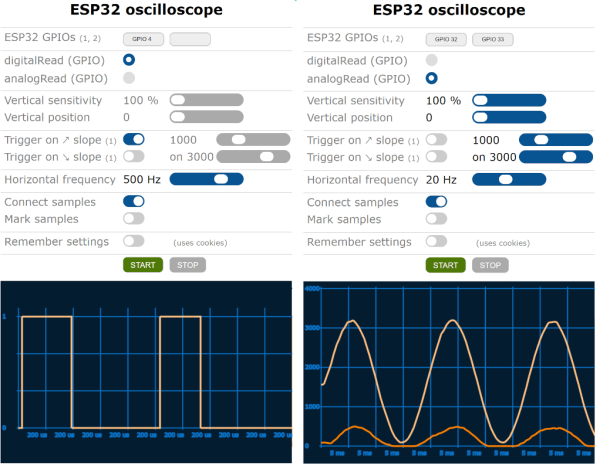
The ESP32 has been a go-to microcontroller platform for a while now, thanks to its versatile capabilities, integrated Wi-Fi and Bluetooth connectivity, and low power consumption. It’s ideal for a wide range of projects especially those revolving around IoT, partially because of all of the libraries and tools available for it now. The latest tool from [The Last Outpost Workshop] adds a feature we didn’t know we wanted until now: a webserver showing real-time updates of what all of the GPIO pins are doing.

The live GPIO pin monitoring library sets up the ESP32 to stream information about what all of the pins are doing in real time to a webserver, which displays the information as a helpful graphic. The demonstration in the video below shows and example troubleshooting a situation where the code is correct but there’s a mistake in the wiring, helping to quickly identify the problem and hopefully eliminating a wild goose chase for a bug in the software. The library can be quickly installed using the Arduino IDE and only requires the use of one other library and a few lines of code to get everything up and running.

As far as a debugging tool goes, something like this could save a lot of us a significant amount of time, especially with how easy it is to set up. A real-time look into the pins and their behavior, including those set up for PWM, is invaluable for plenty of situations. Of course if you’re building something like a real-time operating system that needs responses within a very specific interval you may want to look at more in-depth strategies for probing the GPIO.

Thanks to [Bob] for the tip!

Continue reading “Spying On The ESP32’s GPIO”

A Deep Dive Into Quadcopter Controls

In the old days, building a quadcopter or drone required a lot of hacking together of various components from the motors to the batteries and even the control software. Not so much anymore, with quadcopters of all sizes ready to go literally out-of-the-box. While this has resulted in a number of knock-on effects such as FAA regulations for drone pilots, it’s also let us disconnect a little bit from the more interesting control systems these unique aircraft have. A group at Cornell wanted to take a closer look into the control systems for drones and built this one-dimensional quadcopter to experiment with.

The drone is only capable of flying in one dimension to allow the project to more easily fit into the four-week schedule of the class, so it’s restricted to travel along a vertical rod (which also improves the safety of the lab).  The drone knows its current position using an on-board IMU and can be commanded to move to a different position, but it first has to calculate the movements it needs to make as well as making use of a PID control system to make its movements as smooth as possible. The movements are translated into commands to the individual propellers which get their power from a circuit designed from scratch for this build.

All of the components of the project were built specifically for this drone, including the drone platform itself which was 3D printed to hold the microcontroller, motors, and accommodate the rod that allows it to travel up and down. There were some challenges such as having to move the microcontroller off of the platform and boosting the current-handling capacity of the power supply to the motors. Controlling quadcopters, even in just one dimension, is a complex topic when building everything from the ground up, but this guide goes some more of the details of PID controllers and how they help quadcopters maintain their position.

Continue reading “A Deep Dive Into Quadcopter Controls”