NYT Crossword Decision Puzzles Many

Over at the New York Times (NYT) crossword puzzle desk, newly-appointed Games Editorial Director Everdeen Mason has caused a bit of a ruckus and hubbub (both six letter words with U as the 2nd and 5th letter) among digital puzzle solvers. In a short article published in early August, Ms. Mason announced the end of support for the crossword-solving program Across Lite, abruptly terminating a relationship between the two organizations spanning 25 years. But the ramifications extend much deeper than just one application.

The NYT first published its now-famous crossword puzzle back in 1942, appearing every Sunday, and in 1950 it became a daily feature. In 1993, Will Shortz was chosen as the fourth Crossword Puzzle Editor, a position he still holds today. The NYT online crossword puzzles first appeared in 1996 — puzzle files could be downloaded by modem and solved offline using the program Across Lite.
Modems aside, this basic method has continued until now, and a variety of programs and apps have sprung up over the years that allow not only offline play, but with tailored feature sets, such as support for the visually impaired, puzzle fanatics, puzzle creators, team playing, etc. Naturally the NYT joined the party as well, offering the crossword puzzles online and via smart phone apps.
Continue reading “NYT Crossword Decision Puzzles Many”

Cast-in-Concrete Clock Upgraded After Thirteen Years

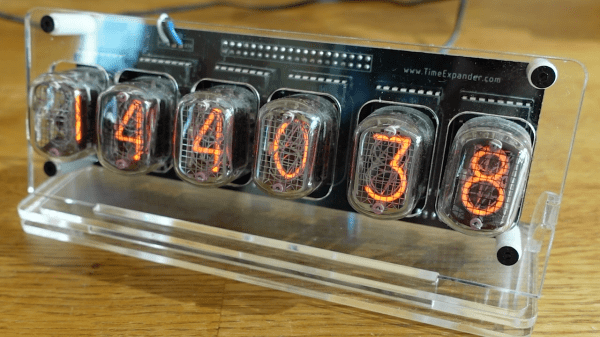
Proving that an old design cast in concrete can indeed be changed, [Hans Jørgen Grimstad] has revisited his Nixie clock from 2008, cleaned up the electronics and packaging, and turned it into a kit. Not that he has plans to enter the kit-making business, but he just thought it would be fun to learn how to make kits. In the video below the break, he’s a bit embarrassed to reveal the inside of his first Nixie clock design, housed in a cast-concrete electronics enclosure. Although it still works, the internal wiring is a flaky, untidy, and perhaps a bit dangerous.

But [Hans] has improved his game over the years, making a number of different clock designs. The latest incarnation is pleasant to look at, built on a PCB which is visible inside a custom acrylic case. Three versions are available to support different types of tubes. The documentation he prepared for the project and the kit is very thorough. He walks you through the unboxing and assembly process in the videos below. Firmware is in C, and runs on a Raspberry Pi Zero W. If you are interesting in making electronics kits, [Hans]’s project would be a good example to follow.

All the necessary information to build the clock is published on the project’s GitHub repository. If you’re looking for enclosure ideas other than concrete or acrylic sheet, check out this write-up on hand-forging artistic Nixie clock enclosures.

Continue reading “Cast-in-Concrete Clock Upgraded After Thirteen Years”

Tesla Door Handle Improvements

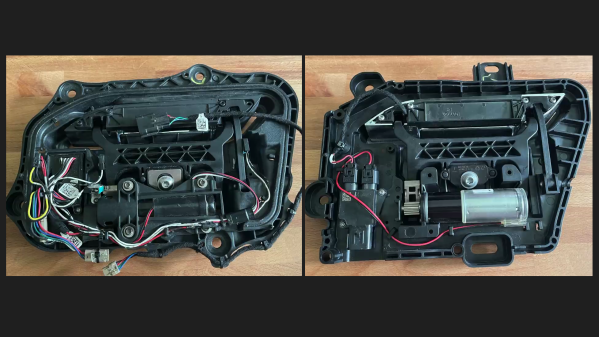
Automotive engineer and former Tesla employee [SuperfastMatt] takes at look at the notorious Tesla door handle design and how it’s changed over the years (see the video below the break). The original handle design consisted of many moving parts, switches and wires which were prone to failure.  Strictly speaking, the door handle is located on the outside of the car’s interior. While it’s sheltered from direct exposure to the elements, it still experiences the extremes of temperature, humidity, and condensation. The handles were so prone to failure that a cottage industry sprang up to provide improved parts and replacements.

Tesla made various improvements over the years, culminating in the latest version which [Matt] reviews in this video. Nearly all the failure points have been eliminated, and the only moving parts, other than the handle itself, is a magnetic sensor to detect handle motion (previously this was sensed by microswitches). [Matt] indelicately opens up the control module, and discovers an NXP programmable angle sensor ( KMA215 ). This all-in-one sensor detects the angle of a magnetic field, and reports it over an automotive communications bus that’s become more and more common over the last ten years: Single Edge Nibble Transmission (SENT) aka SAE J2716. SENT is a low-cost, transmit-only protocol designed for sensors to send data to the ECU. Check out [Matt] decoding it on the oscilloscope and Raspberry Pi in the video — it looks pretty simple at first glance.

We agree with [Matt]’s conclusion that the door handle design has been significantly improved with this latest iteration, questions of whether one needs a retracting door handle aside. If you’d like to learn more about SENT, here is a tutorial written by IDT (now Renasas) applications engineer Tim White. This isn’t [Matt]’s first encounter with a Tesla door handle — back in 2012 we covered his project which used one to dispense beer. Thanks to [JohnU] for sending in this tip.

Continue reading “Tesla Door Handle Improvements”

Ferranti’s Ghost Tours The Chip Factory That Made The ULA

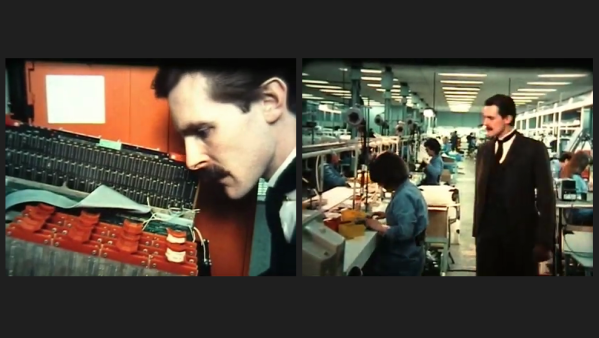
Former Ferranti Electric engineer [Martin Mallinson] recently posted a 1980s documentary on YouTube (see the video below the break). It shows in some detail the semiconductor plant at Gem Mill outside of Manchester UK, as seen through the eyes of the ghost of founder Dr. Sebastian Ferranti. This dramatic device seems a little silly at times, but the documentary still provides a very interesting look at the industry at the time.

The Gem Mill plant was one of the first semiconductor facilities, having begun operations in the 1950s by Ferranti. In 1959 they made the first European silicon diode, and went on to commercialize Uncommitted Logic Arrays (ULA) in the early 1980s. Most famously, Ferranti ULAs were used in many home computers of the day, such as the Sinclair ZX81 and ZX Spectrum, Acorn Electron, and the BBC Micro. Much of the factory tour in this documentary is depicting the ULA process, and they hint at an even more advanced technology being developed by the (unnamed) competition — an FPGA? CPLD?

In a series of events worthy of a mystery novel, Ferranti finally closed its doors in 1993 after acquiring a company that was involved with clandestine agencies and illegal arms sales (see Ferranti on Wikipedia). But through a series of acquisitions over the years, many of their products outlived the company and were available under the labels of future owners Plessey, Zetex, and finally Diodes, Inc. The Gem Mill facility was decommissioned in 2004 and in 2008 it was demolished and replaced by a housing estate.

Thanks to [Cogidubnus Rex] for bringing this video to our attention. A couple of other Ferranti documentaries of the same era are also included down below the break.

Continue reading “Ferranti’s Ghost Tours The Chip Factory That Made The ULA”

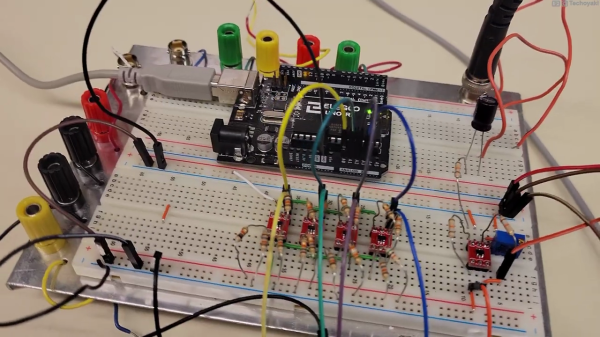
Photo of a prototyping breadboard with an Arduino, whose analog inputs are connected to an array of four small op-amp circuits which perform the voltage slicing function of the Quantizer circuit described in this article.

Arduino Measures 20V Signals Using Quantizer

Canadian electronics geek and nascent YouTuber [Technoyaki] wanted to measure 20 volt signals on his Arduino. One might typically use a voltage divider to knock them down to the 5 volt range of the Arduino’s 10-bit A/Ds. But he isn’t one to take the conventional approach. Instead of using two resistors, [Technoyaki] decides to build an analog circuit out of sixteen resistors, four op amps and a separate 6 VDC supply.

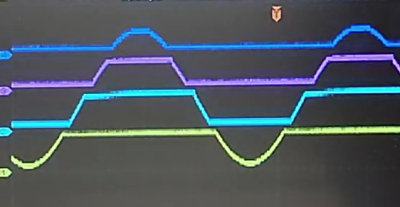
Oscilloscope photo showing the output signals from each of the quantizer's four op amps. They are positioned staggered on the screen so that you can see the original sinusoidal signal clearly.

What is a quantizer? In the usual sense, a quantizer transforms an analog signal (with an infinity of possible values) to a smaller (and finite) set of digital values. An A/D converter is a perfect example of a quantizer. [Technoyaki], stretching the definition slightly, and uses the term to describe his circuit, which is basically a voltage slicer. It breaks up the 20 V signal into four separate 5 V bands. Of course, one could almost  accomplish this by just using an Arduino Due, which has a 12-bit A/D converter (almost, because it has a lower reference voltage of 3.3 V). But that wouldn’t be as much fun.

Why use all these extra components? Clearly, reducing parts count and circuit complexity was not one of [Technoyaki]’s goals. As he describes it, the reason is to avoid the loss of A/D resolution inherent with the traditional voltage divider. As a matter of semantics, we’d like to point out that no bits of resolution are lost when using a divider — it’s more accurate to say that you gain bits of resolution when using a circuit like the quantizer.  And not surprising for precision analog circuitry, [Technoyaki] notes that there are yet a few issues yet to be solved. Even if this circuit ultimately proves impractical, it’s a neat concept to explore. Check out the video below the break, where he does a great job explaining the design and his experiments.

Even though this isn’t quite a cut-and-paste circuit solution at present, it does show another way to handle large signals and pick up some bits of resolution at the same time. We wrote before about similar methods for doubling the A/D resolution of the Arduino. Let us know if you have any techniques for measuring higher voltages and/or increasing the resolution of your A/D converters.

Continue reading “Arduino Measures 20V Signals Using Quantizer”

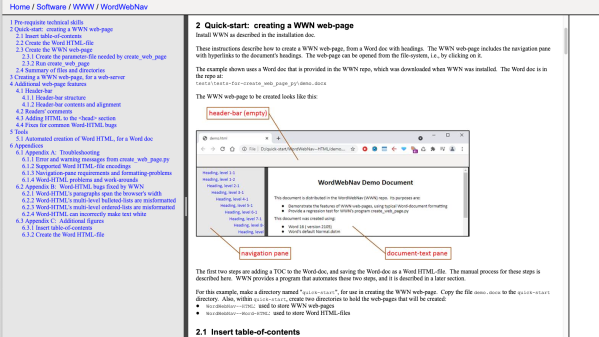
Screen capture of the WWN project, from the project's website, showing the instructions for WWN which are themselves presented as a WWN site.

Making Web Pages With Word?

If you’ve ever examined the messy HTML that results from doing a Save As HTML from Microsoft Word, you can appreciate [Jim Yuill]’s motivation for his WordWebNav (WWN) project. [Jim] uses Word to document his technical projects, and wanted an easy way to generate web pages. Not only is Word-generated HTML nearly unreadable, [Jim] notes there are known bugs, as well. His project attempts to solve these shortcomings, and adds new features like a navigation pane and headers, among others. Here is a link to a dummy project which shows off these features.

There are, of course, other ways of generating web pages from your technical documentation — there is the Markdown / Pandoc combination, various Wiki solutions, or GitHub Pages, for example. If you’re Python-focused, there’s always the Jupyter Notebooks / JupyterLab approach which we wrote about in 2019. But these presume the source documents are in a certain format. If you have years of existing documentation in Word, or you prefer (or are required) to use Word, [Jim]’s WWN tool might be of interest.

The open source, Python-based program can be found in the project’s GitHub repository. [Jim] has a lot of experience writing software, and the clean and well-organized source code reflects this. Do you convert project documentation to HTML for browsing, be it local or online? If so, share your techniques in the comments below.

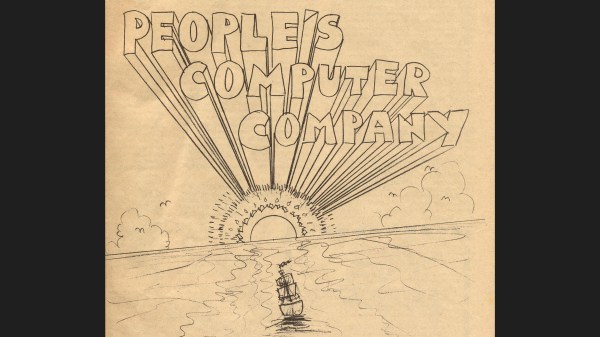
People's Computer Company logo, drawn in a 1970's artistic style

Perusing The People’s Computing Company

If you are a certain age, you might recall the People’s Computing Company (PCC) from the 1970s. It was not really a company, but rather a folksy computer newsletter in the visual style of the times. In the first issue, published in October 1972, founders Dennis Allison, Bob Albrecht and George Firedrake explained their reasons for starting the newsletter:

Computers are mostly used against people instead of for people, used to control people instead of to free them; time to change all that — we need a … People’s Computer Company

The Computer History Museum (CHM) in Mountain View CA has a print collection of these issues donated by [Jim Warren], spanning its ten-year publication run (it changed name to Recreational Computing in 1979). Despite the museum being closed to the public these days over Covid concerns, CHM supporter [Bob Zeidman] has scanned all the issues and they are available at the CHM collections archive.

It’s really fun to browse through these old issues, and see the kinds of topics which were of interest back then. Many would still be of interest today, and many others have become obsolete by advances in technology (but are still fun to read if you have an interest in retro-computing). For example, in the first issue you can read about why you might use different lenses on your Bell & Howell film projector, a comparison of DEC and HP computers as used in educational settings, and how to save money on your teleprinter maintenance contracts and consumables like TTY paper, ribbons, and punched paper tape. If you have some time to kill, check out these archives and take yourself back to a time when desktop publishing meant literally typing and drawing freehand with metal styli on special stencils which were mounted on drums in your mimeograph machine one page at a time.

The PCC was an early supporter of copyright-free software, teaching computer programming, using computer games as a learning tool, and encouraging computer literacy for everyone. They did this not only via the newsletter, but educational books, an organization called ComputerTown USA! for teaching kids, and spin-off periodicals like DragonSmoke and Dr. Dobb’s Journal of Computer Calisthenics & Orthodontia (edited by [Jim Warren] mentioned above) which went on to become the popular computer magazine Dr. Dobb’s Journal which stayed in publication until 2014. We wrote a piece a few years ago about a software-defined radio project from the PCC back in 1975. Do you have any favorite old journal archives that you like to peruse from time to time?