Illustrated Kristina with an IBM Model M keyboard floating between her hands.

Keebin’ With Kristina: The One With The Arboreal Keyboards

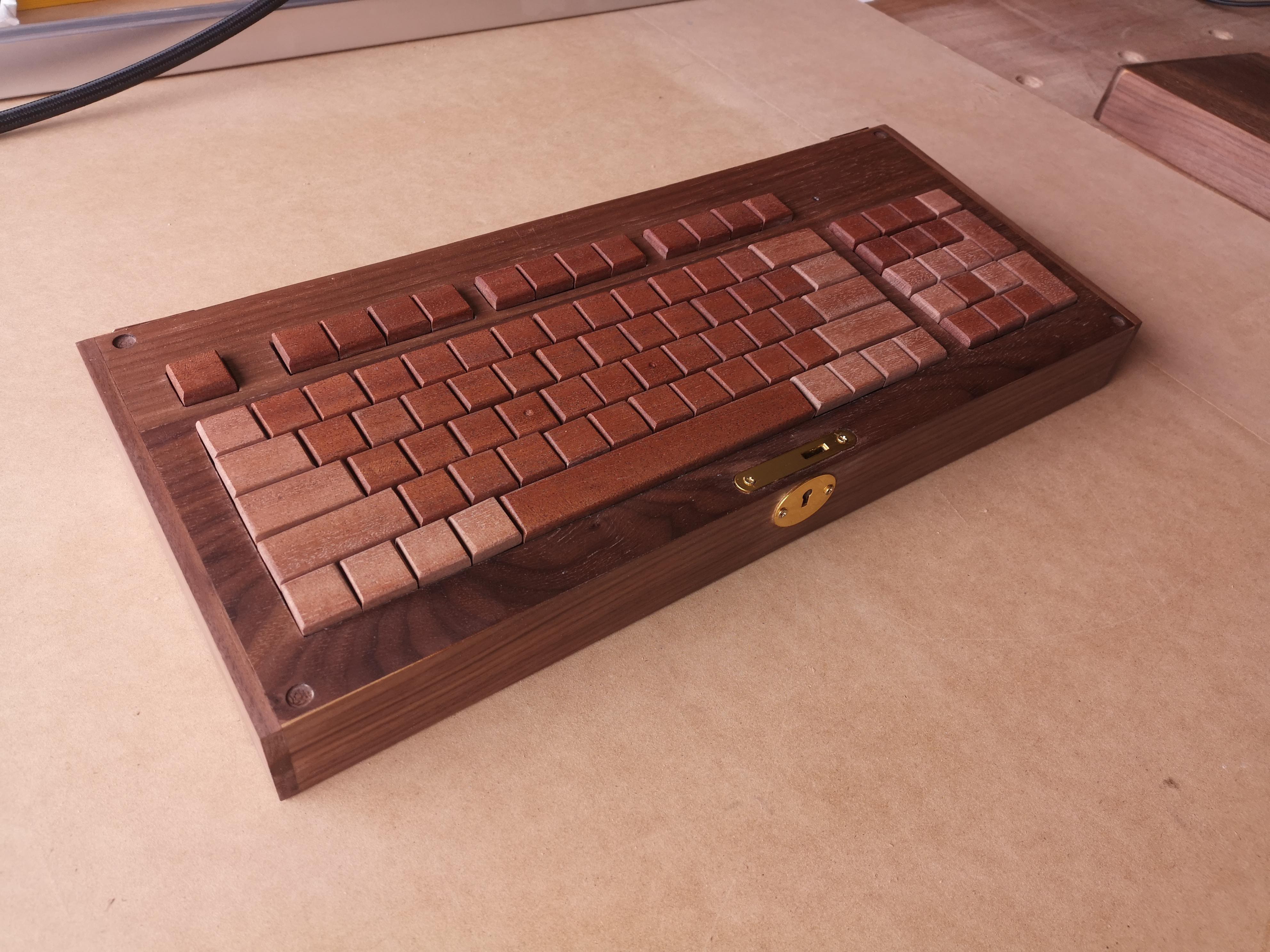
Well, unfortunately we don’t know much yet about this nice wooden keyboard from [Kelvin Chow], but maybe this inclusion will encourage [Kelvin] to post more about it.

Sure is nice-looking, don’t you think? That’s because there some great details at play here, like the legend-less two-tone keycaps and the neat-o locking box it sits in.

This keyboard is inspired by the Hacoa Ki-board, which uses a singles plank of wood to craft the keycaps. [Kelvin] wanted to try this technique for themselves. Evidently this won’t be the last wooden keyboard, so stay tuned for more over on Hackaday.io.

This isn’t the first dead-tree keyboard we’ve seen around here, either. A while back we saw one with Scrabble tile keycaps, and earlier this year, a nice wooden macro pad.

Continue reading “Keebin’ With Kristina: The One With The Arboreal Keyboards”

Virtual Mini Pinball Cabinet Scores Big

Do you love pinball, but can’t justify owning a full-size cabinet? Yeah, us either, and that’s why we’re so interested in [mircemk]’s great-looking DIY mini virtual pinball cabinet. Since [mircemk] is a IT service specialist, they are lucky enough to have access to lots used and broken equipment, and that’s what this build is made of.

Essentially two computers working together, the playfield is a old 17-inch monitor that needed its LED lighting replaced before gracing the MDF cabinet The backglass is an ancient 10-inch tablet that was perfect for this application.

Even the motherboard, RAM, and SSD came from one of [mircemk]’s previous PCs. The SSD needed some attention first as well — it didn’t work sometimes, and didn’t show up in the BIOS at all, so [mircemk] threw it in the oven for 10 minutes at 250°, and now all is well.

One thing we really like about this build is that instead of designing a control board for the buttons, [mircemk] used a cheap USB joystick and wired them up to the pads.

So how does the tablet figure into all of this? It’s connected to a PC via USB and does its job thanks to a piece of software called Wired XDisplay. There is even a tilt switch in this bad boy. Because what’s a pinball cabinet without a tilt switch? A cheater’s cabinet, that’s what. Check out the build/demo video after the break.

Don’t even have the space for a mini cabinet? We hear you. Here’s one that fits in the palm of your hand.

Continue reading “Virtual Mini Pinball Cabinet Scores Big”

Playing The Guitar Of DOOM

Over the years, we’ve seen DOOM run on pretty much everything from an 8088 to a single keycap. We’ve also written up one or two controllers, but we don’t think we’ve ever seen anything like this — playing DOOM with an electric guitar.

The guitar in question is a Schecter Hellraiser Deluxe, which seems like a great choice to us. In order to get the notes to control the game, [DOS Storm] converted a handful of notes to MIDI using a VST plugin called Dodo MIDI 2 and the Reaper DAW. Then it was a matter of converting MIDI to keystrokes. This took two programs — loopMIDI to do take the MIDI data and route it elsewhere, and MIDIKey2Key to actually convert the MIDI to the keystrokes that control DOOM.

The result is that the notes that move Doomguy around are mostly in an A-major bar chord formation, with some controls up in the solo range of the fret board. Be sure to check out the demo video below and watch [DOS Storm] clear level one in a fairly impressive amount of time, considering their controller is a guitar.

That key cap isn’t even the most ridiculous thing we’ve seen DOOM running on. It’s probably a toss-up between that and the LEGO brick.

Continue reading “Playing The Guitar Of DOOM”

Hats Off To Another Weird Keyboard From Google Japan

As portable as keyboards have gotten, you still need some place to put the thing — some kind of bag for travel, and a flat surface for using it. Well, it doesn’t get much more portable than a hat keyboard, now does it?

Every October 1st, Google Japan likes to celebrate the 101-key keyboard by building something revolutionary off the top of their heads. (10/1… 101… get it?) This year was no exception — they created the GCAPS, a ballcap-like device with a single switch inside.

In order to use it, you spin the hat left and right until the desired character is reached, and the rotation is detected by a gyroscope. Then you press down on the top of the hat to send the key codes via Bluetooth.

Under the hood, the hat uses an M5Stick C Plus and, to our dismay, a micro switch that wasn’t even made by Cherry. Oh well —  we landed on the clicky side, so that’s great in our book. Surprisingly, there exists a skull cap/hat skeleton thing on which to build a platform for pressing down on the switch. Just like the teaboard and the long boi keyboards, this thing is completely open source.

Since it types in Japanese, there’s no word on whether it types in all caps, though we like to think that it would given the object it represents. Be sure to check out the product reveal video after the break.

Continue reading “Hats Off To Another Weird Keyboard From Google Japan”

Famicom-Inspired NES TV Looks Rad In Red

Take it from us, insomnia is no joke. But the wee hours can have a great effect on creativity, and if you’ve got a project in mind, doing that is way better than just sitting around, zoning out to infomercials and wishing for sleep. Over recent nights, [insomniacfactory] has been working on a Sharp C1 Famicon-inspired NES TV, and the result is simply fabulous.

The Sharp C1 Famicom was CRT television with a Famicom (precursor to the NES) built in. It allegedly had better picture quality than either a Famicom or NES with a separate television, and this was because it had direct internal display connection. The picture quality was so good that video game magazines at the time used it for screenshots.

Starting with a couple of TVs and a plan, [insomniacfactory] got to work, using the guts from a newer donor TV and a 1985 NES main board with the region-free mod and the RF module removed.

[insomniacfactory] also added also added a wiring harness and a side loader connector from a broken Game Genie to the NES main board. After some careful Dremeling out of the 1981 AKAI TV, they had room for the clone console’s cartridge slot and controller plugs.

This project took a lot of careful and fiddly work, especially since the boards are all bracketed in place and easy to remove. But it totally looks like it was worth it, and now [insomniacfactory] can retro game all night for a while before starting the next insomnia-driven project.

Are you in the mood for more iconic NES? Take a guided tour.

Hackaday Prize 2023: Hydrocleaner Nips Pollution In The Bud

It’s unfortunate, but a lot of trash ends up in our rivers and, eventually, our oceans. Cleaning efforts can be costly and require a lot of human power. One of the ways to keep trash out from reaching the ocean is to attack it at the river level. That’s the idea behind [Xieshi Zhang]’s Hydrocleaner, a semi-autonomous river cleaning robot.

One current method for removing trash is by remote-controlled boats with nets attached. These typically travel in one direction, sort of sweeping left and right and probably missing trash in the process.

Hydrocleaner is capable of turning back and forth, ensuring a much more complete clean-up. The camera spots trash, and the twin-pontoon design allows it to flow easily between them and into the net behind. Currently, the brain behind this boat is a Jetson Nano, although this is a work in progress. The eventual idea is that the boat would navigate itself using GNSS guidance and would navigate toward the trash.

Of course, you could always fight trash with trash.

We’d Sure Like To Strum The Chrumm Keyboard

If you want something as personal as a keyboard done right, you have to do it yourself. Not quite satisfied with the multitude of mechanical offerings out there, [summific] decided to throw their hat into the ring and design the Chrumm keyboard. And boy, are we glad they did.

Between the lovely tenting angle and tilt, the gorgeous flexible PCBs, and the pictures that could pass for renders, [summific] has given us something beautiful to behold that we can only dream of thocking on. Even the honeycomb plate is nice. Oh, but this monoblock split is completely open source.

This Raspberry Pi Pico-powered keyboard features a 3D printable case design without visible screws, and a rotary encoder in the middle. Those palm rests are firmly attached from the underside. Why are the thumb cluster keycaps upside down? It’s not meant to drive you insane; it’s because the contour is more finger-friendly that way, according to some people.

[summific] makes this look easy, but it doesn’t matter, because all the hard work is already done. If you want something easier, start with a macropad. Or a macro pad, even.

Via reddit