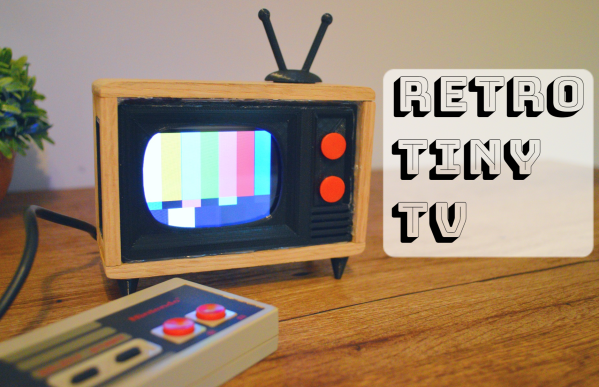
A tiny TV that shows weather, news, and the classic test pattern.

Tiny TV Tells The Temperature Tale

Once upon a time, we would run home from the bus stop to watch Gargoyles and Brady Bunch reruns on the family TV, a late-1970s console Magnavox number that sat on the floor and was about 50% more cabinet than CRT. The old TV, a streamlined white Zenith at least ten years older, had been relegated to the man cave in the basement. It looked so mod compared to the “new” TV, but that’s not the aesthetic my folks were after. They wanted their electronics to double as furniture.

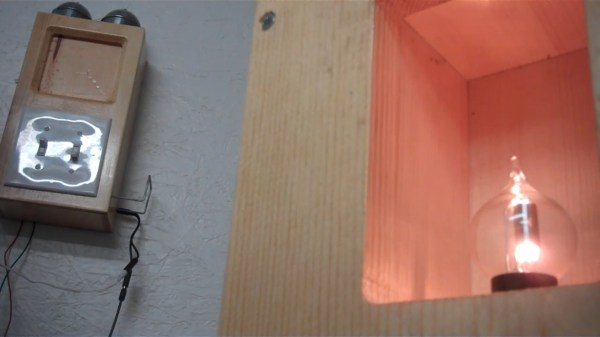
This little TV is a happy medium between the two styles, and for us, it’s all about those feet. But instead of cartoons, it switches between showing the current weather and the top news headlines. Inside that classy oak cabinet is an LCD, an ESP32, and an SD card module. The TV uses OpenWeatherMap and pulls the corresponding weather image from the SD card based on time of day — light images for day, and dark images for night.

We love that it shows the SMPTE color bars, aka the standard American TV test pattern as it switches between weather and news. After showing the top headlines, it automatically switches back to the weather channel. Be sure to check out the short demo video after the break.

Do you like your tiny televisions in strange places? Here’s one you can use to trim your tree this year.

Continue reading “Tiny TV Tells The Temperature Tale”

Illustrated Kristina with an IBM Model M keyboard floating between her hands.

Keebin’ With Kristina: The One With The Curved Typewriter

Aerodox Flies on Wireless Wings

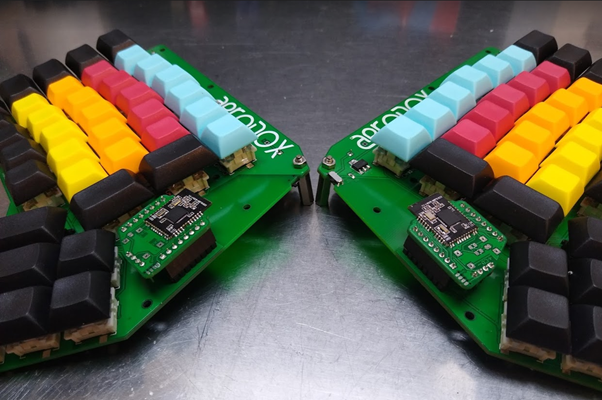
Aerodox, a wireless, split keyboard.[Simon Merrett] didn’t know anything about keyboards when he started this project, but he didn’t let that stop him. [Simon] did what any of us would do — figure out what you like, learn enough to be dangerous, and then start fiddling around, taking all that inspiration and making a mashup of influences that suits your needs.

The Aerodox design became a cross between the ErgoDox‘s key layout and the logic and communication of the Redox Wireless, itself a reduced-size version of the ErgoDox. Interestingly, [Simon] chose the ErgoDox’s dimensions and spacing, and not those of the Redox. Like a lot of people out there, I found the ErgoDox to be too big for my hands, mostly in that the thumb cluster is too far away from the mainland. It’s nice to see that it suits some people, though.

[Simon] worked up a custom hot-swap footprint that makes the board reversible, much like the ErgoDox. Each half has an NRF51822 for a brain, and there’s a third one that acts as a receiver. This external NRF board is connected over UART to an Arduino Pro Micro, which acts as the USB HID and runs QMK. It’s an interesting journey for sure, so go dig into the logs.

Continue reading “Keebin’ With Kristina: The One With The Curved Typewriter”

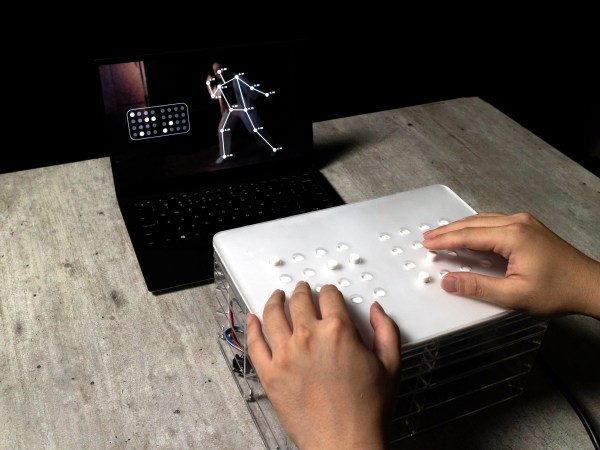
A haptic device that lets visually-impaired people experience the flow and details of dance.

The Beauty Of Dance, Seen Through The Power Of Touch

It’s nothing short of amazing what trained dancers can do with their bodies, and a real shame that visually-impaired people can’t enjoy the experience of, say, ballet. For this year’s Hackaday Prize, [Shi Yun] is working on a way for visually-impaired people to experience dance performances via haptic feedback on a special device.

This platform, which is called Kinetic Soul, uses Posenet computer vision to track a dancer’s movements. Posenet detects the dancer’s joints and creates a point map to determine what body parts are moving where, and at what speed. Then the system translates and transmits the movements to the 32 pins on the surface, creating a touchable picture of what’s going on. Each 3D-printed pin is controlled with a solenoid, all of which are driven by a single Arduino.

We think it’s interesting that Kinetic Soul can speak to the user in two different languages. The first is more about the overall flow of a dance, and the second delves into the deconstructed details. Both methods allow for dances to be enjoyed in real time, or via video recording. So how does one deconstruct dance? [Shi Yun] turned to Laban Movement Analysis, which breaks up human locomotion into four broad categories: the body in relation to itself, the effort expended to move, the shapes assumed, and the space used.

[Shi Yun] has been user-testing their ideas at dance workshops for the visually impaired throughout the entire process — this is how they arrived at having two haptic languages instead of one. They plan to continue getting input as they work to fortify the prototype, improve the touch experience, and refine the haptic languages. Check out the brief demonstration video after the break.

Yes indeed, dance is a majestic way of expressing all kinds of things. Think you have no use for interpretive dance? Think again — it can help you understand protein synthesis in an amusing way.

Continue reading “The Beauty Of Dance, Seen Through The Power Of Touch”

Inside the making of a cylindrical keyboard that doubles as a tea cup.

Can’t Spill Coffee On Your Keyboard If It’s Already Inside

No matter where you live in the world or what beverage you enjoy, it’s too easy to spill it on the keyboard. Obviously, the solution is to combine the two. That’s exactly what Google Japan did this past April Fool’s Day when they released the Gboard — a cylindrical keyboard wrapped around a removable cup. But is it still a joke once you’ve open-sourced it and made a build guide, more or less?

Here’s where it gets weird: each kanji on the keyboard represents a different kind of fish, and they’re laid out in Japanese phonetic order. You’re not stuck with the fish, though — one of the 60 keys switches between fish input and regular Hiragana (the basic Japanese phonetic alphabet). Underneath all those fish are low-profile Kailh chocs hooked up to an ATMega32u4. We only wish it were wireless.

We love that they open-sourced this keyboard, and it even makes sense in a way. In order to produce a good April Fool’s video, you actually have to make the fake product. The better it is (i.e. weird but plausible), the more people will like it and probably want one. So if you’re going to go to all that trouble, why not set it free on GitHub? Note that the second line of the readme is “this is not an officially-supported Google product”, which we suppose goes without saying.

Be sure to check out the short video after the break. If you don’t understand Japanese, you’ll want to turn on the closed captions.

You know, now that Raspberry Pi have made their answer to the Arduino, it’s about time that Apple made their answer to the Raspberry Pi.

Continue reading “Can’t Spill Coffee On Your Keyboard If It’s Already Inside”

A French Minitel terminal becomes a Raspberry Pi-powered mini laptop.

Minitel Terminal Becomes Mini Laptop

In 1980, France took a step into the future when the telecom companies introduced the Minitel system — a precursor to the Web where users could shop, buy train tickets, check stocks, and send and receive electronic mail through a small terminal. Minitel still had 10 million monthly connections in 2009, but the service was discontinued in 2012.

The keyboard of a French Minitel terminal is wired up to an Arduino Pro Micro.So, you can imagine how many Minitel terminals must be floating around at this point. [Gautchh] picked one up at a garage sale a while back and converted it into a battery-powered laptop for taking notes in class. Luckily for us, [Gautchh] recently open-sourced this project and has given us a wiring diagram, STLs, BOM, and a good look into the build process.

[Gautchh] started by gutting the Minitel, but saved the power button and the très chic power indicator that looks like a AA cell. The new 10.4″ LCD screen is held in place with four 3D-printed corner blocks and a bit of hot glue, and the original keyboard (which we’d love to clack on) is now wired up to an Arduino Pro Micro. The main brain — a Raspberry Pi 3B — is easily accessible through a handy little hatch in the back. Well, it looks like we’ve got a new ebay alert to set up.

In the mood for more AZERTY goodness? Check out this gallery of French computers, or a more traditional take on a Minitel with a Raspberry Pi.

Dave went from a passive decoy to a high-speed boating machine.

Dave The Drive-able Duck Does Donuts

[Hey Jude] is tired of the machismo dripping from most modern electronic toys, especially stuff like monster trucks and police/military sets. He grew up on weird stuff, not aggression, and wanted to share the experience of kit-bashing a new toy together alongside his son.

This is essentially an R/C boat stuffed into a decoy duck, but there’s more to it than that. After removing the ballast that made him stay upright, [Hey Jude] performed plastic surgery on both sides of Dave the duck, creating a boat-shaped hole in the bottom, and a hinged bonnet out of the top which serves as an access panel for the boat’s innards. Everything is sealed up with Sugru, though you could probably use caulk or even hot glue (if you wanted something more temporary and less expensive).

The smartest bit has to be the loop on Dave’s back — this makes it easy to lower him into a pond from a footbridge, or rescue him if he stalls in the middle of the water. Check out the footage of Dave’s maiden voyage after the break.

Remote control of things will never get old. Do you have an old Nintendo Zapper lying around? Why not make it do your home automation bidding?

Continue reading “Dave The Drive-able Duck Does Donuts”

A 3D-printed mini laser engraver made from DVD-RW drive motors.

Mini Laser Engraver Could Carve Out A Place On Your Desk

Got a couple of old DVD-RW drives lying around, just collecting dust? Of course you do. If not, you likely know where to find a pair so you can build this totally adorable and fully dangerous laser engraver for your desk. Check out the complete build video after the break.

[Smart Tronix] doesn’t just tell you to salvage the stepper motors out of the drives — they show you how it’s done and even take the time to explain in writing what stepper motors are and why you would want to use them in this project, which is a remix of [maggie_shah]’s design over on Thingiverse. As you might expect, the two steppers are wired up to an Arduino Uno through a CNC shield with a pair of A4988 motor drivers. These form the two axes of movement — the 250mW laser is attached to x, and the platform moves back and forth on the y axis. We’d love to have one of these to mess around with. Nothing that fits on that platform would be safe! Just don’t forget the proper laser blocking safety glasses!

Need something much bigger that won’t take up a lot of space? Roll up your sleeves and build a SCARA arm to hold your laser.

Continue reading “Mini Laser Engraver Could Carve Out A Place On Your Desk”