Tool Turns SVGs Into Multicolor 3D Prints

Want to turn a scaled vector graphic into a multicolor 3D print, like a sign? You’ll want to check out [erkannt]’s svg2solid, a web-based tool that reads an SVG and breaks the shapes up by color into individual STL files. Drag those into your slicer (treating them as a single object with multiple parts) and you’re off to the races.

This sign was printed face-down on a textured build plate. The colors only need to be a few layers deep.

This is especially handy for making 3D printed versions of things like signs, and shown here is an example of exactly that.

It’s true that most 3D printer software supports the .svg format natively nowadays, but that doesn’t mean a tool like this is obsolete. SVG is a 2D format with no depth information, so upon import the slicer assigns a arbitrary height to all imported elements and the user must make any desired adjustments manually. For example, a handy tip for making signs is to make the “background” as thick as desired but limit colored elements to just a few layers deep. Doing so minimizes filament switching while having no impact on final visual appearance.

Being able to drag SVGs directly into the slicer is very handy, but working with 3D models has a certain “what you see is what you get” element to it that can make experimentation or alternate applications a little easier. Since svg2solid turns an SVG into discrete 3D models (separated by color) and each with user-defined heights, if you find yourself needing that then this straightforward tool is worth having in your bookmarks. Or just go straight to the GitHub repository and grab your own copy.

On the other hand, if you prefer your 3D-printed signs to be lit up in a faux-neon style then here’s how to do that in no time at all. Maybe there’s a way to mix the two approaches? If you do, be sure to use our tips line to let us know!

Behold Self-Synchronizing, Air-Flopping Limbs That Hop And Swim

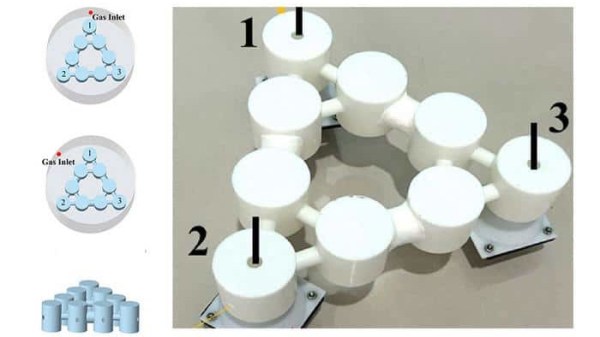
Dutch research institute [AMOLF] shows off a small robot capable of walking, hopping, and swimming without any separate control system. The limbs synchronize thanks to the physical interplay between the robot’s design and its environment. There are some great videos on that project page, so be sure to check it out.

A kinked soft tube oscillates when supplied with continuous air.

Powered by a continuous stream of air blown into soft, kinked tubular limbs, the legs oscillate much like the eye-catching “tube man” many of us have seen by roadsides. At first it’s chaotic, but the movements rapidly synchronize into a meaningful rhythm that self-synchronizes and adapts. On land, the robot does a sort of hopping gait. In water, it becomes a paddling motion. The result in both cases is a fast little robot that does it all without any actual control system, relying on physics.

You can watch it in action in the video, embedded below. The full article “Physical synchronization of soft self-oscillating limbs for fast and autonomous locomotion” is also available.

Gait control is typically a nontrivial problem in robotics, but it doesn’t necessarily require a separate control system. Things like BEAM robotics and even the humble bristlebot demonstrate the ability for relatively complex behavior and locomotion to result from nothing more than the careful arrangement of otherwise simple elements.

Continue reading “Behold Self-Synchronizing, Air-Flopping Limbs That Hop And Swim”

MCP Blender Addon Lets AI Take The Wheel And Wield The Tools

Want to give an AI the ability to do stuff in Blender? The BlenderMCP addon does exactly that, connecting open-source 3D modeling software Blender to Anthropic’s Claude AI via MCP (Model Context Protocol), which means Claude can directly use Blender and its tools in a meaningful way.

MCP is a framework for allowing AI systems like LLMs (Large Language Models) to exchange information in a way that makes it easier to interface with other systems. We’ve seen LLMs tied experimentally into other software (such as with enabling more natural conversations with NPCs) but without a framework like MCP, such exchanges are bespoke and effectively stateless. MCP becomes very useful for letting LLMs use software tools and perform work that involves an iterative approach, better preserving the history and context of the task at hand.

Unlike the beach scene above which used 3D assets, this scene was created from scratch with the help of a reference image.

Using MCP also provides some standardization, which means that while the BlenderMCP project integrates with Claude (or alternately the Cursor AI editor) it could — with the right configuration — be pointed at a suitable locally-hosted LLM instead. It wouldn’t be as capable as the commercial offerings, but it would be entirely private.

Embedded below are three videos that really show what this tool can do. In the first, watch it create a beach scene using assets from a public 3D asset library. In the second, it creates a scene from scratch using a reference image (a ‘low-poly cabin in the woods’), followed by turning that same scene into a 3D environment on a web page, navigable in any web browser.

Back in 2022 we saw Blender connected to an image generator to texture objects, but this is considerably more capable. It’s a fascinating combination, and if you’re thinking of trying it out just make sure you’re aware it relies on allowing arbitrary Python code to be run in Blender, which is powerful but should be deployed with caution.

Continue reading “MCP Blender Addon Lets AI Take The Wheel And Wield The Tools”

Blurry Image Placeholders, Generated With Minimal CSS

Low-quality image placeholders (LQIPs) have a solid place in web page design. There are many different solutions but the main gotcha is that generating them tends to lean on things like JavaScript, requires lengthy chunks of not-particularly-human-readable code, or other tradeoffs. [Lean] came up with an elegant, minimal solution in pure CSS to create LQIPs.

Here’s how it works: all required data is packed into a single CSS integer, which is decoded directly in CSS (no need for any JavaScript) to dynamically generate an image that renders immediately. Another benefit is that without any need for wrappers or long strings of data this method avoids cluttering the HTML. The code is little more than a line like <img src="…" style="--lqip:567213"> which is certainly tidy, as well as a welcome boon to those who hand-edit files.

The trick with generating LQIPs from scratch is getting an output that isn’t hard on the eyes or otherwise jarring in its composition. [Lean] experimented until settling on an encoding method that reliably delivered smooth color gradients and balance.

This method therefore turns a single integer into a perfectly-serviceable LQIP, using only CSS. There’s even a separate tool [Lean] created to compress any given image into the integer format used (so the result will look like a blurred version of the original image). It’s true that the results look very blurred but the code is clean, minimal, and the technique is easily implemented. You can see it in action in [Lean]’s interactive LQIP gallery.

CSS has a lot of capability baked into it, and it’s capable of much more than just styling and lining up elements. How about trigonometric functions in CSS? Or from the other direction, check out implementing a CSS (and HTML) renderer on an ESP32.

A Dual Mirror System For Better Cycling Safety

Rear-view mirrors are important safety tools, but [Mike Kelly] observed that cyclists (himself included) faced hurdles to using them effectively. His solution? A helmet-mounted dual-mirror system he’s calling the Mantis Mirror that looks eminently DIY-able to any motivated hacker who enjoys cycling.

One mirror for upright body positions, the other for lower positions.

Carefully placed mirrors eliminate blind spots, but a cyclist’s position changes depending on how they are riding and this means mirrors aren’t a simple solution. Mirrors that are aligned just right when one is upright become useless once a cyclist bends down. On top of that, road vibrations have a habit of knocking even the most tightly-cinched mirror out of alignment.

[Mike]’s solution was to attach two small mirrors on a short extension, anchored to a cyclist’s helmet. The bottom mirror provides a solid rear view from an upright position, and the top mirror lets one see backward when in low positions.

[Mike] was delighted with his results, and got enough interest from others that he’s considering a crowdfunding campaign to turn it into a product. In the meantime, we’d love to hear about it if you decide to tinker up your own version.

You can learn all about the Mantis Mirror in the video below, and if you want to see the device itself a bit clearer, you can see that in some local news coverage.

Continue reading “A Dual Mirror System For Better Cycling Safety”

Gaze Upon Robby The Robot’s Mechanical Intricacy

One might be tempted to think that re-creating a film robot from the 1950s would be easy given all the tools and technology available to the modern hobbyist, but as [Mike Ogrinz]’s quest to re-create Robby the Robot shows us, there is a lot moving around inside that domed head, and requires careful and clever work.

The “dome gyros” are just one of the complex assemblies, improved over the original design with the addition of things like bearings.

Just as one example, topping Robby’s head is a mechanical assembly known as the dome gyros. It looks simple, but as the video (embedded below) shows, re-creating it involves a load of moving parts and looks like a fantastic amount of work has gone into it. At least bearings are inexpensive and common nowadays, and not having to meet film deadlines also means one can afford to design things in a way that allows for easier disassembly and maintenance.

Robby the Robot first appeared in the 1956 film Forbidden Planet and went on to appear in other movies and television programs. Robby went up for auction in 2017 and luckily [Mike] was able to take tons of reference photos. Combined with other enthusiasts’ efforts, his replica is shaping up nicely.

We’ve seen [Mike]’s work before when he shared his radioactive Night Blossoms which will glow for decades to come. His work on Robby looks amazing, and we can’t wait to see how it progresses.

Continue reading “Gaze Upon Robby The Robot’s Mechanical Intricacy”

Read Motor Speed Better By Making The RP2040 PIO Do It

A quadrature encoder provides a way to let hardware read movement (and direction) of a shaft, and they can be simple, effective, and inexpensive devices. But [Paulo Marques] observed that when it comes to reading motor speeds with them, what works best at high speeds doesn’t work at low speeds, and vice versa. His solution? PicoEncoder is a library providing a lightweight and robust method of using the Programmable I/O (PIO) hardware on the RP2040 to get better results, even (or especially) from cheap encoders, and do it efficiently. Continue reading “Read Motor Speed Better By Making The RP2040 PIO Do It”