Drunken EBay Purchase Becomes Motorized, Speaking Dalek

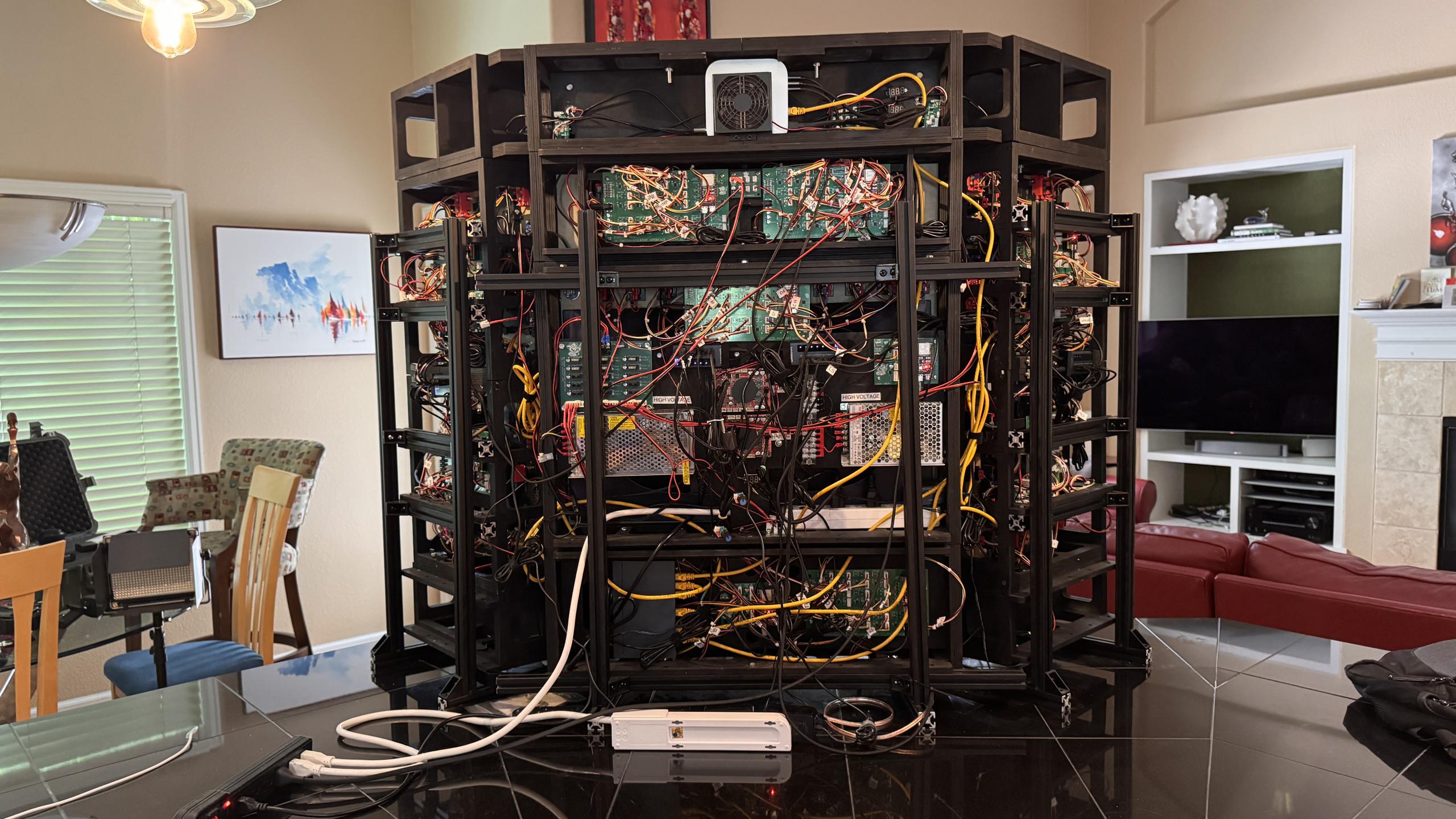
Not every impulsive purchase on eBay leads to possession of a wooden Dalek, but when a friend did exactly that, [Tony Goacher] did his part to turn ‘Dalek Bob’ into a motorized and remote-controlled unit of impressive stature.

Fitting wheels to shafts and motors to a frame can be a bit tricky when none were made with the other in mind.

The purchased Dalek is made of wood and, with the help of two bolts, is of sufficient size to trap a human inside. There’s a bench of sorts upon which the captive can sit, and with some effort, shuffle the surrounding frame awkwardly about. The scale of the Dalek is impressive, but it was clear the effect of human-powered locomotion was lacking. The solution was to install wheelchair motors, tires, and an ESP32-based remote control.

Quite a lot of work went into mounting the motors and wheels, and the challenges will be familiar to anyone who has done hobby robotics. One can choose ideal motors and wheels, but making them fit one another can be an entirely different story. Shafts and hubs are of different sizes, motor mounting doesn’t quite match the platform, and it’s all a bit like fitting a square peg into a round hole. But with access to the right tools, it’s nothing a little metalwork and welding can’t solve.

For the control system, the ESP32 (with a beautiful CNC-routed custom PCB) sets itself up as a wireless access point that serves a web-based control panel for piloting, and controls two H-bridges to drive the motors. What’s more, it also provides a sound board from which a second operator can trigger appropriate phrases and sounds from the Dalek.

Some folks prefer their remote-controlled Daleks plush and cute instead of large and looming, but we like the smooth movement and imposing stature of this one. Watch it all in action in the video, embedded below.

Continue reading “Drunken EBay Purchase Becomes Motorized, Speaking Dalek”

Pocket-sized Test Pattern Generator Helps Check Those CRTs

[Nicholas Murray]’s Composite Test Pattern Generator is a beautifully-made, palm-sized tool that uses an ESP32-based development board to output different test patterns in PAL/NTSC. If one is checking out old televisions or CRTs, firing up a test pattern can be a pretty handy way to see if the hardware is healthy or not.

The little white add-on you see attached to the yellow portion is a simple circuit (two resistors and an RCA jack) that allows the microcontroller to output a composite video signal. All one needs to do is power on the device, then press the large button to cycle through test patterns. A small switch on the side toggles between NTSC and PAL video formats. It’s adorable, and makes good use of the enclosures that came with the dev board and proto board.

In a pinch a hacker could use an original Raspberry Pi, because the original Pi notably included a composite video output. That feature made it trivial to output NTSC or PAL video to a compatible display. But [Nicholas]’s device has a number of significant advantages: it’s small, it’s fast, it has its own battery and integrated charger, and the little color screen mirroring the chosen test pattern is a great confirmation feature.

This is a slick little device, and it’s not [Nicholas]’s first test pattern generator. He also created a RP2040-based unit with a VGA connector, the code of which inspired a hacker’s home-grown test pattern generator that was used to service a vintage arcade machine.

Cookie Launcher Makes You Catch Your Own Snack

Holiday cookies are a joy, and to make things a bit more fun, [The Skjegg] created the Cookie Launcher. At the touch of a button, a door opens and the tin launches a cookie (and perhaps a few crumbs) skyward. Catching it is up to the operator, but since the tin can hold up to 40 cookies at once (39 in a magazine and 1 in the launcher), there’s enough to get some practice in.

The design is a real thing of beauty, from the rotary cookie holder to the ejector. Individual cookies are held in a pan-style magazine that rotates until a tasty disk is lined up with the ejector. The red separators aren’t just for show, either. The little inward protrusion on each one interacts with an optical sensor to ensure the system always knows when things are lined up.

The launcher design is pretty neat, too. There’s a platform that uses two smooth bolts as guides, and elastic bands to store energy. A motor cranks it downward, where it locks into place. The rotary magazine then turns to line up a cookie, which gravity feeds into the launcher by rolling down an incline. When a cookie is in place, a door in the lid opens and the launcher platform releases, sending the cookie skyward.

The original concept for the Cookie Launcher involved voice activation, but training the voice module to trigger on custom Norwegian commands wasn’t very reliable. Luckily, a button is far more obedient. It may be a bit less magical to use, but in our opinion the physicality of a button push meshes perfectly well with the requirement to catch your own cookie.

You can get a good look at the operation and a detailed tour of the insides in the video, embedded below. Thanks to [Rohit] for sending in the tip!

If airborne cookies aren’t your bag, check out one a very different approach to hands-free cookie dispensing.

Continue reading “Cookie Launcher Makes You Catch Your Own Snack”

Christmas Ornament Has Hidden Compartment, Clever Design

If you need something clever for a gift, consider this two-part 3D-printed Christmas ornament that has a small secret compartment. But there’s a catch: the print is a challenging one. So make sure your printer is up to the task before you begin (or just mash PRINT and find out).

Want a challenging print that’s also useful? This two-piece ornament has a small gift area inside, and prints without supports.

This design is from [Angus] of [Maker’s Muse] and it’s not just eye-catching, but meticulously designed specifically for 3D printing. In fact, [Angus]’s video (embedded under the page break) is a great round-up of thoughtful design for manufacture (DFM) issues when it comes to filament-based 3D printing.

The ornament prints without supports, which is interesting right off the bat because rounded surfaces (like fillets, or a spherical surface) facing the build plate — even when slightly truncated to provide a flat bottom — are basically very sharp overhangs. That’s a feature that doesn’t generally end up with a good surface finish. [Angus] has a clever solution, and replaces a small section with a flat incline. One can’t tell anything is off by looking at the end result, but it makes all the difference when printing.

There are all kinds of little insights into the specific challenges 3D printing brings, and [Angus] does a fantastic job of highlighting them as he explains his design and addresses the challenges he faced. One spot in particular is the flat area underneath the hang hole. This triangular area is an unsupported bridge, and because of its particular shape, it is trickier to print than normal bridges. The workable solution consists of countersinking a smaller triangle within, but [Angus] is interested in improving this area further and is eager to hear ideas on how to do so. We wonder if he’s tried an approach we covered to get better bridges.

Want to print your own? 3D files are available direct from [Angus]’s site in a pay-what-you-like format. If your 3D printer is up to it, you should be able to make a few before Christmas. But if you’d prefer to set your sights on next year with something that uses power and hardware, this tiny marble machine ornament should raise some eyebrows.

Continue reading “Christmas Ornament Has Hidden Compartment, Clever Design”

Plug Into USB, Read Hostname And IP Address

Ever wanted to just plug something in and conveniently read the hostname and IP addresses of a headless board like a Raspberry Pi? Chances are, a free USB port is more accessible than digging up a monitor and keyboard, and that’s where [C4KEW4LK]’s rpi_usb_ip_display comes in. Plug it into a free USB port, and a few moments later, read the built-in display. Handy!

The device is an RP2350 board and a 1.47″ Waveshare LCD, with a simple 3D-printed enclosure. It displays hostname, WiFi interface, Ethernet interface, and whatever others it can identify. There isn’t even a button to push; just plug it in and let it run.

Here’s how it works: once plugged in, the board identifies itself as a USB keyboard and a USB serial port. Then it launches a terminal with Ctrl-Alt-T, and from there it types and runs commands to do the following:

  1. Find the serial port that the RP2350 board just created.
  2. Get the parsed outputs of hostname, ip -o -4 addr show dev wlan0, ip -o -4 addr show dev eth0, and ip -o -4 addr show to gather up data on active interfaces.
  3. Send that information out the serial port to the RP2350 board.
  4. Display the information on the LCD.
  5. Update periodically.

The only catch is that the host system must be able to respond to launching a new terminal with Ctrl-Alt-T, which typically means the host must have someone logged in.

It’s a pretty nifty little tool, and its operation might remind you, in concept, of how BadUSB attacks happen: a piece of hardware, once plugged into a host, identifies itself to the host as something other than what it appears to be. Then it proceeds to input and execute actions. But in this case, it’s not at all malicious, just convenient and awfully cute.

3D Printing And Metal Casting Are A Great Match

[Chris Borge] has made (and revised) many of his own tools using a combination of 3D printing and common hardware, and recently decided to try metal casting. Having created his own tapping arm, he tries his hand at aluminum casting to create a much more compact version out of metal. His video (embedded below) really shows off the whole process, and [Chris] freely shares his learning experiences in casting his first metal tool.

The result looks great and is considerably smaller in stature than the 3D-printed version. However, the workflow of casting metal parts is very different. The parts are much stronger, but there is a lot of preparation and post-processing involved.

Metal casting deals with molten metal, but the process is otherwise very accessible, and many resources are available to help anyone with a healthy interest.

The key to making good castings is mold preparation. [Chris] uses green sand (a mixture of fine sand and bentonite clay – one source of the latter is ground-up kitty litter) packed tightly around 3D printed parts inside a frame. The packed sand holds its shape while still allowing the original forms to be removed and channels to be cut, creating a two-part mold.

His first-time castings have a rough surface texture, but are perfectly serviceable. After some CNC operations to smooth some faces and drill some holes, the surface imperfections are nothing filing, filler, and paint can’t handle.

To cast molten metal, there really isn’t any way around needing a forge. Or is there? We have seen some enterprising hackers repurpose microwave ovens for this purpose. One can also use a low-temperature alloy like Rose’s Metal, or eschew molten liquid altogether and do cold casting, which uses a mixture of resin and metal powder instead.

The design files for [Chris]’s tapping arm are available from links in the video description, and he also helpfully provides links to videos and resources he found useful. Watch it in the video, embedded just below.

Continue reading “3D Printing And Metal Casting Are A Great Match”

Why Games Work, And How To Build Them

Most humans like games. But what are games, exactly? Not in a philosophical sense, but in the sense of “what exactly are their worky bits, so we know how to make them?” [Raph Koster] aims to answer that in a thoughtful blog post that talks all about game design from the perspective of what, exactly, makes them tick. And we are right into that, because we like to see things pulled apart to learn how they work.

On the one hand, it’s really not that complicated. What’s a game? It’s fun to play, and we generally feel we know a good one when we see it. But as with many apparently simple things, it starts to get tricky to nail down specifics. That’s what [Raph]’s article focuses on; it’s a twelve-step framework for how games work, and why they do (or don’t) succeed at what they set out to do.

Continue reading “Why Games Work, And How To Build Them”