An Op-Amp From The Ground Up

If we had to pick one part to crown as the universal component in the world of analogue electronics, it would have to be the operational amplifier. The humble op-amp can be configured into so many circuit building blocks that it has become an indispensable tool for designers. It’s tempting to treat an op-amp as a triangular black box in a circuit diagram, but understanding its operation gives an insight into analogue electronics that’s worth having. [Mitsuru Yamada]’s homemade op-amp using discrete components is thus a project of interest, implementing as it does a complete simple op-amp with five transistors.

Looking at the circuit diagram it follows the classic op-amp with a long-tailed pair of NPN transistors driving a PNP gain stage and finally a complimentary emitter follower as an output buffer. It incorporates the feedback capacitor that would have been an external component on early op-amp chips, and it has a couple of variable resistors to adjust the bias. Keen eyed readers will notice its flaws such as inevitably mismatched transistors and the lack of a current mirror in the long-tailed pair, but using those to find fault in a circuit built for learning is beside the point. He demonstrated it in use, and even goes as far as to show it running an audio power amplifier driving a small speaker.

For the dedicated student of op-amps, may we suggest further reading as we examine the first integrated circuit op-amp?

Why Blobs Are Important, And Why You Should Care

We are extraordinarily fortunate to live at a time in which hardware with astounding capabilities can be had for only a few dollars. Systems that would once have taken an expensive pile of chips and discretes along with months of development time to assemble are now integrated onto commodity silicon. Whether it is a Linux-capable system-on-chip or a microcontroller, such peripherals as WiFi, GPUs, Bluetooth, or USB stacks now come as part of the chip, just another software library rather than a ton of extra hardware.

Beware The Blob!

An ESP-01 module
The cheapest of chips still comes with a blob.

If there is a price to be paid for this convenience, it comes in the form of the blob. A piece of pre-compiled binary software that does the hard work of talking to the hardware and which presents a unified API to the software. Whether you’re talking to the ESP32 WiFi through an Arduino library or booting a Raspberry Pi with a Linux distribution, while your code may be available or even maybe open source, the blob it relies upon to work is closed source and proprietary. This presents a challenge not only to Software Libre enthusiasts in search of a truly open source computer, but also to the rest of us because we are left reliant upon the willingness of the hardware manufacturer to update and patch their blobs.

An open-source advocate would say that the solution is easy, the manufacturers should simply make their blobs open-source. And it’s true, were all blobs open-source then the Software Libre crowd would be happy and their open-source nature would ease the generation of those updates and patches. So why don’t manufacturers release their blobs as open-source? In some cases that may well be due to a closed-source mindset of never releasing anything to the world to protect company intellectual property, but to leave it at that is not a full answer. To fully understand why that is the case it’s worth looking at how our multifunctional chips are made.

Continue reading “Why Blobs Are Important, And Why You Should Care”

The Last Few Analogue TV Stations In North America

Analogue TV is something that most of us consider to have been consigned to the history books about a decade ago depending on where in the world we are, as stations made the transition to much more power and frequency efficient digital multiplexes. However some of them still cling on for North American viewers, and [Antenna Man] took a trip to Upstate New York in search of some of them before their final switch-off date later this year.

What he reveals can be seen in the video below the break, an odd world of a few relatively low-power analogue TV stations still serving tiny audiences, as well as stations that only exist because their sound carrier can be picked up at the bottom of the FM dial. These stations transmit patterns or static photographs, with their income derived from the sound channel’s position as an FM radio station. While his journey is an entertaining glimpse into snowy-picture nostalgia it does also touch on some other aspects of the aftermath of analogue TV boradcasting. The so-called “FrankenFM” stations sound much quieter, we’re guessing because of the lower sound carrier deviation of the CCIR System M TV spec compared to regular FM radio. And we’re told that there are more stations remaining in Canada, so get out there if you still want to see an analogue picture before they’re gone forever. Where this is being written the switch to DVB was completed in 2013, and it’s still a source of regret that we didn’t stay up to see the final closedown.

Does your country still have an analogue TV service? Tell us in the comments.

Continue reading “The Last Few Analogue TV Stations In North America”

A Look At The Interesting RP2040 Peripheral, Those PIOs

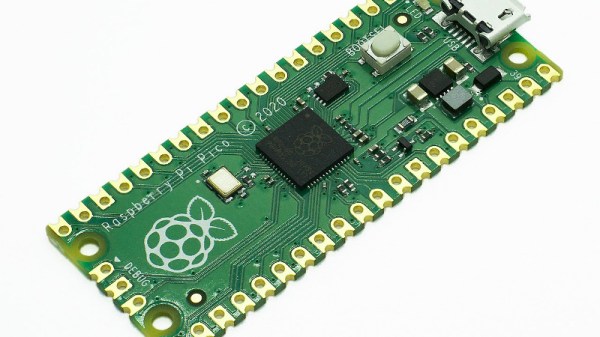
The Raspberry Pi Pico is the latest product in the Raspberry Pi range, and it marks a departure from their previous small Linux-capable boards. The little microcontroller board will surely do well in the Pi Foundation’s core markets, but its RP2040 chip must have something special as a commercial component to avoid being simply another take on an ARM microcontroller that happens to be a bit more expensive and from an unproven manufacturer in the world of chips. Perhaps that special something comes in its on-board Programmable IO peripherals, or PIOs. [CNX Software] have taken an in-depth look at them, which makes for interesting reading.

The PIOs are a set of state machines that have their own simple assembly language to execute simple repetitive I/O tasks without requiring the attention of the main processor core. How they can be configured is up to the imagination of the programmer, but examples suggested are extra I2C or SPI buses, or video interfaces. We expect the hacker community to push them to extremes with unexpected applications, much as has happened with the ESP32’s I2S peripheral. The article introduces the assembly language, then gives us simple examples in assembler, C/C++, and Python. If you have a Raspberry Pi Pico then you’ll surely be wanting to have a play with the PIOs, and we look forward to seeing what you come up with.

You can read Hackaday’s review of the Pico here.

The Politics Of Supersonic Flight: The Concord(e)

Every nation has icons of national pride: a sports star, a space mission, or a piece of architecture. Usually they encapsulate a country’s spirit, so citizens can look up from their dreary lives and say “Now there‘s something I can take pride in!”  Concorde, the supersonic airliner beloved by the late 20th century elite for their Atlantic crossings, was a genuine bona-fide British engineering icon.

But this icon is unique as symbols of national pride go, because we share it with the French. For every British Airways Concorde that plied the Atlantic from London, there was another doing the same from Paris, and for every British designed or built Concorde component there was another with a French pedigree. This unexpected international collaboration gave us the world’s most successful supersonic airliner, and given the political manoeuverings that surrounded its gestation, the fact that it made it to the skies at all is something of a minor miracle. Continue reading “The Politics Of Supersonic Flight: The Concord(e)”

No More Cows: Iconic 1990s Download Site Finally Shuttered By Tucows

In the early and mid 1990s there were a host of big players in the nascent public Internet that played their part in guiding the adventurous early Web users on their way. Many of them such as Netscape or Altavista have fallen by the wayside, while players such as Lycos and Yahoo are still in existence but shadows of their former selves. Some other companies broadened their businesses to become profitable and still exist quietly getting on with whatever they do. An example is Tucows, now a major domain name registrar, who have finally announced the closure of their software library that was such an essential destination in those times.

The company name was originally an acronym: “The Ultimate Collection Of Winsock Software”, started in 1993 by a library employee in Flint, Michigan. As its name suggests it was a collection of mostly shareware Windows software, and the “Winsock” refers to Windows Sockets, the API used by Windows versions of the day for accessing network resources. It seems odd to modern eyes, but connecting a 486 PC running Windows 3.1 to the Internet was something of a complex process without any of the built-in software we take for granted today. Meanwhile the fledgling Linux distributions were only for the extremely tech-savvy or adventurous, so the world of open-source software had yet to make a significant impact on consumer-level devices.

The passing of a Windows shareware library would not normally be a story of interest, but it is the part that Tucows played in providing a reliable software source on the early Web  that makes it worthy of note. It’s something of a shock to discover that it had survived into the 2020s, it’s been so long since it was relevant, but if you sat bathed in the glow of a CRT monitor as you waited interminably for your CuteFTP download over your 28.8k modem to finish then you probably have a space for Tucows somewhere in your heart. If you fancy a trip down memory lane, the Internet Archive have a very period-ugly-looking version of the site from 1996.

You may no longer have a 486 on your desk, but if you want to you can still build one.

What Makes A Good Antenna?

It sometimes seems as though antennas and RF design are portrayed as something of a Black Art, the exclusive preserve of an initiated group of RF mystics and beyond the reach of mere mortals. In fact though they have their difficult moments it’s possible to gain an understanding of the topic, and making that start is the subject of a video from [Andreas Spiess]. Entitled “How To Build A Good Antenna”, it uses the design and set-up of a simple quarter-wave groundplane antenna as a handle to introduce the viewer to the key topics.

What makes this video a good one is its focus on the practical rather than the theoretical. We get advice on connectors and antenna materials, and we’re introduced to the maths through online calculators rather than extensive formulae. Of course the full calculations are there to be learned by those with an interest, but for many constructors they can be somewhat daunting. We’re shown a NanoVNA as a useful tool in the antenna builder’s arsenal, one which gives a revolutionary window on performance compared to the trial-and-error of previous times. Even the ground plane gets the treatment, with its effect on impedance and gain explored and the emergence of its angle as a crucial factor in performance. We think this approach does an effective job of breaking the mystique surrounding antennas, and we hope it will encourage viewers to experiment further.

If your appetite has been whetted, how about taking a look at a Nano VNA in action?

Continue reading “What Makes A Good Antenna?”