An Amiga 500 For The 21st Century

There was a period in the late 1980s when the home computer to own did not come with an Apple logo and was not an IBM, Compaq, or any of the other clones, but instead sported a Commodore logo. The Amiga 500 was an all-in-one console-style cased machine that maybe wasn’t quite the computing powerhouse you might have wished it to be, but gave you enough of the capabilities of the more accomplished 16-bit machines of the day to be an object of desire while also having a games catalogue second to none.

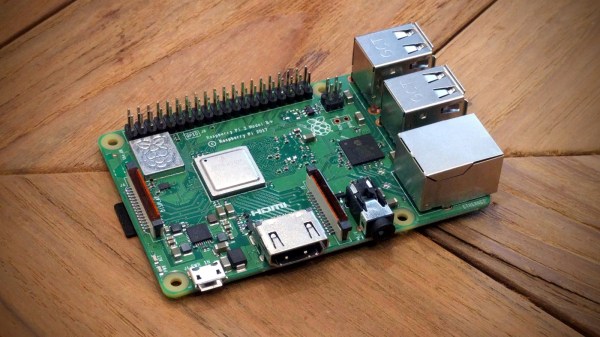
A500s have survived in reasonable numbers, but inevitably working A500s haven’t. Fortunately there are decent emulators, and it was for one of these that [intric8] has produced an extremely well-done installation of a Raspberry Pi 3 in an Amiga case. The intention has been throughout to avoid modification or damage to the Amiga case, and eventually to have all Amiga internal peripherals including the floppy drive in a fully working condition.

The result has a Tynemouth Software USB adaptor for the Amiga keyboard, and a set of nicely designed 3D printed backplates to bring the extended Raspberry Pi ports to the back of the case. The floppy isn’t yet interfaced and there isn’t a socket for the quadrature mouse, but otherwise it’s a very tidy build. He might be interested in one of the several USB to quadrature interfaces we’ve featured over the years.

You might ask why so much effort should be put in for an emulation of an A500, and in a sense you’d be right to do so. The Pi will run the emulator from any case or none. But if you happen to have a spare A500 case, why not give this one a go!

Great Emergency Lights From Not-So-Great UPS

We know your shame. Like you, we wanted to save some scratch and bought the bottom-of-the-range UPS, only to discover that it is no use to man or beast as it lacks the power to perform any reasonable task. It’s now sitting in a corner, to gather dust as its batteries deteriorate.

Not so fast with the UPS abandonment! [rue_mohr] came up with a modification for a small APC UPS that turned it into something a little more useful. Removing the mains inverter from the picture with a few displaced wires and PCB mod, the UPS is now a 12V battery with a mains charger and power outage detection built-in. In this state it’s the perfect power pack for some 12V LED strips used for emergency lighting. There is a handy 3D print that fits the rear socket cut-outs on the US version of the device and provides apertures  for a pair of DC power jacks.

This is a relatively simple hack, but we like it for taking the focus away from the obvious part of the UPS, its mains inverter, and turning to the batteries as the main event. It’s a relatively tiny device, but in the past we’ve featured a UPS at the other end of the scale being used for power back-up to a whole house. Meanwhile we’d like to take a leaf from the [BOFH]’s book, and recommend that the most important piece of infrastructure requiring a UPS is the sysadmin’s coffee machine.

Ever Wonder How The Bots On Robot Wars Were Built?

Building a robot that can do anything well is a tough challenge. Building one that can stand up to another robot trying to violently put it out of commission is an even harder task. But it makes for some entertaining television! It is this combination that thrust a few creative robot building teams into the world of Robot Wars.

SMIDSY in the pits for series 5 of the UK Robot Wars TV show. From left to right: [Andy Pugh], [Robin Bennett], and [Mik Reed]. RIP [Mik].
SMIDSY, short for the insubstantial excuse heard by many a motorcyclist “Sorry Mate, I Didn’t See You”, is a robot that competed in several seasons of the British incarnation of the Robot Wars TV show. It wasn’t the most successful of machines because its weapons were slightly weedy compared to some of the competition, but it was one of the more robust and reliable platforms on the circuit at the time thanks to its combination of simple uncomplicated construction and extremely good design. I had the pleasure of being on the team that built and competed with SMIDSY and carry from it some of the more found memories from that decade.

A few weeks ago I learned that a friend from that period in my life had died following an illness. I hadn’t seen [Mik] for a few years as our lives had drifted apart, but if we were to turn back the clock nearly a couple of decades you would find us and about twenty other fellow members of the Ixion British motorcyclist’s mailing list hard at work building a Robot Wars robot.

The hard work and determination make this a great story. But even more so it’s fun to look back on the state of the art of the time and see some clever workarounds in a time when robot building was just starting to be approachable by the average engineer.

Continue reading “Ever Wonder How The Bots On Robot Wars Were Built?”

LED Strips Are So Hot Right Now

Sometimes there will appear a figure that flies in the face of reason, and challenges everything you think you know about a subject. Just such a moment came from [Chris Taylor] at Milton Keynes Makerspace when he characterised a set of LED strips, and the figure in question was that he found an LED strip creates the same amount of heat as its equivalent incandescent bulb.

We can hear your coffee hitting the monitor and your reaching for the keyboard to place a suitably pithy comment, because yes, that’s a pretty unbelievable statement. But it’s no less true, albeit that the key to it lies in its details. If you have a 100 W incandescent bulb, 88% of the energy is radiated as light and infra-red, leaving 12 W heating the bulb itself. To get the same light output from an LED meanwhile we’d only need 17 W, of which 11.9 W would be left to heat the LED. Which means that an LED strip can get as hot as an incandescent bulb with equivalent light output, and he’s run some tests to prove it.

If you’ve worked with LEDs, you’ll know that they get hot. But to learn that they have the potential to get as hot as their incandescent equivalents is something of a eye-opener, and should demonstrate the need for adequate thermal mitigation. It’s easy to take them for granted, and we’ve taken a look before at some of their safety pitfalls.

Disclosure: [Jenny List] is a member of MK Makerspace.

Pipe Your Way Through The Jams

Playing the bagpipes is an art that takes a significant effort to master, both in keeping a constant air supply through balancing blowstick and bag and in learning the finger positions on the chanter. This last task we are told requires constant finger practice, and a favorite place for this is on the steering wheel as a would-be piper drives. [DZL] therefore took this to the next level, placing touch sensors round a car steering wheel that could be interpreted by an Arduino Pro Mini to produce a passable facsimile of a set of bagpipes via an in-car FM transmitter. It lacks the drone pipes of the real thing, but how many other Škodas feature inbuilt piping?

We’ve covered an unexpected number of bagpipe projects over the years, but never had a close look at this rather fascinating musical instrument. If you are curious, the US Coast Guard pipe band has a short guide to its parts, and we’ve brought you a set of homemade pipes built from duct tape and PVC pipe. They may once have been claimed as an instrument of war, but they seem to also be a favorite instrument of hardware hackers.

Thanks [Sophi] for the tip.

From Cop Car Data Terminal, To Retro Computer

It is possible that you will have lived your life without ever coming into contact with a Motorola MDT9100-T. The data terminal of choice for use in police cars across the globe was a computer with a full-sized QWERTY keyboard, a small CRT display, a mainboard sporting an Intel 386SX processor, and a custom version of Windows 3.1. [Trammell Hudson] and some friends from NYC Resistor scored some MDT9100s in an online auction and found them to be just too good an opportunity not to crack them open and see what could be done.

The custom Windows install could be bypassed with a DOS prompt for some period demoscene action, but [Trammell] wanted more. The 386SX wasn’t even quick when it was new, and this computer deserved the power of a BeagleBone! A custom cape was created on a prototyping cape to interface with the MDT9100 header carrying both keyboard and video. A bit of detective work revealed the display to be a 640×480 pixel mono VGA. The ‘Bone’s LVDS output can drive VGA through a resistor ladder DAC with the aid of an appropriate device tree overlay. The keyboard was then taken care of with a Teensy working as a USB device, resulting in a working Linux computer in the shell of an MDT9100.

It’s always good to see old technology brought up to date. Amusingly a couple of years ago we reported on the death of VGA, but retro projects like this one mean it’ll be a long time before we’ve heard the last of it.

Reverse Engineer An X-Ray Image Sensor

If you think of a medical x-ray, it is likely that you are imagining a photographic plate as its imaging device. Clipped to your tooth by your dentist perhaps, or one of the infamous pictures of the hands of [Thomas Edison]’s assistant [Clarence Madison Dally].

As with the rest of photography, the science of x-ray imaging has benefited from digital technology, and it is now well established that your hospital x-ray is likely to be captured by an electronic imaging device. Indeed these have now been in use for so long that their first generation can even be bought by an experimenter for an affordable sum, and that is what the ever-resourceful [Lucy Fauth] with the assistance of [Jana Marie Hemsing], has done. Their Trophy DigiPan digital x-ray image sensor was theirs for around a hundred Euros, and though it’s outdated in medical terms it still has huge potential for the x-ray experimenter.

The write-up is a fascinating journey into the mechanics of an x-ray sensor, with the explanation of how earlier devices such as this one are in fact linear CCD sensors which track across the exposed area behind a scintillator layer in a similar fashion to the optical sensor in a flatbed scanner. The interface is revealed as an RS422 serial port, and the device is discovered to be a standalone unit that does not require any commands to start scanning. On power-up it sends a greyscale image, and a bit of Sigrok examination of the non-standard serial stream was able to reveal it as 12-bit data direct from the sensor. From those beginnings they progressed to an FPGA-based data processor and topped it all off with a very tidy power supply in a laser-cut box.

It’s appreciated that x-rays are a particularly hazardous medium to experiment with, and we note from their videos that they are using some form of shielding. The source is a handheld fluoroscope of the type used in sports medicine that produces a narrow beam. If you remember the discovery of an unexpected GameBoy you will be aware that medical electronics seems to be something of a speciality in those quarters, as do autonomous box carriers.

Continue reading “Reverse Engineer An X-Ray Image Sensor”