USB Connectivity That Is So Very Very Small

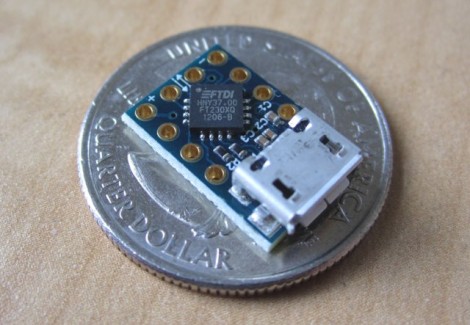
Using FTDI chips as a USB to Serial solution is nothing new, but this MicroFTX board takes the footprint to a new low. If you’re space limited this should have no problem fitting into your project. But if you plan to use it for prototyping we predict it’ll be lost in the parts bin forever as soon as you take your eyes off of it.

The USB Mini-B connector is becoming quite popular with hobby electronics these days. But here [Jim Paris] chose to use its little brother, the USB micro connector. Want to put this together by hand? How are you with 0402 footprints and QFN chips? In fact, there’s a ground pad on the bottom of that IC which means you really need to use a reflow oven to do the job right.

Aside from the diy-unfriendly fabrication size, we do like the design. There are four output pins (voltage, ground, TX, and RX) with a set of four solder jumpers to configure them. It can be powered from the USB port or an external connection, with the option for 5V or 3.3V output.

[Thanks John]
A Much Easier Take On An Android Garage Door Opener

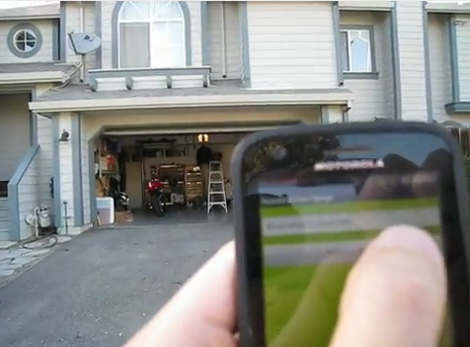
[Andy] is taking the complexity of a smartphone-controlled garage door down a notch with this project. He’s not interested in checking on the state of the door (open or closed) using a video feed, or in controlling the thing from anywhere in the world. He just wants to use his Android as the remote control and we say amen to that.

The circuitry in the garage is pretty simple. A relay is used to simulate a button press on the in-garage wired opener. This relay is driven by an Arduino which uses a Bluetooth shield for connectivity. Since his Android phone has a Bluetooth modem the rest of the project is just app development. As you can see in the video, the app automatically connects to the Arduino when it is launched, then waits for the button press to send the electronic equivalent of ‘Open Sesame”.

The project covers a series of posts so if you want to see how he got the app up and running make sure to browse through his archives. The next iteration for this app needs to be a background widget that enables Bluetooth, connects to the Arduino, and send s the open command all with one press.

Continue reading “A Much Easier Take On An Android Garage Door Opener”

Fuzzy Time Used To Keep The Kids In Bed

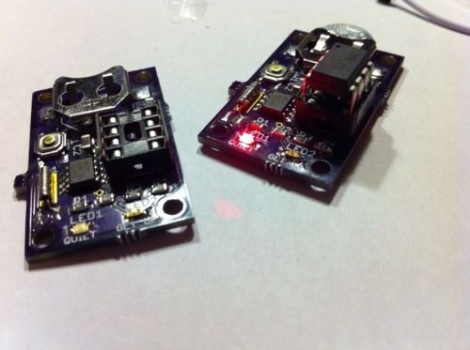
Like many parents, [Mike Tsao] is plagued by his kids’ urge to rise like the dead long before he’s ready to wake up. In an effort to preserve sanity, he built this clock to let the young ones know when it’s okay to get out of bed. Fittingly, he calls it the OK-Wake.

You may notice that the clock doesn’t have a display. That’s because his children are still too young to tell time (this is the foundation for needing a custom clock). Instead, that LED acts as the feedback. At night it will be off. Starting ninety minutes before it’s time to wake the LED will begin to pulse red, increasing in frequency as the target time approaches. When it’s okay to get out of bed the LED turns green and exhibits a pleasant “breathing” behaviour.

An ATtiny25 drives the device, along with an RTC chip. The single button is used to set the alarm. Actual time doesn’t really matter at all. Instead, the button just sets the alarm for twelve hours from when it’s pressed.

Building A Bigger Bar Graph

Take a gander at the Giant LED bar graph which [Chunky Hampton] recently completed (from this image we don’t think the nick name suits him). It’s simple both mechanically and electrically, but we love the look and think it would be a nice addition to your home, hackerspace, or as a children’s museum exhibit (we’re looking at you [Mr. Porter]).

The enclosure is a hunk of PVC electrical conduit. It’s got to be one of the largest sizes, but still should be found at most home stores. The base mounts easily and the cover snaps into place. [Chunky] used a hole saw to create the openings for the LED modules. They’re circular boards with multiple single-color LEDs on them. A common power bus feeds the high side of each bit, while a couple of transistor ICs controlled by 595 shift registers address them on the low side. From there just use any controller you wish, but in this case it’s an Arduino.

[Chunky] uses the meter to display power output from his stationary bicycle generator. But he also put together a little Larson Scanner demo which you can see after the break.

Continue reading “Building A Bigger Bar Graph”

What The Flux: Buy It Or Brew It Yourself

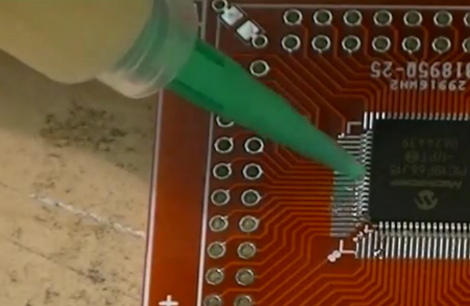
Flux generally makes our lives easier. It’s the best bet when trying to prevent solder bridges with fine-pitch components like you see here. But it is also indispensable when it comes to desoldering components from a board (we’re talking just one component without disturbing all of the others). But have you ever looked at what it costs to pick up a syringe of liquid flux from an online retailer? In addition to the cost of the product itself there’s usually a hazardous material handling fee that is rolled into the shipping cost. So we were happy that [Christopher] sent in a link to the DIY flux page over at Dangerous Prototypes.

The concept is simple enough. Mix some rosin with some solvent. Turns out these items are really easy to source. The solvent can be acetone (which you may have on hand for removing toner transfer from freshly etched PCBs) or plain old rubbing alcohol. And an easy source for rosin is your local music store. They sell it to use on bow hair for String players. Grind it up, throw it in a bottle and you’re good to go. Now does anyone know where we can source needle-tipped bottles locally?

For those that still just want to buy flux we highly recommend watching part one and part two of [Ian’s] flux review series.

Wireless IPod Charger Built From Scratch

Despite the obvious use of a lot of wire, this project is actually a wireless charging system. [Jared] built it as a way to explore the concepts behind transferring power inductively. Alternating current on one of the white coils induces current on the other. This is then rectified, and regulated for use as a 5V charger. In this case it powers his iPod, but any USB device should work with the setup.

The transmitter uses the power supply from an old laptop as a source. Some filtering and a couple of MOSFETS are responsible for generating the AC current on the transmitting coil. The receiving coil feeds the bridge rectifier. In the writeup that voltage is fed to a 7805 regulator to provide a stable 5V output. However, in the video demo after the break [Jared] shows off the boost converter that he uses on his improved circuit. This way if the voltage drops due to poor alignment of the coils it will still be able to provide a steady output.

We’ve seen the same coil concept used to add wireless charging to cellphones too.

Continue reading “Wireless IPod Charger Built From Scratch”

UnoJoy Makes Your Arduino Play Well With Xbox 360 Or PS3

We’ve seen Arduino-based game controllers before, but the UnoJoy project wants to make it easy for you to plug them into a gaming console.

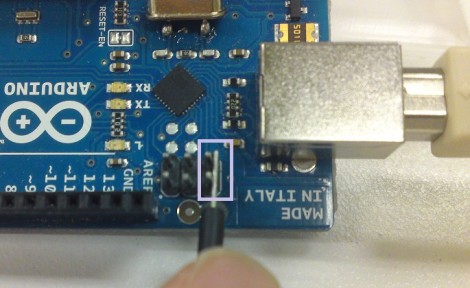
The project is targeted at the Arduino UNO. Why only that hardware… isn’t Arduino universal? Well yes, but in this case the bootloader needs to be overwritten so that the Arduino will enumerate as an approved controller on your game system. Here the device is being put into DFU mode in preparation for flashing.

Once that part’s done it’s time to get to work on your own hardware interface. The UnoJoy library provides all of the hooks you need to push controller data to the game console, it’s up to you to use the Arduino IDE to decide when these events happen. This would be a great opportunity to make the Pinball Stop controllers work with the Xbox Live Arcade games. Or take a look after the break to see [Alan Chatham] using the library to control Gran Turismo as if it were an NES Power Pad game.

Continue reading “UnoJoy Makes Your Arduino Play Well With Xbox 360 Or PS3”