Low-voltage Wind Turbine Lighting

led_wind_turbine

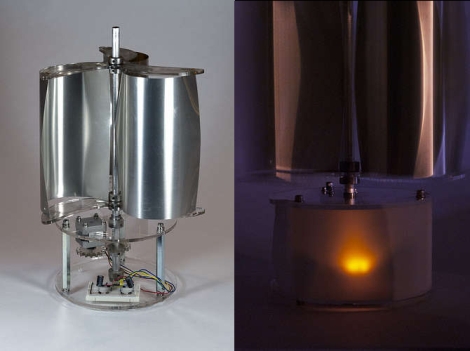
Instructables user [Dustyn] recently constructed a wind-based lantern to provide a bit of free, renewable light in urban settings. The project is based around a vertical-axis wind turbine, which she says are better suited to these environments since wind often comes from all different directions. Despite their lower efficiency compared their horizontal-axis brethren, this style of turbine seems to fit her needs quite well.

She provided a complete bill of materials, down to the last screw and washer you would need to replicate her work. The wind sails were constructed from thin aluminum flashing, and inserted between two acrylic sheets. These were then mounted to the central aluminum shaft of the turbine, which drives the stepper motor built into the base.

The current from the stepper motor is rectified and run through a pair of capacitors before being used to light the attached LED. This allows the bipolar motor to provide current regardless of the direction the turbine is turning, and the caps smooth things out so that the LEDs don’t flicker wildly under varying wind conditions. The turbine is not going to light up a full city block, but it is definitely a nice alternative to sun jars.

Stick around to see a video of the turbine mechanism in action.
Continue reading “Low-voltage Wind Turbine Lighting”

Laptop Touchpad-based LED Lighting Control

touchpad_lighting

[Dave] needed some extra light above his desk/workbench area and decided to wire up some RGB LED light strips to brighten the place up a bit. He wasn’t content with using a standard switch to toggle them on and off, and after some brainstorming, he decided to build a capacitive touch circuit using a pair of copper tubes mounted in a project box. Just as he was putting the finishing touches on his switch, he saw a project online where a Synaptics touchpad was used in conjunction with an Arduino for lighting control. The copper tube switch was pitched, and he got busy working with his Arduino.

When connected to an Arduino, the touchpads can be used in two modes – relative and absolute. Relative mode is familiar to most people because it is used to guide the mouse cursor around on a laptop’s screen. Absolute mode however, relays coordinate information back to the Arduino, allowing the user to map specific areas of the pad to specific functions. [Dave] enabled his touchpad to use absolute mode, and mapped a handful of different functions on the Arduino. He can now fade his lights on and off or light the room on a timer, as well as use a sliding function to tweak the LEDs’ brightness.

It’s a neat, yet simple hack and a great way to repurpose old laptop touchpads.

Continue reading for a quick demo video he put together, and swing by his site if you want to take a look at the source code he used to get this working.

Continue reading “Laptop Touchpad-based LED Lighting Control”

Portable NES Console Gets It Oh So Right

nes_portable

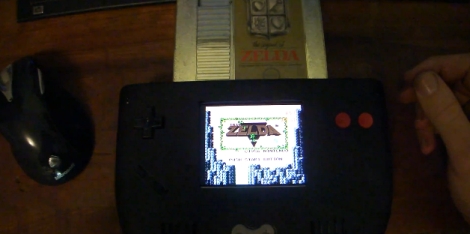
[Doug] over at the moddedbybacteria forums has been working hard on a fantastic looking portable NES console and wrote in to let us know it was complete.

The console started as a simple idea to use a Nintendo on a chip (NOAC) board in order to create a portable console that played original NES cartridges. Once a plastic case and some batteries were sourced, along with the NOAC board, the project was well on its way.

[Doug] eventually decided that he would rather use a real Nintendo motherboard in the project, so the NOAC was scrapped…temporarily. He accidentally fried the Nintendo board, so it was back to the NOAC, but with upgraded wiring to take care of some interference problems he was having earlier in the build. An original NES controller was disassembled for use in the console, which gives the portable an authentic feel. Getting the case to look just right was a long process, but we think he did a great job with it.

If you want to take a look at his entire build log, be aware that it is 23 pages long. If you’re impatient and want to jump straight to the unveiling, that happens on page 22.

Keep reading to see a pair of videos [Doug] put together both during the production and after his build was completed.

If you are interested in seeing some other portable NES consoles we have featured in the past, look no further than here, here, and here.

Continue reading “Portable NES Console Gets It Oh So Right”

Mini Arcade Cabinet Looks As Good As The Real Thing

mame_cab

[Ed] had a netbook he no longer needed and decided to make it into a mini MAME cabinet for some of his family members. MAME cabinets are pretty plentiful, but this one was so nicely done, we wanted to share it.

He removed the monitor from an EeePC 901 in order to get some precise measurements, then went about crafting a mini cabinet from MDF. The whole thing was wrapped in sticky label paper adorned with old-school Galaga graphics, then covered in plexiglass for a nice sleek look that also protects the artwork.

He used an iPac 2 controller board to wire up all of the buttons and joystick to the netbook, opting to solder the controller’s wires directly to the USB header on the eeePC’s motherboard. A power switch was added up on top for easy operation, and the cabinet was sealed shut, though the back does open easily in the event that maintenance is required. The system is managed using the Maximus Arcade front end for MAME, which [Ed] claims is incredibly easy.

If you are interested in making your own MAME cabinet, check out some of the other MAME-based projects we have featured in the past, and don’t miss the video below of [Ed’s] cabinet in action.

Continue reading “Mini Arcade Cabinet Looks As Good As The Real Thing”

Geiger Counter A/D Conversion For Radiation Level Crowdsourcing

arduino_geiger_counter

[Akiba] and the crew at Tokyo Hakerspace are still hard at work trying to help out their fellow countrymen after the recent earthquake, tsunami, and ongoing nuclear crisis in Japan. You may remember the group as they are behind the Kimono Lantern project we featured last week. This time around, their efforts are focused on getting usable information out to those who need it.

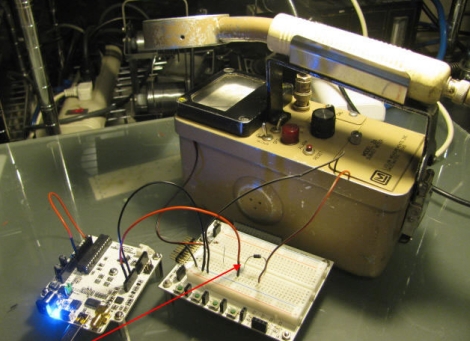
With all of the talk about nuclear fallout, they wanted to see what sort of measurements they could get in Tokyo, however they could not locate a Geiger counter anywhere nearby. Luckily, they were eventually able to source two old counters from the Reuseum in Idaho. One is being lent out to individuals in order to check if their home’s radiation levels are safe, but it was decided that the other would reside outdoors in order to collect radiation readings from the air.

[Akiba] wanted to put the results from the external Geiger counter up on Pachube, however these old units are all analog. He figured that a quick and dirty way to do analog to digital conversion would be to monitor the chirps coming off the counter’s speaker. This was done by wiring up an Arduino to the speaker leads, and keeping track of each time the speaker was activated. This resulted in an accurate digital radiation reading, matching that of the counter’s analog display. The Arduinio wirelessly sends the information to another Arduino stationed inside his apartment, which then uploads the data to Pachube.

A walkthrough of his conversion as well as the source code for both the Arduino counter and the Pachube uploader are available on his site, in case anyone else in the Tokyo area has a Geiger counter handy and wishes to do the same.

DIY Low-power PSU For Home Server Use

diy_pc_psu

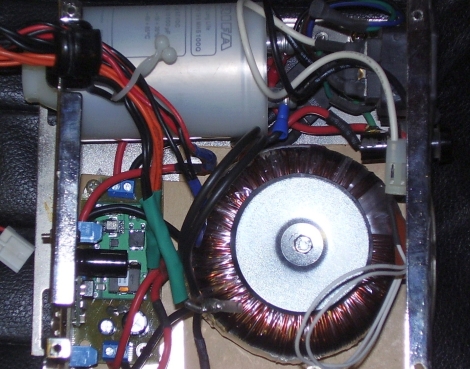
[Viktor] decided to replace his old power hungry home server with a model that is much easier on the old electric bill. The new motherboard uses an Intel Atom chip and consumes far less power than its predecessor. He figured there was no reason to use a bulky ATX power supply when all he needed was 12V for the mainboard and a pair of 5V rails for his hard drives, so he decided to build a PSU himself.

He sourced a 100VA toroid transformer as the basis of the power supply due to its popularity with audio amp builders, adding a standard bridge rectifier and smoothing capacitor before regulating the DC output. A pair of switching regulators were added, one for the 6A, 12V, and a second for the 1.5A, 5V supply. The motherboard only requires about 18W at full tilt, so the PSU should be more than sufficient for his needs.

Schematics and board layouts are available for free on his site, if you are in the market for your own DIY low-power PSU.

Looking for more build to suit electronics?  Check out this DIY amp we featured just the other day.

[Thanks, Chris]

Real Life Super Mario Coin Block

mario_coin_block

Instructables user [Bruno] recently constructed a fun little toy that brings a bit of the Mario nostalgia out of the video game universe and into ours. His Super Mario coin block is instantly recognizable from the first Mario game and performs just as you would expect it to. Punching or tapping the bottom of the block releases coins one at a time, complete with sounds straight from the game.

The coin block is constructed from thick cardboard and wrapped in color mock ups of the in-game block. Inside, a spring-loaded tube of coins is placed above a launch arm which is also connected to a spring. A servo actuated arm pulls the launch arm down, dropping a coin from its tube on to the launch arm which is then flung from the top of the box once the servo arm rotates far enough. When this occurs, the built-in MP3 player is triggered to play the “coin sound” from the game. A 555 timer is used to ensure the servo actuated arm rotates once per activation, and a LM386-based amplifier is used to increase the output volume of the MP3 player, both of which operate using rechargeable batteries.

Be sure to check out some of the inner workings as well as the final product in the videos embedded below.

[Thanks, Samjc3]

Continue reading “Real Life Super Mario Coin Block”