Stripping DRM From OverDrive Media Console EBooks

stripping_drm_from_overdrive_media_center_ebooks

[Armin Tamzarian’s] local library recently started lending eBooks via the OverDrive Media Console system. He checked out a couple of books, which got him thinking about how the copy protection scheme was implemented. He wondered what recourse users had if they wanted to view a book they have already checked out on a different, or unsupported piece of hardware.

His research centers around Adobe’s ADEPT digital rights management scheme, which is used to protect the books offered on loan by OverDrive. The topic is broken down into three parts, starting with an introduction to the EPUB file structure, the OverDrive Media Console, as well as the aforementioned ADEPT DRM scheme.

The second part takes a close look at the OverDrive Media Console itself, where he uses the ineptkey and ineptepub utilities written by [I♥CABBAGES] to pull the RSA cipher keys from the EPUB data he uncovered. When he then tries to strip the ADEPT DRM layer from his books however, he discovers that OverDrive is using a non-compliant version of the ADEPT standard, which renders existing tools useless.

The final part of [Armin’s] discussion digs even deeper into the OverDrive Console’s inner workings, where he finds that the OverDrive Media Console stores quite a bit of information in an SQLite database. After a bit of digging, he finds all the data he needs to strip the DRM from his books. [Armin] also took the time to wrap all of his findings up into a neat little tool called OMCStrip, which as you may have guessed, strips the DRM from ADEPT-protected eBooks with ease.

cleaning_pcbs

Cleaning Flux From PCBs The Easy Way

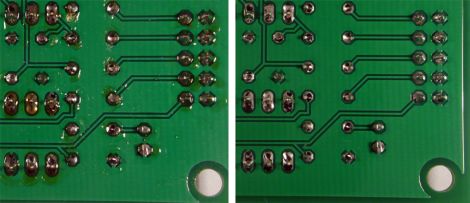
While we’re all for building circuits on protoboard or constructing a deadbug circuit for a last minute project, it’s always nice to see a proper PCB now and again. We think that leftover flux can sometimes make even the nicest of circuit boards look a bit dingy, and Hackaday reader [RandomTask] wholeheartedly agrees. He wrote in to share a method he found online that he uses to get his PCBs squeaky clean after soldering.

The secret to his clean PCBs is a product called Poly Clens. It’s essentially a paint brush cleaner that does a great job at removing flux without having to resort to using a brush to scrub it off the board. [RandomTask] simply submerges his newly assembled board in a small container filled with Poly Clens, agitating it for about half a minute or so. After the flux has been removed he rinses it with water, pats it dry, then ensures the board is moisture-free with a few passes of his heat gun.

He says that the entire process takes him less than 5 minutes per board, which is far better than the old alcohol and stiff brush method he used in the past.

What tips or tricks do you have for getting your new projects cleaned up? Be sure to share them with us in the comments.

FPGA Mandelbrot Fractal Engine

fpga_mandelbrot

[Mike Field] has always been interested in the Mandelbrot Set since he first read about it back in the ‘80s. Having coded it on a Commodore VIC20 back int he day, he always returned to the Mandelbrot set when he wanted to try out some new programming technology.

He wanted to delve deeper into the world of FPGAs, so [Mike] figured the best way to do so would be to use one to program a Mandelbrot fractal engine. He started out with a goal of creating a 640×480 Mandelbrot display, but over time, he found that he could push his Nexus 2 FPGA to 800×600. He didn’t stop there, and after tweaking a few things, he was amazed to find that he could push a 1024×768 display from the small board.

He kept a pretty detailed log as he went along, should you be interested in trying your hand at the process as well. Though there is no video of the FPGA in action, there are a few cool pictures showing off his handiwork.

Building A One-ton Linear Servo

one_ton_servo_jack

A while back, [Windell] from Evil Mad Scientist Laboratories wrote up an article for Make Magazine detailing how he built a one-ton, servo-controlled scissor jack for under $100. He dropped us a line to let us know that the project details have been released for free at Make Projects, so we stopped by to take a look.

The project starts out by pulling apart an electronic scissor jack to get access to the solder pads for the up and down buttons. Once wires are added there, a servo is the next victim. [Windell] recommends using an old servo with a busted motor, but you can use a good one just the same. The servo’s pots are replaced with 10 turn pots, and then wired up to a controller board, to which the jack is also connected. Then, to provide feedback to the servo, a string is looped around the top of the jack, which is used to turn the pots added in the previous step.

[Windell] says that the setup works quite well, though we imagine the duty cycle might be a bit short before adjustments are required. Regardless, it’s a quick way to get a heavy load lifted with servo precision.

Wireless Mouse Li-Poly Retrofit With USB Charging

wireless_mouse_lipoly_retrofit

It’s no secret that wireless mice can eat through batteries pretty quickly. Rather than keep a fresh supply of AAs on hand at all times, [Phil] decided he would convert his mouse to use a rechargeable lithium polymer battery instead.

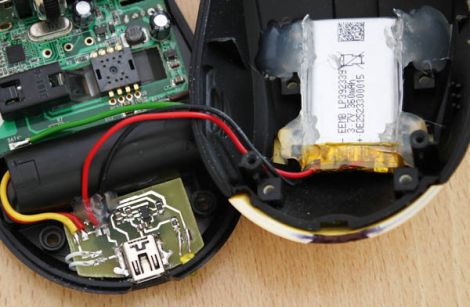
This isn’t the first time we’ve seen a cell phone battery crammed into a mouse to increase capacity, but we think this one has been done quite nicely. [Phil] managed to fit a 2.7 – 4.2v Li-Poly battery in the mouse’s palm rest, where there was a little extra empty space. The battery can be charged from any USB port via a custom-built charging module, which he constructed using a MAX1555 charge controller. Another custom-built circuit resides in the space previously occupied by the AA batteries, which uses an MC340063 DC to DC converter to drop the battery’s voltage down to the 1.25v required by the mouse.

The only part of the build that [Phil] is not pleased with is the power switch on the bottom, but since you rarely see that, we could care less. We think it is quite well done, and with a second version already in the works, we anticipate that it will get even better.

Be sure to check out [Phil’s] video tour of the hack, which you can see below.

Continue reading “Wireless Mouse Li-Poly Retrofit With USB Charging”

Open Hardware Summit 2011 Call For Submissions

The Open Hardware Summit is gearing up for their second annual conference, which is to be held on September 15th, 2011 in New York City. The summit aims to be a venue where users can present, discuss, and learn about open hardware of all kinds. Hot on the heels of the Open Hardware definition announcement, the summit is bound to be an exciting gathering of hackers, makers and hobbyists of all kinds.

The organizers are looking to you, the hacker community, to help put make the event a memorable one. They have put out an official call for submissions in several broad formats. They are interested in talks, breakout sessions, and project demos on topics such as manufacturing, diy technology, open hardware in the enterprise, and more.

If you think you have something interesting to share with the open hardware community, make your voice heard, and be sure to get your submissions in before the June 24th deadline!

[via NYC Resistor]

Building An Electromagnetic Pendulum Clock

electromagnetic_pendulum_clock

[Stephen Hobley] has been experimenting with an electromagnetic pendulum in order to build himself a clock. Through the course of his experiments, he has learned quite a bit about how pendulums function as well as the best way to keep one moving without the need for chains and weights, which are typically associated with these sorts of clocks.

His first experiments involved driving a simple pendulum with a pulse motor. He discovered that the easiest way to keep the pendulum moving was to use a coil to detect when the it reached the equilibrium point, pushing it along by sending a small pulse to that same coil. He noticed that he could keep the pendulum moving at a pretty good tick if he triggered the magnetic coil every third pass, so he implemented an Arduino to keep count of passes and apply the appropriate force when needed.

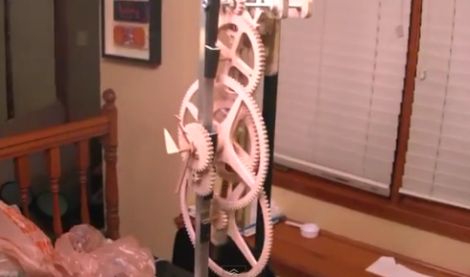
He has been making pretty decent headway since his first experiments and now has nearly all of the clock works assembled. Crafted out of wood, he uses a 15-tooth primary drive ratchet, which powers two 60-tooth gears responsible for keeping track of seconds, as well as a pair of larger gears that track the minutes and hours.

It’s looking good so far, we can’t wait to see it when finished.

Stick around to see a quick video demonstration of the clock with all of its gearing in action.

Continue reading “Building An Electromagnetic Pendulum Clock”