The Past, Present, And Future Of CircuitPython

Modern microcontrollers like the RP2040 and ESP32 are truly a marvels of engineering. For literal pocket change you can get a chip that’s got a multi-core processor running at hundreds of megahertz, plenty of RAM, and more often than not, some form of wireless connectivity. Their capabilities have been nothing short of revolutionary for the DIY crowd — on any given day, you can see projects on these pages which simply wouldn’t have been possible back when the 8-bit Arduino was all most folks had access to.

Limor Fried

Thanks to the increased performance of these MCUs, hackers and makers now even have a choice as to which programming language they want to use. While C is still the language of choice for processor-intensive tasks, for many applications, Python is now a viable option on a wide range of hardware.

This provides a far less intimidating experience for newcomers, not just because the language is more forgiving, but because it does away with the traditional compile-flash-pray workflow. Of course, that doesn’t mean the more experienced MCU wranglers aren’t invited to the party; they might just have to broaden their horizons a bit.

To learn more about this interesting paradigm shift, we invited the fine folks at Adafruit to the Hack Chat so the community could get a chance to ask questions about CircuitPython, their in-house Python variant which today runs on more than 400 devices.

Continue reading “The Past, Present, And Future Of CircuitPython”
OLED Display Lets Vintage PC Engage Turbo Mode In Style

Back in the 486 days, it was common to see a “Turbo” button on the front panel of many PCs, which was used to toggle between the CPU’s maximum speed and a slower clock rate that was sometimes necessary for compatibility with older software. Usually an LED would light up to show you were running at this higher speed, or if your machine was very fancy, it might even have a numerical display that would show the current CPU frequency.

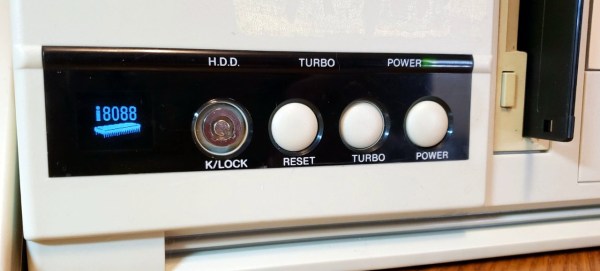
[Joshua Woehlke] wanted to add a similar display to his 486, but figured that with modern technology, he could do something a bit more interesting. Especially when he realized that the spot on his case where the two-digit LED display would have originally been mounted was the perfect size to hold a common 0.96″ SSD1306 OLED. From there it was just a matter of wiring it up to an Arduino and writing some code to display different graphics depending on the computer’s current CPU speed.

Just like the frequency indicators of yore, the Arduino doesn’t actually measure the CPU’s frequency, it’s simply reading the state of the Turbo LED on the front panel. When the LED is off the Arduino shows an image of a i8088 CPU on the screen to indicate the computer is running in compatibility mode, and when the LED is on, the screen shows the Cyrix Cx486 DX2 logo. When the button hasn’t been pressed in awhile, the display defaults to a star field screensaver.

Regular readers may recall we recently covered a similar project that used an Arduino to add a little flair to an era appropriate seven-segment LED display. We’d say there’s still a good deal of romanticism about computers having a big “TURBO” button you can smash whenever you feel the need for speed.

486 Gets Animated Turbo Button Thanks To Arduino

There was a point in time, excruciatingly brief, in which desktop computers often had a large “TURBO” button on their front panel. Some even featured an LED display that would indicate the current CPU frequency, providing visual conformation that your machine had leaped to a blistering 66 MHz.

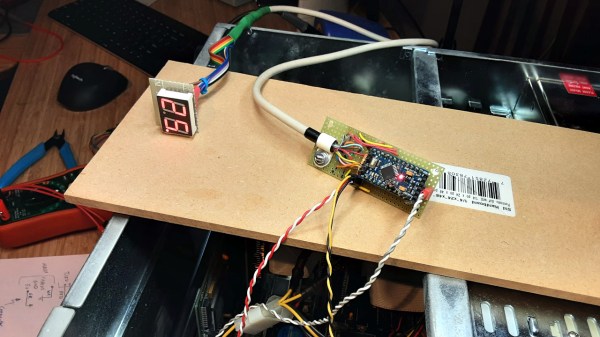
The 486 that [someyob] is restoring had the Turbo button, but sadly there was just a simple LED to show whether or not it was engaged. But there was a window in the front panel where it seemed like a numerical display was intended to go, so they decided to wire up their own CPU indicator by sensing the state of the Turbo LED with an Arduino Pro Mini.

Now to modern audiences, this might seem like cheating. After all, the Arduino isn’t actually measuring the CPU speed, nor is it directly controlling it (that’s still done by the original Turbo button wiring). But the truth is, even back in the day, the CPU frequency displays faked it — they just toggled between showing two predefined frequencies depending on the state of the button. The arrangement [someyob] has come up with does the same thing, except now there’s some extra processing power in the mix, so the display can show some slick animations as it switches between 33 and 66 Mhz.

In the GitHub repository, [someyob] has provided the Arduino source code and schematics showing how the microcontroller was shoehorned into the existing front panel wiring without compromising its functionality. There’s even a brief video below that shows the display in operation.

Like the idea but don’t have a 486 laying around? Don’t worry. We’ve seen a similar panel built for modern machines that  just doesn’t look the part, it actually manages to be functional.

Continue reading “486 Gets Animated Turbo Button Thanks To Arduino”

Restoring The Cheapest TRS-80 At The Swap Meet

We don’t know if you’ve looked into it recently, but the prices for vintage computers are through the roof right now. These classic machines are going through something of a renaissance at the moment, with even relatively commonplace computers commanding several hundred dollars if they’re in good condition. For those looking to start a collection without breaking the bank, you may need to accept some specimens that have seen better days.

That’s the situation [Vlado Vince] recently found himself in — he wanted to get his hands on a TRS-80 Model I, but wasn’t willing to spend eBay prices. So he waited until the Vintage Computer Federation’s swap meet in June and was able to snag a “fully functional” example for $95. Unfortunately the seller must have been using some form of that phrase which we were previously unaware of, as it took a considerable amount of work to get it back online.

Continue reading “Restoring The Cheapest TRS-80 At The Swap Meet”

Mapping The Depths With An Autonomous Solar Boat

Ever look out at a pond, stream, or river, and wonder how deep it is? For large bodies of water that are considered navigable, it’s easy enough to pull up a chart and find out. But what if there’s no public data for the area you’re interested in?

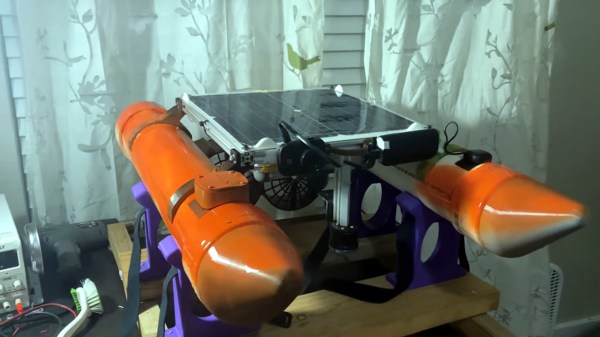
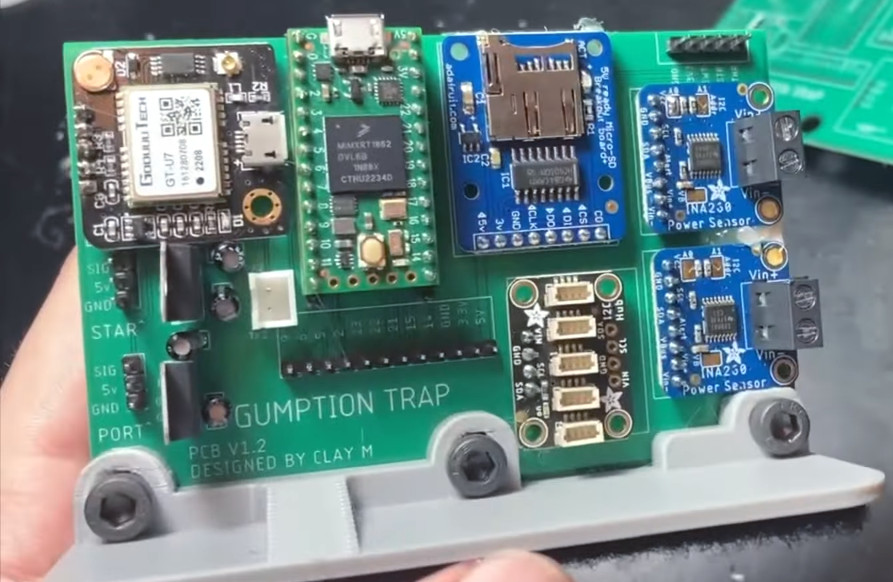
Well, you could spend all day on a little boat taking depth readings and making your own chart, but if you’re anything like [Clay] you could build a solar-powered autonomous robot to do it for you. He’s been working on the boat, which he calls Gumption Trap, for the better part of a year now. If we had to guess, we’d say the experience of designing and building it has ended up being a bit more interesting to him than the actual depth of the water — but that’s fine by us.

The design of the boat is surprisingly economical, as far as marine designs go. Two capped four-inch PVC pipes are used as pontoons, and 3D printed brackets attach those to an aluminum extrusion frame that holds the electronics and solar panel high above the water. This arrangement provides an exceptionally stable platform that would be all but impossible to flip under normal circumstances.

Around the back of the craft, there’s a pair of massive 3D printed thrusters, complete with some remarkably chunky printed propellers. The lack of rudders keeps things simple, with differential thrust between the two motors enough to keep the Gumption pointed in the right direction.

Continue reading “Mapping The Depths With An Autonomous Solar Boat”

2600 Breaks Free From DRM With PDF/EPUB Subscription

Hackaday has been online in some form or another since 2004, which for the Internet, makes us pretty damn old. But while that makes us one of the oldest surviving web resources for hacker types, we’ve got nothing on 2600 — they’ve been publishing their quarterly zine since 1984.

Summer 2023 Issue of 2600

While the physical magazine can still be found on store shelves, the iconic publication expanded into digital distribution some time ago, thanks largely to the Kindle’s Newsstand service. Unfortunately, that meant Amazon’s recent decision to shutter Newsstand threatened to deprive 2600 of a sizable chunk of their income. So what would any group of hackers do? They took matters into their own hands and spun-up their own digital distribution system.

As of today you’re able to subscribe to the digital version of 2600 in DRM-free PDF or EPUB formats, directly from the magazine’s official website. Which one you pick largely depends on how you want to read it: those looking for the highest fidelity experience should go with PDF, as it features an identical layout to the physical magazine, while those who are more concerned with how the content looks on their reader of choice would perhaps be better served by the flexibility of EPUB. After signing up you can download the current Summer issue immediately, with future issues hitting your inbox automatically. Load it onto your home-built Open Book, and you can really stick it to the establishment.

While the ending of this story seems to be a happy one, we can’t help but see it as a cautionary tale. How many other magazines would have the means and experience to offer up their own digital subscriptions? Or for that matter, how many could boast readers savvy enough to utilize it? The reality is many publications will be injured by Amazon’s decision, some mortally so. That’s a lot of power to be put into the hands of just one company, no matter how quick the shipping is.

Hackaday Prize 2023: Meet The Assistive Tech Finalists

If you’re still toiling away at your entry for the Gearing Up Challenge of the 2023 Hackaday Prize, don’t panic! No, you haven’t lost track of time — due to some technical difficulties we had to delay the final judging for the Assistive Tech Challenge that ended May 30th.

Today we’re pleased to announce that all the votes are in, and we’re ready to unveil the ten projects that our panel of judges felt best captured the spirit of this very important challenge. Each of these projects will take home $500 and move on to the final round of judging. There are few more noble pursuits than using your talents to help improve the lives of others, so although we could only pick ten finalists, we’d like to say a special thanks to everyone who entered this round.

Continue reading “Hackaday Prize 2023: Meet The Assistive Tech Finalists”