FreeCAD Debugging

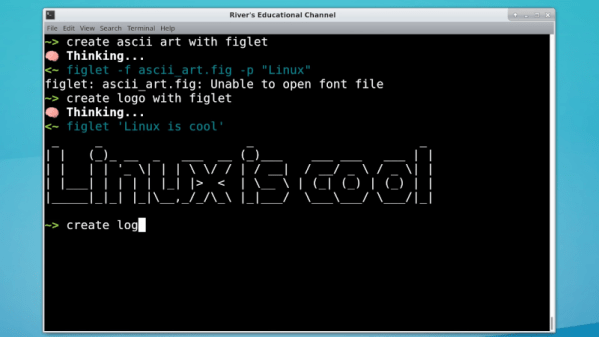
Powerful software programs often have macro programming languages that you can use, and if you know how to program, you probably appreciate them. However, sometimes the program’s built-in debugging facilities are lacking or even nonexistent If it were just the language, that wouldn’t be such a problem, but you can’t just grab a, for example, VBA macro from Microsoft Word and run it in a normal Basic interpreter. Your program will depend on all sorts of facilities provided by Word and its supporting libraries. [CrazyRobMiles] was frustrated with trying to debug Python running inside FreeCAD, so he decided to do something about it.

[Rob’s] simple library, FakeFreeCad, gives enough support that you can run a FreeCAD script in your normal Python development environment. It only provides a rude view of what you are drawing, but it lets you explore the flow of the macro, examine variables, and more.

Continue reading “FreeCAD Debugging”

Gyroscope Level Is Digital

A spirit level, you know the kind of level with a little bubble in a tube of fluid, is a basic construction tool. [DesignBuildDestroy] took an Arduino, a gyroscope chip, and an OLED, and made a 3D printed level with no bubble, but it does have a nice digital display.

It is funny when you realize that at one time a gyroscope was a high tech item reserved for missiles and aircraft. Now you can grab a six-axis sensor for pennies. Even, better, the code used in the project can offload the Arduino for a lot of processing.

Continue reading “Gyroscope Level Is Digital”

Cutting Balsa Wood With Air (Oh, And A Laser)

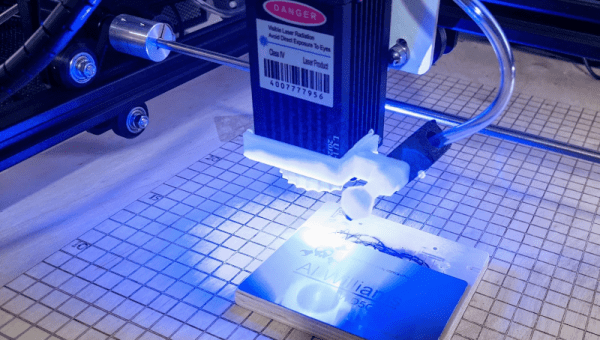
[DIY3DTech] likes using his Ortur laser cutter for balsa wood and decided to add an air assist system to it. Some people told him it wasn’t worth the trouble, so in the video below, he compares the results of cutting both with and without the air assist.

The air assist helped clear the cut parts and reduced charring in the wood. The air system clears residue and fumes that can reduce the effectiveness of the laser. It can also reduce the risk of the workpiece catching on fire.

Continue reading “Cutting Balsa Wood With Air (Oh, And A Laser)”

MicroOS Is Immutable Linux

Linux finds a lot of uses in computers that aren’t desktops. But there is a problem. What happens if your mission-critical control computer or retail kiosk gets an update and then fails? Happens all the time with Windows and it can happen with Linux, too. The openSUSE project has an answer: MicroOS which bills itself as immutable. Aimed at container deployment, the operating system promises atomic updates with no disk changes during runtime. If an update does break something, the BTRFS file system allows you to roll back to a previous snapshot. [Tyler] installs the OS and gives it a walkthrough in the video below.

As [Tyler] found, there are not many applications installed by default. Instead, you are expected to install flatpaks so the applications live in their own containers, isolated from the operating system and each other.

Continue reading “MicroOS Is Immutable Linux”

Turn-by-turn Smart Glasses Give You Direction

[SamsonMarch] designs electronic products by day and — apparently — does it in his spare time, too. His latest is a pair of really cool shades that give him turn-by-turn directions as he walks around town. Unlike some smart glasses, these get around the difficult problem of building a heads-up display by using a very simple interface based on colored LEDs visible to your peripheral vision in the temples of the frames.

The glasses themselves look great; designed in Fusion 360 and cut out of wood, no one would give them a second glance. [Sam] says you could 3D print them, too, but we think the wood looks best even if the stock is a cheap bamboo cutting board. He also cut the lenses out of acrylic.

The slots in the temples are where the action is, though. An iPhone app takes input and talks to Apple services to get directions. A lot of thought went into making the app work even though the phone keeps trying to put it to sleep. Each PCB hosts an RGB LED for indicating left/right turn and destination. They talk to the app using BLE and include accelerometers which put the boards — powered by coin cells — into sleep mode when no movement is detected.

Overall a fun and good looking project. There are even covers to hide the boards during normal use. The files you need to reproduce it are on GitHub. Usually, when we see smart glasses, they have some sort of screen which is harder to do. Of course, it is impossible to avoid comparisons to Google Glass.

Continue reading “Turn-by-turn Smart Glasses Give You Direction”

Robotics Club Teaches Soldering

Oregon State University must be a pretty good place to go to school if you want to hack on robots. Their robotics club, which looks active and impressive, has a multi-part video series on how to solder surface mount components that is worth watching. [Anthony] is the team lead for their Mars Rover team and he does the job with some pretty standard-looking tools.

The soldering station in use is a sub-$100 Aoyue with both a regular iron and hot air. There’s also a cheap USB microscope that looks like it has a screen, but is covered in blue tape to hold it to an optical microscope. So no exotic tools that you’d need a university affiliation to match.

Continue reading “Robotics Club Teaches Soldering”

DSP Spreadsheet: The Goertzel Algorithm Is Fourier’s Simpler Cousin

You probably have at least a nodding familiarity with the Fourier transform, a mathematical process for transforming a time-domain signal into a frequency domain signal. In particular, for computers, we don’t really have a nice equation so we use the discrete version of the transform which takes a series of measurements at regular intervals. If you need to understand the entire frequency spectrum of a signal or you want to filter portions of the signal, this is definitely the tool for the job. However, sometimes it is more than you need.

For example, consider tuning a guitar string. You only need to know if one frequency is present or if it isn’t. If you are decoding TouchTones, you only need to know if two of eight frequencies are present. You don’t care about anything else.

A Fourier transform can do either of those jobs. But if you go that route you are going to do a lot of math to compute things you don’t care about just so you can pick out the one or two pieces you do care about. That’s the idea behind the Goertzel. It is essentially a fast Fourier transform algorithm stripped down to compute just one frequency band of interest.  The math is much easier and you can usually implement it faster and smaller than a full transform, even on small CPUs.

Continue reading “DSP Spreadsheet: The Goertzel Algorithm Is Fourier’s Simpler Cousin”