ESP32 Altair Emulator Gets Split Personality

If you wanted me to demo CP/M running on an emulated Altair 8800, I’d pull out a tiny board from my pocket. You might wonder how I wound up with an Altair 8800 that runs CP/M (even WordStar), that fits in your pocket and cost less than $10. Turns out it’s a story that goes back to 1975.

When the Altair 8800 arrived back in 1975, I wanted one. Badly. I’d been reading about computers but had no hands-on experience. But back then, as far as I was concerned, the $400 price tag might as well have been a million bucks. I was working for no real pay in my family’s store, though in all fairness, adjusted into today’s money that was about $2,000.

I’d love to buy one now, but a real Altair costs even more today than it did back then. They also take up a lot of desk space. Sure, there are replicas and I’ve had a few. I even helped work the kinks out of Vince Briel’s clone which I’ve enjoyed. However, the Briel computer has two problems. First, it takes a little work to drive a serial port (it uses a VGA and a PS/2 keyboard). Second, while it’s smaller than a real Altair, it is still pretty large — a byproduct of its beautiful front panel.

So to quickly show off CP/M to someone, you need to haul out a big box and find a VGA monitor and PS/2 keyboard — both of which are becoming vanishing commodities. I made some modifications to get the serial port working, but it is still a lot to cart around. You could go the software route with a simulator like SIMH or Z80pack, but now instead of finding a VGA monitor and a PS/2 keyboard, you need to find a computer where you can install the software. What I really wanted was a simple and portable device that could boot CP/M.

Continue reading “ESP32 Altair Emulator Gets Split Personality”
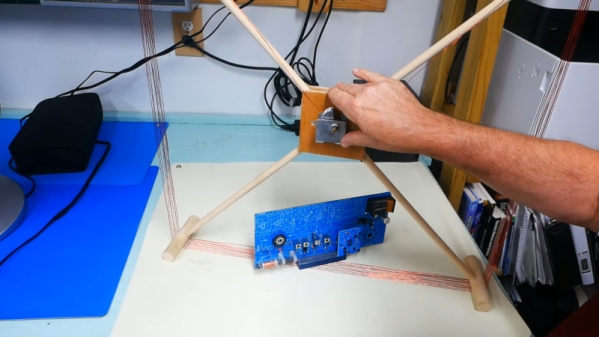
Antenna Pulls In AM Stations

While we can’t argue that FM has superior audio quality and digital streaming allows even higher quality in addition to worldwide access, there’s still something magic about hearing a weak and fading AM signal from thousands of miles away with nothing between the broadcaster’s antenna and yours. If you can’t have a big antenna — or even if you can — a loop antenna can help your big antenna fit in less space. In the video after the break, [TheOffsetVolt] covers an AM loop and shows how it can pull in distant AM stations.

Continuing with the educational radio he’s talked about before,  he adds a loop antenna that is two feet on each side of a square, making it four square feet in area. Although he calls it an amplifier, it’s really just a passive tuned circuit that couples to the radio’s built-in antenna. There’s no actual connection between the antenna and the radio.

We aren’t sure if the reradiation explanation is really what’s happening, or if it is just transformer coupled to the main antenna. But either way, it seems to work well. You can think of this as adding a preselector to the existing radio. Loop antennas are directional, so this design could work as a direction finder.

We have seen many loop antennas, some with novel construction methods.  Some even tune themselves.

Continue reading “Antenna Pulls In AM Stations”

Linux-Fu: One At A Time, Please! Critical Sections In Bash Scripts

You normally think of a critical section — that is, a piece of a program that excludes other programs from using a resource — as a pretty advanced technique. You certainly don’t often think of them as part of shell scripting but it turns out they are surprisingly useful for certain scripts. Most often, a critical section is protecting some system resource like a shared memory location, but there are cases where a shell script needs similar protection. Luckily, it is really easy to add critical sections to shell scripts, and I’ll show you how.

Sometimes Scripts Need to Be Selfish

One very common case is where you want a script to run exactly one time. If the same script runs again while the original is active, you want to exit after possibly printing a message. Another common case is when you are updating some file and you need undisturbed access while making the change.

That was actually the case that got me thinking about this. I have a script — may be the subject of a future Linux-Fu — that provides dynamic DNS by altering a configuration file for the DNS server. If two copies of the script run at the same time, it is important that only one of them does modifications. The second copy can run after the first is totally complete.

Continue reading “Linux-Fu: One At A Time, Please! Critical Sections In Bash Scripts”

$5 Lets Your Documents Go Virtual

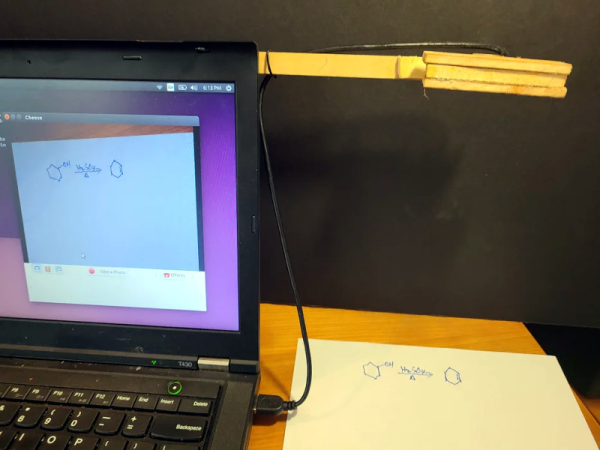
Video conferencing is nothing new, but the recent world events have made it much more mainstream than it has been in the past. Luckily, web camera technology is nothing new and most software can also show your screen. But what about your paper documents? Turns out that [John Nelson] can show you how to spend $5 for an old laptop camera module and put your documents center stage on your next Zoom, Skype or other video conferences.

This is especially good for things that would be hard to draw in real time during a conference like a quick sketch, a schematic, or as you can see in the post and the video demo below, chemical molecule diagrams.

Continue reading “$5 Lets Your Documents Go Virtual”

Rack ’em Stack ’em Raspberry Pi Controller Board

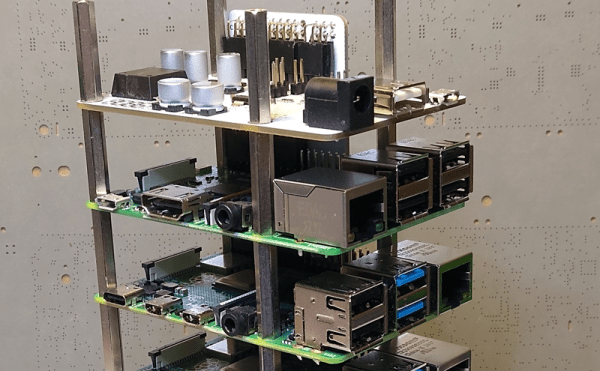
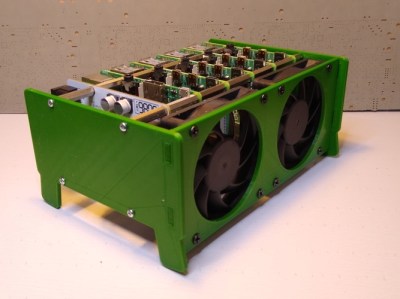
It isn’t that hard to assemble an array of Raspberry Pi boards and there are several reasons you might want to do so. The real trick is getting power to all of them and cooling all of them without having a mess of wires and keeping them all separated. The ClusterCTRL stack lets you stack up to five Raspberry Pi boards together. The PCB aligns vertically along the side of the stack of Pis with sockets for each pin header. Using a single 12 to 24V supply, it provides power for each board, a USB power connection, and provisions for two fans. There is also a USB port to control the fans and power.

There’s also a software component to deliver more granular control. Without using the software, the PI’s power on in one second and monitor a GPIO pin to control the fans. With the software, you can turn on or off individual nodes, gang the two fans to turn on together, and even add more stacks.

There is a case that you can print from STL files, although you can buy them preprinted on the Tindie listing where the bulk of information on ClusterCTRL is found. You could also have a 3D printing vendor run off a copy for you if you’d rather.

The power supply is a 10A 5.1V DC to DC converter. That works out to 2A per Pi and 51W total. The power supply for the input, then, needs to be enough to cover 51W, the power for the fans, and some overhead for regulator inefficiency and other small overhead.

We’ve seen a lot of Pi clusters over the years including one that is a good learning tool for cluster management. Of course, there’s always the Oracle cluster with 1,060 boards, which is going to take a bigger power supply.

Popcorn Pocket P. C. Open Sourced

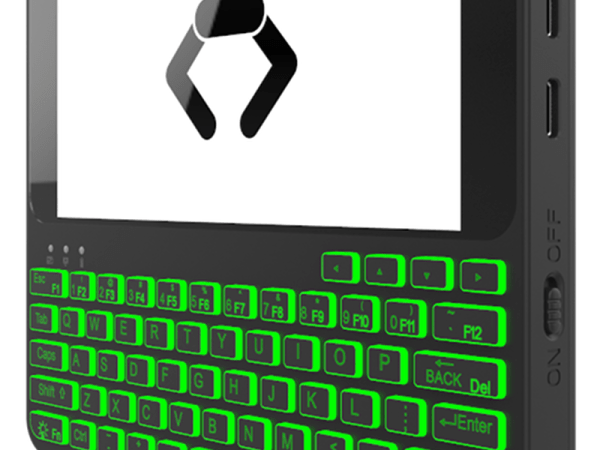
If you miss the days you could get an organizer that would — sort of — run Linux, you might be interested in Popcorn computer’s Pocket P. C., which was recently open-sourced on GitHub. Before you jump over to build one, though, there are a few things you should know.

First, the files are untested since the first unit hasn’t shipped yet. In addition, while the schematic looks pretty complete, there’s no actual bill of materials and the PCB layers in the PDF file might not be very easy to replicate, since they are just a series of images, one for each layer. You can see an overview video of the device, below.

Continue reading “Popcorn Pocket P. C. Open Sourced”

Linux Fu: Remote Execution Made Easy

If you have SSH and a few other tools set up, it is pretty easy to log into another machine and run a few programs. This could be handy when you are using a machine that might not have a lot of memory or processing power and you have access to a bigger machine somewhere on the network. For example, suppose you want to reencode some video on a box you use as a media server but it would go much faster on your giant server with a dozen cores and 32 GB of RAM.

Remote Execution

However, there are a few problems with that scenario. First, you might not have the software on the remote machine. Even if you do, it might not be the version you expect or have all the same configuration as your local copy. Then there’s the file problem. the input file should come from your local file system and you’d like the output to wind up there, too. These aren’t insurmountable, of course. You could install the program on the remote box and copy your files back and forth manually. Or you can use Outrun.

There are a few limitations, though. You do need Outrun on both machines and both machines have to have the same CPU architecture. Sadly, that means you can’t use this to easily run jobs on your x86-64 PC from a Raspberry Pi. You’ll need root access to the remote machine, too. The system also depends on having the FUSE file system libraries set up.

Continue reading “Linux Fu: Remote Execution Made Easy”