Honey, They Shrunk The Transistor

Silicon transistors keep shrinking (current state of the art is about 20 nanometers). However–in theory–once the gate goes to 5 nanometers, the electrons tunnel through the channel making it impossible to turn the transistor off. Berkeley researchers have used a different material to produce a transistor with a 1-nanometer gate. For point of reference, a human hair is about 50,000 nanometers thick.

The secret is to switch away from silicon in favor of another semiconductor. The team’s choice? Molybdenum disulfide. Never heard of it? You can buy it at any auto parts store since it is a common lubricant. Electrons have more effective mass as they travel through molybdenum disulfide than silicon. For a larger transistor, that’s not a good thing, but for a small transistor, it prevents the electron tunneling problem.

Continue reading “Honey, They Shrunk The Transistor”

Raspberry Pi Boots CP/M

Retrocomputing is an enjoyable and educational pursuit and — of course — there are a variety of emulators that can let you use and program a slew of old computers. However, there’s something attractive about avoiding booting a modern operating system and then emulating an older system on top of it. Part of it is just aesthetics, and of course the real retrocomputing happens on retro hardware. However, as a practical matter, retrocomptuters break, and with emulation, you’d assume that CPU cycles spent on the host operating system (and other programs running in the background) will take away from the target retrocomputer.

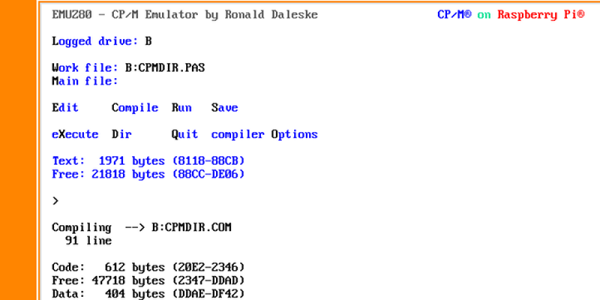
If you want to try booting a “bare metal” Z80 emulator with CP/M on a Raspberry Pi, you can try EMUZ80 RPI. The files reside on an SD card and the Pi directly boots it, avoiding any Linux OS (like Raspian). It’s available for the Raspberry Pi Model B, A+, and the Raspberry Pi 2 Model B. Unlike the significant boot times of the standard Linux distros on the earliest models of Pi, you can boot into CP/M in just five seconds. Just like the old days.

The secret to this development is an open source system known as Ultibo, a framework based on Open Pascal which allows you to create bare metal applications for the Raspberry Pi. The choice of Free Pascal will delight some and annoy others, depending on your predilections. Ultibo is still very much in active development, but the most common functions are already there; you can write to the framebuffer, read USB keyboards, and write to a serial port. That’s all you really need to make your own emulator or write your own Doom clone. You can see a video about Ultibo (the first of a series) below.

Continue reading “Raspberry Pi Boots CP/M”

Beware Common Sense Engineering

I am always torn about the title of “engineer.” When I talk to school kids about engineering, I tell that an engineer is a person who uses science and math to solve or analyze practical problems. However, these days you hear a lot of engineering titles thrown around to anyone who does any sort of technical (and sometimes non-technical) work. “Software engineers” don’t have to be licensed to practice, while civil engineers do. What’s in a name and does any of this matter?

Continue reading “Beware Common Sense Engineering”

TensorFlow Robot Recognizes Objects

Children can do lots of things that robots and computers have trouble with. Climbing stairs, for example, is a tough thing for a robot. Recognizing objects is another area where humans are generally much better than robots. Kids can recognize blocks, shapes, colors, and extrapolate combinations and transformations.

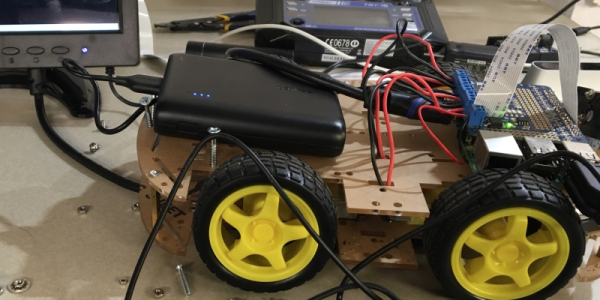
Google’s open-source TensorFlow software can help. It is a machine learning system used in Google’s own speech recognition, search, and other products. It is also used in quite a few non-Google projects. [Lukas Biewald] recently built a robot around some stock pieces (including a Raspberry Pi) and enlisted TensorFlow to allow the robot to recognize objects. You can see a video of the device, below.

Continue reading “TensorFlow Robot Recognizes Objects”

Cheap 360 Degree Camera

How much would you pay for a 360 degree camera? How about $15 if you already have a Raspberry Pi and a Pi camera hanging around? If you don’t, you’ll have to add that minimal cost into the build. [Gigafide] noticed how a spherical mirror, made to see around corners, showed an all-around view if you took a picture of it from below. He snagged a panoramic lens made for an iPhone and stripped it for its optics. Some custom software and a little work resulted in a usable 360 degree camera.

SimpleCV (a light version of OpenCV) provides the algorithms to unwrap the frames and you can take video with the setup (see the video below). Mounting the optics took some 3D printing and the Pi operates as a hot spot to send the video out.

Continue reading “Cheap 360 Degree Camera”

Party Drone Comes Up Roses

[Nicomedia] (a team of two) built a payload for their drone with two distinct purposes: to allow it to drop things like rose petals and to fire off fireworks. Honestly, while it is a cool idea, we are a little worried that dropping things from a height might not be a good idea (although rose petals are probably OK) and lighting off fireworks from a drone didn’t seem like a good idea at all. If you want to reproduce this, you probably need to make sure either of these things are legal in your part of the planet.

In the video below, you can see the effect. A servo tied to the drone’s controller opens the box to release the payload. In this case, the team didn’t have a spare channel so they used a separate controller, but if you had a spare channel on the flight controller, that would probably be better.

Continue reading “Party Drone Comes Up Roses”