Starlink Satellites Posing Issues For Astronomers

Spotting satellites from the ground is a popular pastime among amateur astronomers. Typically, the ISS and Iridium satellites have been common sightings, with their orbits and design causing them to appear sufficiently bright in the sky. More recently, SpaceX’s mass launches of Starlink satellites have been drawing attention for the wrong reasons.

A capture from the Cerro Telolo observatory, showing the many Starlink satellite tracks spoiling the exposure.

Starlink is a project run by SpaceX to provide internet via satellite, using a variety of techniques to keep latency down and bandwidth high. There’s talk of inter-satellite laser communications, autonomous obstacle avoidance, and special designs to limit the amount of space junk created. We’ve covered the technology in a comprehensive post earlier this year.

The Starlink craft have long worried astronomers, who rely on a dark and unobstructed view of the sky to carry out their work. There are now large numbers of the satellites in relatively low orbits, and the craft have a high albedo, meaning they reflect a significant amount of the sunlight that hits them. With the craft also launching in a closely-packed train formation, there have already been impacts on research operations.

There is some hope that as the craft move to higher orbits when they enter service, this problem will be reduced. SpaceX are also reportedly considering modifications to the design to reduce albedo, helping to keep the astronomy community onside. Regardless, with plans on the table to launch anywhere from 12,000 to 42,000 satellites, it’s likely this isn’t the last we’ll hear about the issue.

Advanced Techniques For Realistic Baking Animations

Computer graphics have come a long way since the days of Dire Straits and their first computer animated music video in 1985. To move the state of the art forward has taken the labor of countless artists, developers and technicians. Working in just that field, a group from UCLA have developed an advanced system for simulating baking in computer graphics, and the results look absolutely delicious.

We propose a porous thermo-viscoelastoplastic mixture model.

The work is being presented at SIGGRPAH Asia, and being an academic paper, is dense in arcane terminology. To properly simulate baking, the team had to consider a multitude of interdependent processes. There’s heat transfer to consider, the release of carbon dioxide from leavening agents, the browning of dough due to evaporation of water, and all manner of other complicated chemical and physical interactions.

With a model that takes all of these factors into account, the results are amazingly realistic. The team have shown off renders of cookies in the oven, freshly baked loaves of bread being torn apart, and even muffins full of melted chocolate chips.

We imagine it would have been difficult not to work up an appetite during the research process. We’ve seen impressive work from SIGGRAPH before, like this method for printing photorealistic images on 3D surfaces. Video after the break.

Continue reading “Advanced Techniques For Realistic Baking Animations” →

DIY CNC Router Uses Chains The Right Way

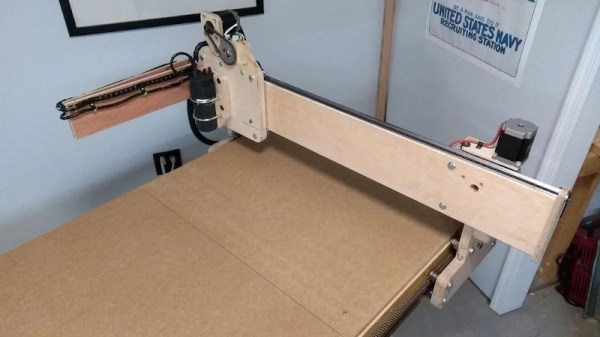
There are a million and one ways to build your own CNC router, depending on your tastes, budget, and application, your design choices will differ accordingly. [Steve Tyng] was well aware of this when undertaking his project, and built the machine that made sense for him.

[Steve’s] build has a strong focus on keeping costs down, and that’s reflected in the hardware used. Wanting a large work area of 30″ x 60″, off-the-shelf linear rails in 6 foot lengths were prohibitively expensive. Instead, 1″ angle iron was sourced from the local garden centre, and used in conjunction with steel v-bearings. It’s a lot cheaper, and good enough for the application at hand, so why not? Other smart choices abound, such as using an IKEA cabinet as the base, and a fanless computer to run the show to avoid death by dust.

When it came time to build the axes, there was plenty of roller chain on hand. Chain is usually passed up for options such as timing belts or ballscrews in the CNC community, as it tends to stretch over time and offers poor accuracy. However, [Steve] took stock of the drawbacks of the method, and made efforts to overcome these weak points in the design. The Y and X axes were specially designed to keep the chain supported along its length. This helped avoid the problem of long drooping chains and poor tension.

While it’s not an industrial-strength build with world-beating accuracy, it’s a solid CNC machine that can carve out large workpieces without issue. Over the years, we’ve seen plenty of DIY CNCs, built with everything from PVC pipe to welded steel. Video after the break.

Continue reading “DIY CNC Router Uses Chains The Right Way” →

A Foolproof Raspberry Pi Media Player

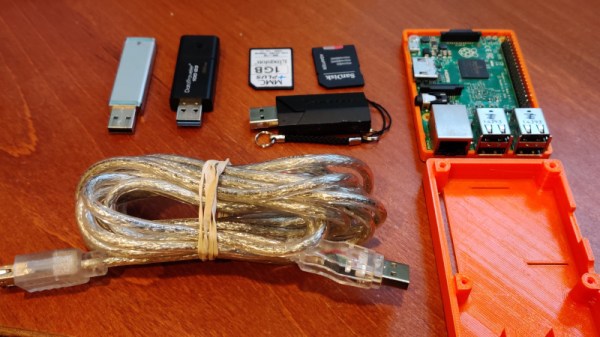
The media landscape in the home has changed precipitously over the years. Back in the days when torrents were king, DVD players and TVs started to sprout USB ports and various methods of playing digital videos, while hackers repurposed office machines and consoles into dedicated media boxes. [Roiy Zysman] is a fan of a clean, no-fuss approach, so built his PiVidBox along those lines.

The build, unsurprisingly, starts with a Raspberry Pi. Cheap, capable of playing most common codecs, and fitted with an HDMI port as standard, it’s a perfect platform for the job. Rather than fiddle with complex interfaces or media apps, instead, the PiVidBox uses a simple script. The Pi is configured to continually scan the /media folder for mounted devices, and play any videos it comes across. Simply pop in an SD card or USB drive, and the content starts rolling. No buttons, remotes, or keyboards needed!

It’s a interface without much flexibility, but it makes up for that in barebones simplicity. We can imagine it would come in handy for a conference room or other situation where users grow tired of messing around with configurations to get screens to work. The Raspberry Pi makes a rather excellent basis for a media player build, and we’ve seen some stunning examples in the past!

Colorizing Images With The Help Of AI

The world was never black and white – we simply lacked the technology to capture it in full color. Many have experimented with techniques to take black and white images, and colorize them. [Adrian Rosebrock] decided to put an AI on the job, with impressive results.

The method involves training a Convolutional Neural Network (CNN) on a large batch of photos, which have been converted to the Lab colorspace. In this colorspace, images are made up of 3 channels – lightness, a (red-green), and b (blue-yellow). This colorspace is used as it better corresponds to the nature of the human visual system than RGB. The model is then trained such that when given a lightness channel as an input, it can predict the likely a & b channels. These can then be recombined into a colorized image, and converted back to RGB for human consumption.

It’s a technique capable of doing a decent job on a wide variety of material. Things such as grass, countryside, and ocean are particularly well dealt with, however more complicated scenes can suffer from some aberration. Regardless, it’s a useful technique, and far less tedious than manual methods.

CNNs are doing other great things too, from naming tomatoes to helping out with home automation. Video after the break.

Continue reading “Colorizing Images With The Help Of AI” →

If You Can’t Buy The Keyboard You Want, Build It Instead

The great thing about being a maker is that when the market fails to meet your needs, you can strike out on your own. [GuzziGuy] did just that, building a bespoke mechanical keyboard that’s stylish to boot.

The aim was to create a keyboard well suited to working without a mouse, and with a keypad on the opposite side to suit a left-hander’s predilections. The case consists of an aluminium top plate with an attractive walnut base, both cut on a Workbee CNC machine. Keycaps are sourced from YDMK and Amazon, with the parts chosen giving the build a striking early 1980s workstation look.

The keys are handwired to a series of DuPont connectors for easy disassembly. These hook up to an Elite-C controller, a USB-C remix of the popular Arduino Pro Micro. Based on the ATmega32U4, it’s got native USB HID functionality, making it perfect for keyboard builds.

The fit and finish is what really makes this project, going to show that a few hours well spent on the CNC can turn you out a beautiful project. As far as mechanical keyboards go, your imagination really is the limit!

A Mechanical Shutter Release For A Digital Camera

Most digital cameras these days come with some kind of electronic remote shutter release. Various solutions exist, using USB cables, smartphone apps, or dedicated remotes. [Steloherd] wasn’t happy with the options available for his Ricoh GRII, though, so built a rig to do things the old fashioned way.

The spring plate helps protect the shutter button from damage.

[Steloherd] wanted to use an old-school mechanical release cable, so devised a way to use it to trigger the Ricoh’s standard shutter button. A small aluminium bracket was created, attached to the hot shoe on top of the camera via a mounting foot from a standard flash accessory. A spring plate was then created to help spread the load from the mechanical release pin, ensuring it triggers the camera effectively without damaging anything.

Installing the mechanical release proved difficult, as the DIN standard calls for an obscure M3.4 conical tapped thread. Rather than muck about finding rare tooling, [Steloherd] simply recut the thread on the release cable to a straight M3x0.5, and did the same for the bracket.

Overall, it’s a tidy hack, and one that could be adapted to other cameras fairly easily. Other methods we’ve seen involve such odd choices as linear actuators harvested from air fresheners, if you’d believe it. As always, if it works, it works!