Your Own Engineering Workstation, With Mame

There are some things that leave indelible impressions in your memory. One of those things, for me, was a technical presentation in 1980 I attended — by calling in a lot of favors — a presentation by HP at what is now the Stennis Space Center. I was a student and it took a few phone calls to wrangle an invite but I wound up in a state-of-the-art conference room with a bunch of NASA engineers watching HP tell us about all their latest and greatest. Not that I could afford any of it, mind you. What really caught my imagination that day was the HP9845C, a color graphics computer with a roughly $40,000 price tag. That was twice the average US salary for 1980. Now, of course, you have a much better computer — or, rather, you probably have several much better computers including your phone. But if you want to relive those days, you can actually recreate the HP9845C’s 1980-vintage graphics glory using, of all things, a game emulator.

The Machine

The HP9845C with a Colorful Soft Key Display

Keep in mind that the IBM PC was nearly two years away at this point and, even then, wouldn’t hold a candle to the HP9845C. Like many machines of its era, it ran BASIC natively — in fact, it used special microcode to run BASIC programs relatively quickly on its 16-bit 5.7 MHz CPU. The 560 x 455 pixel graphics system had its own CPU and you could max it out with a decadent 1.5 MB of RAM. (But not, alas, for $40,000 which got you — I think –128K or so.)

The widespread use of the computer mouse was still in the future, so the HP had that wonderful light pen. Mass storage was also no problem — there was a 217 kB tape drive and while earlier models had a second drive and a thermal printer optional, these were included in the color “C” model. Like HP calculators, you could slot in different ROMs for different purposes. There were other options such as a digitizer and even floppy discs.

Continue reading “Your Own Engineering Workstation, With Mame”

Your Own IBM Mainframe (or Vax, Or Cray…) The Easy Way

If you want the classic experience of working with an IBM mainframe or another classic computer like a DEC VAX, you have a few choices. You could spend a lot of money trying to find one, transport it, and refurbish it. But, of course, most of us will settle for an emulator. While there are great emulators out there, most of the time you aren’t interested in running just the bare machine — you want the operating systems, the compilers, and the other software that made these machines so interesting. Running your three lines of machine code isn’t as much fun as playing hunt the wumpus or compiling some Fortran IV code. Unfortunately, finding copies of all this old software can be daunting. But thanks to the efforts of [Rattydave], you can do it with no problems at all. The secret? Pre-built docker images that have everything you need in one place.

Continue reading “Your Own IBM Mainframe (or Vax, Or Cray…) The Easy Way”

Reliving Second-Hand Nostalgia With The PDP-11

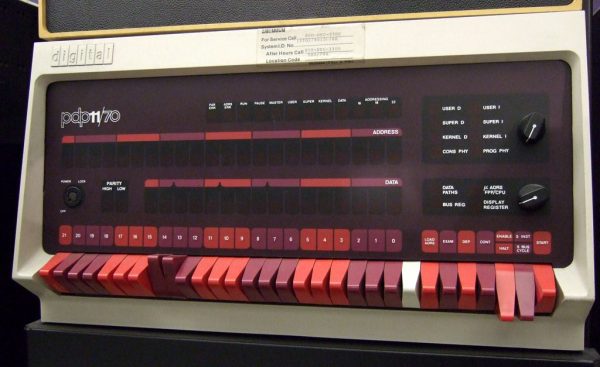
Levy’s Hackers: Heroes of the Computer Revolution is something like required reading for the hacker subculture, and Hackaday by extension. The first section of that book is all about early hackers and their adventures with the PDP-1 at MIT. The PDP-11 has earned a special place in hacker history for being the minicomputer used to write the first Unix. We’re always amazed to find how many of our readers have stories about programming PDP microcomputers, usually the PDP-11. Those of us young enough to have missed out on the PDP experience often have something of a second-hand nostalgia for the old machines. An exceptionally detailed article over at Ars Technica promises to get us started reliving the glory days, even if it is for the first time.

It turns out that there’s an emulator for the old minicomputers, the History Simulator, abbreviated SimH. The article gives step-by-step instructions to get the emulator running, booting Unix 2.11 on a virtual PDP-11. The fun doesn’t stop there. The write-up includes an intro the the PDP-11 hardware, and a crash-course to assembly programming for the beast. It’s a great look at how the stack, branching, and subroutines work under the hood. Most of it still applies to computing today, so it really is worth the read.

Looking for more PDP-11 lore? Check out our coverage of DEC’s history.

The image above is “PDP-11” by ToastyKen, and is licensed under CC BY 2.0

A Miniature VT102 Running A Miniature PDP11

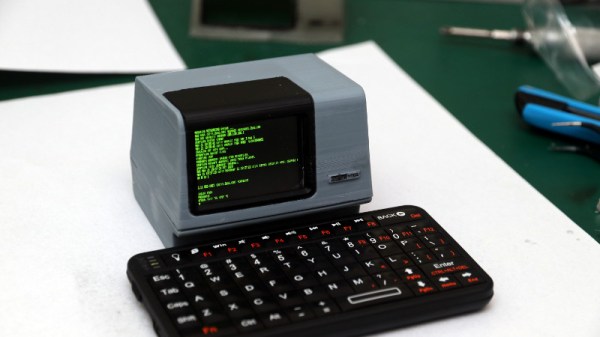
We spend a lot of time looking at retrocomputing in the form of gaming and home computers, but it’s true to say that minicomputers are less common than hardware projects. Perhaps it’s the size, cost, or even relative rarity of the original machines, but DEC minicomputers are a bit unusual around here. [Sprite_TM] hasn’t bought us a PDP11 or a VT102 terminal, but he’s done the next best thing in the form of a miniature working VT102 that also conceals a PDE11 emulator. It runs Tetris, which was originally developed on a Russian clone of the PDP11 architecture, and the 2.1BSD operating system.

Powering it all is an ESP32 module, and the PDP11 emulator is the well-known SIMH software. Porting this to the slightly limited environment of the microcontroller required a few compromises, namely the network stack and the configuration interface. In a particularly clever move [Sprite_TM] enabled BSD networking by writing an ESP32 layer that takes network packets via SIMD directly from BSD. It includes its own DHCP client and wireless network configuration tool, allowing an ancient UNIX-derived operating system from the 1970s to connect to the 21st century Internet through an emulator with its network code stripped out.

The case is a masterwork in OpenSCAD, a complete VT102 unit in miniature with a tiny LCD screen that when printed on a resin printer is a remarkable facsimile of the real thing. It doesn’t have a keyboard counterpart, but even with a miniature Bluetooth ‘board it still looks pretty impressive. In the video below the break he boots it into 2.1BSD, and importantly since it is a server operating system, logs into it from his laptop and plays a game of Zork.

[Sprite_TM] has brought us so many impressive projects over the years using the ESP32 and other parts. Maybe you have a favorite, but for us it’s the PocketSprite Game Boy-like tiny handheld console.

Continue reading “A Miniature VT102 Running A Miniature PDP11”

“A Guy In A Jet Pack” Reported Flying Next To Aircraft Near LAX

In case you needed more confirmation that we’re living in the future, a flight on approach to Los Angeles International Airport on Sunday night reported “a guy in a jet pack” flying within about 300 yards of them. A second pilot confirmed the sighting. It’s worth watching the video after the break just to hear the recordings of the conversation between air traffic control and the pilots.

The sighting was reported at about 3,000 feet which is an incredible height for any of the jet packs powerful enough to carry humans we’ve seen. The current state of the art limits jet pack tech to very short flight times and it’s hard to image doing anything more than getting to that altitude and back to the ground safely. Without further evidence it’s impossible to say, which has been an ongoing problem with sightings of unidentified flying objects near airports.

While superheros (or idiots pretending to be superheros) flying at altitude over the skies of LA sounds far fetched, the RC super hero hack we saw nine years ago now comes to mind. At 300 yards, that human-shaped drone might pass for an actual person rather than a dummy. This is of course pure speculation and we don’t want to give the responsible members for the RC aircraft community a bad name. It could have just as easily been trash, balloons, aliens, or Mothra. Or perhaps the pilot was correct and it was “some guy” flying past at 3,000 feet. That’s not impossible.

We anxiously await the results of the FAA’s investigation on this one.

Continue reading ““A Guy In A Jet Pack” Reported Flying Next To Aircraft Near LAX”

ESP32 Altair Emulator Gets Split Personality

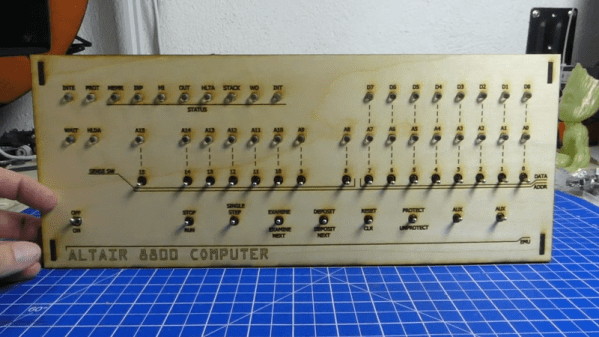
If you wanted me to demo CP/M running on an emulated Altair 8800, I’d pull out a tiny board from my pocket. You might wonder how I wound up with an Altair 8800 that runs CP/M (even WordStar), that fits in your pocket and cost less than $10. Turns out it’s a story that goes back to 1975.

When the Altair 8800 arrived back in 1975, I wanted one. Badly. I’d been reading about computers but had no hands-on experience. But back then, as far as I was concerned, the $400 price tag might as well have been a million bucks. I was working for no real pay in my family’s store, though in all fairness, adjusted into today’s money that was about $2,000.

I’d love to buy one now, but a real Altair costs even more today than it did back then. They also take up a lot of desk space. Sure, there are replicas and I’ve had a few. I even helped work the kinks out of Vince Briel’s clone which I’ve enjoyed. However, the Briel computer has two problems. First, it takes a little work to drive a serial port (it uses a VGA and a PS/2 keyboard). Second, while it’s smaller than a real Altair, it is still pretty large — a byproduct of its beautiful front panel.

So to quickly show off CP/M to someone, you need to haul out a big box and find a VGA monitor and PS/2 keyboard — both of which are becoming vanishing commodities. I made some modifications to get the serial port working, but it is still a lot to cart around. You could go the software route with a simulator like SIMH or Z80pack, but now instead of finding a VGA monitor and a PS/2 keyboard, you need to find a computer where you can install the software. What I really wanted was a simple and portable device that could boot CP/M.

Continue reading “ESP32 Altair Emulator Gets Split Personality”

Learn PDP-11 Assembly For Fun But Probably No Profit

Learning a new skill is fun, especially one that could land you a new job. We don’t think you’ll find too much demand for PDP-11 assembly language programmers, but if it still interests you, check out [ChibiAkumas’s] video that starts a series on that subject for “absolute beginners.”

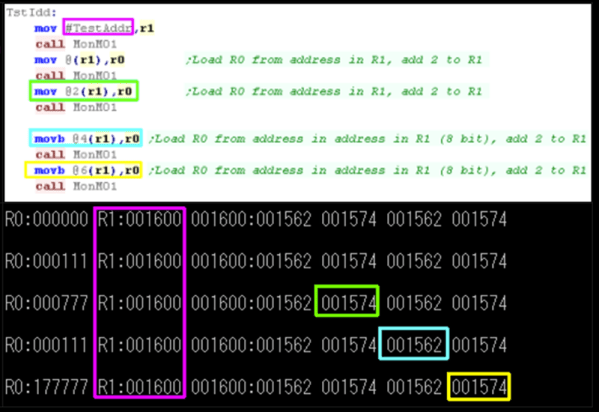
The PDP-11 is a venerable computer, but you can still find simulators ranging from SIMH to browser-based virtual devices with front panels. If you want real hardware, there is a PDP-11 on a chip that is still around (or you can score the real chips, sometimes) and there are some nice hardware simulations, too.

Continue reading “Learn PDP-11 Assembly For Fun But Probably No Profit”