Linux Fu: Yet Another Shell Script Trick

I’m going to go ahead and admit it: I really have too many tray icons. You know the ones. They sit on your taskbar, perhaps doing something in the background or, at least, giving you fingertip access to some service. You’d think that creating a custom tray icon would be hard, but on Linux, it can be surprisingly simple. Part of the reason is that the Freedesktop people created standards, so you don’t typically have to worry about how it works on KDE vs. GNOME or any of the other desktop environments. That’s a big win.

In fact, it is simple enough that you can even make your own tray icons with a lowly shell script. Well, of course, like most interesting shell scripts, you need some helper programs and, in this case, we’ll use YAD — which is “yet another dialog,” a derivative of Zenity. It’s a GTK program that may cause minor issues if you primarily use KDE, but they are nothing insurmountable.

The program is somewhat of a Swiss army knife. You can use it to make dialogs, file pickers, color selectors, printer dialogs, and even — in some versions — simple web browsers. We’ve seen plenty of tools to make pretty scripts, of course. However, the ability to quickly make good-looking taskbar icons is a big win compared to many other tools.

Docs

Depending on what you want to do, YAD will read things from a command line, a file, or standard input. There are dozens of options, and it is, honestly, fairly confusing. Luckily, [Ingemar Karlsson] wrote the Yad Guide, which is very digestible and full of examples.

Exactly what you need will depend on what you want to do. In my case, I want a tray icon that picks up the latest posts from my favorite website. You know. Hackaday?
Continue reading “Linux Fu: Yet Another Shell Script Trick”

Linux Fu: Compose Yourself!

Our computers can display an astonishing range of symbols. Unicode alone defines more than 150,000 characters, covering everything from mathematical operators and phonetic alphabets to emoji and obscure historical scripts. Our keyboards, on the other hand, remain stubbornly limited to a few dozen keys.

On Windows, the traditional workaround involves memorizing numeric codes or digging through character maps. Linux, being Linux, offers something far more flexible: XCompose. It’s one of those powerful, quietly brilliant features that’s been around forever, works almost everywhere, and somehow still feels like a secret.

XCompose is part of the X11 input system. It lets you define compose sequences: short key sequences that produce a Unicode character. Think of it as a programmable “dead key” system on steroids. This can be as simple as programming an ‘E’ to produce a Euro sign or as complex as converting “flower” into a little flower emoji. Even though the system originated with X11, I’ve been told that it mostly works with Wayland, too. So let’s look deeper.

Continue reading “Linux Fu: Compose Yourself!”

2WD robot

Two-Wheeled Arduino Robot Project For Beginners

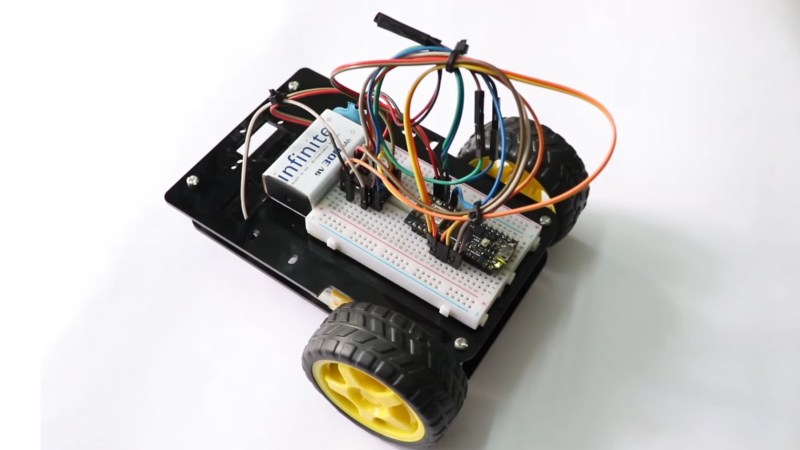
Here’s a fun build from [RootSaid] that is suitable for people just getting started with microcontrollers and robotics — an Arduino-controlled two-wheeled robot.

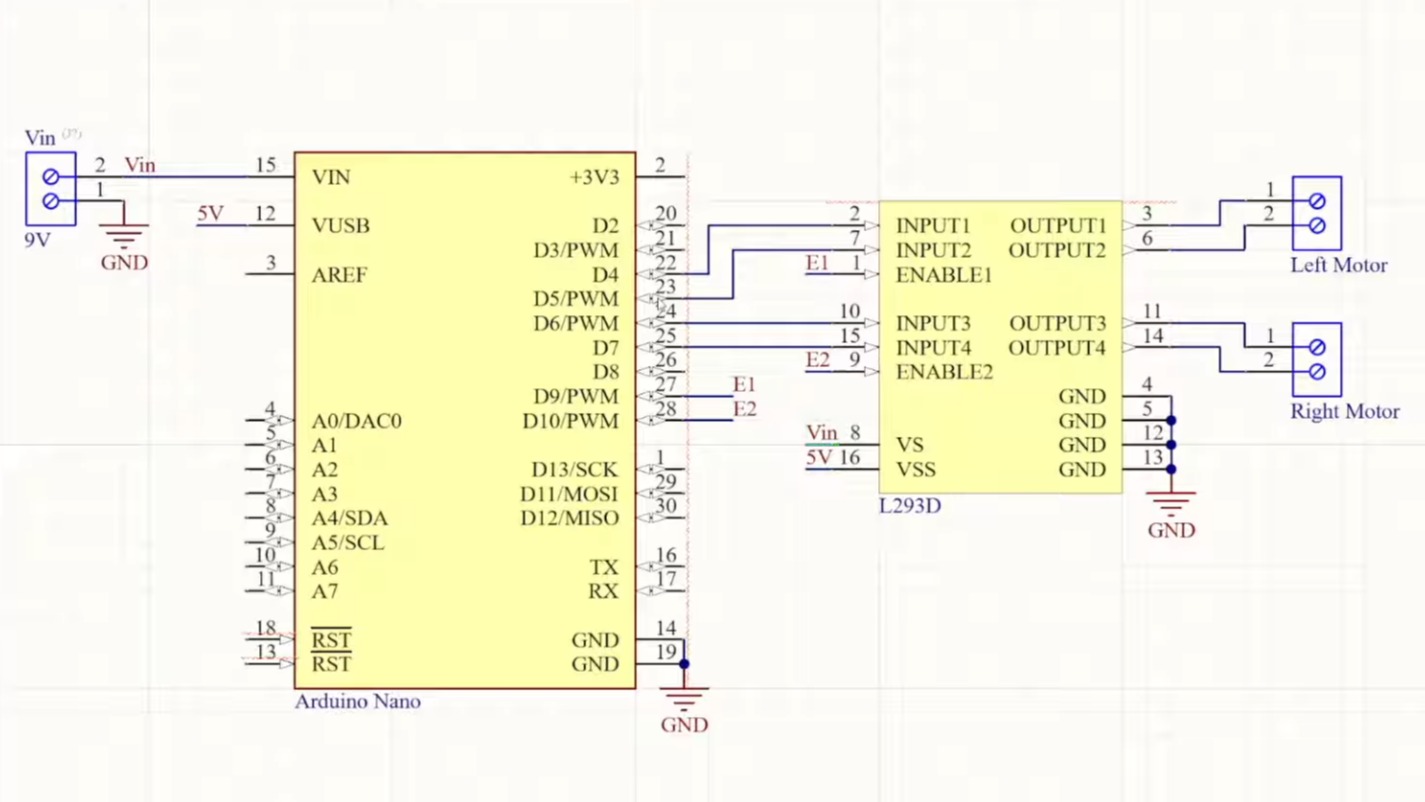
The video assumes you already have one of the common robotics kits that includes the chassis, wheels, and motors, something like this. You’ll also need a microcontroller (in this case, an Arduino Nano), a L293D motor driver IC, a 9 V battery, and some jumper wires.

The video goes into detail about how the two wheels connected to one motor each can move the robot in various directions: forward, backward, left, and right. The motors can be made to spin either forward or backward, depending on the polarity of the power supply, using an H-bridge circuit.

The L293D motor driver IC powers and controls the motors connected to the wheels. The L293D takes its commands from the Arduino. The rest of the video is spent going over the software for controlling the wheels.

When you’re ready to go to the next level, you might enjoy this robot dog.

Continue reading “Two-Wheeled Arduino Robot Project For Beginners”

This Week In Security: Hornet, Gogs, And Blinkenlights

Microsoft has published a patch-set for the Linux kernel, proposing the Hornet Linux Security Module (LSM). If you haven’t been keeping up with the kernel contributor scoreboard, Microsoft is #11 at time of writing and that might surprise you. The reality is that Microsoft’s biggest source of revenue is their cloud offering, and Azure is over half Linux, so Microsoft really is incentivized to make Linux better.

The Hornet LSM is all about more secure eBPF programs, which requires another aside: What is eBPF? First implemented in the Berkeley Packet Filter, it’s a virtual machine in the kernel, that allows executing programs in kernel space. It was quickly realized that this ability to run a script in kernel space was useful for far more than just filtering packets, and the extended Berkeley Packet Filter was born. eBPF is now used for load balancing, system auditing, security and intrusion detection, and lots more.

This unique ability to load scripts from user space into kernel space has made eBPF useful for malware and spyware applications, too. There is already a signature scheme to restrict eBPF programs, but Hornet allows for stricter checks and auditing. The patch is considered a Request For Comments (RFC), and points out that this existing protection may be subject to Time Of Check / Time Of Use (TOCTOU) attacks. It remains to be seen whether Hornet passes muster and lands in the upstream kernel. Continue reading “This Week In Security: Hornet, Gogs, And Blinkenlights”

Build A Pocket-Sized Wi-Fi Analyzer

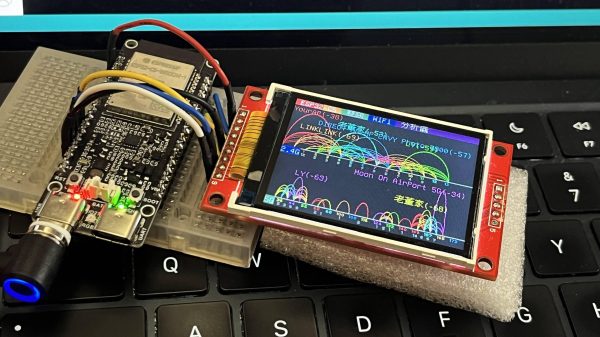
Wi-Fi! It’s everywhere, and yet you can’t really see it, by virtue of the technology relying on the transmission of electromagnetic waves outside the visual spectrum. Never mind, though, because you can always build yourself a Wi-Fi analyzer to get some insight into your radio surroundings, as demonstrated by [moononournation].

The core of the build is the ESP32-C5. The popular microcontroller is well-equipped for this task with its onboard dual-band Wi-Fi hardware, even if the stock antenna on most devboards is a little underwhelming. [moononournation] has paired this with a small rectangular LCD screen running the ILI9341 controller. The graphical interface is drawn with the aid of the Arduino_GFX library. It shows a graph of access points detected in the immediate area, as well as which channels they’re using and their apparent signal strength.

If you’re just trying to get a basic read on the Wi-Fi environment in a given locale, a tool like this can prove pretty useful. If your desires are more advanced, you might leap up to tinkering in the world of software defined radio. Video after the break.

Continue reading “Build A Pocket-Sized Wi-Fi Analyzer”

The Zen Must Flow From Arrakis Sand Table

In Dune, the Fremen people of Arrakis practice an odd future hybrid religion called “zensunni.” This adds an extra layer of meaning to the title of [Mark Rehorst]’s Arrakis 3.0 sand table, given that the inspiration for the robotic sand table seems to be Zen gardens from Japan.

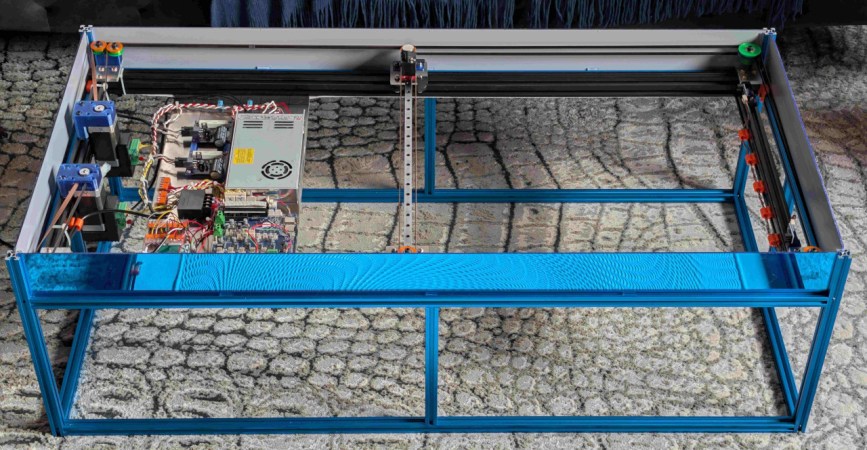
The dunes on the tabletop version of Arrakis owe nothing to sand worms, but are instead created a rolling metal ball. With all workings happening below, it looks quite magical to the uninitiated, but of course it’s not magic: it’s magnets. Just beneath the tabletop and its sands, the steel ball is being dragged along by the magnetic field of a powerful neodynium magnet.

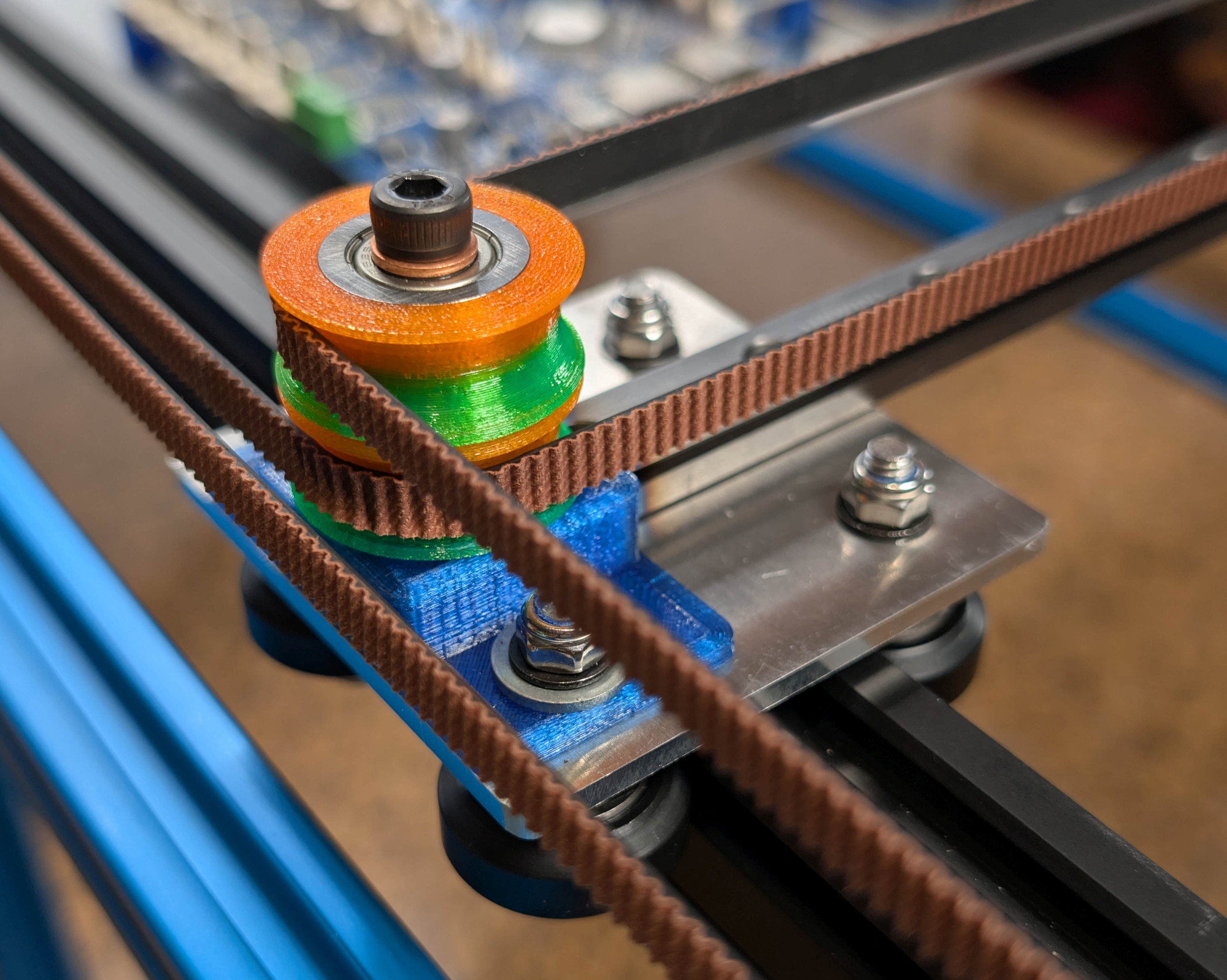
That magnet is mounted in a CoreXY motion system that owes more than a little bit to modern 3D printers. Aside from the geometry, it’s using the standard G6 belt we see so often, along with a Duet3D mainboard, NEMA 17 steppers, and many 3D printed parts to hold its aluminum extrusions together. Thanks to that printer-inspired motion system, the ball can whirl around at 2000 mm/s, though [Mark] prefers to run slower: the demo video below shows operation at 1000 mm/s before the sand has been added.

This build was designed for ease of construction and movement: sized at 2’x4′ (about 61 cm x 122 cm), it fits through doors and fits an off-the-shelf slab of coffee table glass, something that [Mark] wishes he’d considered when building version two. That’s the nice thing about jumping in on a project someone’s been iterating for a while: you’ve got the benefit of learning from their mistakes. You can see the roots of this design, and what has changed, from the one he showed us in 2020. 

Naturally you’re not limited to CoreXY for a sand table, though it is increasingly popular — we’ve seen examples with polar mechanisms and even a SCARA arm.

Continue reading “The Zen Must Flow From Arrakis Sand Table”

Water On Mars? Maybe Not

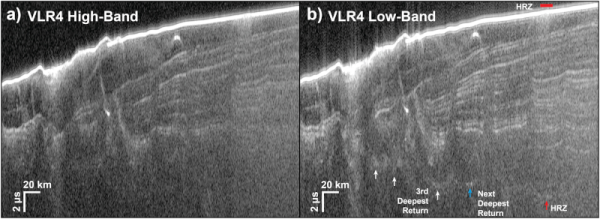
We were as excited as anyone when MARSIS (the Mars Advanced Radar for Subsurface and Ionosphere Sounding) experiment announced there was possibly liquid water under the southern polar ice cap. If there is liquid water on Mars, it would make future exploration and colonization much more feasible. Unfortunately, SHARAD (the Shallow Radar) has a new trick that suggests the data may not indicate liquid water after all.

While the news is a bummer, the way scientists used SHARAD to confirm — or, in this case, deny — the water hypothesis was a worthy hack. The SHARAD antenna is on the Mars Reconnaissance Orbiter, but in a position that makes it difficult to obtain direct surface readings from Mars. To compensate, operators typically roll the spacecraft to give the omnidirectional antenna a clearer view of the ground. However, those rolls have been under 30 degrees.

Continue reading “Water On Mars? Maybe Not”