Chess Table: Physical Interface For Internet Games

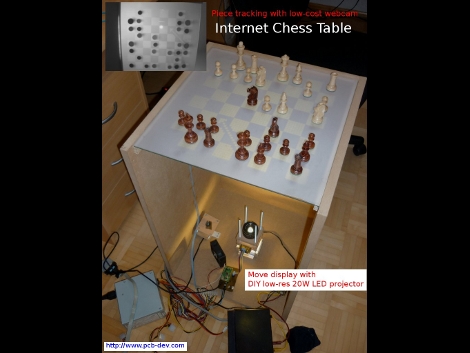
Wanting to get back to playing with actual pieces, [Thomas Pototschnig] built a chess table that interfaces with the Internet. The table uses an custom setup to project the board on the frosted surface of the table. Chess moves from your internet opponent are displayed as arrows on the board so you can move the pieces. Your moves are detected by a webcam below the surface as this table actually functions as a multitouch display. From the description, it sounds like the projector was made from a 128×64 graphic LCD display. A 64×64 pixel area is used, with an LED below and a lens above. This works remarkably well. See for yourself after the break.

Want some other options for your chess setup? You can play against a robot arm, or if you’ve got 144 square feet of extra space you can build a really big board for the occasional game.

Continue reading “Chess Table: Physical Interface For Internet Games” →
16-pixel Handheld Gaming

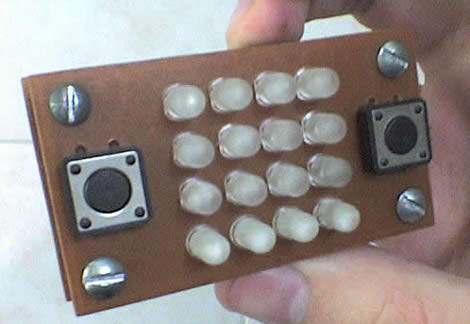
What we need in today’s handhelds is LESS resolution. Take a look at the video after the break to see the exciting action that [Bruno Pasquini] 4×4 LED matrix handheld game delivers. The device is made up of 16 bi-color LEDs, four buttons, and a PIC 16F628. There’s no schematic yet but it looks like there’s no need for shift registers, just some transistors to handle the current load for the rows of each color. We’ve seen a 64-pixel handheld that plays Super Mario Brothers, but this portable brings a top scrolling racing game with just 25% of that display size.

Continue reading “16-pixel Handheld Gaming” →

Adding Speech Recognition To Your Embedded Platform.

[youtube=http://www.youtube.com/watch?v=OEUeJb6Pwt4&feature=player_embedded]

Last week, we posted a story about how to configure speech recognition at a beginner level. Several of the commenters expressed an interest in doing speech recognition for embedded devices. [Nickolay Shmyrev] volunteered to write some directions for those people. In this article, [Nickolay] will be taking you through the basics of setting up your embedded device with CMUsphinx an open source toolkit for speech recognition. He gives programming examples in both C and python. Though we are hosting this, we haven’t set it up and tried it, so please direct any questions you have at [Nickolay] in the comments.
Continue reading “Adding Speech Recognition To Your Embedded Platform.” →

CubeStormer; Quick Solutions From LEGO Parts

[youtube=http://www.youtube.com/watch?v=eaRcWB3jwMo]

CubeStormer solves Rubik’s cubes and it does it quickly! Made entirely out of LEGO, a Mindstorm web camera is used to scan in the cube with four mechanical hands for manipulation. The device is capable of solving a random cube in less than 11 seconds. That’s quite a bit faster than the last Minstorm solver we saw, and the CuBear solver we are so fond of.

[Thanks Ferdinand]

Try As You Might, Scooty Won’t Fall Over

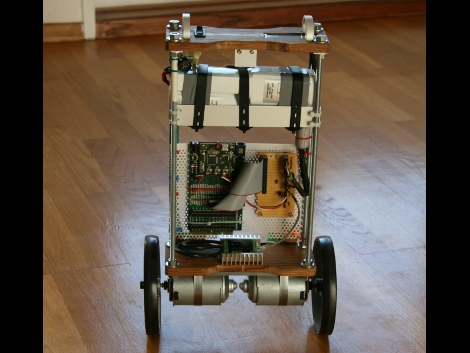
Scooty is a balancing robot based around a PIC32. The project is the first iteration in a long road toward a ridable version. The video after the break shows some incredible promise. Scooty is pitted against a large rubber ball. The two roll into each other but Scooty maintains balance thanks to that powerful processor, an inertial sensor, and a range finder.

Scooty versus a ball isn’t really fair to the ball. We’d like to see Scooty versus the ball balancing robot.

Continue reading “Try As You Might, Scooty Won’t Fall Over” →

Electric Mountainboard With Wireless Control

[youtube=http://www.youtube.com/watch?v=AkhjeEDaagQ]

[Andres Guzman] is chauffuering himself around the University of Illinois campus thanks to his wirelessly controlled mountainboard. He added a brushless motor to drive the rear axel with the help of a chain. Power is provided by a Lithium Iron Phosphate battery which we’ve seen used in other electric vehicles due to its lightweight properties. A wireless PlayStation 2 controller operates the motor but steering remains a lean-to-turn system.

Top 10 Features We’d Like To See In Android 3.0

UPDATE:

Hello HaD readers,
Sorry for the delay in updating this. I was on probation while the editors worked with Jason to figure out some things.

Clearly, for my recent debut article, I didn’t research Android OS well enough. After reading each of your comments, I realize that the article fell short of HaD’s and its readers standards for high-quality writing and reporting. Every point I made in the article were problems I noticed in my experience with Android, but I should have done more research on others’ experiences and the capabilities of each version of the OS. To each reader, I am sorry and will do better by you in future posts.

Poor Google. Despite its numerous capabilities with smartphones spread across a variety of carriers, Android still struggles to garner the prestige and positive perceptions of iOS 4. Sales continue to rise, but at the end of the day, the average person is still left lusting for an iPhone. Well, here are 10 features  that should be added to Android 3.0 that could change the tide.
1. A no-brainer task manager.
Google says Android doesn’t need a task manager, that it closes programs efficiently without any user-intervention, substandard apps often suck memory dry. Because of this, Android users are forced to download complicated task-managers, each with its own odd UI, and weigh which one works the best. Google, please fess up to the problem and put something in there a computer novice could use.  Something with big buttons would be nice.