Tools: Saleae Logic, Logic Analyzer

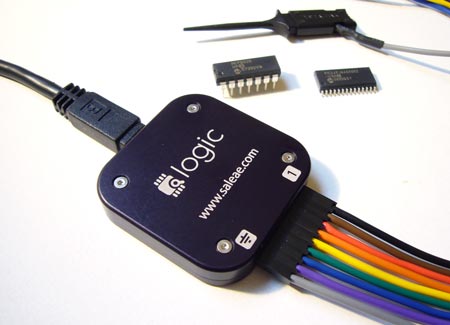
A logic analyzer records bus communications between two chips. If you’ve ever had a problem getting two chips to talk, or wanted to reverse engineer a protocol, a logic analyzer is the tool you need to spy on the bus.

The Logic is a USB logic analyzer with eight channels and sampling rates up to 24MHz. Among hobby-level logic analyzers, the Logic has a good mix of features and decent sampling rates. We’ve been following Joe Garrison’s work on the Logic for a long time. If you’ve ever considered bringing a product to market, you can learn a lot from Joe’s blog that documents his development process.

When it debuted, the Logic was so popular that it was hard to buy one. It’s now widely available, and Saleae gave us one to try. Read our review below.

Continue reading “Tools: Saleae Logic, Logic Analyzer” →

New Battery For An HP50G

calc1

According to the author, the HP 50G is an awesome calculator. But as awesome as it is, it is powered off of not-so-awesome AAA batteries. These little batteries don’t last long under the load of the calculators awesomeness, so a mod needed to be done. The battery chosen for installation was a replacement battery for a Sony PSP. He was able to find one, including the external charge regulator board for $10.  Dropping it into the case and wiring it to charge off of the existing mini USB port looks fairly simple, very few actual modifications are necessary to the body. Unfortunately, they did end up with an LED protruding from the bottom that makes it wobble a bit, but they’re guessing that they get about 2x the battery life now.

Automatic Blind Opener

blinds

[Contraptionmaker] ran into a problem when putting plastic insulation over his windows during the winter. When you cover the windows from the inside to prevent drafts, your access to the stick that opens the blinds is cut off. His solution was to build an automatic blind opener from a cordless drill. He started with some motors he had around the house, but none of them were strong enough. The final solution was a $10 Black & Decker drill. After removing the handle and trigger to extend it, he made a simple wall mount for it. You may notice him soldering some batteries into it, in his directions. Those are just for backup, in case the power goes out. You can see a video of it in action after the break. If you want something triggered by an alarm, or for a different type of blind, we may be able to help you out.

Continue reading “Automatic Blind Opener” →

Automated DVD Dispenser

dvd

[Andrew] made this DVD dispenser for his senior project in high school. It is using an ATmega8515 for the brains, and a custom coded driver for the LCD. As you can see in the video, after the break, you can select a DVD by various identifiers such as genre or title. It then pushes that DVD out of the rack so you can grab it. Right now, all the DVDs have to be placed in predetermined positions, but it’s not a bad start at all. Thanks for sending this in [Andrew].

Continue reading “Automated DVD Dispenser” →

N8VEM Computer With A 3Km Wireless Link

pterm

[James] sent in this project in which he built a tiny computer with text based OS and a 3Km wireless link. The details are a bit scarce, but he used an N8VEM, a Propeller Pocket Term, a 4 line LCD and an RF Transceiver to build it. It runs CP/M, the text based operating system and uses less than a half of a watt, without the vga monitor. With a total cost of 145 and 4 serial ports for sensors, this thing could come in handy. Especially since its low power consumption could allow it to be solar powered.  You may recall the N8VEM from an earlier post we did.

Tethering The Kindle 2

kindle

This is not an article on how to use your Kindle’s internet connection with your computer. We’ll let [Jesse] explain why:

This is not a tutorial about how to use the Kindle 2’s Sprint connection from your computer. I don’t know that it’s possible to do so without making changes to the Linux installation on the Kindle. I do know that abusing the Kindle’s Sprint modem like that would upset Amazon a great deal.  Bear in mind also that Amazon know where you live. They know your Kindle’s serial number and thanks to the built in GPS, they know where you are right now.

What this is, however, is a nice tutorial on how to connect your Kindle to your computer so that it can use your computer’s internet connection. The instructions assume you are using a Mac, so you may have to adapt it if you aren’t. Basically you put the Kindle in Debug mode and tell it to use the USB tether for it’s network connection. This should allow not only a faster connection, but possibly a chance to see what exactly they are transferring back and forth.

Smart Card Emulator

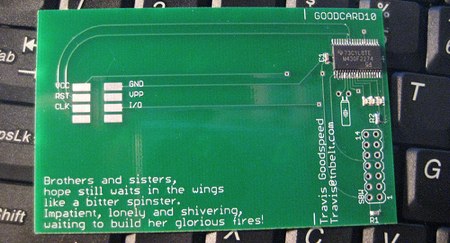
Here’s a quick prototype from [Travis Goodspeed]. It’s a smart card built around an MSP430 microcontroller. We’ve used the MSP430 in the past because of its low power demands. He says this business card currently supports 1.8V to 3.3V, but a future design will have 5V as well. Technologies like Java Card exist for running applets on smart cards, but a familiar microcontroller like the MSP430 could certainly make development much faster. Knowing [Travis], there’s a reader somewhere about to go through some serious fuzzing.