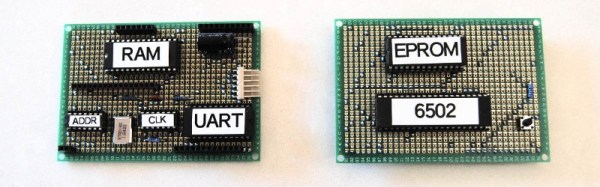
One of the designers whose work we see constantly in the world of retrocomputing is [Grant Searle], whose work on minimal chip count microcomputers has spawned a host of implementations across several processor families.
Often a retrocomputer is by necessity quite large, as an inevitable consequence of having integrated circuits in the period-correct dual-in-line packages with 0.1″ spaced pins. Back in the day there were few micros whose PCBs were smaller than a Eurocard (100 mm x 160 mm, 4″ x 6.3″), and many boasted PCBs much larger.
One of the miracle technological gadgets of the 1950s and 1960s was the transistor radio. Something that can be had for a few dollars today, but which in its day represented the last word in futuristic sophistication. Of course, it’s worth remembering that portable radios were nothing new when the transistor appeared. There had been tube radios in small attaché cases, but they had never really caught the imagination in the same way. They were bulky, like all tube radios they had to warm up, and they required a pair of hefty batteries to work.
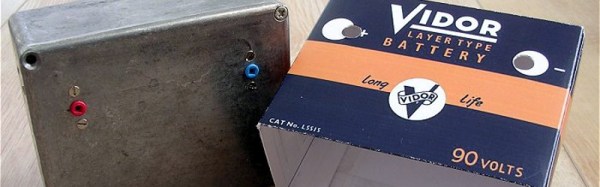
If you have a portable tube radio today, the chances are you won’t be able to use it. The low voltage heater battery can easily be substituted with a modern equivalent, but the 90V anode batteries are long out of production. Your best bet is to build an inverter, and if you’re at a loss for where to start then [Ronald Dekker] has gone through a significant design exercise to produce a variety of routes to achieve that goal. It’s a page that’s a few years old, but still a fascinating read.
A problem with these radios lies with their sensitivity to noise. They are AM receivers from an era with a low electrical noise floor, so they don’t react well to high-frequency switch-mode power supplies. Thus, the inverters usually tasked for projects like this are low-frequency, at 50Hz as this is a European project, to mimic one source of electrical noise that would have been an issue for the designers in the 1950s.
We are taken through transformer selection and a variety of discrete inverter designs using multivibrators, investigating how to maximize efficiency through careful manipulation of switch-on and switch-off times. Then a PIC microcontroller design is presented, and finally a CMOS ring counter.
The final converter is mounted in a diecast box and covered with a printed card shell to mimic a period battery. If you weren’t intimately familiar with battery tube radios, you might mistake it for the real thing.
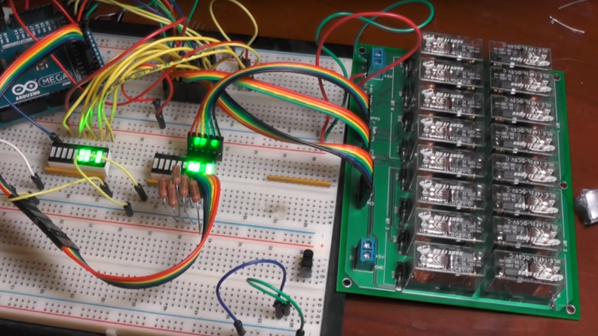
The aptly named [Clickity Clack]’s new YouTube channel promises to be very interesting if he can actually pull off a working computer using nothing but relays. But even if he doesn’t get beyond the three videos in the playlist already, the channel is definitely worth checking out. We’ve never seen a simpler, clearer explanation of binary logic, and [Clickity Clack]’s relay version of the basic logic gates is a great introduction to the concepts.
Using custom PCBs hosting banks of DPDT relays, he progresses from the basic AND and XOR gates to half adders and full adders, explaining how carry in and carry out works. Everything is modular, so four of his 4-bit adder cards eventually get together to form a 16-bit adder, which we assume will be used to build out a very noisy yet entertaining ALU. We’re looking forward to that and relay implementations of the flip-flops and other elements he’ll need for a full computer.
And pay no mind to our earlier dismissal of non-traditional computer projects. It’s worth checking out this discrete 7400 logic computer and this all-transistor build. They’re impressive too in their own way, if a bit quieter than [Clickety Clack]’s project.
What I particularly like about the Van de Graaff (or VDG) is that it’s a combination of a few discrete scientific principles and some mechanically produced current, making it an interesting study. For example, did you know that its voltage is limited mostly by the diameter and curvature of the dome? That’s why a handheld one is harmless but you want to avoid getting zapped by one with a 15″ diameter dome. What follows is a journey through the workings of this interesting high voltage generator.
Wherever you may live in the world, who do you wish to smile upon you and deliver good fortune? You may be surprised to discover that for a significant number of Brits this role is taken by someone called [Ernie].
What, [Jim Henson]’s Ernie from Sesame Street‘s famous duo Bert and Ernie? Sadly not, because the owner of a [Rubber Duckie] can’t offer you the chance of a million quid every month. Instead, [Ernie] is a computer that has been anthropomorphised in the national imagination. More properly referred to as E.R.N.I.E, for Electronic Random Number Indicator Equipment, he is the machine that picks the winning bond numbers for the Premium Bonds, a lottery investment scheme run by the British Government.
Brits have been able to buy £1 bonds, up to 50,000 of them today, since the 1950s, and every month they are entered into a drawing from which ERNIE picks the winners. The top two prizes are a million pounds, but for most bond holders the best they can hope for is the occasional £25 cheque. Premium Bonds are often bought for young children so a lot of Brits will have a few, often completely forgotten. Prizes never expire, so if you are the holder of old bonds you should consider asking National Savings and Investments whether anything is owed to you.
The Great Grandfather of Premium Bond Drawings
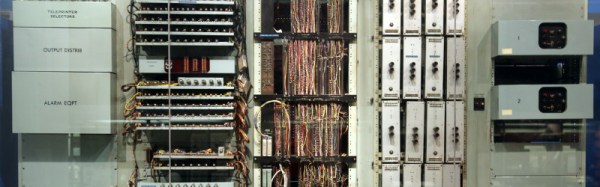
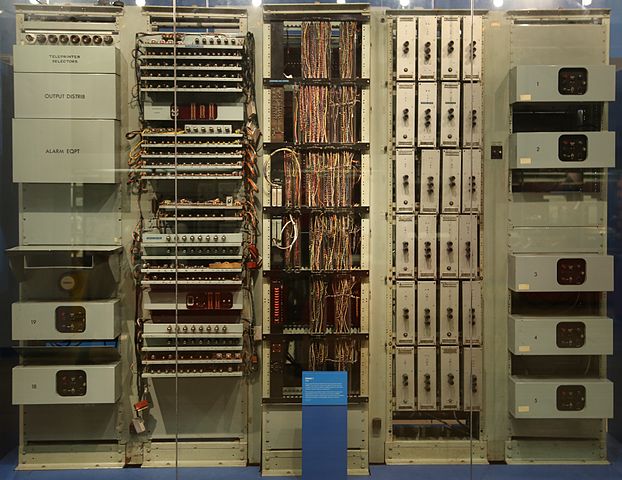
The original 1957 ERNIE, now in the collection of the Science Museum, London. Geni [CC BY-SA 4.0-3.0-2.5-2.0-1.0, via Wikimedia Commons.The current ERNIE is the fourth-generation model, but our attention today is on its 1950s ancestor. In a way it’s the most interesting of the machines because it has an unusual pedigree, being a creation of the Post Office Research Station, at Dollis Hill, London. As such it came from the lab of the Colossus engineer [Tommy Flowers], and is described as being a descendant of the now-famous but then still top-secret first digital computer used by the World War Two codebreakers. It’s thus a fascinating study for the student of computer history as well as for its role in British postwar social history, because it represents the only glimpse (had they known it at the time) that the British public had of the technology that had helped them so much a decade earlier.
A significant effort was made to ensure that the draw was truly random, and the solution employed by [Flowers] and his team was thoroughly tested before each draw. The thermionic noise generated across a neon tube was sampled, and this random voltage delivered the truly random numbers used to generate the winning bond numbers. The machine’s construction is extremely reminiscent of its wartime predecessor, however it is as well to bear in mind that it owes this to the standard racking and paint used in British telephone exchanges of the day. Gone though are the octal tubes, and in their place are their more familiar miniature successors.
We have two films for you showing this incarnation of ERNIE in action. The first is a National Savings promotional film which explains ERNIE’s purpose, while the second shows us the Minister of the time starting the first draw. Believe it or not, this was a cause of major national excitement at the time.
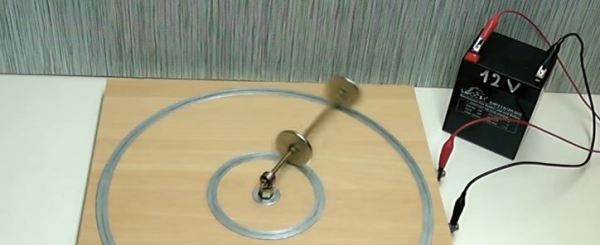
As a hacker, chances are that you have built a homopolar motor, as you only need three things: a battery, a magnet and some copper wire. There are zillions of videos on YouTube. This time we want to show you [Electric Experiments Roobert33]´s version. Definitely a fresh twist on the ubiquitous design that you see everywhere. His design is a bit more complicated, but the result makes the effort worthwhile.
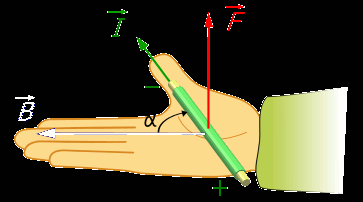
Right hand rule for the Lorenz force. By Jfmelero, via Wikimedia Commons
The homopolar motor was the first electric motor ever built. Created Michael Faraday in 1821, it works because of the Lorentz force. This force acts on any current-carrying conductor that is immersed in a magnetic field which is perpendicular to the current. These motors really have no practical applications, but are an excellent way to learn basic aspects of electromagnetism.
In this setup, there are two conductive rings placed above a wooden base, connected to the battery terminals. Neodymium magnets are connected by a conductive rod that pivots in the center of the rings, closing the circuit and allowing the flow of current. Then the Lorentz force makes its magic and pushes the rod and magnets in a circular motion.
Very clean and well-edited work, as are other videos by [Electric Experiments Roobert33]. You may want to replicate this nice motor, or you can also make the simpler version to start experimenting.
You’re in a desert, walking along in the sand when all of a sudden you look down and see a tortoise. It’s crawling toward you.
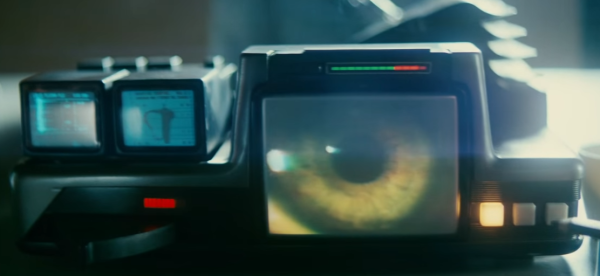
Any Sci-Fi fan knows this is a question from the iconic Voight-Kampff test, as made famous by the movie Blade Runner. Humans pass the test. Replicants fail and are “retired”. We may not have replicants just yet, but [Tom Meehan] is building his own version of the Voight-Kampff machine. He’s entered it in the 2017 Hackaday Sci-Fi Contest.
The machine itself is an odd mix of 70’s and 80’s electronics with older technology. Three mini CRT displays, a sensor arm, and a bellows are some of the machine’s best-known features. [Tom] is starting with the sensor arm, an odd mix of belts and telescoping rods. He’s already got a manually operated prototype built. Add a motor, and one part of the machine is ready for action.
[Tom’s] version of the Voight-Kampff test isn’t going to be a just movie prop. He plans to add a sensor suite which will turn his machine something of a modern polygraph. A Non-contact Temperature sensor will measure blush response. Iris images will be captured by a Raspberry Pi NoIR camera. Pulse oxygen and galvanic skin response will also be captured by a separate hand module. All this data will be processed by a Raspberry Pi computer.
There’s quite a lot of work to be completed. Let’s hope for humanity’s sake that [Tom] gets it done before the contest deadline of March 6.