8-bit Logic Chip Computer Build

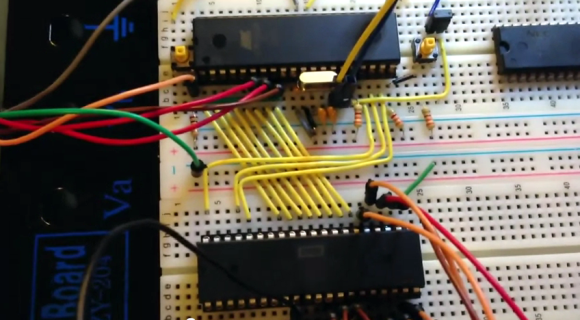
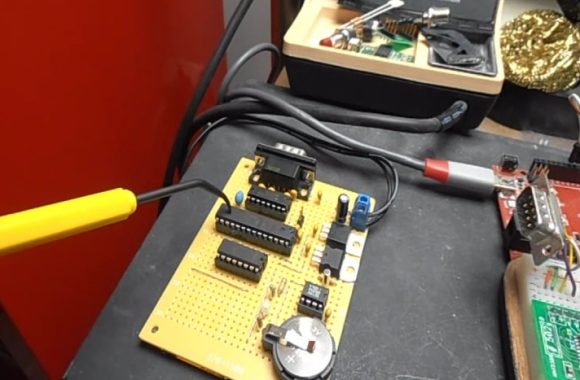
[Kyle] has been hard at working building an 8-bit computer from the ground up. He’s using a set of logic IC’s for the various components, and some NVRAM chips to store the control words. What you see above is the roadmap for his instruction set. He’s just started writing them to the chips, making the job easier by building an Arduino-based programmer.

We’ve enjoyed watching [Quinn Dunki’s] progress with her Z80  6502-based PC build which started on a breadboard in much the same way but has come a long way since those humble beginnings. Recently we also looked in on a 4-bit computer that is using discrete components. But [Kyle’s] take on the challenge falls somewhere in between the two.

The gist of his design can be found in one of his earlier post. He’s got a ring counter which starts by clearing the address register. It then loads the NVRAM address of the next instruction which is then executed on the subsequent count. It seems the build still has some way to go so make sure to keep your eye out for updates.

[via Reddit]

Building A Computer With Discrete Transistors

You’re going to want to do some stretching before undertaking a soldering project like this one. We’re betting that the physical toll of assembling this 4-bit discrete processor project is starting to drive [SV3ORA] just a bit crazy. This small piece of electronic real estate is playing host to 62 transistors so far, and he’s not done yet.

It’s one thing to build some logic gates in Minecraft (and then turn then into a huge 16-bit ALU). But it’s another thing to actually commit to a physical build. [SV3ORA] does a great job of showing the scope of the project by posting a tight shot of one inverter, then three in a row, then the entire 8-bit address and display system. These gates are built on the copper side of the board, with the power feed, LEDs for displays, and jumpers for control on the opposite side. We’re excited to see where he goes with this project!

But hey, if you don’t want to do that much soldering there’s a lot you can do on a few breadboards.

Real BMW Dash Cluster For Your Racing Games

Here’s a cool add on that could making racing games just a little more engaging. How about a real instrument cluster? [Herctrap] has written up the schematics and shared the code to get a real car’s instrument cluster to be driven from x-sim. It is a slightly different approach than we’ve seen before, but really not too complicated.While this is still just another accessory sitting on his desk, it really seems to add a considerable amount of feedback to the game. Next he needs to build a motion rig for his seat!

Continue reading “Real BMW Dash Cluster For Your Racing Games”

Veronica Gets VRAM And Its Own Boot Logo

[Quinn Dunki] just reported in on the latest iteration in her computer project which is called Veronica. This time she added RAM to increase the VGA performance of her build. Like just about every other part of the project, [Quinn] knew what she wanted to do, but had to overcome a lot of issues along the way.

The goal is to implement a 256×240 display with 8-bit color depth. [Quinn] says this is on par with game console technology from the 1980’s. The problem is that the 10MHz AVR controller can’t really keep up with the scan rate of this size of display. The answer is to add RAM which stores all of the color data, the microcontroller will simply advance the address pointer on the memory chips to match the sync rate of the VGA output.

After hooking up her hardware design she gets a screen full of uninitialized pixel data. But moving from there to the final product seen above was quite frustrating. It turns out that noise on the breadboard was most of the problem, further compounded by entire breadboard row which wasn’t contacting the wires to make the temporary connections. A bit of jockeying for position and by Jove, she’s got a boot screen.

That breadboard sure has become crowded since her first VGA experiments.

Android On Your Netbook

Looks like there’s a pretty easy way to install Ice Cream Sandwich, the newest version of Android, on your Netbook. Actually this is limited to a few types of hardware including netbooks like the eeePC. That’s because the ISO files used during installation have been tailored to the hardware used on those devices. As with other Linux distros, the ISO file can be loaded on a thumb drive using Unetbootin. From there you can give it a whirl as a Live CD (or USB as it were) or choose to install it on your hard drive. We haven’t given it a spin as the eeePC version doesn’t want to boot on our Dell Mini 9, but we don’t see a reason why this couldn’t be set up as a dual boot option.

Now why would you want to run Android on your netbook? We’ve already seen that there’s a way to run Android apps in Ubuntu. We bet some people just love Android, and others just hate the Unity desktop that Ubuntu now uses… especially when the Netbook Remix had a lot of good things going for it.

A Simple Touch Interface For Music Player Daemon And More

mpd-controller

[Andrew] recently got the authorization to install Linux on his work PC, and he was looking for a way to control his music without relying on keyboard shortcuts to do so. Additionally, he wanted an unmistakable visual cue when he received messages in Pidgin, so he decided to build an external input/notification box.

The control box, quite literally, is a cardboard box in which [Andrew] crammed some components he got way back when from the crew at Seeed Studio. A Seeeduino serves as the brains of his control panel, interfacing with his PC over USB. He uses a set of 4 touch sensors and a potentiometer to control the MPD, allowing him to easily switch tracks, pause his music, control the volume, and lock his computer with a simple touch. A side-mounted RGB LED lights green to show that the system has received his commands successfully, pulsing a bright blue whenever a message arrives via Pidgin.

While the case isn’t exactly pretty, it is small, recycled, and takes up very little desk space. [Andrew] says that it works great, and he has made his code available on github if anyone is interested in using it.

8-bit Computer Project Lands In A Philco Radio Case

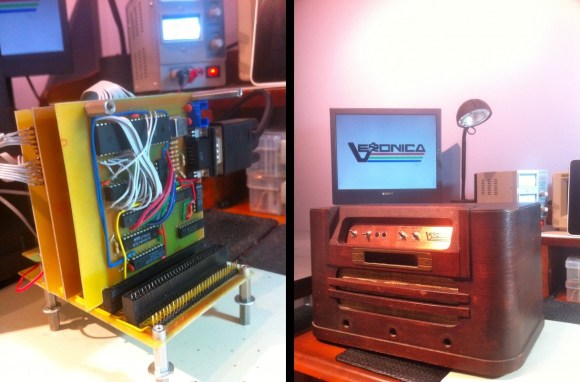
We’ve enjoyed seeing the development progress of Veronica, [Quinn Dunki’s] 8-bit computer project. It started out on a breadboard, then moved to edge-connected PCBs, and now [Quinn] has given Veronica a body of her own.

The donor is a Philco Model 42-327T and was produced in 1942. It was chosen because it is non-functional and missing several pieces. We wonder about the collector’s value of the piece but since [Quinn] snagged it from eBay there can’t be in huge demand right now. The teardown images are priceless. There seems to be no reasoning behind component placement for the beast. It looks more like a junk drawer packed full of relic components than something that actually worked once upon a time.

But we digress. After gutting the retro wooden case [Quinn] set out to fabricate her own face plate. Since she’s comfortable working with copper clad, she whipped up a negative design and etched the dashboard seen above. It mounts in the original dial opening, and hosts all of the controls she needs to work with the 8-bit computer. Just below is where the present buttons used to be located. You can just see the hexout display for reading data from the registers mounted in that void.