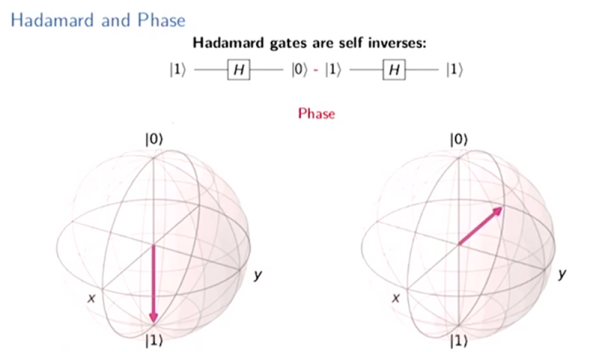
We all know that quantum computing is coming, but it is hard to know how to get started with it. [Mtreinish] suggests Qiskit — an Apache Licensed SDK for developing quantum applications. He has a presentation he gave in Singapore that you can see below, and a notebook you can go through on GitHub. If you are impatient, you can even run the notebook online through Google.
The tools can work against several backends including a simulator or the real hardware available from IBM. The official site has a different notebook you can use as a tutorial. Interestingly, the foundation of all Qiskit programs is “Terra” (the Earth) and permeating all Qiskit elements is Aer or air. There are also fire and water elements. At the bottom of the official notebook, you’ll find a lot of community notebooks that go deeper into specific topics.
When I am at a loss for an explanation in the world of electronics, I reach for my well-thumbed Horowitz & Hill. When H&H fails me which is not that often, the chances are I’ll find myself looking in an application note from a semiconductor company who is in cut-throat competition with its rivals in a bid for my attention. These companies have an extensive sales and marketing effort, part of which comes in the dissemination of knowledge.
Razor blades may be sold to young men with images of jet fighters and a subtle suggestion that a clean-shaven guy gets his girl, but semiconductor brands are sold by piquing the engineer’s interest with information. To that end, companies become publishing houses in praise of their products. They produce not only data sheets that deal with individual device, but app notes documents which cover a wider topic and tell the story of why this manufacturer’s parts are naturally the best in the world.
These app notes frequently make for fascinating reading, and if you haven’t found them yet you should head for the documentation sections of semiconductor biz websites and seek some of them out.
Cryptocurrencies: love them, hate them, or be baffled by them, but don’t think you can escape them. That’s the way it seems these days at least, with news media filled with breathless stories about Bitcoin and the other cryptocurrencies, and everyone from Amazon to content creators on YouTube now accepting the digital currency for payments. And now, almost everyone on the planet is literally bathed in Bitcoin, or at least the distributed ledger that makes it work, thanks to a new network that streams the Bitcoin blockchain over a constellation of geosynchronous satellites.
Ho Chi Mihn City is the hub for sourcing the materials and tools driving the growing Vietnamese economy. Whether you’re building new, or keeping existing equipment running, the supply chains and service companies aren’t yet in place and the markets of HCMC are the go-to for parts and equipment. Let’s get a little taste of what I saw in my tour of the markets.
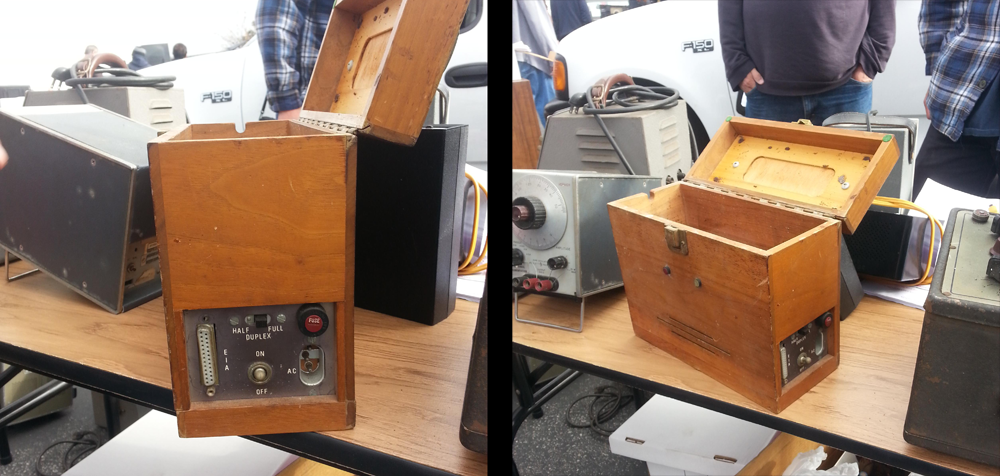
A few years ago, I was out at the W6TRW swap meet at the parking lot of Northrop Grumman in Redondo Beach, California. Tucked away between TVs shaped like polar bears and an infinite variety of cell phone chargers and wall warts was a small wooden box. There was a latch, a wooden handle, and on the side a DB-25 port. There was a switch for half duplex and full duplex. I knew what this was. This was a modem. A wooden modem. Specifically, a Livermore Data Systems acoustically coupled modem from 1965 or thereabouts.
The Livermore Data Systems Modem, where I found it. It cost me $20
The probability of knowing what an acoustically coupled modem looks like is inversely proportional to knowing what Fortnite is, so for anyone reading this who has no idea what I’m talking about, I’ll spell it out. Before there was WiFi and Ethernet and cable modems and fiber everywhere, you connected to the Internet and BBSes via phone lines. A modem turns digital data, in this case a serial connection, into analog data or sound. Oh yeah, we had phone lines, too. The phone lines and the phones in your house were owned by AT&T. Yes, you rented a phone from the phone company.
90s kids might remember plugging in a US Robotics modem into your computer, then plugging an RJ-11 jack into the modem. When this wooden modem was built, that would have been illegal. Starting with the communications act of 1934, it was illegal to attach anything to the phone in your house. This changed in 1956 with Hush-A-Phone Corp v. United States, which ruled you could mechanically attach something to a phone’s headset. (In Hush-A-Phone’s case, it was a small box that fit over a candlestick phone to give you more privacy.)
The right to attach something to AT&T’s equipment changed again in 1968 with Carterphone decision that allowed anyone to connect something electronically to AT&T’s network. This opened the door for plugging an RJ-11 phone jack directly into your computer, but it wasn’t until 1978 that the tariffs, specifications, and certifications were worked out. The acoustically coupled modem was the solution to sending data through the phone lines from 1956 until 1978. It was a hack of the legal system.
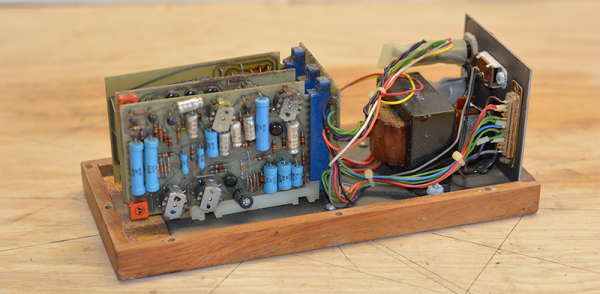
This leaves an ancient modem like the one sitting on my desk in an odd position in history. It was designed, marketed and sold before the Carterphone decision, and thus could not connect directly to AT&T’s network. It was engineered before many of the integrated chips we take for granted were rendered in silicon. The first version of this modem was introduced only a year or so after the Bell 103 modem, the first commercially available modem, and is an excellent example of what can be done with thirteen or so transistors. It’s time for the teardown, so let’s dig in.
After a youth spent playing with Amigas and getting into all sorts of trouble on the school computer network, I’ve always had a soft spot in my heart for hardware from the 80s and 90s. This extends beyond computers themselves, and goes so far as to include modems, photocopiers, and even the much-maligned dot matrix printer.
My partner in hacking [Cosmos2000] recently found himself with a wonderful Commodore MPS 1230 printer. Its parallel interface was very appropriate in its day, however parallel ports are as scarce as SID chips. Thankfully, these two interfaces are easy to work with and simple in function. Work on a device to marry these two disparate worlds began.
Enter: The Paralleloslam
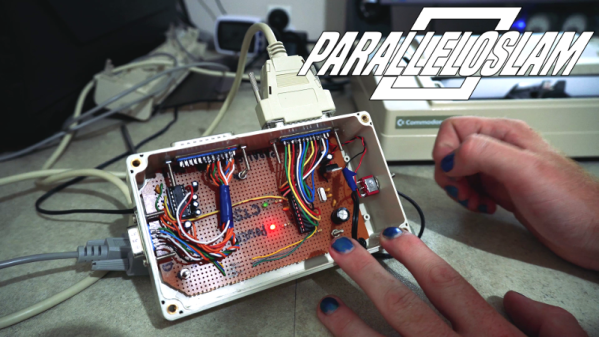
While I was gallivanting around the Eastern coast of Australia, [Cosmos2000] was hard at work. After some research, it was determined that it would be relatively simple to have an Arduino convert incoming serial data into a parallel output to the printer. After some testing was performed on an Arduino Uno, a bespoke device was built – in a gloriously plastic project box, no less.
An ATMEGA328 acts as the brains of the operation, with a MAX232 attached for level conversion from TTL to RS232 voltage levels. Serial data are received on the hardware TX/RX lines. Eight digital outputs act as the parallel interface. When a byte is received over serial, the individual bits are set on the individual digital lines connected to the printer’s parallel port. At this point, the strobe line is pulled low, indicating to the attached device that it may read the port. After two microseconds, it returns high, ready for the next byte to be set on the output lines. This is how parallel interfaces operate without a clock signal, using the strobe to indicate when data may be read.
At this point, [Cosmos2000] reached out – asking if I had a name for the new build.
One of the unfortunate things about Hackaday’s globe-spanning empire is that you often don’t get to meet the people you work with in person. Since I was in China and it’s right next door, I really wanted to pop over to Vietnam and meet Sean Boyce, who has been writing for Hackaday for a couple of years, yet we’ve never met. I suggested we could make this happen if we put together a meetup or unconference. Sean was immediately confident that the Ho Chi Minh City hardware hackers would turn out in force and boy was he right! On Sunday night we had a full house for the first ever Hackaday Vietnam Meetup.