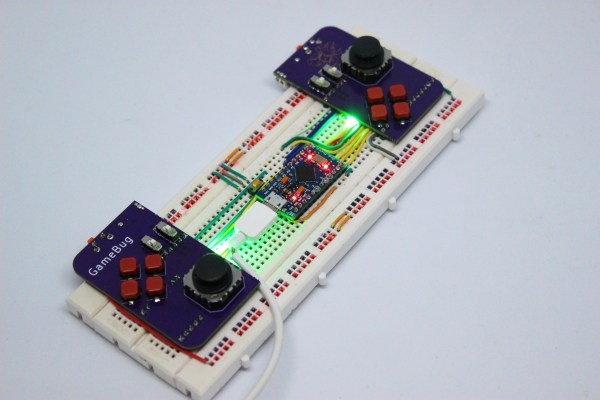
A pair of purple PCB-based game controllers on a solderless breadboard

Odd Inputs And Peculiar Peripherals: The GameBug Turns Your Breadboard Into A Game Console

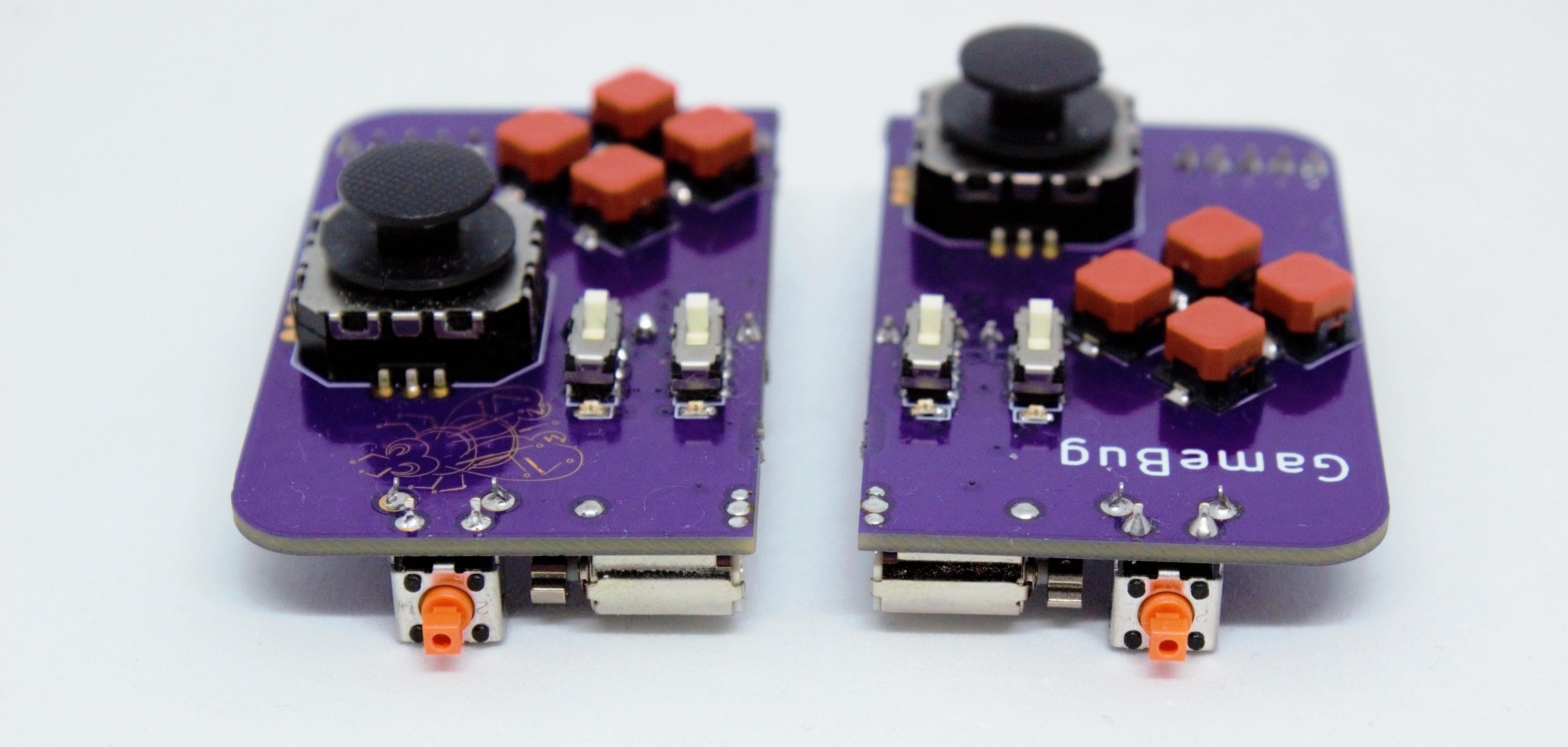
What’s more fun than playing video games? Designing your own video game hardware, of course! If you’ve followed these pages long enough you’ll have seen dozens of great examples of homebrew hardware, and perhaps been inspired to try such a project yourself. This often starts with assembling the basic bits onto a solderless breadboard, which is fine for programming but not so great for testing: squeezing pushbuttons into your breadboard works for basic debugging, but is not very user-friendly or reliable. A better solution can be found in [Dimitar]’s GameBug: a set of breadboard-compatible joypad-like controllers.

The GameBug’s design excels in its simplicity: a miniature analog joystick, four buttons arranged in a diamond pattern, a shoulder button and two sliding switches are sitting on a neat purple PCB. On the bottom are two rows of pin headers to ensure a snug fit on your solderless breadboard. There’s even a little vibrating motor for haptic feedback.

Interfacing with the GameBug is simplified by the integrated readout electronics. A Schmitt trigger-based debounce circuit ensures clean signals from all the pushbuttons, while a motor driver chip provides stable current to the haptic feedback system. An RGB LED can be used as yet another user feedback device, or simply for decorative lighting.

All design files are available on [Dimitar]’s GitHub page, along with an Arduino sketch to help you try out the GameBug’s functionality. Having a proper gamepad might come in handy with breadboard-based game systems like Tiny Duck Hunt or this impressive mess of wires that makes up a Colecovision.

A pair of purple PCB-based game controllers

LED Heart Keeps Tabs On Your RuneScape Character

The MMORPG RuneScape holds a special place in the hearts of those who played it in the early 2000s. Sure it might seem exceptionally quaint by modern standards, but at the time it was groundbreaking stuff. Plus you could play it for free, which certainly helped get people onboard. While there’s a more modern build available, many who played the game from the early days prefer to stick with what they know, and continue to run a version of the game that has now become known as Old School RuneScape.

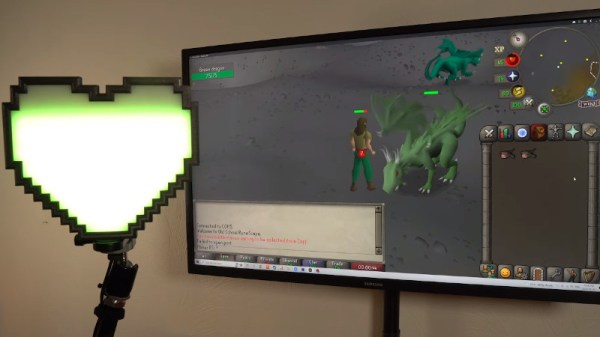
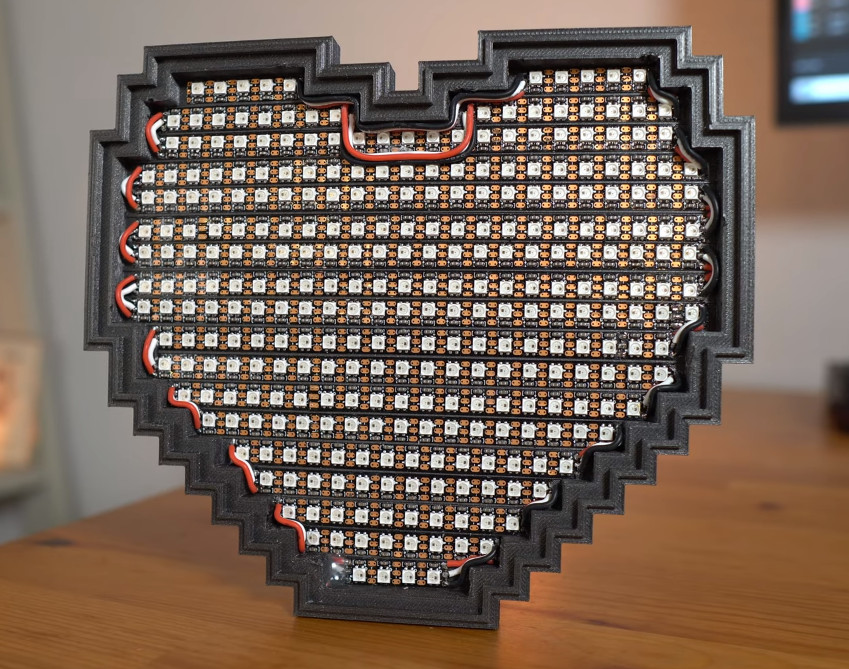
[Austin Blake] is one of those early adopters, and the work he put into this LED health indicator should tell you all you need to know about how dedicated he is to the classic game. The 3D printed heart holds an incredible 312 NeoPixel LEDs, which are controlled by a 5 volt compatible Arduino Nano Every located on the back side.  Both the color and “fill level” of the heart will change in real-time to correspond to the health of the player character.

Building the light itself was pretty straightforward, but getting the health value from the game was another story. As [Austin] explains in the video, his first attempt involved using Python and some image recognition routines to literally read the indicator off of the screen. The idea worked, and is frankly a fascinating hack worth keeping in mind on its own, but unfortunately it was too slow to provide the real-time feedback he was looking for.

Eventually he turned his attention to RuneLite, which is an open source client for Old School RuneScape. Thanks to its open source nature he could have hacked a routine to read the current health value and send it off to the Arduino, but thanks to a mature plug-in system, he didn’t have to.

The game’s API let him create a simple and reliable way of getting the data out of the game, similar to what we see in the flight simulator community for driving physical gauges and displays. RuneLite features a repository of community-developed plugins, and [Austin] says that he’d be happy to submit his for inclusion if others are interested in building similar indicators — a perfect match for this motion-sensing RuneScape axe.

Continue reading “LED Heart Keeps Tabs On Your RuneScape Character”

English Words In French Gaming? Non Merci!

Are you a gamer? If you’re French, it seems that you shouldn’t be using so much English in pursuit of your goals.

It’s a feature of an active language, that it will readily assimilate words from others. Pizza, karaoke, vuvuzela, parka, gateau, schadenfreude, they have all played their part in bringing a little je ne sais quoi into our everyday speech. This happens as a natural process as whatever the word is describing becomes popular, and sometimes these new words cause a backlash from those who see themselves as the language’s defenders.

Often this is a fringe activity such as the British politician who made a fool of himself in a radio interview by insisting on the now-archaic Wade-Giles “Peking” rather than the vastly more common Pinyin “Beijing”, but for some tongues it’s no laughing matter. Nowhere is this more the case than in the Francophone world, in which the Academie Francaise and the French and Quebecquois governments see themselves as very much the official guardians of French. And now it seems that the French ministry of culture have turned their eyes upon gamers.

It’s nothing new for words associated with technology to fall under this scrutiny, a quarter century ago in the CD-ROM business it was de rigeur for localized discs to talk about le logicel, l’ordinateur, and telecharger instead of program, computer, and download. The talk of the industry was that Sony refused to do this for PlayStation consoles sold in Quebec during the 1990s, and thus all their sales in the province had to be under-the-counter. But there’s a sense from reading the reports that this intervention is a little clumsy; while it’s easy to say logicel we’re not so sure that jeu video de competition  or video game competition for e-sports and joueur-animateur en direct or live player-animator for streamer aren’t just too much of a mouthful for easy adoption. For the first one, we can’t help remembering that sport is also an everyday French word, so couldn’t they have come up with something less clumsy such as reseau-sports or network-sports?

Here at Hackaday more than one of us are unrepentant Francophiles, so the evolution of French words in our field is of interest to us. Habitez-vous en France ou Quebec? Donnez-nous votres idees dans les commentaires! (mais en Anglais s’il vous plait pour les Americains, excusez-nous)

Header image: Christopher Macsurak, CC BY-SA 4.0.

Practical Wireless “Tele-Tennis” Build After Only 34 Years

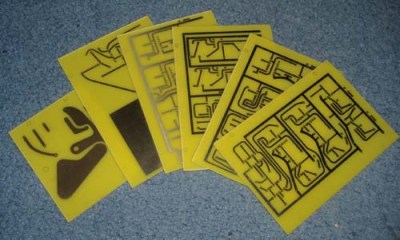
Home-etched PCBs ready for drilling

Back in November 1974 the publication “Practical Wireless” produced a five-part article series showing the reader how to construct a version of the popular “pong” game that could be played on the television screen available in the typical British home. [Grant Searle] had wanted to build this project for years, but it took him until 2008 to find the opportunity to do so. The magazine article printed PCB layouts to 1:1 scale, with a bill of materials and assembly instructions. After each month, the reader would have an assembled the project a little more, with the final month dedicated to point-to-point wiring and final setup. Subsequent months contained some enhancements such as a scoring system and sound effects, but these are not yet part of the main build. In order to understand the build, you will need to download the PDF copy of the magazines prints. (And if you’re an electronics nerd like this scribe, you’ve already done that right?)

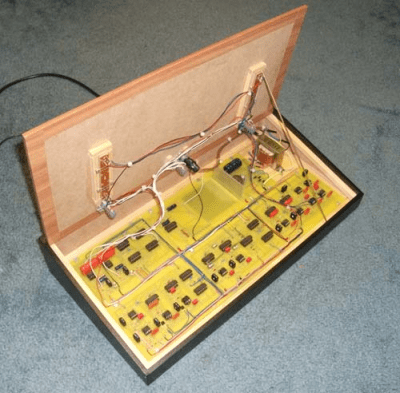
A tidy assembly job with an authentic retro style

The electronics are based upon pure discrete 7400-series logic, 741 opamp-based ramp generators and, you guessed it, 555 timers. The way the various boards have discrete functions is particularly interesting. For example, in part 3, the PCB described (board A) not only is the master field/line sync generator, but also generates the video signals for the ball, with its position and size determined in an analogue fashion. Signals coming into the board from Board C (top/bottom base) cause a discrete flip-flop to toggle, changing the ball’s direction as it ‘bounces’ off the edge of the screen. Each board generates its own video signal, which are then all combined in the final video mixer (board E) that simply wire-OR’s them all with the composite sync to generate the composite video needed. This would have been tapped off and fed to a UHF video modulator, but [Grant] chose not to install that for the build. The whole thing was wrapped up inside an MDF case, coated in that dubious fake-wood plastic wrap, for that very 70’s aesthetic some of us remember fondly.

Pong is such a popular classic game, that we’ve covered many, many variants over the years. Here’s one that’s purely mechanical, another that uses the original PCB with a visually appealing twist, and finally, a completely virtual simulation of the original arcade circuit, courtesy of Falstad. We’re sure there will be many more to come.

Thanks [JohnU] for the tip!

Electronic Catan Game Board Is Modular

Plenty of gamers around these parts require an expensive PC to play games, often spending thousands of dollars for a gaming machine. Believe it or not, though, there are entire classes of games that don’t require any electronics at all, but that doesn’t mean that they don’t benefit from the addition of some neat gadgets. This Settlers of Catan game uses custom LCD tiles with a built-in custom mesh network.

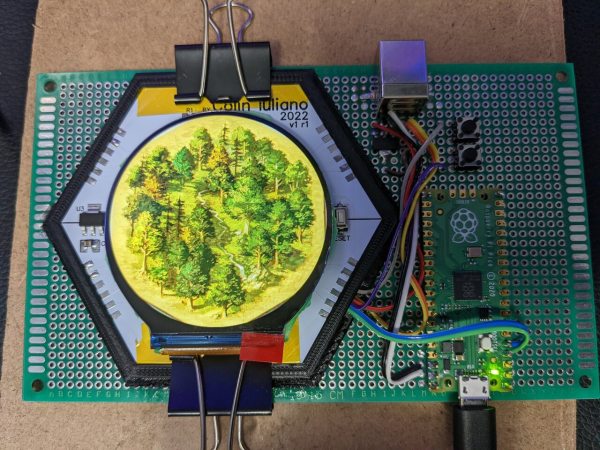
The tiles for the game board themselves are hexagonal and snap together using magnetic pogo pins in order to form a board of any size or shape. The pogo pins also allow communication for a pseudo-mesh network to operate with each tile’s built-in PCB to allow the game board to know exactly which tiles are placed where and to display the correct image on each one. Each tile contains it own RP2040 microcontroller, keeping the overall cost of each tile to a minimum.

For those regularly hosting game night, a project like this could really change the traditionally analog game’s dynamic for the better. It was mostly a project that [Colin Iuliano] built just for fun, and if he ever builds a second one he does plan on some improvements, but we’d say that it looks like a success already. For other Catan-based electronic design inspiration, take a look at this complete and non-modular electronic game board.

One Coder Is Porting Portal To The Nintendo 64

When Portal came out in 2007, developers Valve chose not to release the groundbreaking title on an obsolete Nintendo console long out of production. Nobody cared at the time, of course, but [James Lambert] is here to right that wrong. Yes, he’s porting Portal to the N64.

The port, or “demake,” as [James] calls it, has been under construction for some time. The project has posed some challenges: Portal was developed for PCs that were vastly more powerful than the Nintendo 64 of 1996. Thus, initial concerns were that the console wouldn’t be able to handle the physics of the game or render the recursive portal graphics.

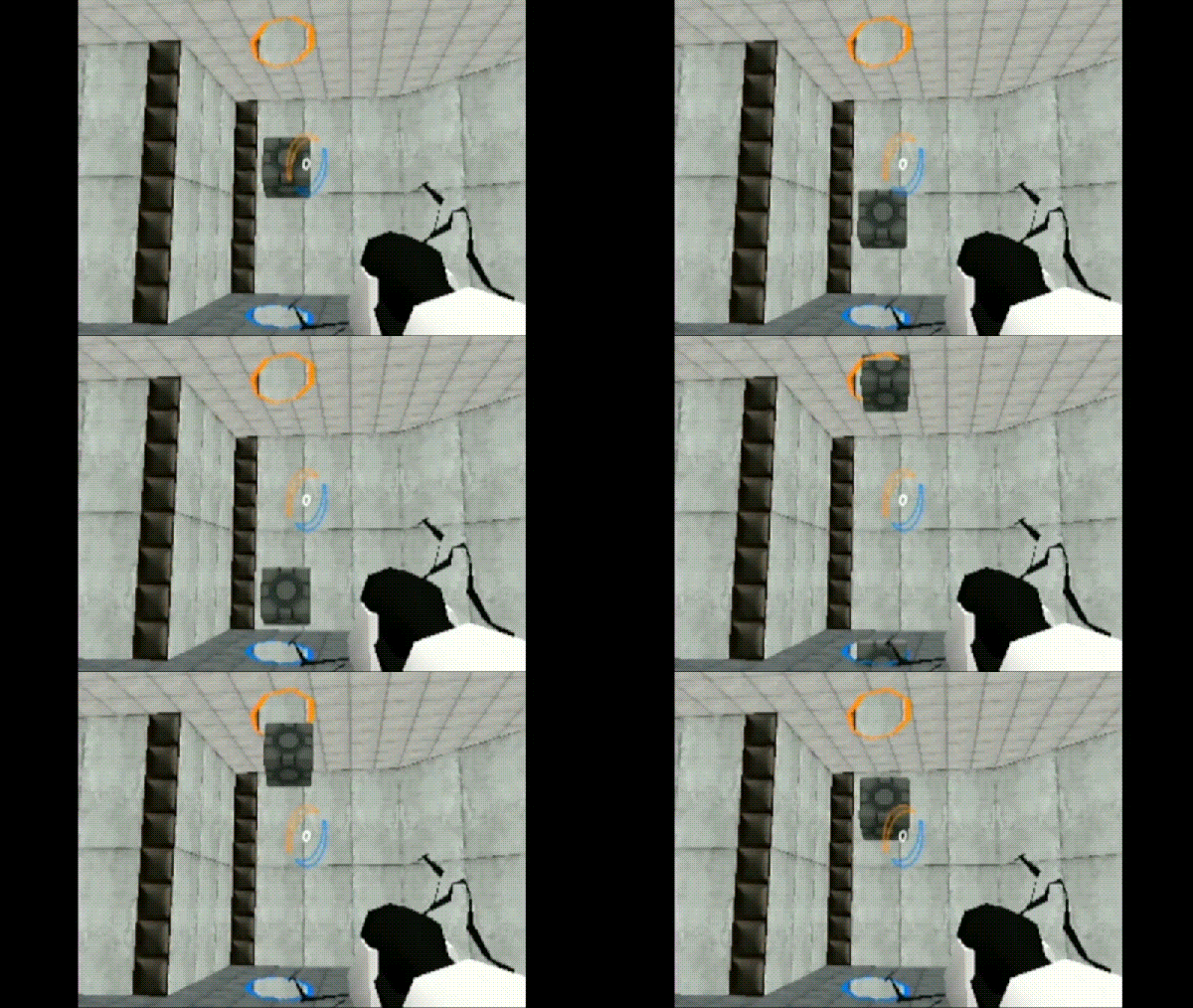
However, hard work has paid off. [James] has chipped away, bit by bit, making improvements to his engine all the while. The latest work has the portals rendering nicely, and the companion cube works just the way you’d expect. There’s also a visible portal gun, and the engine can even render 15 recursive layers when looking through mirrored portals. Sixteen was too much.

Of course, there’s still lots to do. There’s no player model yet, and basic animations and sound are lacking. However, the core concept is there, and watching [James] flit through the not-quite-round portals is an absolute delight. Even better, it runs smoothly even on original Nintendo hardware. It’s a feat worthy of commendation.

We had no idea what [James] had in store back when we featured his work creating real-time shadows on N64 hardware. Now we know! Video after the break.

Continue reading “One Coder Is Porting Portal To The Nintendo 64″

A self-service checkout computer game

Practice Your Shopping Skills With This Self-Service Checkout Game

Self-service checkouts have become a common feature in supermarkets the world over, a trend accelerated by the coronavirus pandemic. While some may lament the loss of human contact, others relish the opportunity to do their own scanning: with a bit of practice, self-service can provide for a very fast checkout experience. Assuming, of course, that the machine recognizes each product, the built-in weight sensor works correctly, and you don’t get selected for a random check.

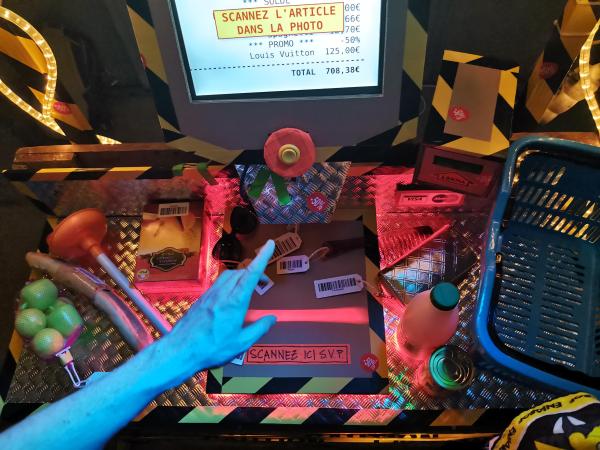
If you want to practice your checkout game without spending loads of money, you might want to have a look at [Niklas Roy] and [Kati Hyyppä]’s latest project: Bonprix is a game where the goal is to scan as many items as possible within a 90-second time limit. Installed at the Eniarof DIY festival, it’s designed to resemble a typical supermarket checkout with a display, a barcode scanner and a shopping basket filled with random items. The screen indicates which item should be scanned next; if you’re too slow, the checkout will begin to offer discounts, which you obviously don’t want. When the 90 seconds are over, the machine spits out a receipt indicating your total score.

The checkout desk is made from wooden pallets and cardboard; inside is a laptop running Linux, with a handheld barcode scanner attached via USB. An LED strip provides a beam of bright red light to indicate the scanning area, and turns green when a barcode is successfully scanned. Arduinos control the LEDs and the big red-and-yellow “start” button, while a thermal printer from an ATM prints the receipts at the end of each game.

Apart from a bit of fun, the Bonprix project tries to address questions relating to consumer culture and self-checkouts: is it fair to let customers do their own work? Should they be paid for it? Is it even ethical to encourage people to spend as much as possible?

While this is the first time we’ve seen a self-service checkout computer game, we’ve done a few deep dives into the fascinating technology of barcodes that makes it all possible. Check this out!

Continue reading “Practice Your Shopping Skills With This Self-Service Checkout Game”