Hackaday Podcast 190: Fun With Resin Printing, Tiny Tanks, Lo-Fi Orchestra, And Deep Thoughts With Al Williams

This week, Editor-in-Chief Elliot Williams and Assignments Editor Kristina Panos rendezvoused in yet another secret, throwaway location to rap about the hottest hacks from the previous week. We start off by gushing about the winners of the Cyberdeck Contest, and go wild over the Wildcard round winners from the Hackaday Prize.

It’s the What’s That Sound? results show, and Kristina was ultimately stumped by the sound of the Kansas City Standard, though she should have at least ventured a guess after shooting down both modem and fax machine noises.

Then it’s on to the hacks, which feature an analog tank-driving simulator from the 1970s, much ado about resin printing, and one cool thing you can do with the serial output from your digital calipers, (assuming you’re not a purist). And of course, stay tuned for the Can’t-Miss Article discussion, because we both picked one of resident philosopher Al Williams’ pieces.

Direct download.

Check out the links below if you want to follow along, and as always, tell us what you think about this episode in the comments!

Continue reading “Hackaday Podcast 190: Fun With Resin Printing, Tiny Tanks, Lo-Fi Orchestra, And Deep Thoughts With Al Williams”

This Week In Security: Linux WiFi, Fortinet, Text4Shell, And Predictable GUIDs

Up first this week is a quintet of vulnerabilities in the Linux kernel’s wireless code. It started with [Soenke Huster] from TU Darmstadt, who found a buffer overwrite in mac80211 code. The private disclosure to SUSE kernel engineers led to a security once-over of this wireless framework in the kernel, and some other nasty bugs were found. A couple result in Denial-of-Service (DOS), but CVE-2022-41674, CVE-2022-42719, and CVE-2022-42720 are Remote Code Execution vulnerabilities. The unfortunate bit is that these vulnerabilities are triggered on processing beacon frames — the wireless packets that announce the presence of a wireless network. A machine doesn’t have to be connected or trying to connect to a network, but simply scanning for networks can lead to compromise.

The flaws were announced on the 13th, and were officially fixed in the mainline kernel on the 15th. Many distros shipped updates on the 14th, so the turnaround was quite quick on this one. The flaws were all memory-management problems, which has prompted a few calls for the newly-merged Rust framework to get some real-world use sooner rather than later.

Fortinet

Much of Fortinet’s lineup, most notable their Fortigate firewalls, has a pre-auth authentication bypass on the administrative HTTP/S interface. Or plainly, if you can get to the login page, you can break in without a password. That’s bad, but at this point, you *really* shouldn’t have any administrative interfaces world-accessible on any hardware. Updated firmware is available.

More than just a couple days have passed, so we have some idea of the root problem and how it was fixed. It’s a simple one — the Forwarded HTTP headers on an incoming request are unintentionally trusted. So just send a request with Forwarded:for and Forwarded:by set to 127.0.0.1, and it falls through into code logic intended for internal API calls. Add a trusted SSH key, and pop, you’re in. Whoops. Continue reading “This Week In Security: Linux WiFi, Fortinet, Text4Shell, And Predictable GUIDs”

Retrotechtacular: The Original Weather Channel

The Weather Channel has decided to pull the plug on its automated weather display, a favorite experience for weather geeks everywhere. However, it wasn’t the original weather nerd TV station.  Early cable TV networks had their own low-tech versions of this much longer ago than you might expect. For example, check out the video below which shows one of these weather stations back in 1975.

The audio was from a local FM station and you can enjoy handwritten public service announcements, as well.

Continue reading “Retrotechtacular: The Original Weather Channel”

2022 Hackaday Prize: Congratulations, Wildcard Winners!

The Wildcard Round is the wildest round, and the 2022 Hackaday Prize had a slew of great entries. We’ve winnowed the wildcards down to a large handful, and we’re happy to announce the finalists. Every winner receives a $500 award, and is automatically entered for the final round of the Hackaday Prize. The grand prize winners will be announced during Supercon on Nov. 5th, and we’ll be streaming so you can root for your favorites whether you’re with us in Pasadena or not.

So without further ado, the finalists. Continue reading “2022 Hackaday Prize: Congratulations, Wildcard Winners!”

Art of 3D printer in the middle of printing a Hackaday Jolly Wrencher logo

3D Printering: Managing Multiple Printing Profiles

I know people who have 3D printers that are little more than appliances. They buy it, they print with it, and they don’t change much of anything. That doesn’t describe me and, I’m guessing, it doesn’t describe you either. This does lead to a problem, though, when it comes to slicers. You have to keep changing profiles and modifying them. It can be hard to keep things straight. For example, if you have profiles for different nozzles, you get to make a choice: keep one profile and edit the parts that change, or keep multiple profiles and any common changes have to be propagated to the other profiles.

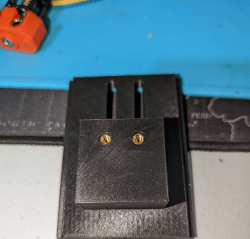
Part of the reason I want to manage multiple profiles has to do with this mystery object…

I’ve long wanted to create a system that lets me have baseline profiles and then just use specific profiles that change a few items in the baseline. Turns out, I didn’t need to do it. Prusa Slicer and its fork, SuperSlicer, have the capability already. Both of these, of course, are based on Slic3r, but the scripting languages are different and what I’m doing does require G-code scripting. The problem is, this capability is not documented very well and the GUI doesn’t really support it directly, which requires a little sidestepping. I’ll show you how I have things set up and where the limitations are. If you want to try your hand at it, I highly suggest you backup your configuration directory or switch to a new one.

Continue reading “3D Printering: Managing Multiple Printing Profiles”

Lubrication Engineering Hack Chat

Join us on Wednesday, October 19 at noon Pacific for the Lubrication Engineering Hack Chat with Rafe Britton!

You know the old joke: if it moves when it shouldn’t, fix it with duct tape, and if it doesn’t move but it should, fix it with WD-40. For a lot of us, that’s about as far as our expertise on lubricants — and adhesives — goes. That’s a shame, because with hundreds of years of petrochemical engineering expertise behind us, not to mention millennia more of ad hoc experience with natural substances, just reaching for that trusty blue and yellow can for a spritz is perhaps a wasted opportunity. Sure, it’ll work — maybe — but is it really the right tool for the job?

Modern lubricants are extremely complex and highly engineered materials, often built atom by atom to perform a specific job under specific, often extremely challenging, conditions. Oils and greases are much more than just the slippery stuff that keeps our mechanical systems running, and while you might not need to know all the details of how they’re made to put them to use, a little inside information could go a long way in making sure your mechanism lasts.

join-hack-chatWe’ve invited Rafe Britton on the Hack Chat to talk about all aspects of lubrication engineering. With degrees in engineering and physics, Rafe runs Lubrication Expert and the Lubrication Explained channel on YouTube to help his clients figure out what they don’t know about lubrication, and how to put that knowledge to use in the real world. Be sure to bring your questions and concerns about lubrication, as well as your lubrication success stories and failures — especially the failures!

Our Hack Chats are live community events in the Hackaday.io Hack Chat group messaging. This week we’ll be sitting down on Wednesday, October 19 at 12:00 PM Pacific time. If time zones have you tied up, we have a handy time zone converter.

Teardown: Cooler Max Liquid Cooling System

Every week, the Hackaday tip line is bombarded with offers from manufacturers who want to send us their latest and greatest device to review. The vast majority of these are ignored, simply because they don’t make sense for the sort of content we run here. For example, there’s a company out there that seems Hell-bent on sending us a folding electronic guitar for some reason.

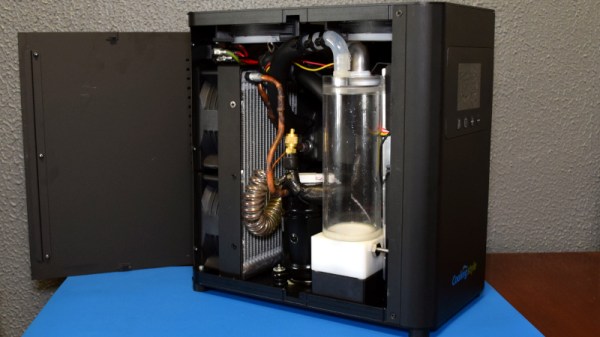
At first, that’s what happened when CoolingStyle recently reached out to us about their Cooler Max. The email claimed it was the “World’s First AC Cooler System For Gaming Desktop”, which featured a “powerful compressor which can bring great cooling performance”, and was capable of automatically bringing your computer’s temperature down to as low as 10℃ (50°F). The single promotional shot in the email showed a rather chunky box hooked up to a gaming rig with a pair of flexible hoses, but no technical information was provided. We passed the email around the (virtual) water cooler a bit, and the consensus was that the fancy box probably contained little more than a pair of Peltier cooling modules and some RGB LEDs.

The story very nearly ended there, but there was something about the email that I couldn’t shake. If it was just using Peltier modules, then why was the box so large? What about that “powerful compressor” they mentioned? Could they be playing some cute word games, and were actually talking about a centrifugal fan? Maybe…

It bothered me enough that after a few days I got back to CoolingStyle and said we’d accept a unit to look at. I figured no matter what ended up being inside the box, it would make for an interesting story. Plus it would give me an excuse to put together another entry for my Teardowns column, a once regular feature which sadly has been neglected since I took on the title of Managing Editor.

There was only one problem…I’m no PC gamer. Once in a while I’ll boot up Kerbal Space Program, but even then, my rockets are getting rendered on integrated video. I don’t even know anyone with a gaming computer powerful enough to bolt an air conditioner to the side of the thing. But I’ve got plenty of experience pulling weird stuff apart to figure out how it works, so let’s start with that.

Continue reading “Teardown: Cooler Max Liquid Cooling System”