Designing A High Performance Parallel Personal Cluster

Kristina Kapanova is a PhD student at the Bulgarian Academy of Sciences. Her research is taking her to simulations of quantum effects in semiconductor devices, but this field of study requires a supercomputer for billions of calculations. The college had a proper supercomputer, and was getting a new one, but for a while, Kristina and her fellow ramen-eating colleagues were without a big box of computing. To solve this problem, Kristina built her own supercomputer from off-the-shelf ARM boards.

Continue reading “Designing A High Performance Parallel Personal Cluster”

Minimal MQTT: Building A Broker

In this short series, we’re going to get you set up with a completely DIY home automation system using MQTT. Why? Because it’s just about the easiest thing under the sun, and it’s something that many of you out there will be able to do with material on-hand: a Raspberry Pi as a server and an ESP8266 node as a sensor client. Expanding out to something more complicated is left as an exercise to the motivated reader, or can be simply left to mission creep.

We’ll do this in four baby steps. Each one should take you only fifteen minutes and is completely self-contained. There’s a bunch more that you can learn and explore, but we’re going to get you a taste of the power with the absolute minimal hassle.

In this installment, we’re going to build a broker on a Raspberry Pi, which is the hub of your MQTT network. Next time, we’ll get an ESP8266 up and running and start logging some data. After that, we’ll do some back-end scripting in Python to make the data speak, and in the last installment, we’ll explore some of the useful frills and fancy bits. Let’s get started!

Continue reading “Minimal MQTT: Building A Broker”

Hackaday Links: It’s Mother’s Day And You Forgot

[AvE] noticed someone was having trouble with their Nepeploid Shilden Inversker, and after a sinusoidal lambda deplanarization test, noticed the dinglebop wouldn’t pass through the grumbo. [AvE] is probably just some guy who wears overalls to bed, but he does know a polyfractal magnetorestrictor when he sees one. To wit, he has a novel application of Eularian magnetronics resulting in a friction factor over unityGame changing stuff here, from the guy who brought you the beer stein made out of an oil filter.

It was soft launched at the Midwest RepRap Festival this year, and now Lulzbot’s TAZ 6 is finally out. The biggest new feature? The electronics ‘brain box’ holds everything, including the power supply. This tower of brain box makes the Taz 6 harder to build from source, but there are unconfirmed reports that Lulzbot may sell this brainbox separately.

Boldport, and founder [Saar Drimer] are the cream of the crop when it comes to artistic PCBs. Boldport’s catalog and [Saar]’s portfolio include a tribute to [Bob Pease], a beautiful board with multicolor solder masks, and an emergency business card. Now Boldport is doing a beautiful PCB of the month club. It’s called Boldport Club, and each three-month membership gets you three months of pretty PCBs. The shop will also stop taking orders for the Boldport club 25 hours after this post goes live. If you missed the boat on the club, you can still get in on the pretty PCB action – we have the Boldport cordwood puzzle available in the Hackaday store.

The Apple IIgs was the last gasp of the Apple II before that platform was phased out for the Macintosh. Despite being mostly forgotten, except for thousands of units in middle school computer labs until the 2000s, it was a very interesting machine, with a wavetable synth, real multitasking, a GUI, and very high resolution graphics. After 30-odd years the IIgs now has quadraphonic sound. The 4soniq card was introduced at the WOzFest III conference last month, and it will give an Apple IIgs with four channels of audio output.

There’s a lot of stuff happening next weekend, and Hackaday is going to be there. If you’re at the Maker Faire Bay Area, Hackaday is taking over a pub. It’s on Saturday night, so it doesn’t conflict with the bring-a-hack at an undisclosed location on Sunday night. Me? I’m going to hamvention, mostly for the purposes of documenting the two parking lots full of swap meet. Find me and I’ll get you some Hackaday swag.

Running A Hackerspace Is Hard: Egypt Edition

It’s no secret that it’s difficult to run a hackerspace. Different personalities, different material requirements, and often constrained spaces can require continual negotiation. But if you think that having the metalworking types getting their shavings on your electronics bench is a problem, try having your entire hackerspace demolished on short notice.

The situation in Cairo is far from normal at the moment. The building that Cairo Hackerspace had recently moved to was raided, closed for two months, and then re-opened under strict surveillance in February.

All was well until a part of the building unexpectedly collapsed. Then they got a demolition order, followed by postponement, followed by armed police entering anyway and breaking stuff, followed by a further declaration of the building as safe, and now a heritage site. And all of this over a week’s time. While some of the art studios in the Townhouse were saved, the Cairo Hackerspace’s space is gone.

tumblr_inline_o5virriTeD1t3bbl6_500

The good news? Nobody got hurt in all of this, and the Cairo Hackerspace crew were able to get their gear out after the initial demolition notice. They’ve been working on a mobile hackerspace-in-a-van approach lately, so hopefully they’ll be able to keep on hacking.

So when you’re bickering over who didn’t clean up the hackspace’s coffee machine, or the proper location of your favorite soldering iron, think kindly about the Cairo crew and get back to doing what you do best — projects.

How about you? What hackerspace tales do you have? Contact us through the tips line — we’d love to hear.

Hacklet 106 – Robots That Teach

One of the best ways to teach electronics and programming is with hands-on learning. Get the concepts off the computer screen and out into the real world. Students of all ages have been learning with robots for decades. Many older Hackaday readers will remember the turtle robots. These little ‘bots would drive around drawing shapes created in the logo programming language. This week’s Hacklet is all about the next generation of robots that teach electronics, mechanics, programming, and of course, hacking. So let’s check out some of the best educational robot projects on Hackaday.io!
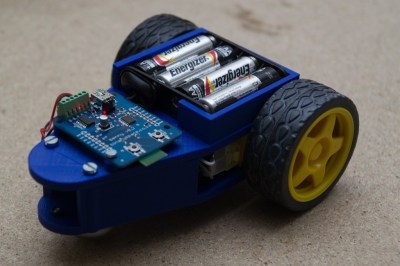
edubotWe start with [Tom Van den Bon] and Edubot Controller (Benny). Buying one or two robots can get expensive. Equipping a classroom full of them can break the bank. [Tom] is hoping to make robots cheaper and more accessible with Edubot, his entry in the 2016 Hackaday prize. Edubot rides on a 3D printed frame with low-cost gear motors for a drive system. Edubot’s brain is an STM32F042, a low-cost ARM processor from ST micro. The micro and motor drives are integrated into a custom board [Tom] designed. He’s has even begun creating lesson plans so students of various ages and skill levels can participate and learn.
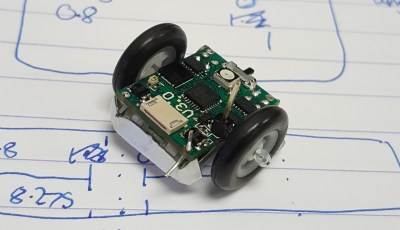
microbotNext up is [Joshua Elsdon] with Micro Robots for Education. Big robots can be intimidating. They can also cause some damage when hardware and software created by budding engineers doesn’t operate as expected. Tiny robots though, are much easier to wrangle. [Joshua ] may have taken tiny to an extreme with these robots. Each robot is under 2 cm square. The goal is for each one to cost less than  £10 to produce. These micro bots have big brains with their ATmega328P micro controllers. [Joshua] is currently trying to figure out a low-cost way to produce wheels for these robots.
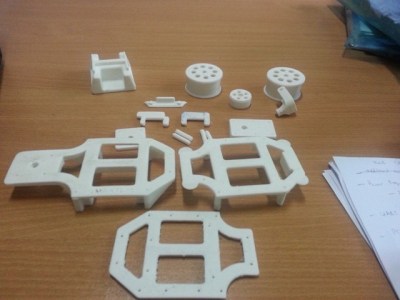
Next we have [shamylmansoor] with 3D printed mobile robot for STEM education. Robots are expensive, and international shipping can make them even more expensive. [Shamyl] is shooting for a robot which can be made locally in Pakistan. 3D printing is the answer. The robot’s chassis can be printed on any FDM printer. Wheels,and tires are low-cost units. Motors are RC servos modified for continuous rotation. The brains of the robot is an Arduino Mega 2560, which should provide plenty of inputs for sensors. [Shamyl] even included a solderless breadboard so students can prototype circuits and sensors right on the robot’s body.
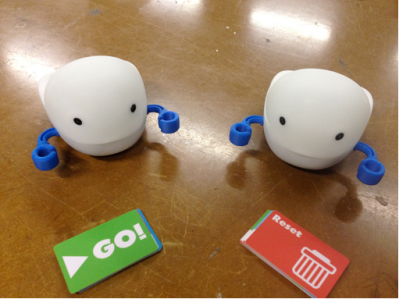
 

plobotFinally we have [Rodolfo] with Plobot. Plobot is a robot designed for the youngest hackers – those from four to seven years old. [Rodolfo] designed Plobot to be programmed with RFID cards. Each card contains a command such as move forward, turn, start, and reset. Many of the language mechanics are inspired by the Scratch programming language. Plobot’s processor is a Sanguino, running [Rodolfo’s] custom code. An ESP8266 allows Plobot to be connected to the outside world via WiFi. [Rodolfo] has even created a custom over the air update system for Plobot’s firmware. Plobot has already been tested with students, where it made a great showing. We’re hoping both [Rodolfo] and Plobot do well in the 2016 Hackaday Prize!

If you want more mind hacking goodness, check out our brand new educational robot list! Did I miss your project? Don’t be shy, just drop me a message on Hackaday.io. That’s it for this week’s Hacklet, As always, see you next week. Same hack time, same hack channel, bringing you the best of Hackaday.io!

How To Design, Manufacture, And Document A Hardware Product

It’s pretty awesome to have a hardware design hero jump at the chance to work on a Hackaday conference badge. I am of course talking about Voja Antonic.

I’ve gotten to know him over the last two years when we were introduced and he agreed to work on some original articles. He’s long been a hacker and shared his story of technology despite politics and society changing around him. His Galaksija computer was the first personal computer available in Yugoslavia with over 8,000 kits sold. Since those days he never stopped refining his design and fabrication skills. For instance, his method of making cases from FR4 is beyond compare, and reading some of his wisdom from hardware design in the casino industry is the kind of fascinating stuff that rarely makes it out for others to enjoy.

But I digress — the point is Voja’s been around the block, he knows what he’s doing, and he does it at an amazingly high level. He did an incredible job with the Hackaday | Belgrade conference badge. It features a 16×8 LED display, IR comms hardware, 5 user buttons, USB programming, an option for an accelerometer module, and has spectacular life running on two AAA batteries. It was a hit at the conference, and so was his talk discussing the design and fabrication. Check it out below and then join me below the fold.

Continue reading “How To Design, Manufacture, And Document A Hardware Product”

Hackaday Dictionary: Transformers

Funny stuff, electricity. It’s all about the volts and the amps, and controlling these two factors. Most of the time, the electricity coming into your device is at a higher voltage than you need, so you have to convert it down to something more usable. The easiest way to do this is with a transformer.

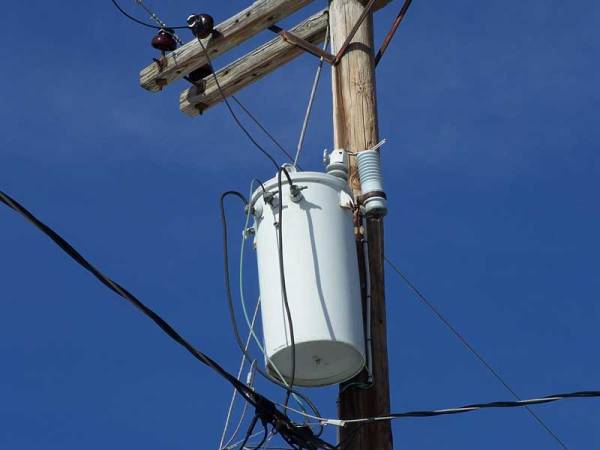
The transformer in your power supply takes a high voltage from the mains and converts it down into a lower voltage to power your gadgets. You’ll find one in all power supplies, from the miniature USB version that powers your cell phone to the big ones hanging on a telephone pole that drive your home’s mains electricity. Although these transformers are different sizes, they share the same fundamental design.

Continue reading “Hackaday Dictionary: Transformers”