Mimisbrunnur

Calculator Case To Scratch-Built Pocket E-Reader

E-readers are an awesome creation allowing you to display digital information in a way that requires little battery life. While there’s plenty of very impressive models to chose from on the commercial market, it’s also possible to build one yourself — which is exactly what [kaos-69] did in his Mimisbrunnur project, creating a truly unique e-reader from scratch.

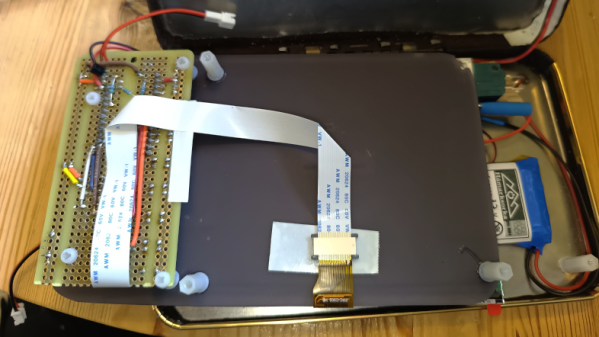
While looking through old junk at home, [kaos-69] came across a case that held a calculator and pen at one point in the distant past. The pen was gone and the calculator no longer functioned but the case held promise. He removed the calculator and got some parts on order. For the e-paper display he went with a 5.83-inch unit that just fit inside the spring-loaded case. The Mimisbrunnur is powered by a 2000 mAh LiPo battery, with a micro SD card reader for storing what will be displayed. The brains come from an RP2040 microcontroller on an Adafruit Feather breakout board, which worked out great as it already takes care of battery management and the 24-pin interface for the e-paper display.

There are also eight buttons that live below the display for user interface, and even some LEDs to aid in reading in the dark. The depth of the case allowed all this to be connected with the use of a perfboard and some risers to set the screen forward, allowing the battery to live behind it. Using the Mimisbrunnur is pretty straightforward with the eight buttons sitting below icons on the screen giving you clear guidance on how to turn the page, add a bookmark, or browse the SD card for another file to open.

We’ve seen some impressive DIY e-readers over the years, such as the dual-screen Diptyx and the Open Book. But this project is an excellent reminder that a device doesn’t have to be complex to get the job done.
The Joy Of Making Handheld Tetris From Scratch

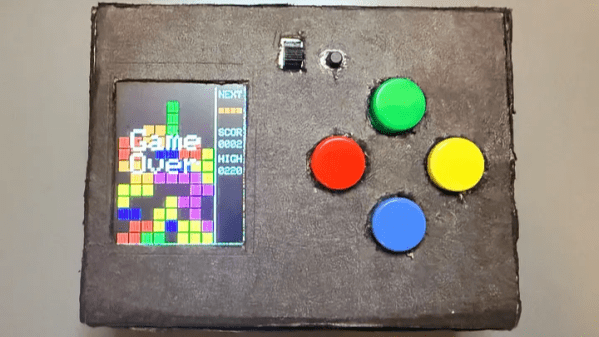
As anyone who’s made a thing knows, a lot of work goes into bringing something from idea to completion. But there’s also considerable satisfaction in the process. [Willian] recently did exactly that, and shares the joyful experience of creating a homebrew handheld game gadget from scratch. It runs a homebrewed Tetris clone (as well as Snake), and we love the results.

The game gadget uses an ATmega328P programmed via the Arduino IDE, and a 1.8″ TFT color LCD screen. It’s self-contained in a box with a few buttons as controls and runs off three AAA cells. [Willian] made the smart design choice to run the microcontroller at 8 MHz instead of the more common 16 MHz, because doing so meant the board can run at 3.3 V instead of 5 V. Why does this matter? The LCD display runs off 3.3 V as well, and if all components can run off the same supply and logic levels, it simplifies things considerably.

Also, creating a 3.3 V supply is a simple matter of three alkaline cells in series with an LDO (low drop-out) regulator, which is great for a handheld device. We do note that AA cells have a considerably higher energy density and capacity than AAA cells and are usually the better choice, but one works with what one has, and sometimes the space and weight saved by AAA is just too good to pass up.

The software has some notable approaches to keep things responsive and optimal. Instead of defining each of the Tetris pieces as a 2D shape, [Willian] instead pre-defines each piece (and their rotations) so that rotating a piece is just an index change in an array, instead of a transform implementing a rotation. Also, full-screen redraws are comparatively slow over SPI and caused flickering, so only cells that have changed are redrawn to the screen to keep things responsive. The code is all on GitHub, and it’s a great peek at how things get implemented under the hood.

The enclosure is just cardboard, and it does the job in [Willian]’s case. But we’ll point out that cardboard is actually a highly adaptable material from which to prototype. With just a few tips and a little care, paper products can be your new best friend when it comes to one-offs and prototypes.

Symbian On Nokia Lives Again, In 2026

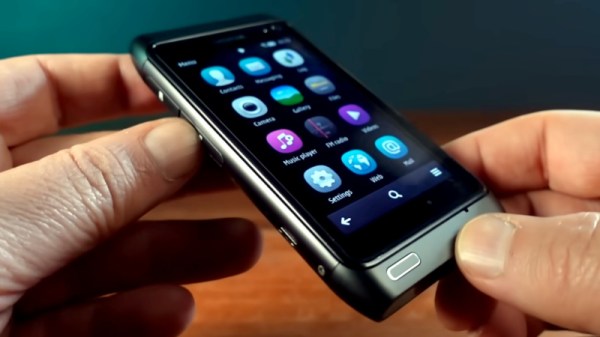
Do you remember Nokia phones, with their Symbian OS? Dead and gone, you might think, but even they have dedicated enthusiasts here in 2026. Some of them have gone so far as to produce a new ROM for the daddy of Symbian phones, the Nokia N8, and [Janus Cycle] is giving it a spin.

For many people, the smartphone era began when the first Apple iPhones and Android devices reached the market, but the smartphone itself can be traced back almost two decades earlier to an IBM device. In the few years before the birth of today’s platforms many people even had smartphones without quite realizing what they had, because Nokia, the market leader in the 2000s, failed to make their Symbian platform user friendly in the way that Apple did. The N8 was their attempt to produce an iPhone competitor, but its lack of an on-device app store and that horrific Windows-based installation system meant it would be their last mass-market flagship before falling down the Microsoft Windows Phone rabbit hole.

In the video below the break he takes a pair of N8s and assembles one with that beautiful camera fully working, before installing the new ROM and giving it a spin. We get to see at last what the N8 could have been but wasn’t, as it gains the last Symbian release from Nokia, and the crucial missing app store. Even fifteen years later it’s a very slick device, enough to make us sorry that this ROM won’t be made for the earlier N-series sitting in a drawer where this is being written. We salute its developers for keeping the N8 alive.

Oddly, this isn’t the only Nokia from that era that’s received a little 2020s love.

Continue reading “Symbian On Nokia Lives Again, In 2026”

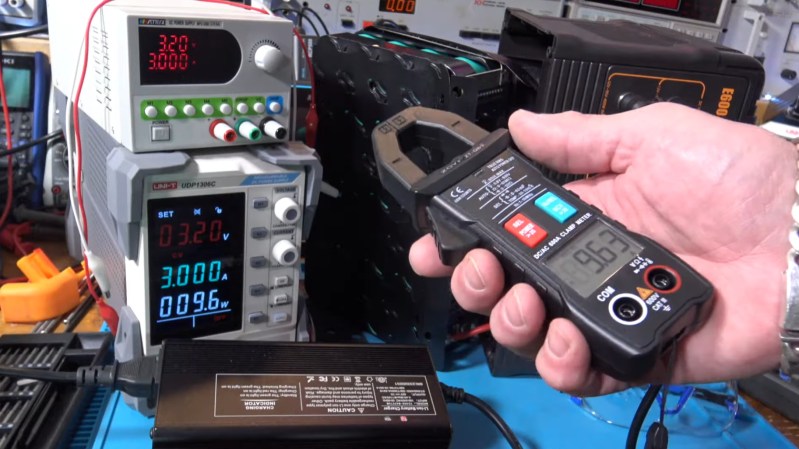
A hand holding the Zoyi ZT-QB9 Smart Clamp meter

Review And Demo Of The Zoyi ZT-QB9 Smart Clamp Meter

Over on YouTube [Kiss Analog] reviews the New Zoyi ZT-QB9 Smart Clamp meter.

If you’re putting together an electronics lab from scratch you absolutely must get a multimeter to start. A typical multimeter will be able to do current measurements but it will require you to break the circuit you’re measuring and interface it to your meter using its mechanical probes.

A good choice for your second, or third, multimeter is a clamp-based one. Many of the clamp meters have the clamp probe available for current measurements while still allowing you to use the standard 4mm banana jack probes for other measurements, particularly voltage and resistance.

If you’re curious to know more about how clamp meters work the answer is that they rely on some physics called the Hall Effect, as explained by the good people at Fluke.

In the video the following clamp meters are seen: Zoyi ZT-QB9, PROVA 11, and Hioki CM4375. If you’re in the market for a clamp meter you might also like to consider the EEVblog BM036 or a clamp meter from Fluke.

We have of course posted about clamp meters before. Check out Frnisi DMC-100: A Clamp Meter Worth Cracking Open or ESP32 Powers DIY Smart Energy Meter if you’d like to know more. Have your own trusty clamp meter? Don’t need no stinkin’ clamp meter? Let us know in the comments!

Continue reading “Review And Demo Of The Zoyi ZT-QB9 Smart Clamp Meter”

DIY E-Reader Folds Open Like A Book

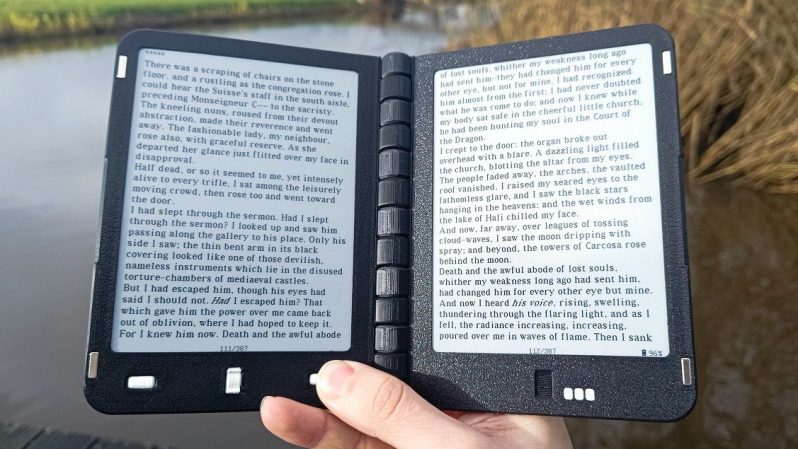
There are plenty of lovely e-readers out on the market that come with an nice big e-paper display. There aren’t nearly as many that come with two. [Martin den Hoed] developed the Diptyx e-reader with such a design in order to better replicate the paper books of old. 

The build is based around the ESP32-S3, a powerful microcontroller which comes with the benefit of having WiFi connectivity baked in. It’s hooked up to a pair of 648×480 e-paper displays, which are installed in a fold-open housing to create the impression that one is reading a traditional book. The displays themselves are driven with custom look-up tables to allow for low-latency updates when turning pages. The firmware of the device is inspired by the epub reader from [Atomic14], and can handle different fonts and line spacing without issue. Power is from a pair of 1,500 mAh lithium-polymer cells, which should keep the device running for a good long time, and they can be charged over USB-C like any  modern gadget.

You can follow along with the project on the official website, or check it out on Crowd Supply if you’re so inclined. The project is intended to be open source, with files to be released once the design is finalized for an initial production run.

We’ve seen some great DIY e-reader builds over the years, and we’re loving the development we’re seeing in the writer deck space, too. If you’re whipping up something fun in this vein, be sure to let us know on the tipsline!

Building Rust Apps For Cheap Hackable Handheld Console

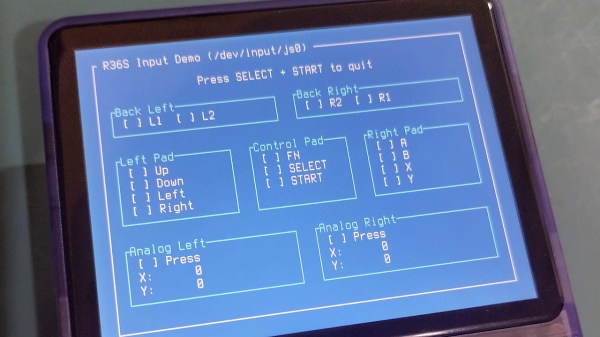
The age of cheap and powerful devices is upon us. How about a 20 EUR handheld game console intended for retro game emulation, that runs Linux under the hood? [Luiz Ferreira] kicks the tires of a R36S, a very popular and often cloned device running a quad-core RK3326 with an Ubuntu-based OS, and shows us how to write and cross-compile a simple app for it using Rust – even if you daily drive Windows.

Since a fair bit of the underlying Linux OS is exposed, you can quickly build even text applications and have them run on the console. For instance, [Luiz]’s app uses ratatui to scan then print button and joystick states to the screen. Perhaps the most important thing about this app is that it’s a detailed tutorial on cross-compiling Rust apps for a Linux target, and it runs wonders using WSL, too.

Installing your app is simple, too: SSH into it, username ark and password ark. Looking for a Linux-powered device with a bright screen, WiFi, a fair few rugged buttons, and an OS open for exploration? This one is quite reassuring in the age of usual portables like smartphones getting more and more closed-off to tinkering. And, if the store-bought hackable Linux consoles still aren’t enough, you can always step it up and build your own, reusing Joycons for your input needs while at it.

Switch Switch 2 To CRT

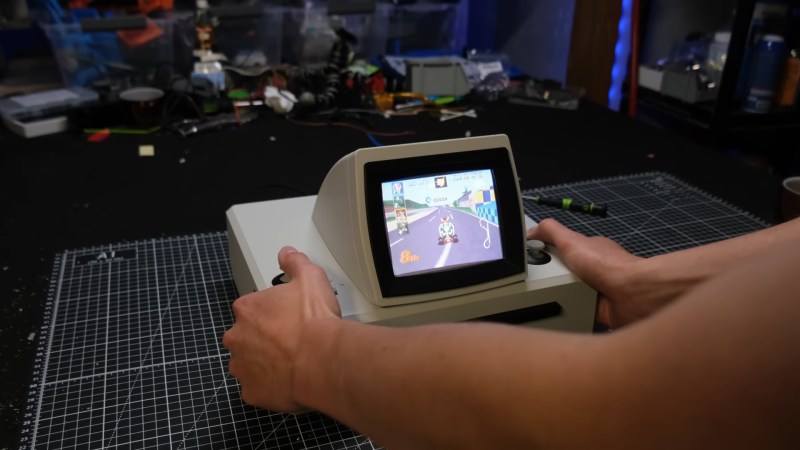
Have you ever imagined what the Nintendo Switch would look like if Nintendo had produced it in the mid-1990s? [Joel Creates] evidently did, because that’s exactly what this retro CRT-toting Switch 2 dock looks like.

Yes, it is portable, thanks to a 100W power bank torn apart and built into the 3D printed case. The full-color CRT comes from a portable TV, so it’s got portability in its heritage. Fitting all that chunky CRT goodness into a hand-held was, of course, a challenge. [Joel] credits AI slop with inspiring the 45-degree angle he eventually settled on. However, the idea of recessing handles inside the case so it could be thick enough but still comfortable to hold was all base-model H.Sap brainpower. There are shoulder controls hidden in those recesses, too, for the games that can use them.

We particularly like the cartridge-like way the Switch 2 slides into place with a satisfying click as its USB-C port connects. It’s plugging into an extension cable that leads to the guts of an official Nintendo dock, buried deeply (and conveniently) inside the 3D-printed box, stacked neatly with the HDMI-to-VGA and VGA-to-Composite converters [Joel] needed to get a nice 4:3 image on the CRT. No word on if he blows on the Switch 2 before plugging it in, but we certainly would.

We’ve featured plenty of portable game systems over the years, and some have been very well done, like this exquisitely done PS2 conversion — but very few have brought CRTs to the party. This retrofitted Game Boy is about the only exception, and [Joel] calls it out in his video as inspiration.

It looks like this is the first Switch 2 hack we’ve featured (with the exception of a teardown or two), so if you know of more, please let us know.

Continue reading “Switch Switch 2 To CRT”