Old Chart Recorder Becomes Single-Pixel Scanner

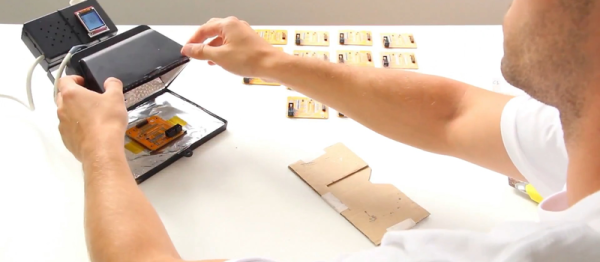
With so many ways to capture images from paper, do we really need another one? Especially one that takes 15 minutes to capture a 128×128 pixel image? Probably not, but building a single-pixel RGB scanner is pretty instructive, and good clean fun to boot.

We have to admit that when [Kerry Wong] scored an ancient Hewlett-Packard X-Y chart recorder a while back, we wondered if it would lead to anything useful. One may quibble with the claim that the Lorenz attractor plotter he built with it is useful, and this single pixel scanner is equally suspect, but we like the idea. Using an Arduino to drive the X- and X-axis of the recorder through a raster pattern over the bed and replacing the pen with an RGB sensor board, [Kerry] was able to collect the color data for each pixel and reconstruct the image. It wouldn’t be too hard to replicate this if you don’t have an analog X-Y recorder, which just goes to show that not everything needs to be steppers and digital to get something useful done. Or at least semi-useful.

As for the RGB sensor used, they’ve made appearances here many times before, mostly in M&M sorters but with the occasional synesthesia simulator.

Continue reading “Old Chart Recorder Becomes Single-Pixel Scanner”

RADAR Controlled Speakers

[Scott] had a simple problem – he was tired of leaning over his work bench to change the volume on his speakers. He desired a system that would readily allow him to switch the speakers on and off from a more comfortable distance. Not one to settle for the more conventional solutions available, [Scott] whipped up a RADAR-activated switch for his speaker system.

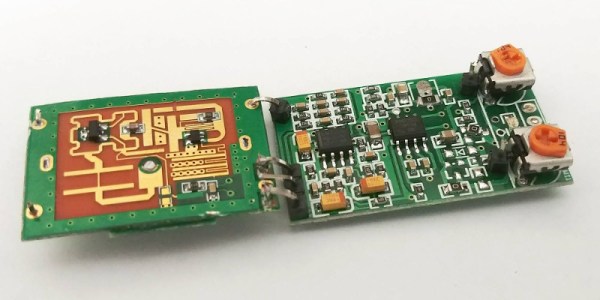
The build relies on a surprisingly cost-effective RADAR module available off the shelf, running in the 5.8GHz spectrum. At under $10, it’s no big deal to throw one of these into a project that requires some basic distance sensing. [Scott] decided to keep things simple – instead of going with a full-fat microcontroller to control the speakers, a 74HC590 IC was used to create a latch. Each time the RADAR module senses an object in close proximity, it toggles the state of the latch. The latch then controls a transistor that switches the power for the speakers.

Overall it’s a build that combines a modern integrated RADAR module with some very simple control logic to create a functional build. Of course, there’s so much more you can do with some 74-series logic. Video after the break.

Continue reading “RADAR Controlled Speakers”

Tetris On A Soldering Iron

Our commenteers have all said good things about the open-source TS100 soldering iron pencil: things like “it solders well”. But we’ve all got soldering irons that solder well. What possible extra value does having open-source firmware on a soldering iron bring? [Joric] answered that question for us — it can play Tetris. (Video embedded below.)

While that’s cool and all, it wasn’t until we were reading through the README over at GitHub that the funniest part of this hack hit us. Every time you lose a game, the iron tip temperature increases by 10 degrees. Tetris for masochists? The makings of some horrible bar bets? We’re just glad that it’s open-source, because we’re not that good and it would get too hot to handle fast.

We haven’t tried out a TS100 yet, but this hack is almost pushing us to impulse purchase. There are alternative versions of the firmware if you just don’t like the font, for instance. And now, Tetris. Will this become the hot new gaming platform that you’ve been waiting for? Let us know in the comments.

Continue reading “Tetris On A Soldering Iron”

How Do They Synchronize Power Stations With The Grid?

There are probably times in every Hackaday reader’s life at which you see something and realise that the technology behind it is something you have always taken for granted but have never considered quite how it works. Where this is being written there was such a moment at the weekend, an acquaintance on an amateur radio field day posted a picture of three portable gas-powered alternators connected together and running in synchronization. In this case the alternators in question were fancy new ones with automatic electronic synchronization built-in, but it left the question: how do they do that? How do they connect a new power station to the grid, and bring it into synchronization with the line? There followed a casual web search, which in turn led to the video below the break of a bench-top demonstration.

If two AC sources are to be connected together to form a grid, they must match each other exactly in frequency, phase, and voltage. To not do so would be to risk excessive currents between the sources, which could damage them and the grid infrastructure. The video below from [BTCInstrumentation] demonstrates in the simplest form how the frequencies of two alternators can be matched, by measuring the frequency difference between them and adjusting their speed and thus frequency until they can be connected. In the video he uses neon bulbs which flash at the difference frequency between the two alternators, and demonstrates adjusting the speed of one until the bulbs are extinguished. The two alternators can then be connected, and will then act together to keep themselves in synchronization. There are further videos in which he shows us the same process using a strobe light, then demonstrates the alternators keeping themselves synchronized, and phase deviation between them.

Of course, utility employees probably do not spend their time gazing at flashing neon bulbs to sync their power stations. The same measurements are not performed by eye but by electromechanical or electronic systems with automatic control of the contactors, just as they are in the fancy electronic alternator mentioned earlier. But most of us have probably never had to think about synchronizing a set of alternators, so to see it demonstrated in such a simple manner should fill a knowledge gap even if it’s one only of idle curiosity.

Continue reading “How Do They Synchronize Power Stations With The Grid?”

Use All That Extra Space With PCB Panelization

Anyone who’s made a PCB has encountered the conundrum of having to pay for space that you don’t use… for instance, designing a round PCB and seeing the corners go to waste. The solution? Smaller boards added to the blank spots.

One logical stumbling block might be that you simply don’t have a small PCB design ready to go. Latvian hacker [Arsenijs] created a resource of small PCBs that can be dropped into those blank spots, as well as a tutorial on how to combine the gerbers into a single panel.

Great minds think alike, and this guide is following hot on the heels of [Brian Benchoff’s] article on panelization. They’re both a great read. It’s interesting to think that not long ago we would see multiple guides on home etching boards and now we’ve climbed the production ladder to guides that help better utilize PCB fab houses. Neat!

This project seems a logical spinoff of [Arsenijs]’s ZeroPhone Pi smartphone project, a finalist for the 2017 Hackaday Prize that makes a low-cost phone using a stack of PCBs. One imagines that while prototyping the phone [Arsenijs] ended up with a lot of wasted space! Fill that up with smaller designs like breakouts, or decorative items like a hackerspace business card. If you’re looking for small PCBs you can find a few in the files area of the project on Hackaday.io. Otherwise, you can share yours and [Arsenijs] will add them.

An ExoArm For The Elderly

Prosthetic and assistive technologies have come have come a long way in recent years. When there are not only major medical research organizations, but individuals getting on board designing tools to improve the lives of others? That’s something special. Enter a homebrew essay into this field: ExoArm.

Attached to the body via what was available — in this case, the support harness for a gas-powered weed-eater — which distributes the load across the upper body and an Arduino for a brain, ExoArm designer [Kristjan Berce] has since faced roadblocks with muscle sensors meant to enable more instinctive control. So — for now — functionality is limited to a simple up and down motion controlled by two switches. It is worth noting that the down switch is currently mounted in such a way that when the user moves their arm down, the ExoArm follows suit, so there is some natural feel to using the arm in its present iteration.

Continue reading “An ExoArm For The Elderly”

Dirty Now Does Cables

PCB makers Dirty made a name for themselves in the prototype PCB biz, with a convenient web form and numerous options for PCB color, thickness, layers, silk screening, and so on. Now they’ve branched out into custom cabling with Dirty Cables.

You can design it yourself by dragging wires and connectors out of a sidebar and arranging them on a workspace, deciding which wire goes to what pin of the connector. Your choices for wires include various gauges and ribbon configurations. You choose a color (they have eleven) select connectors and drag those out too–choose from 17 cable-to-cable and cable-to-board connector families. We made a quick cable with four 32ga wires and two 16ga wires, with two different connectors on each side, with pricing updated realtime. If you want a sample pack of connectors, Dirty sells them for $10.

The downside to the service: there’s a minimum order of 100, though paying Shenzhen prices might make it worth your while. Just imagining crimping all of those connectors makes Hackaday’s hands hurt.

To get a sense of the diversity of connectors out there, read Elliot’s piece on the connector zoo that we published last year.

[thanks, Akiba]