Variometer Build For Gliding Aircraft

If you’re flying through the air in a non-powered vehicle your rate of descent is something that you want to keep any eye one. With that in mind, [Adrian] decided to design his own Variometer (translated) what will have a place in the cockpit next to the other instrumentation. It emits a pitch whose frequency is dictated by the rate at which altitude is being lost or gained.

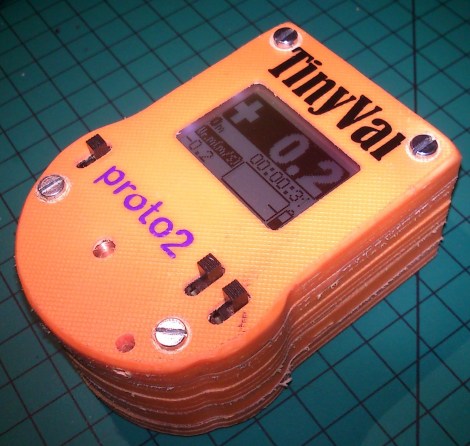
He went with a PIC 24FJ64 microcontroller to drive the device. It’s reading data from an MS5611 barometric pressure sensor. This measures changes in air pressure associated with a change in altitude. As a user interface he chose one of SparkFun’s Nokia 5110 LCD screen breakout boards. He also went with one of their boost converts which lets him power the device from just one battery cell. The case itself is cut from several layers of plastic using a CNC mill.

In the video after the break you can see how sensitive the device is. Moving it just a few feet up or down has an immediate effect on the sound and the displayed data.
Continue reading “Variometer Build For Gliding Aircraft”

SquareWear Sewable Microcontroller Board

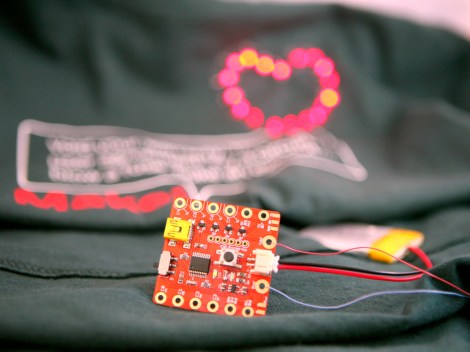
If you’re into adding electronics to your wearable items this little board will be of interest. The 1.6″x1.6″ board is called SquareWear and comes in several different flavors.

It may be a bit of a surprise that this is not an Arduino compatible board. [Ray] tried a few projects with PIC microcontrollers and ended up really liking them. He chose to go with the PIC 18F14K50 for this project. The chip has USB functionality and is running a bootloader. He thinks this makes it easier to work with over a wide range of computers than the Lilypad (a sewable Arduino compatible board which sometimes runs into FTDI driver issues the first time you try to program it).

We like the fact that it is open source. As we mentioned earlier, it comes in a few different flavors. There is a red or white version that uses a LiPo battery, and one that is driven from a CR2032 coin cell. If you’re working on a small project to which you would like to add a rechargeable battery this will serve as a cheap and easy reference design.

[via Adafruit]

Put Your Dev Board To Work As A Demoscene Display

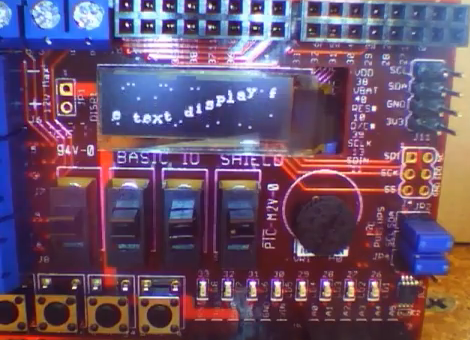
If you’re looking for a way to push your comfort zone with that slick new microcontroller you’ve been working with we think [Morgan Gangwere] has the answer. He took his chipKit development board and used it as a demoscene platform.

Demoscene refers to audio and visual demos written to squeeze as much entertainment out of a given platform as possible. We’ve seen demos for a lot of different platforms; for instance, here’s a Propeller chip demo. But this use of the onboard OLED screen brings a smile to our faces. With well under 100 lines of code [Morgan] implemented several different video effects (the music heard in the clip after the break is not being produced by the board). There is a star field which serves as the background. Over the top of it a scrolling message is displayed following a sine wave shape. The speed at which it scrolls is set by the trimpot, which you can see adjusted about 50 seconds into the clip.

Continue reading “Put Your Dev Board To Work As A Demoscene Display”

Make Dual Pin Header Footprints Into Breadboard Friendly DIP

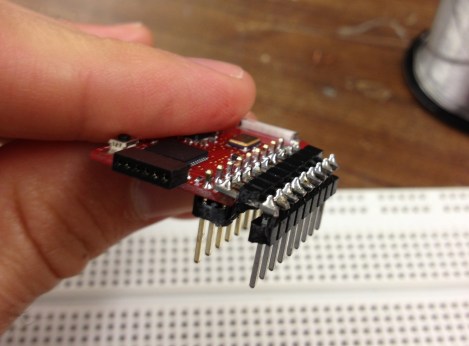
[John] wrote in with a solution to a prototyping issue that has vexed us for quite some time. Above you can see the DIP friendly solution for dual-row pin headers which he came up with. With just a bit of easy soldering he now has a breadboard friendly device for prototyping.

He starts by soldering a dual row pin header on the board, then clips off all of the legs on the outside row. The row of legs that remain are then inserted into one side of the trench on his breadboard. The other side of the trench has a single row pin header, and he solders them to the outer row on the breakout board using another single pin header aligned horizontally. This isn’t a 100% convenient solution, as it’s still pretty hard to get your jumper wires in the breadboard on the side covered by the breakout board. But if you plan in advance you can place your wires first, then plug in the development board.

Here [John] is working with TI’s eZ430-RF2500 board. We’d like to go back and remove the dual pin socket we soldered on our eZ430-F2013, replacing it with this style of pins.

Cornell ECE 4760 Lecture Videos Now Online

Whenever we hear about ECE 4760 we take notice. That’s because a ton of fantastic hacked together projects have resulted from the class. It’s offered at Cornell University and focuses on designing projects based on microcontrollers. We look at it as a ‘how to connect everything to your microcontroller’ guide. The good news for you is that 34 lecture videos from the Spring 2012 ECE 4760 class are now available to watch for free online. When coupled with the course webpage itself (which outlines the reading, labs, and homework) this turns into an opportunity to work through the entire course on your own schedule.

If you need a brief preview, here’s a couple random things we’ve seen as final projects from the course: a digital saxophone, a handwriting decoder, and a haptic feedback unit for building your biceps.

We’re still working our way through the Nand2Tetris project, but we’re putting these lectures on our watch list for later.

[via Reddit]

The Ultimate Low-cost Dev Board

We see a lot of microcontroller dev boards here at Hackaday, so much that we’re jokingly considering changing our name to Board a Day. These devices – from Arduinos to Arduino-compatible boards, very, very small boards, to extremely powerful ARM devices – are a great way to learn about the wonders of controlling electricity with code. There’s a problem, though: if you’re teaching a class on programming microcontrollers, giving each student a $20 board is nearly out of the question.

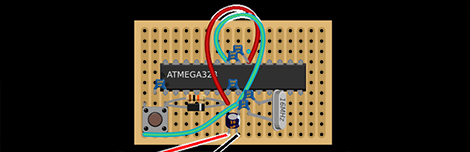
This is where the shrimp comes in. It’s a very, very minimal Arduino-compatible circuit meant to control all the pins on an ATMega328. The components only cost about £1.40 ($2.25 USD) when bought in volume, making it perfect for teaching a class or workshop on the Arduino and giving each student a circuit to take home.

The basic circuit is just an ATMega328 – the same microcontroller used in the Arduino Uno – with a few caps, resistors, and a 16 MHz crystal. It’s a very bare-bones system, but once built and programmed provides all the functionality of a $25 Arduino.

Like all microcontroller platforms, there’s the chicken-and-egg problem of actually programming the device. The Shrimp team is using a CP2102 USB to UART bridge to program each shrimp. Not an inexpensive part, but it is of course possible to only have one serial bridge for each workshop.

LED Fun And Light Painting With The PyMCU

pymcu-led-pov-writing

Recently [Richard] at [pyMCU] was nice enough to send me one of their units to try out. As featured here before, this little board allows you to control physical things using your computer and the Python programming language. After evaluating it and making a LED blink, there were a couple other LED projects I wanted to try.

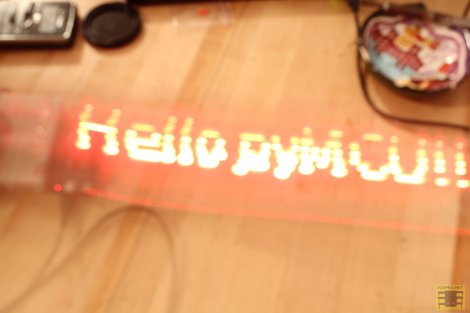
The first idea was to make a LED chaser. This was quite simple, using a little code and plugging in a few LEDs. From this, since you can make the LEDs chase each other, then in the right sequence it should be able to be used to display images using long-exposure photography. Be sure to check out the video after the break of this 10 LED chaser/light bar being assembled.

The results of this LED light bar experiment were really cool, writing some simple text and image with 10 LEDs. Considering the low component count, this is one of the simplest light bar builds that we’ve seen. Programming was simple as well, since the computer using Python does all the processing of the drawing as well as physically turning the LEDs on and off. Of course this setup isn’t without its limitations, having to be connected to a computer being the most obvious. Continue reading “LED Fun And Light Painting With The PyMCU”