Embedded Linux Meets Arduino With The Rascal Micro

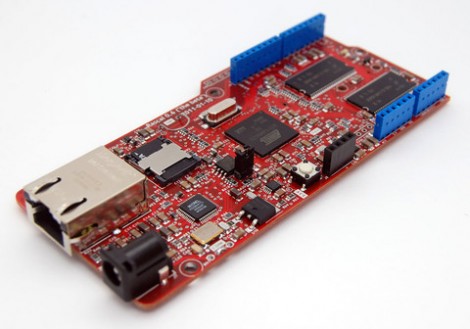
Behold the Rascal Micro. It’s running embedded Linux and has a dual-row of pin headers which probably seem pretty familiar. The idea here is to bring Arduino hardware (ie: shields) to a party with a powerful web server.

The image above is the beta version of the hardware. What’s being shown off in a recent Engadget demo is a version that slides two USB ports in between the barrel jack and the NIC. This makes it easy to jump over to wireless with the use of a USB dongle, or you can figure out what other peripherals you want to include in your project.

The novelty here is that the web server included a built-in editor. So not only can it serve you a webpage to control hardware or display sensor status, but it will let you edit the interface without needing to reflash anything.

The price rings in somewhere around $100-150, and like the popular Raspberry Pi board, you can’t get your hands on it right now.
The Effect Of Code On Power Consumption

Of course putting a microcontroller into sleep mode or changing the clock rate has an effect on the power consumption of the chip, but what about different bits of code? Is multiplying two numbers more efficient than adding them, and does ORing two values consume more power than NOPping? [jcw] wanted to compare the power draw of a microcontroller running different loops, so he threw some code on a JeeNode and hooked it up to an oscilloscope.

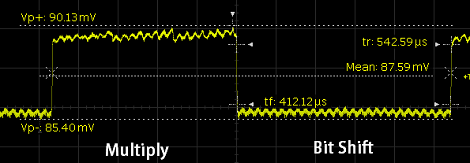
For his test, [jcw] tested two instructions: multiply and shift left. These loops run 50,000 and 5,000 times, respectively (bit shifting is really slow on ATMegas, apparently) and looked at the oscilloscope as the JeeNode was doing its work.

Surprisingly, there is a difference in power consumption between the multiply and shift loops. The shift loop draws 8.4 mA, while the multiply loop draws 8.8 mA. Not much, but clearly visible and measurable. While you’re probably not going to optimize the power draw of a project by only using low-power instructions, it’s still very interesting to watch a microcontroller do its thing.

MyHDL Python Programming Option For FPGA

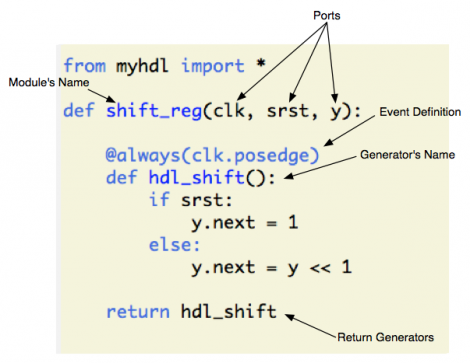
MyHDL is a Python module that brings FPGA programming into the Python environment. [Christopher Felton] tipped us off about a simple tutorial he just finished that gives an overview of how the module is used.

You may remember hearing about PyCPU a couple days ago which can run very simple Python code on a FPGA. There was a healthy discussion in the comments section comparing PyCPU and MyHDL. Although they may seem similar at first, the two are quite different. PyCPU creates a processor on the FPGA chip which can execute a small range of Python code. MyHDL actually implements Hardware Description Language in the Python environment. Once you’re used HDL to model your hardware choices in a Python script, it is converted to VHDL then fed to the toolchain and pushed to the chip like normal.

This is not an absolute beginner’s experience. But if you’re well-versed in Python it makes the jump to HDL a lot easier because you’ll be working with syntax that is already familiar to you.

Building A 1980s Microcomputer With A Parallax Propeller

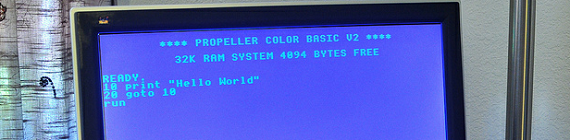
The folks over at Gadget Gangster put up an Instructable to build a retro 80s 8-bit microcomputer. Even though they’re using modern components, it still hearkens back to a time when 10 year olds learned 6502 assembly, PEEKing and POKEing was the best way to program, and using a mouse was a novelty.

The build uses a Parallax Propeller dev board to provide an amazing amount of horsepower for a simple microcontroller. After hooking the Propeller up to a TV via an RCA jack and adding an infrared keyboard, Gadget Gangster had a simple computer that can load programs off an SD card.

Because a microcomputer is useless if you can’t program it, Gadget Ganster ported BASIC  to the Propeller. With VGA and sound output, along with the ability to add a PS/2 keyboard and Wii controller, this modern take on a classic paradigm is more powerful than dozens of Commodore 64s.

As a small aside, we don’t see nearly enough builds using a Propeller. A parallel processing microcontroller having 10 times the computational ability of a low-end ARM processor is interesting to say the least; we’re honestly puzzled by the dearth of Propeller projects. If you’ve got a Propeller project, send it into the tip line.

Bossy Calendar Tells Visitors When To Go Away

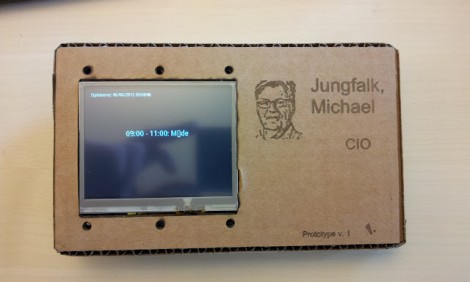
So here’s the scenario. You’re the boss and everyone needs to kiss up to you speak with you about important project details. You need a receptionist, or a creative employee who will build a calendar display the lets people check if you’re free to chat. It works by querying a Microsoft Exchange server for the guy’s calendar. The hardware within doesn’t deal directly with the full Exchange API, but relies on a server-side script that feeds it info on request. This is a nice touch since you can do a lot of filtering on the server and keep it simple with the embedded electronics

Speaking of embedded hardware, this uses Gadgeteer modules. You probably don’t remember, but these are Microsoft’s electronic modules aimed at C# and .NET programmers. It uses the main board, and LCD, USB host, and Wifi modules. This is the first project we remember seeing since the hardware was announced.

We wonder if this will change the boss’ behavior? Will he start scheduling creatively so that he gets more time without interruption?

New STM32 Discovery Board Can Now Be Programmed On Linux

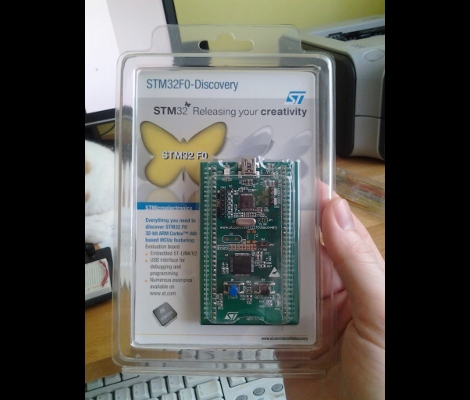
Last Wednesday I posted a video review of the new STM32F0-Discovery board which is built around an ARM Cortex-M0 chip. I speculated that it should work with the open source project aimed at programming these discovery boards. I tested it out and a connection could be made, but no code could be flashed. So I spent a few hours over the weekend and added support.

My updates are already in the stlink repository. After cloning the code, you can use three commands to compile the software (./autogen.sh, ./configure, make). That’s assuming you have all of the necessary dependencies (I had to install libusb-1.0-0-dev) and that you add the udev rule suggested in the documentation (also found in the repository). The program st-util connects to the board and provides a listening port for an ARM debugger (I’m using arm-none-eabi-gdb from CodeSourcery G++ Lite).

When I first started testing, the chip id was reporting as 0. It turns out the register address polled for this information was wrong. After finding that in the almost-900 page reference manual I went through the painstaking process of finding the hex values necessary to properly memory map the device. From there I also updated the blink example to generate an ELF file compatible with the Cortex-M0 chip. So out of the gate you should be able to use an ARM cross compiling toolchain to compile the example, connect to the board with this utility, then use the debugger from the toolchain to connect and flash that example to RAM.

There’s lots more to be done. To fully utilize the chip it is necessary to use a startup file and linker script when compiling. I’ve done nothing in this area, but I hope to work on some tutorials as I get further along. Of course if you have your own successes developing for this board using a Linux machine we want to hear about it!

Data Logging Directly To Google Docs (Google Drive)

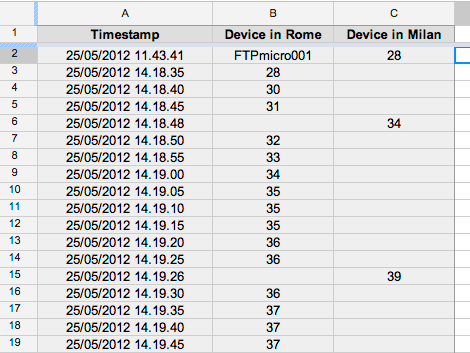
[Emanuele] is using Google Docs to log his temperature sensor data automatically (translated). We can see a few benefits gained by using this system. One is that you don’t have to visit the site of the logging hardware to harvest the data, another is that Google will automatically graph the data for you. Of course this means you need some way to connect your logger to the Internet, but we’ve seen buckets of different techniques for doing so. In this case, [Emanuele] is using PIC hardware that has a NIC on the board. But the technique could be used from a computer just as easily as from a microcontroller.

The meat and potatoes of the hack is sniffing out the HTTP header and syntax for writing to cells on a Google Docs (soon to be Google Drive) spreadsheet. After making a new spreadsheet and copying the URL and key from the address bar, he loads up the page using a header-viewer web service. With all the pertinent info in hand he crafts about a dozen lines of code to assemble the HTTP packet, and rolls the timestamp and temperature reading into it dynamically. See the system in action after the break.

Continue reading “Data Logging Directly To Google Docs (Google Drive)”