Building A Better Circuit For Renewable Energy Harvesting

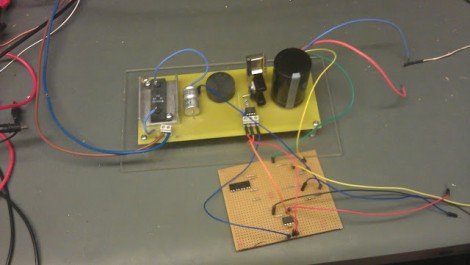
[David], [Ian], and [Sajjad] finished and submitted their entry to the ChipKIT challenge just under the wire. They designed and built a maximum power tracking circuit for use with renewable sources. That is to say, this is a voltage regulator for use with solar cells and other generative sources like wind or water power. The idea is to use the best concepts of switch-mode power supply design, but replace the more wasteful parts with circuits that can harness and roll the loss back into the output.

We have to admit, following their development choices from the write-up at the top is a bit rocky. But luckily they filmed an in-depth description of the design choices, as well as a demonstration of the circuit along with various test measurements. If you’ve got twenty minutes and some patience all will become clear in the video after the break.

This will go along great with that bucket-based hydro generator you built.

Continue reading “Building A Better Circuit For Renewable Energy Harvesting”
Building The Worst Linux PC Ever

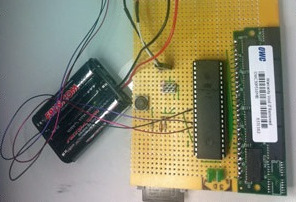
Linux is generally considered the go-to OS for under powered computers. Wanting to challenge the preconceived notion that Linux requires ‘a computer made in the last 20 years,’ [Dmitry] built the worst Linux PC ever around a simple 8-bit microcontroller.

The ATMega1284p [Dmitry] used doesn’t have a lot to offer as far as RAM and storage goes; just 16 kilobytes of SRAM and a paltry 128 kilobytes of Flash storage. While this may be voluminous in the embedded world, it’s peanuts compared to the gigabytes of RAM and hard drive space on even a low-end netbook. To solve this problem, [Dmitry] threw an antique 30-pin RAM SIMM at the problem. It’s wired up directly to the microcontroller, as is the 1 Gigabyte SD card that serves as the PC’s hard drive.

Linux requires a 32-bit CPU and a memory management unit, something the puny microcontroller doesn’t have. For [Dmitry], the best course of action was emulating an ARM processor on an AVR. We’re not sure if we’re dealing with genius or madness here, but it did prove to be a valuable learning exercise in writing a modular ARM emulator.

How fast is it? [Dmitry] tells us it takes two hours to boot up to a bash prompt, and four more to load up Ubuntu and login. If you want a Megahertz rating, good luck; the effective clock speed is about 6.5 kilohertz. While the worst Linux PC ever won’t win any races, its simple construction puts it within the reach of even the klutziest of hardware builders; the entire device is just a microcontroller, RAM, SD card, a few resistors, and some wire.

If you’d like to build your own worst Linux PC, [Dmitry] has the firmware and disk image available to download. If you want to watch the time-lapse of this thing booting, check out the video after the break.

Continue reading “Building The Worst Linux PC Ever”

Polish Your Understanding Of Capacitors By Building This Meter

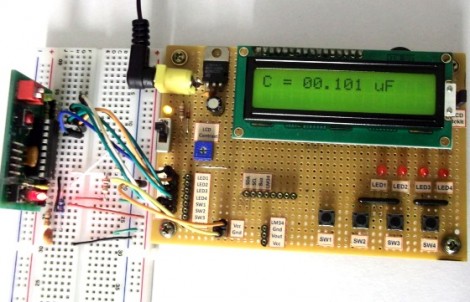
Building a capacitance meter is a great exercise. If you’re feeling quite safe in your digital-circuit-only life, this will push just far enough out of the comfort zone for you to see there’s nothing to fear in adding analog circuits to your designs. Here, [Raj] compares a voltage divider and RC timer to calculate the value of a capacitor. The project is aimed at teaching the concepts, and will be easy to follow for anyone who has at least a bit of experience working with a programmable microcontroller.

The meter is based on an established equation that uses are starting and ending voltage, as well as the time it took to transition between the two, to calculate capacitance. The capacitor will be charged from 0 volts to 0.5 volts. Using the built-in analog comparator is the easiest way to do this. [Raj] breadboarded a voltage divider to establish a 0.5V reference on one of the comparator’s pins. The other input comes from a circuit that places a resistor in line with the capacitor being tested. When that reading rises above the 0.5 volt reference the comparator match will be tripped, stopping a timer that had been running during the charge cycle. From there it’s just a matter of using the timer value in the calculation.

Brute Force A Password Protected PDF Using The BeagleBone

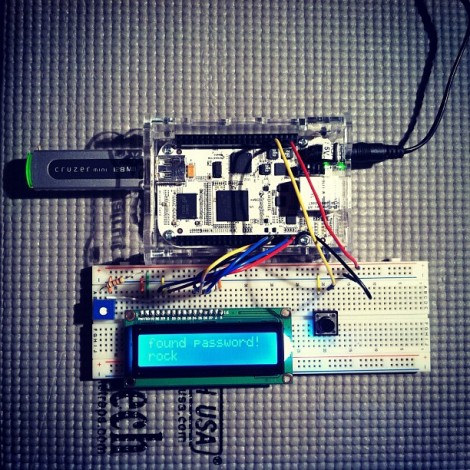
The biggest benefit to using the BeagleBone is it’s 700 MHz ARM processor. If you’re just messing around with basic I/O that power is going unused, but [Nuno Alves] is taking advantage of its power. He built a PDF password cracker based on the $85 development board.

We recently saw how easy it is to perform basic I/O using the BeagleBone. Those techniques are in play here, used to drive a character LCD and sample a button input from the breadboard circuit. [Nuno] even published separate posts for each of these peripheral features.

The password protected PDF file is passed to the device on a thumb drive. Since the BeagleBone is running embedded Linux you don’t need to mess around with figuring out how to read from the device. A click of the button starts the process. Currently the code just uses a brute force attack which can test more than 6000 four-character passwords per second.  This is quite slow for any password more than four or five characters long, but [Nuno] does mention the possibility of running several ARM processors in parallel, or using a dictionary (or rainbow table) to speed things up. Either way it’s an interesting project to try on the hardware. You can see his video demo of the device after the break.

Continue reading “Brute Force A Password Protected PDF Using The BeagleBone”

Putting Multitasking On An AVR

[vinod] wanted to familiarize himself with AVR assembly programming, but wanted to do something a little more ambitious than simply blinking an LED. While the completed build does blink a few LEDs, we love that e decided to implement multitasking on his microcontroller.

The program [vinod] came up with uses round robin scheduling to give one of the seven programmed tasks a little bit of compute time every time a timer is triggered. Although it’s extremely simple compared to “real-life” real-time operating systems like VxWorks, it’s still an impressive achievement.

In the video after the break, [vinod] shows off his task-switching with seven LEDs. The white LED is a PWM task, while the six other LEDs are simple toggling tasks  that switch a LED on and off at set intervals independent of each other. This would be hard – if not impossible – to do without some sort of scheduling. Nice work, [vinod].

Continue reading “Putting Multitasking On An AVR”

Twiddling An LED Using The BeagleBone’s Embedded Linux

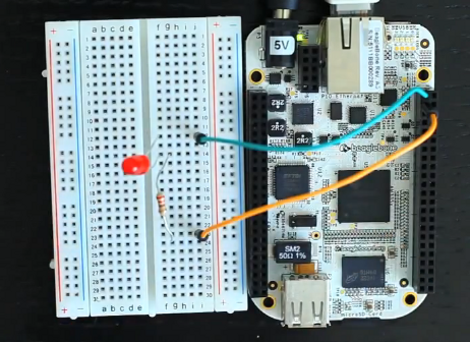
If you comfortable working with 8-bit microcontrollers, the thought of moving to a hardware platform running embedded Linux may be a bit daunting. After all, there’s a lot going on between you and the chips on a board like the BeagleBone seen above. But [Matt Richardson] shows how easy it can be to get at the pins on this device. He put together a primer on hardware control from the embedded shell.

You will remember that the BeagleBone is the newest generation of the BeagleBoard. The ARM processor and other goodies make it a powerful tool, and those already familiar with Linux will be able to get up and running in no time. Just connect the board to your network and SSH into it to get started. [Matt] outlines this setup process in the clip after the break. He then hits the reference manual to find the pinout of the female headers on either side of the board. Each available I/O pin is mapped to the /sys directory and can easily be controlled by echoing your commands to the appropriate files. But [Matt] went a step further than that, writing his own Python library that implements Arduino-style syntax like the digitalWrite() function.

This example should give you enough of a shove to start porting your own libraries over for use with the device. Don’t forget to document your projects and tip us off about them. Continue reading “Twiddling An LED Using The BeagleBone’s Embedded Linux”

Playing MP3s From An FPGA

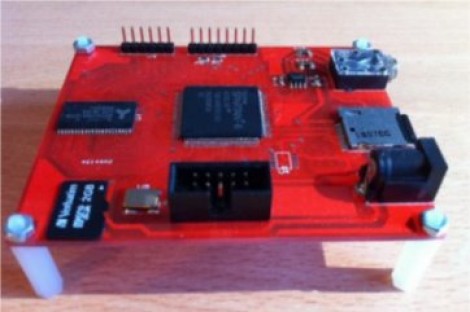
Building an audio player is a fun project. It used to be quite a task to do so, but these days the MP3 decoder chips are full-featured which means that if you know how to talk to other chips with a microcontroller you’ve got all the skills needed to pull off the project. But that must have been too easy for [Ultra-Embedded], he decided just to build an MP3 player out of an FPGA.

It’s not quite as difficult as it first sounds. He didn’t have to figure out how to decode the audio compressions. Instead he rolled the Helix MP3 decoder library into the project. It had already been optimized to run on an ARM processor, and since he’s using a RISC soft processor the translation wasn’t tough at all. He’s using a 24-bit stereo DAC chip to bridge the gap between the audio jack and the FPGA output. Clocking that chip with the FPGA isn’t ideal and causes 44.1 kHz audio to run 3% too slow. He says it’s not noticeable, which we believe. But if you try to play along with a song the pitch shift might end up driving you crazy.

If you’d prefer to just stick to the microcontroller based players this one’s small and inexpensive.