DIY Propeller-based ECG

propeller_ecg

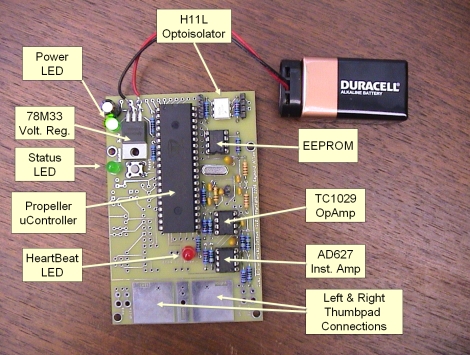
[Ray] likes to build all sorts of Propeller-based projects, but one of the more interesting items we came across was this DIY ECG. While we have covered other DIY electrocardiograms before, he left the breadboard behind and put together a nicely done PCB for his build.

The ECGs design should be pretty familiar to anyone that has seen our ECG coverage in the past. The user places his thumbs on the large built-in pads, which allow the circuit to sense the electrical signals produced by heart’s contractions. These small electrical impulses are then amplified using an AD627 instrument amplifier before being further amplified via a dual op-amp.

The amplified signal is filtered and then fed into the Propeller’s ADC, which displays the user’s heart rhythms via an LED. The data can also be fed into a computer via an optoisolated serial connection.

[Ray] lays out a litany of warnings and precautions that should be followed before downloading his schematics and firmware. We have to echo those warnings, as it doesn’t take a large well-placed shock to disrupt the heart.
Microsoft’s Attempt At An Arduino Killer — Feels Like A Gimmick

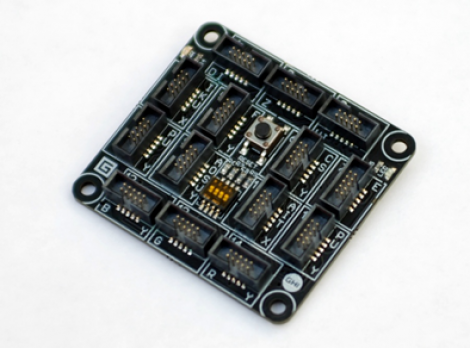
Microsoft has thrown its hat into the open source hardware hobby market. Their offering is called the Gadgeteer. We’d love to tell you all about it, but the big M didn’t make it very easy to find out about the device and it’s addons. When we set out to find what processor is running on the board we were happy to see that they do call it an Open Source Hardware project, but no schematic is posted. When we did finally navigate to the hardware documentation it’s a file that must be downloaded and you’ve got to agree to their licensing before grabbing it. So that’s as far as we went, and now we’ll go back to using more open tools.

For those of you who aren’t scared off by the lack of openness, the first thing you’ll notice about this board is that it’s full of connector headers. Instead of the small rows that Arduino uses, the Gadgeteer is meant to use ribbon cables to connect to various breakout boards. You can program for the platform in C# using the .NET framework. This means using Microsoft Visual Studio for those that are already acquainted with the platform. But regular readers will note that we’re always looking for Linux support in our IDEs and you won’t find that here.

[Thanks Hrasdt (and several others) via Slashdot]

Bluetooth Morse Code Keyboard For The Disabled

The team a Zunkworks wanted to build a device for people who can’t normally use a keyboard and mouse. The Bluetooth Morse code keyboard is what they came up with. This build gives the user full control over the keyboard and mouse using a single button or a sip & puff interface.

Continue reading “Bluetooth Morse Code Keyboard For The Disabled”

Making The Case For In-circuit Debugging Tools

in_circuit_debugging_of_pic_microcontrollers

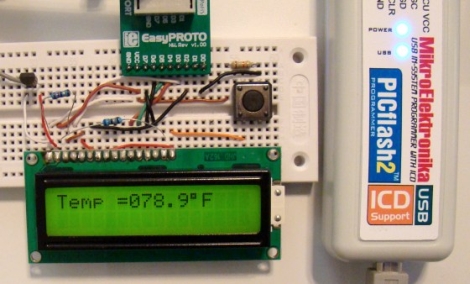
If you are in the market for a PIC microcontroller programmer, you may want to consider a model with an In-Circuit Debugger (ICD). [Rajendra] put together a great tutorial on using an ICD when debugging PIC firmware, which makes a pretty convincing argument for owning one.

In his tutorial, he happens to be using a MikroElektronika PICflash2, but he says that there are plenty of other ICDs out there if you are not keen on this particular model. The PICflash2 not only acts as an ICD, but as the name suggests it works as an ICSP as well.

[Rajendra] walks us through a short debugging session using some simple code that reads data from an LM34DZ temperature sensor, displaying the results on an LCD screen. While he isn’t actually hunting for bugs, he does show how easy it is to step through the PIC’s code one statement at a time, evaluating variables and registers along the way.

[Rajendra] does point out that using an ICD does occupy a few I/O pins while running, limiting your resources just a bit. We think that being able to debug code as it runs is pretty reasonable tradeoff if you don’t necessarily need each and every pin available for use.

AVR Programmer Modelled After The MkII – Uses LUFA

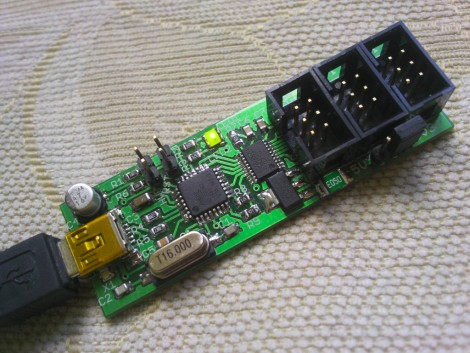
Here’s a new option for building your own AVR programmer. It’s called the MkII Slim and the diminutive size makes it live up to its name. The design is rather spartan, using just three chips; a voltage regulator, a MAX3002 level converter, and an Atmel AT90USB162 as the main microcontroller. This chip has a built-in USB module, foregoing the need for a separate FTDI chip.

The firmware is built on the Lightweight USB Framework for AVRs (LUFA). This is a USB stack implementation originally called MyUSB that was developed by [Dean Camera]. Regular lurkers over at the AVRfreaks forums will recognize [Dean’s] name, or his handle [abcminiuser] as a source for many of the high quality AVR tutorials found there. But we digress.

The programmer offers all the features you’d want in an In-System Programmer. It can easily be reflashed with future updates thanks to the bootloader running on the chip. There’s jumper-selectable power options, and it can program targets running at 3.3V or 5v. The full development package including code and artwork is available for download at the site linked above. For your convenience we’ve embedded the schematic after the break.

Continue reading “AVR Programmer Modelled After The MkII – Uses LUFA”

USB Reddit Upvote/Downvote Button

reddit_upvote_downvote_button

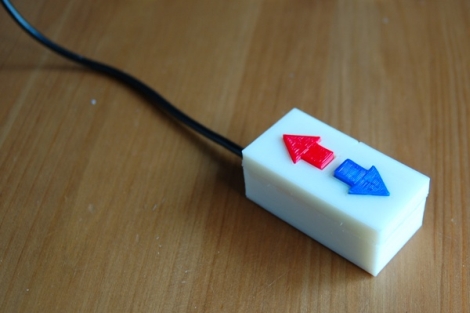
[Chris] has recently become a self-declared Reddit addict and wanted to build something that would streamline the process of voting on posts. Inspired by the Awesome Button hack featured on Make a little while back, he thought that a physical upvote/downvote button would be the ideal peripheral for all of his Reddit needs.

He was a big fan of using the Reddit Enhancement Suite, which allows you to submit votes with a single keystroke. He combined this browser extension with a Teensy development board, and had his voting button prototyped in no time. Once he fine-tuned the Arduino sketch that he used to emulate the required keypresses, he got busy building a case for his creation.

He busted out his 3D printer and had a custom working project box in about 30 minutes. He printed arrows for the upvote and downvote buttons, snapped everything together, and then gave his quick vote box a spin. Everything worked perfectly, and he’s quite happy with his creation.

We imagine that our resident Reddit addict in chief is pretty jealous right about now…

Stick around if you’d like to see a time lapse video of the button’s creation.

Continue reading “USB Reddit Upvote/Downvote Button”

RGB LED Spectrum Analyzer Coffee Table

rgb_led_spectrum_analyzer_coffee_table

This year, students working for Texas Instruments as part of their Co-op program were challenged to construct a project around the company’s MSP430 microcontroller. A team of three students, [Max Thrun, Mark Labbato, Ian Cathey] decided to build something that would fit perfectly in any college student’s dorm room – an RGB LED coffee table.

We’ve covered RGB LED tables in the past, but as far as we can tell this is the first MSP430 based unit we’ve seen. Microcontroller aside, the table features a lot of items that are considered “standard equipment” when it comes to these sorts of living room LED installations. The trio installed 128 RGB LEDs into their table, isolating each one using a wooden grid, and used some frosted glass to diffuse the display a bit.

What really makes this table stand out is the software. The team wrote an application that creates a Fast Fourier Transform of whatever music is being played, in order to find beats and generate real-time visualizations for their table. The result is a pleasing display that’s sure to be a hit at parties.

Check out the video below to see their creation in action.

Continue reading “RGB LED Spectrum Analyzer Coffee Table”