Microcontroller Communications Using Flashing Lights

phototransistor_pc_microcontroller_communications

[Scott] was driving in the pouring rain behind a car with its blinkers on when inspiration struck. He had previously created a simple communications system using his sound card that allowed him to send data to a microcontroller from his PC, but he thought that doing the same thing with light would be an interesting exercise.

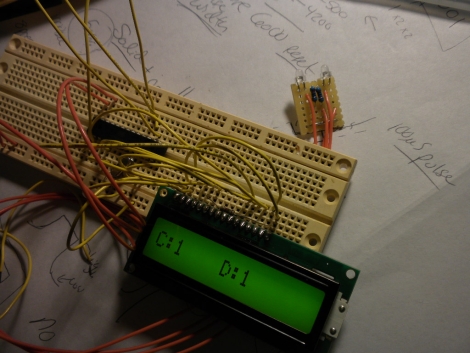
He decided that the best way to go about building such a system would be to use a phototransistor along with his computer monitor to send data to his microcontroller. While he couldn’t really think of any practical application for the project, that didn’t stop him from putting it together just for grins.

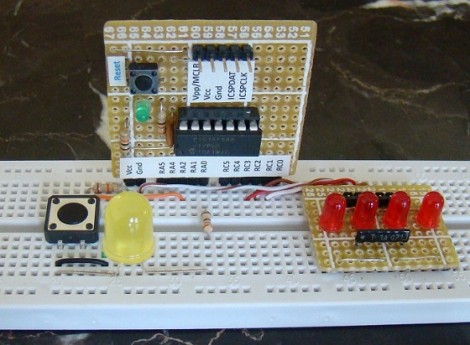
[Scott] says the circuit is dead-simple, and includes a pair of phototransistors along with their required resistors. The receiver was tied into the ADC of his microcontroller, where he was easily able to pick up some simple light patterns. His ultimate goal is to put together a javascript application that sends data to his microcontroller, though he’s looking for a bit of assistance on the programming side of things – any takers?

While [Scott] couldn’t come up with any applications off the top of his head, we know of at least one. Anyone familiar with the Bloomberg financial application will likely have come across their “B-Unit”. This piece of hardware is about the size of a credit card, but thicker. Armed with a fingerprint scanner and a photodiode, it reads a series of flashing lights from your computer screen in order to ‘synchronize’ the unit for each login session that is not initiated with an official Bloomberg keyboard. So there’s one for you!

Continue reading to see a video of the system in action.

Continue reading “Microcontroller Communications Using Flashing Lights”
A Study In AVR Power Saving Techniques

amtel_avr

[Scott] found the iCufflinks from Adafruit Industries pretty interesting, but he thought that the stated run time of 24 hours was a bit short. He figured he could improve the product’s power consumption at least a little bit, to improve the overall battery life.

From their schematics, he placed an order for parts and built two identical iCufflink mock-ups side by side – one running their code and one running his. He took baseline current draw measurements, then got busy slimming down the cufflinks’ software. It had been 20 years since he touched assembly, and he has never written it for an AVR, but judging by his work he’s not rusty in the least.

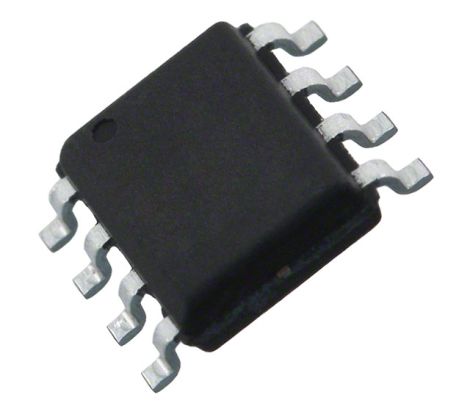
He slowed the ATtiny’s clock down and tweaked a few other settings for a savings of 53μA, but the real improvements came via a fairly simple fix. The original code called for the processor to institute a counting loop to sleep, which he found to be very wasteful. Instead, he chose to put the processor in an idle state, using the chip’s watchdog timer to wake it when it was time to pulse the LED. The power savings from this change alone was a whopping 261μA!

When he was said and done, the changes save about 315μA of current draw, and should allow the cufflinks to run for up to 38 hours without swapping batteries. In [Scott’s] opinion, a nearly 60% improvement in battery life is pretty good for a day’s work, and we’re inclined to agree.

Understanding Interrupts In PIC Microcontrollers

Interrupts are the name of the game for more functional microcontroller firmware. [Rajendra] just posted a tutorial covering all of the interrupt types for the PIC 16F688 microcontroller. He gives an overview of all of the major points: what an interrupt is, what causes interrupts, how to read the datasheet (often overlooked) to set up interrupts, and finally he applies it to a test platform and a bit of code.

We’ve been playing around with an Arduino again over the weekend and are a bit frustrated with the restricted access to interrupts. That issue deals with AVR interrupts, a topic with which we’re already well acquainted. But we work with PIC hardware much less often and it’s fun to explore how the other half does things, both in hardware and in code.

Regarding Atmel’s Xmega Chips

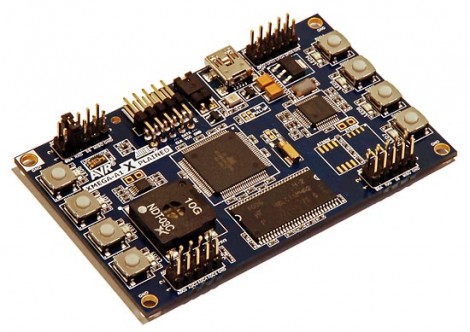
A few years back Atmel announced a new line of chips, the XMega series. We see the name bouncing around here and there, but when [Michael Kleinigger] mentioned that he’s seen very few project using these chips we realized that not only is he right, but we know next to nothing about them. Just give his XMega review post a whirl and you’ll be up to speed in no time.

He compares an XMega128A1 side-by-side with an ATmega1280. For those that abhor reading paragraphs full of words, there’s a table that can give you the quick facts like how the XMega costs less and runs faster. But we know from past discussions (like the one on PWM) that [Mike] knows his stuff so the whole thing’s worth a read. He’ll lead you through the programming tool chain (which hasn’t changed), a bit about the new event system, and then finish with a demo program on the Xplained development board.

All About Accelerometers

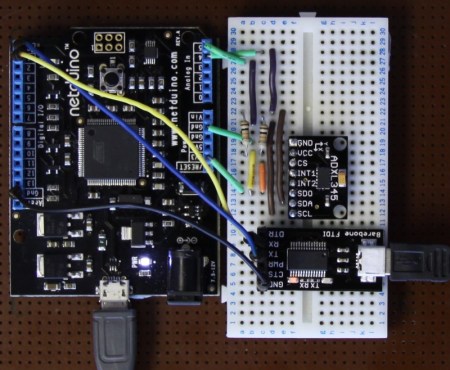
If you’ve ever wondered about the use of or theory behind or the use of accelerometers, this tutorial by Love Electronics is a very good resource. In this article, Love takes one through how to hook up an ADXL345 accelerometer and use it with a Netduino processor. Before the subject of hooking everything up is broached, a very good discussion is given on the general theory and operation of accelerometers.

Information is given about installing all the required software and libraries. Additionally, a mini tutorial about writing a “hello” application using the .NET framework is given. Finally, the application gives the [Windows Presentation Foundation] tools necessary to visualize the raw data that the Netduino produces.

One could really start using this processor and accelerometer from scratch with this tutorial and some basic electronics knowledge.  This could add a great new feature to your next robot or allow measurement that couldn’t be done with simpler sensors.

The Firebird32, A New Dev Board On The Block

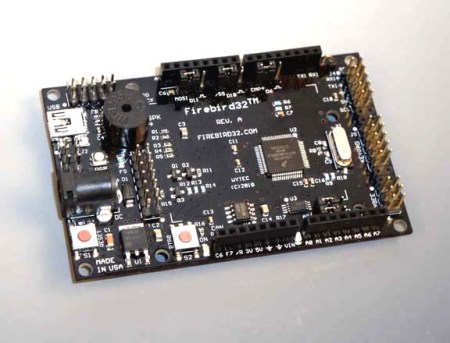
Here is yet another development board to add to your list (If you are into keeping lists), introducing the Firebird32. There seems to be no end to the production of new development boards, following the current style the Firebird32 comes in the familiar Arduino form factor to fit all of your Arduino shields.

The Firebird32 from [Wytec] is build around the 32bit Freescale Flexis MCU [MCF51JM128] running the Coldfire V1 core commonly found in industrial and medical equipment. We were kindly donated a board before release, the first thing that we noticed was  the onboard 8×2 segment LCD which makes the perfect debuging tool. The board along with fitting standard Arduino shields has extra input headers for a keypad, an accelerometer and an extra communication header (IC2/SPI/SCI). It’s also sporting 8 x 12bit analogue inputs, external 32k EEPROM, an RGB LED, a buzzer and an extra push button. The Flexis chip along with the beefy 32bit processor can run at a clock rate up to 48Mhz using PLL and has an integrated USB port, all of this for under $30.

Continue reading “The Firebird32, A New Dev Board On The Block”

Using Binary Code Modulation To Control LED Brightness

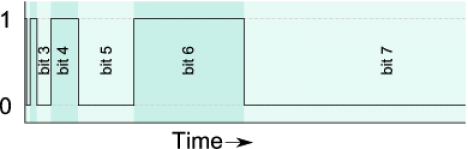
Pulse Width Modulation is definitely the preferred method of dimming an LED with a microcontroller, but we were interested in hearing about a different method called Binary Code Modulation. BCM does the same thing as PWM, it turns the LED on and off very rapidly so that your eye cannot detect a flicker. The brightness level is a result of the average amount of time the LED is on versus when it is off. This is called duty cycle and although it can be the same percentage for both PWM and BCD, there is a fundamental difference.

While PWM usually uses a cyclical on/off cycle (30% on, 70% off, repeat) BCD uses a cumulative cycle. As you can see above, each successive bit of binary code carries double significance compared to the previous bit. Now just assign a duty cycle based on your precision, and have an interrupt fire for each bit of the counter. The graph above shows some highs and some lows combining to reach the target duty cycle. An interrupt is used for each bit, and pin changes are made in the service routine.

The benefit of this system is that it is scaleable without adding overhead. You’re already running the interrupts so servicing 8 or 128 LEDs doesn’t have vastly different needs as it would with PWM. The big downside is that the more bits of precision you use, the faster your processor must run so that the eye doesn’t detect the lengthy on or off cycles of the higher bits as visible flickering.

Thank you [Yetihehe] for tipping us off about a link that [Tomas Martinsen] left when commenting about an Arduino library for up to 768 PWM outputs.