Boobie Board Powered Twitter Notifier

boobie_board_twitter_notifier

The team over at Archonix frequently challenge themselves to create a full working project in under 20 minutes. [Andrew Armstrong] put together a blog post detailing their most recent “Quickproject” – a simple Twitter notifier built using their Boobie Board.

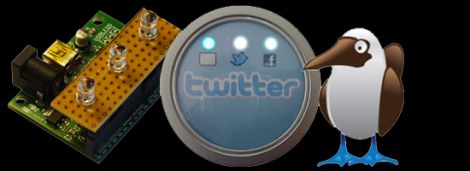
They started by putting together a small notifier breakout module that could later be attached to their Boobie Board. The module is pretty simple and includes a trio of LEDs to alert you to activity across several online services, though only the Twitter notification module is currently complete. The notifier’s code was written in LUA, and primarily designed to interact with Linux desktops. They do not currently have a Windows compatible version of the code available, but they are more than happy to host it if someone desires to port their code over.

The notifier was put into an old candy tin with a plastic window, which is perfect fit for their project. All in all, the entire thing took them about 40 minutes, with half spent on hardware, half on code. The notifier does just what it was intended to do, but they have a healthy list of improvements that they would like to add, including the use of the other two notifier LEDs.

External Text Display For Nexus One

Nexus One External Display

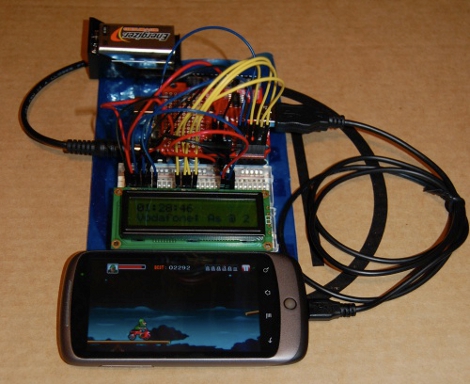
[follower] prototyped a 2-line external display for his Nexus One using an Arduino with a USB Host Shield, and the Android Open Accessory Protocol. There are two basic software pieces at work: an Arduino sketch that handles displaying data sent from the phone, and a lightweight android app to detect the presence of the external screen and send data to it. As shown here, it diplays the time and the beginning of the most recently received SMS message.

This project coalesced from several other things [follower] had been working on with regards to USB accessories, background services, interfacing with the Arduino and handling SMS messages, so it’s modular and open-source.  If you’re interested in mashing up microcontroller projects and your android phone, there’s plenty of stuff in this project to help you get off the ground.

As hacks go, this is very much a “because you can” sort of deal that’s designed to tie a bunch of cool things together. You’re unlikely to catch us carrying an LCD and breadboard around in our pockets any time soon, but it paves the way for some potentially fun phone accessories.

Handy Board Plays Music With An NES Controller

[Alex Busman] has been working with an old microcontroller board called the Handy Board. Recently, he figured out how to interface an NES controller to play music. With 8 buttons on an NES controller, [Alex] has control over an entire musical scale, so he demonstrates this in his video by covering the Dr. Mario Theme.

The Handy Board is a microcontroller board originally designed in 1995 for LEGO robots. With a 68HC11 μC running at 2MHz and 32KB of RAM, the Handy Board has been superseded by the LEGO Mindstorms NTX NXT, the Handy Board is thankfully still being supported, and is still a great platform to learn embedded design.

It’s great to see a build on relatively obsolete hardware, especially considering this would be a trivial build with an Arduino. We think it’s great [Alex] is learning the ins and outs of ‘difficult’ hardware – it’s a great way to learn something. Check out the walk though of [Alex]’s build after the break.

Continue reading “Handy Board Plays Music With An NES Controller”

Stereo Amplifier With Digital Volume Control

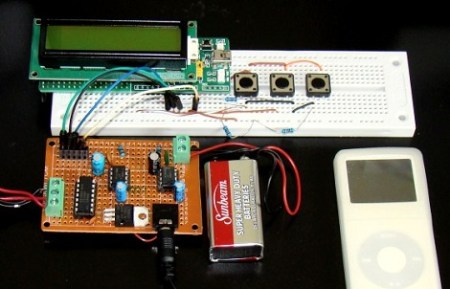
A regular Hack A Day reader sent in a tip about an LM386 stero amplifier with digital volume control. The resulting build is very professional and could easily be adapted into a slick iPod dock build.

We’ve seen a few LM386-based amplifiers over the years including one that fits inside a 9V battery, but this is the first implementation of digitally controlled volume we’ve seen. The volume control of this amp uses the DS1868 dual digital pot IC in place of the usual 10K pot providing 256 steps between zero and full volume. The DS1868 is controlled by a PIC μC with a 3-wire serial connection, although this could be implemented on any microcontroller.

Although the code provided with this build outputs volume as a linear function, it would be trivial to implement a logarithmic volume output. Because the ear perceives loudness on a logarithmic scale, this would be a great way to adjust audio volume and provide a more fine-grained control. Of course this could be implemented with a logarithmic pot, but where’s the fun in that?

Check out a video of the amp after the break.

Continue reading “Stereo Amplifier With Digital Volume Control”

Building An Up-to-date MSPGCC Toolchain

[Sergio Campamá] wrote in to tell us he’s assembled a guide for compiling the latest release of MSPGCC. This is a cross-compiling tool chain for the popular MSP430 line of microncontrollers. We used a version available from the Ubuntu repositories when developing with the TI Launchpad and the eZ430-F2013.

Installing from repositories is easy, but you don’t get the newest features and often newer hardware isn’t supported. [Sergio] reports that the newest version, called Uniarch, pulls source code and header files from the middle of this month and supports over 300 devices. In fact, it specifically outlines the goal of making new hardware easier to incorporate than with previous versions. He’s tailored this guide specifically for Ubuntu but while we were wading through a Google search we also found a page that outlines compilation for OSX.

We didn’t really notice before, but GitHub sure does make those README.md files look nice when viewed on the web, doesn’t it?

ATtiny13 Powered Handheld Helicopter Game

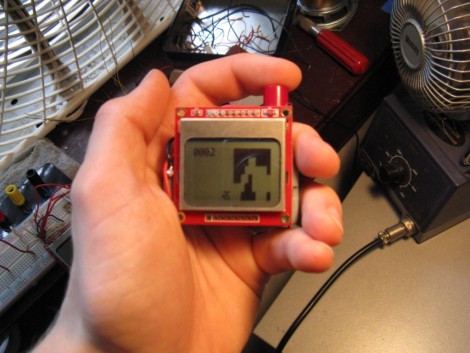
[Owen] just finished putting together a portable helicopter game. It’s pretty impressive, especially since he used an ATtiny13 microcontroller. That chip uses an 8-pin dip package, offering only five I/O pins (six if you use the reset pin) and 1k of programming space.

The game runs on a small cellphone-type LCD screen. The helicopter remains somewhere in the center column of the screen as the maze that makes up the game board approaches one step at a time. The single button that controls the helicopter will raise it with each step of the maze when held down, or allow it to fall when released. The player’s progress is shown as a hex value in the upper left corner of the screen. When you hit a wall, your score will be shown next to the high score for the game and will be saved in EEPROM if it’s a new record. As the game progresses, the maze gets harder based on the score. Check it out in a video clip after the break.

Continue reading “ATtiny13 Powered Handheld Helicopter Game”

Pulse Width Modulation With Microcontrollers

Those following the ProtoStack tutorials will be happy to hear that there is a new installment which explains Pulse Width Modulation. If you’ve never heard of PWM before, it’s a method of generating a signal that is logic 1 for a portion of the time and logic 0 for the remainder of the time. It is the most commonly used method for dimming an LED, and that’s [Daniel’s] example in this tutorial. But you’ll also find it used in many other applications such as servo motor control and piezo speaker control.

[Daniel] starts off with a brief explanation of duty cycle, then moves on to some examples of hardware and software PWM. Many of the AVR microcontrollers have a hardware PWM feature that allows you to configure a pin that toggles based on a target timer value. This is demonstrated using an ATmega168, but a method of using interrupts and your own code is also covered in case you don’t have a hardware PWM pin available.