Composite Video With MSP430 Chip

[NatureTM] used part of the Thanksgiving holiday to get composite video output working with an MSP430 microcontroller. He’s using one of the chips that came with the TI Launchpad, which is a big hardware limitation because of the relatively small code memory and RAM. The chip displays one still image at a resolution of 192×40 pixels. Still, this is a great way to learn about composite video signals, as a lot of other projects use a TVout library to save you the headaches. All you’ll need is a TI Launchpad, a 16 MHz crystal oscillator, two resistors, and an RCA jack. Dig through the code and see what a great job [NatureTM] did of offloading as much work onto the chip’s peripherals as possible.

Make Your Own Solenoids, Then Play The Xylophone

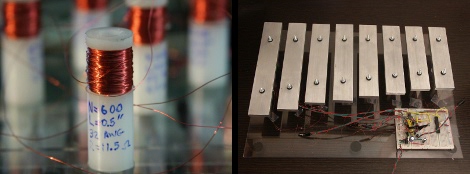
Learn to manufacture your own solenoids and then use them to play the xylophone by watching the tutorial video after the break. [Humberto Evans] and the team at Nerd Kits do a great job of not only manufacturing the coils, but the xylophone itself. The bars are machined from some aluminum stock and they take you down the rabbit hole with they why’s and how’s of engineering the keys.

We’re unlikely to replicate this machining process but the solenoids are another story all together. Starting at about 3:30 you can learn about designing, building, and using these little marvels. They’re basically an electromagnetic cuff with a metal slug in the middle. The solenoid seen above uses a body milled from HDPE and wrapped with magnet wire. The slug in the center is steel, with a few rare-earth magnets at the top. When you run current through the coil it repulses the magnets on the slug, witch then strikes the xylophone key. Using a MOSFET and a protection diode, actuating them is as simple as sending a digital high from your microcontroller of choice.

We’ve seen solenoids used to play a vibrophone before, but those were commercial units. Making your own hardware is far more hardcore.

Continue reading “Make Your Own Solenoids, Then Play The Xylophone”

J1: A Small, Fast, CPU Core For FPGA

[James Bowman] of the Willow Garage published a paper on his J1 CPU core for field-programmable gate arrays. This was originally developed and used for the Ethernet cameras on the PR2 (you know, that incredibly expensive beer delivery system?) robot. It uses a 16-bit von Neumann architecture and lacks several processor features you’d expect a CPU to have such as interrupts, multiply and divide, a condition register, and a carry flag. None-the-less, its compact at just 200 lines of Verilog and it can run at 80 MHz. [James] compares the J1 to three different FPGA CPU Cores commonly used and discusses how the system is built in his 4-page paper that has the details you’re interested in but won’t take all day to dig through.

VGA Interfacing AVR Microcontrollers

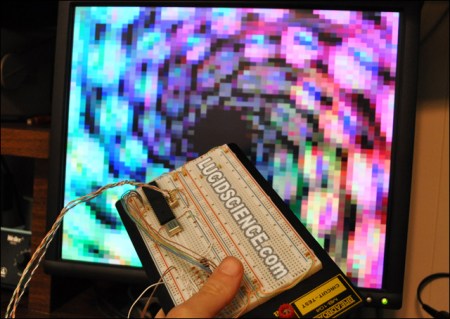
[Lucidscience] is back again, this time showing us how to push data to a VGA monitor from your AVR project.  It turns out that it is pretty simple, requiring only n open port and a few resistors and diodes. Well, it is that simple for the most basic version which gives you 56×60 pixels. Of course he couldn’t live with that and had to expand. Version 2 outputs 240×240 resolution and has additional sram and a double buffer making animations smoother and flicker free. As usual, the project is quite well documented with photos of the entire build process and schematics for you to build your own. A video of version 1 and version 2 are available after the break.

[via HackedGadgets]

Continue reading “VGA Interfacing AVR Microcontrollers”

SmartLCD Makes Video For Microcontrollers Easy

[Rossum] developed a host board that makes it easy to drive a TFT screen using an inexpensive microcontroller. He’s looked around at a bunch of LCD’s that are easy to get your hands on and decided that the iPod Nano 2G screens are the right balance of performance (176×132 TFT) and low cost ($1-$5). They’re not particularly difficult to talk to, but with 22 pins they’re a bit hardware hungry.

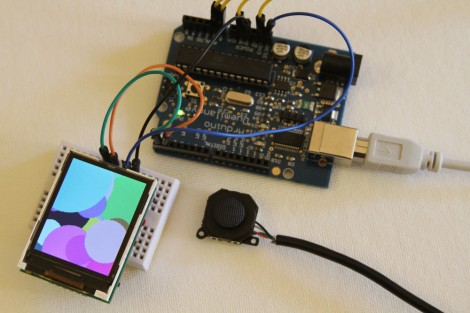
He takes us through the signal sniffing he used to figure out the communications process. From there he harness the power of an ARM Cortex M0 processor, which he’s worked with in the past, to drive the screen. His implementation results in a driver board called the SmartLCD that takes care of the screen’s parallel protocol, power, and backlight. From there it’s just four connections and you can use a small microcontroller like the Arduino seen above with ease. See what it can do after the break.

Continue reading “SmartLCD Makes Video For Microcontrollers Easy”

AVR Programming 04: Writing Code, Etc.

Welcome back to this fourth and final installment of the series. The first three parts should have been enough to get you off the ground, but a few more learning examples wouldn’t hurt. It’s also a good time to discuss some of the other things these little chips can do. Join me after the break to:

  • Expand the sample code, adding features to our simple program while I challenge you to write the code yourself.
  • Discuss AVR fuse bits, how to use them, and what to watch out for
  • Touch on some of the peripherals you’ll come across in these chips

As a grand flourish to the series, I’ve used the example hardware from this final part to build a bicycle tail light. Hopefully this will inspire you to create something much more clever.

Series roadmap:

Continue reading “AVR Programming 04: Writing Code, Etc.”

Build Your Own SOIC Progamming Clip

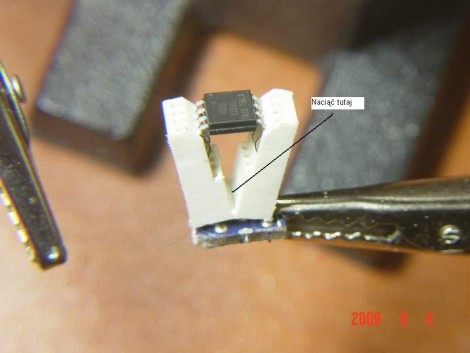
[Pyra] was looking for a way to reprogram some ATtiny13 microcontrollers in a SOIC package. He’s re-engineering some consumer electronics so adding an ISP header to the design isn’t an option. He had been soldering wires to the legs of every chip but this is quite tedious. What he needs is an adapter that can make physical contact with the legs just long enough to program new firmware. After looking around he discovered that a PCI socket can be used as a progamming clip (translated). It shares the same pitch as a standard SOIC package but is not wide enough for the chip. He cut out 4 rows of the socket and the section of motherboard it was soldered to. Then he made a cut down the middle of the plastic and bent the two sections apart. The image above illustrates this, but not shown are the eight wires that he later added to connect to the device.

We wonder if this can be adapted to program SOIC parts without removing them from a circuit board. That would be a handy tool for finishing up the LED lightbulb hack.