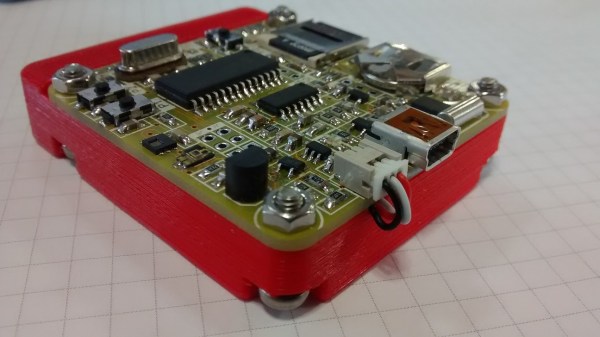
A Short Introduction To Staking And Potting

Staking and potting are not often used in the hobby electronics world, not really entering to the common vernacular. However, everyone who’s ever busted out a glue-gun to convince that dang wire that keeps coming loose to stay has done it.

However, as [Sean Thomas] touches on, staking is not necessarily as easy as a dob of hot glue. There is a method to the madness. [Sean] gives some examples in pictures, but also directs people to the excellent NASA standard methods for staking. It’s surprising how many unintuitive caveats there are to the proper technique.

Potting, or covering everything in epoxy forever, is a great way to get a waterproof, unserviceable, and practically mechanically invincible circuit. The big challenge in potting is picking the right material. A soft silicone, for example, might transfer an unexpected force to an unexpected section of the circuit and cause a mechanical failure. A nice hard epoxy may be too insulating and cause a thermal failure. The standard RTV from the big box store has acetic acid that will eat your components.

These two techniques that come in handy when you need them and worth the bit of reading it takes to get familiar. Have you used either in your own workshop? Let us know the application and the material/techniques you have tried in the comments below.

A Spreadsheet For Guesswork

Ever wish you could guess more precisely? Or maybe just make your guesses look confusingly legitimate? Guesstimate could help.

It uses Monte Carlo simulations to add some legitimacy to the ranges given to it. For example, if you say the cost of lumber for your next project could be between 2 and 8 dollars a piece, you don’t typically mean that it’s equally likely to be any of those numbers. Most people mean that the boards are most likely to be around 3-5 dollars and everything lower or higher is less probable. Using different shaped distributions, Guesstimate can help include this discrepancy of thought into your pseudo-calculations.

It’s a neat bit of code with a nice interface. There is a commercial side to the project for those who want to collaborate openly or pay someone to host it privately. It has a few neat example models for those interested.

Does anyone use anything like this in their daily lives? Is there another similar project out there? This kind of thing is pretty cool!

What Does ESD Do To My Circuit And How Can I Protect Against It?

[Kevin Darrah] is risking the nerves on his index finger to learn about ESD protection. Armed with a white pair of socks, a microfiber couch, and a nylon carpet, like a wizard from a book he summons electricity from his very hands (after a shuffle around the house). His energy focused on a sacrificial 2N7000 small signal MOSFET.

So what happens to a circuit when you shock it? Does it instantly die in a dramatic movie fashion: smoke billowing towards the roof, sirens in the distance? [Kevin] set up a simple circuit to show the truth. It’s got a button, a MOSFET, an LED, and some vitamins. When you press the button the light turns off.

He shuffles a bit, and with a mini thunderclap, electrocutes the MOSFET. After the discharge the MOSFET doesn’t turn the light off all the way. A shocking development.

So how does one protect against these dark energies out to destroy a circuit. Energies that can seemingly be summoned by anyone with a Walmart gift card? How does someone clamp down on this evil?

[Kevin] shows us how two diodes and a resistor can be used to shunt the high voltage from the electrostatic discharge away from the sensitive components. He also experimentally verifies and elucidates on the purpose of each. The resistor does nothing by itself, it’s there to protect the diodes. The diodes are there to protect the MOSFET.

In the end he had a circuit that could withstand the most vigorous shuffling, cotton socks against nylon carpeting, across his floor. It could withstand the mighty electric charge that only a grown man jumping on his couch can summon. Powerful magics indeed. Video after the break.

Continue reading “What Does ESD Do To My Circuit And How Can I Protect Against It?”

Sometimes Square Is Square: Basic Machinist Skills

Is it possible to make an entertaining video about turning a cube of aluminum into a slightly cubier cube? As it turns out, yes it is, and you might even learn something along with the sight gags and inside jokes if you watch [This Old Tony] cover the basics of squaring up stock.

Whether you’re working in wood or metal, starting with faces that are flat, smooth and perpendicular is the key to quality results. [Tony] is primarily a machinist, so he works with a nice billet of aluminum and goes through some of the fundamental skills every metalworker needs to know. When you’re working down to the thousandths of an inch it’s easy to foul up, and tricks such as using a ball bearing between the vise jaws and the stock to prevent canting are critical skills. He covers tramming the mill, selecting which faces to cut and in which order, and ways to check your work on the surface plate and make any corrections if and when things go wrong. Look for cameos by fellow machinist [Abom79] and [Stefan Gotteswinter], including one with [Stefan] in a very compromising position. But a ball in a vise and no [AvE] reference? C’mon!

[Tony] makes a potentially tedious subject pretty entertaining by keeping things light, and we appreciate both the humor and attention to detail. He’s turned out some great videos that we’ve covered before, like making your own springs or a shop-built boring head, and his stuff is really worth checking out.

Continue reading “Sometimes Square Is Square: Basic Machinist Skills”

The Most Impractical Bluetooth Speaker Of 2016

Ever feel overwhelmed by the sheer amount of usable surface area in your house? Ever wish that your Bluetooth speaker was fluffier? Do you ever long for a future in which all your music is accompanied by perfectly timed light flashes. Is the gentle passing of a cumulus cloud across a bright blue sky the only thing that will keep the voices at bay? We might have the speaker for you.

Joking aside the effect is pretty cool. It’s a standard levitation doohickey at it core. While we don’t know what the inside looks like exactly, we can take our guesses. The cloud has some magnets and a coil for receiving power. Inside is a hacked apart Bluetooth speaker, a microcontroller, and some LEDs. It’s all surrounded by fluffy white pillow stuffing and hot glue.

The base has a power supply and a rechargeable battery. We’re not sure why, we suppose it’s a pain to reset the floaty cloud. It’s certainly not portable. If you’d like one, it can probably be replicated with a few challenging weekends of work. The other option is to wait, as they claim to be pursuing a commercial something or another. Which these days means they’re gonna file for a patent on something everyone and their grandmother has done and then sell it as a six thousand dollar desk ornament. Still! Pretty cool. Video after the break.

Continue reading “The Most Impractical Bluetooth Speaker Of 2016”

Faux-AI Clapper Almost Seems To Be Listening

When a job can be handled with a microcontroller, [devttys0] likes to buck the trend and build a circuit that requires no coding. Such was the case with this “Clapper”-inspired faux-AI light controller, which ends up being a great lesson in analog design.

The goal was to create a poor man’s JARVIS – something to turn the workshop lights on with a free-form vocal command. Or, at least to make it look that way. This is an all-analog circuit with a couple of op amps and a pair of comparators, so it can’t actually process what’s being said. “Aziz! Light!” will work just as well as any other phrase since the circuit triggers on the amplitude and duration of the spoken command. The AI-lite effect comes from the clever use of the comparators, RC networks to control delays, and what amounts to an AND gate built of discrete MOSFETs. The end result is a circuit that waits until you finish talking to trigger the lights, making it seems like it’s actually analyzing what you say.

We always enjoy [devttys0]’s videos because they’re great lessons in circuit design. From block diagram to finished prototype, everything is presented in logical steps, and there’s always something to learn. His analog circuits that demonstrate math concepts was a real eye-opener for us. And if you want some background on the height of 1980s AI tech that inspired this build, check out the guts of the original “Clapper”.

Continue reading “Faux-AI Clapper Almost Seems To Be Listening”

OpenFixture Takes The Pain Out Of Pogo Pins

[Elliot] (no relation, but hey, cool name!) wrote in with his OpenFixture model for OpenSCAD. It’s awesome because it takes a small problem, that nonetheless could consume an entire day, and solves it neatly. And that problem is making jigs to test assembled electrical products: a PCB test fixture.

In the PCB design software, you simply note down the locations of the test points and feed these into the OpenSCAD model. ([Elliot] shows you exactly how to do it using KiCAD.) There are a few more parameters of the model that you can tweak to match your particulars, but you should have a DXF outline for a test jig in short order. Cut that out, assemble, and test.

If you have to make more than a few handfuls of a complicated circuit, it becomes worth it to start thinking about testing them systematically. And with this OpenSCAD model, you can have the test jig up and running before the first prototype boards are back in from the fab. How cool is that?