An Over-Engineered Basement Monitor

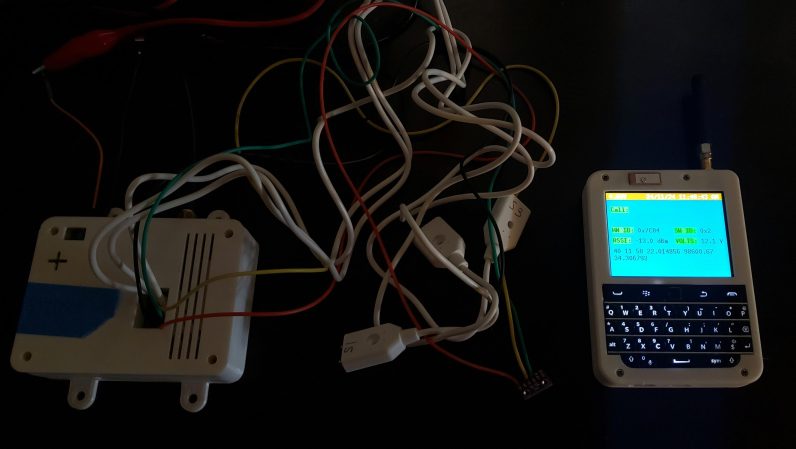
[Stephen] has a basement that depends on a sump pump. What that means is if the pump fails or the power goes out, the basement floods—which is rather undesirable. Not wanting to rely on a single point of failure, [Stephen] decided to build a monitor for the basement situation, which quickly spiralled to a greater degree of complexity than he initially expected.

The initial plan was just to have water level sensors reporting data over a modified CATS packet radio transmitter. On the other end, the plan was to capture the feed via a CATS receiver, pipe the data to the internet via FELINET, and then have the data displayed on a Grafana dashboard. Simple enough. From there, though, [Stephen] started musing on the possibilities. He thought about capturing humidity data to verify the dehumidifier was working. Plus, temperature would be handy to get early warning before any pipes were frozen in colder times. Achieving those aims would be easy enough with a BME280 sensor, though hacking it into the CATS rig was a little challenging.

The results are pretty neat, though. [Stephen] can now track all the vital signs of his basement remotely, with all the data displayed elegantly on a nice Grafana dashboard. If you’re looking to get started on a similar project, we’ve featured a great Grafana guide at a previous Supercon, just by the by. All in all, [Stephen’s] project may have a touch of the old overkill, but sometimes, the most rewarding projects are the ones you pour your heart and soul into!

E-Ink Screen Combined With Analog Dial Is Epic Win

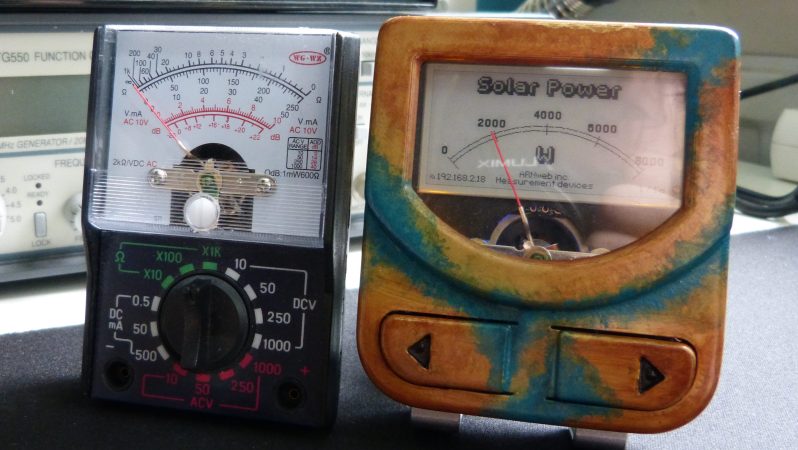
Analog dials used to be a pretty common way of displaying information on test equipment and in industrial applications. They fell out of favor as more advanced display technologies became cheaper. However, if you combine an analog dial with a modern e-ink display, it turns out you get something truly fantastic indeed.

This build comes to us from [Arne]. The concept is simple—get an e-ink display, and draw a dial on it using whatever graphics and scale you choose. Then, put it behind a traditional coil-driven analog dial in place of the more traditional paper scale. Now, you have an analog dial that can display any quantity you desire. Just update the screen to display a different scale as needed. Meanwhile, if you don’t need to change the display, the e-ink display will draw zero power and still display the same thing.

[Arne] explains how it all works in the writeup. It’s basically a LilyGo T5 ESP32 board with an e-ink screen attached, and it’s combined with a MF-110A multimeter. It’s super easy to buy that stuff and start tinkering with the concept yourself. [Arne] uses it with Home Assistant, which is as good an idea as any.

You get all the benefits of a redrawable display, with the wonderful visual tactility of a real analog dial. It’s a build that smashes old and new together in the best way possible. It doesn’t heart that [Arne] chose a great retro font for the dial, either. Applause all around!

Square Roots 1800s Style — No, The Other 1800s

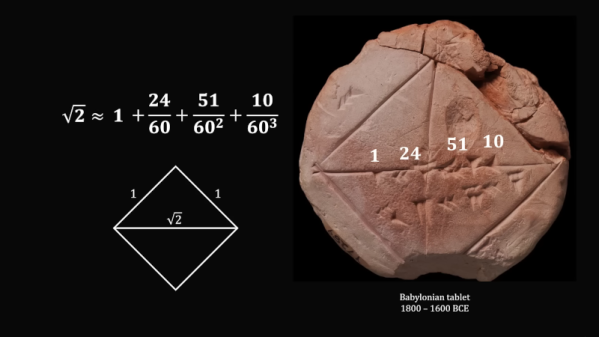
[MindYourDecisions] presents a Babylonian tablet dating back to around 1800 BC that shows that the hypotenuse of a unit square is the square root of two or 1.41421. How did they know that? We don’t know for sure how they computed it, but experts think it is the same as the ancient Greek method written down by Hero. It is a specialized form of the Newton method. You can follow along and learn how it works in the video below.

The method is simple. You guess the answer first, then you compute the difference and use that to adjust your estimate. You keep repeating the process until the error becomes small enough for your purposes.

Continue reading “Square Roots 1800s Style — No, The Other 1800s” →

RISC CPU Lives In Excel

Last time we checked in on [Inkbox], he had made a 16-bit CPU in Excel. Impressive, but not really practical. Presumably, his latest project isn’t any more practical, but we suspect an 8-bit RISC CPU was easier to implement in Excel and probably runs faster, too. The new machine uses a stack architecture with a simplified instruction set of ten instructions. You can follow along with his Excel adventure in the video below.

If you think about it, you may decide that doing something like this in Excel is easy because you could just script it and use Excel as the user interface. That’s true, but that’s not how [Inkbox] does it. He won’t use scripts or IF statements in a cell. That makes things much harder.

Continue reading “RISC CPU Lives In Excel” →

Custom Mouse Rocks Neat Thumbstick Design

A mouse is just two buttons, and a two-dimensional motion tracking system, right? Oh, and a scroll wheel. And a third button. And…now you’re realizing that mice can be pretty complicated. [DIY Yarik] proves that in spades with his impressive—and complex—mouse build. The only thing is, you might argue it isn’t really a mouse.

The inspiration for the mouse was simple. [Yarik] wanted something that was comfortable to use. He also wanted a mouse that wouldn’t break so often—apparently, he’s had a lot of reliability issues with mice in recent years. Thus, he went with a custom 3D-printed design with a wrist rest at the base. This allows his hand to naturally rest in a position where he can access multiple buttons and a central thumbstick for pointing. In fact, there’s a secondary scroll control and a rotary dial as well. It’s a pretty juicy control surface. Code is up on GitHub.

The use of a thumbstick is controversial—some might exclaim “this is not a mouse!” To them, I say, “Fine, call it a pointing device.” It’s still cool, and it look like a comfortable way to interface with a computer.

We’ve seen some other neat custom mice over the years, too, like this hilarious force-feedback mouse. Video after the break. Continue reading “Custom Mouse Rocks Neat Thumbstick Design” →

Simple Stack Of Ferrites Shows How Fluxgate Magnetometers Work

Have you ever wondered how a magnetometer works? We sure have, which was why we were happy to stumble upon this article on simple homebrew fluxgate magnetometers.

As [Maurycy] explains, clues to how a fluxgate magnetometer works can be found right in the name. We all know what happens when a current is applied to a coil of wire wrapped around an iron or ferrite core — it makes an electromagnet. Wrap another coil around the same core, and you’ve got a simple transformer.

Now, power the first coil, called the drive coil, with alternating current and measure the induced current on the second, or sense coil. Unexpected differences between the current in the drive coil and the sense coil are due to any external magnetic field. The difference indicates the strength of the field. Genius!

Continue reading “Simple Stack Of Ferrites Shows How Fluxgate Magnetometers Work” →

Analog Shift Register Revealed

Nowadays, if you want to delay an audio signal for, say, an echo or a reverb, you’d probably just do it digitally. But it wasn’t long ago that wasn’t a realistic option. Some devices used mechanical means, but there were also ICs like the TCA350 “bucket brigade” device that [10maurycy10] shows us in a recent post.

In this case, bucket brigade is a euphemism calling to mind how firemen would pass buckets down the line to put out a fire. It’s a bit of an analog analogy. The “bucket” is a MOSFET and capacitor. The “water” is electrical charge stored in the cap.  All those charges are tiny snippets of an analog signal.

Continue reading “Analog Shift Register Revealed” →