E3D’s Love Letter To Toolchanging 3D Printers

It’s been just over a year since E3D whetted our appetites for toolchanging printers. Now, with the impending release of their first toolchanging system, they’ve taken the best parts of their design and released them into the wild as open source. Head on over to Github for a complete solution to exchanging, locating, and parking tools on a 3D printer.

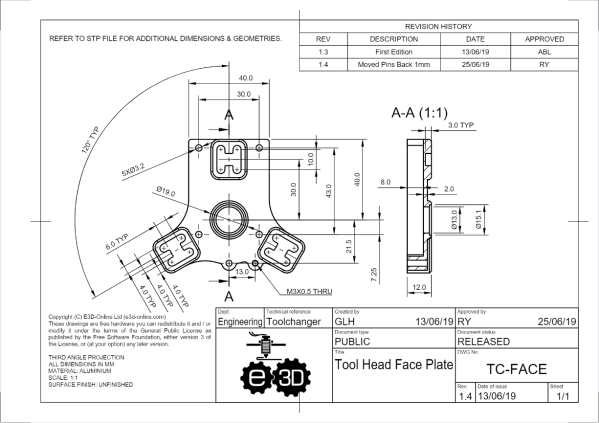
For anyone interested in fabricating the design, the files are in a format that you can almost re-zip and email to a manufacturer for quotes. As is, the repository offers STP-style CAD files, a complete set of dimensioned drawings, exploded views, and even a bill of materials. Taken as a whole, the system elegantly solves the classic problems that we’d encounter in toolchanging. Locking tools is done with a spring-based T-bar that swivels onto an wedge-shaped groove on the back of each tool plate. Locating tools is done so with a 3-groove kinematic coupling fabriacted from dowel pins. With these problems solved and presented so cleanly, these files become a path by which we can establish a common means for exchanging tools on 3D printer systems.

It’s worth asking: why develop an exceptional design and then release it for free? I’ll speculate that E3D has done an excellent job over the years establishing a well-recognized standard set of stock parts. Nearly every 3D printer builder is bound to have at least one spare V6 hotend sitting idle in a disassembled pool of former-3D-printers. With tool-changing positioned to become another step forward in the space of possibilities with 3D printing, setting the standard for tools early encourages the community to continue developing applications that lean on E3D’s ecosystem of parts.

In the last 30 years, 3D printing has transformed away from a patent-trolling duopoly to a community-friendly group of contributors that lean on each other’s shoulders with shared findings. It’s a kind gesture to the open-source community of machine builders to receive such a feature-complete mechanism. With that said, let’s start rolling the toolchanger hacks.

The Backbone Of VHF Amateur Radio May Be Under Threat

A story that has been on the burner for a few weeks concerns a proposal that will be advanced to the ITU World Radiocommunication Conference 2023. It originates with French spectrum regulators and is reported to be at the behest of the Paris-based multinational defence contractor Thales. The sting in its tail is the proposed relegation of amateur radio to secondary status of the widely used two-meter band (144 MHz) to permit its usage by aircraft. The machinations of global spectrum regulation politics do not often provide stories for Hackaday readers, but this one should be of concern beyond the narrow bounds of amateur radio.

Most parts of the radio spectrum are shared between more than one user, and there is usually a primary occupant and a secondary one whose usage is dependent upon not interfering with other users. If you’ve used 435 MHz radio modems you will have encountered this, that’s a band shared with both radio amateurs and others including government users. While some countries have wider band limits, the two-meter band between 144 MHz and 146 MHz is allocated with primary status to radio amateurs worldwide, and it is this status that is placed under threat. The latest ARRL news is that there has been little opposition at the pan-European regulator CEPT level, which appears to be causing concern among the amateur radio community.

Why should this bother you? If you are a radio amateur it should be a grave concern that a band which has provided the “glue” for so many vital services over many decades might come under threat, and if you are not a radio amateur it should concern you that a commercial defence contractor in one country can so easily set in motion the degradation of a globally open resource governed by international treaties penned in your grandparents’ time. Amateur radio is a different regulatory being from the licence-free spectrum that we now depend upon for so many things, but the principle of it being a free resource to all its users remains the same. If you have an interest in retaining the spectrum you use wherever on the dial it may lie, we suggest you support your national amateur radio organisation in opposing this measure.

Power To The Pi 4: Some Chargers May Not Make The Grade

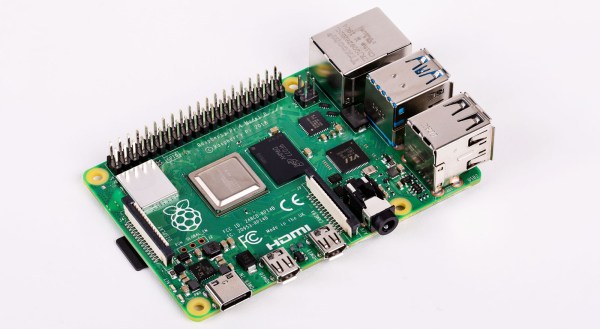
The Raspberry Pi 4 has been in the hands of consumers for a few days now, and while everyone seems happy with their new boards there are some reports of certain USB-C power supplies not powering them. It has been speculated that the cause may lie in the use of pulldown resistors on the configuration channel (CC) lines behind the USB-C socket on the Pi, with speculation that one may be used while two should be required. Supplies named include some Apple MacBook chargers, and there is a suggestion is that the Pi may not be the only device these chargers fail to perform for.

Is this something you should be worried about? Almost certainly not. The Pi folks have tested their product with a wide variety of chargers but it is inevitable that they would be unable to catch every possible one. If your charger is affected, try another one.

What it does illustrate is the difficulties faced by anybody in bringing a new electronic product to market, no matter how large or small they are as an organisation. It’s near-impossible to test for every possible use case, indeed it’s something that has happened to previous Pi models. You may remember that the Raspberry Pi 2 could be reset by a camera flash or if you have a very long memory, that the earliest boards had an unseemly fight between two 1.8 V lines that led to a hot USB chip, and neither of those minor quirks dented their board’s ability to get the job done.

Mistakes happen. Making the change to USB-C from the relative simplicity of micro-USB is a big step for all concerned, and it would be a surprise were it to pass entirely without incident. We’re sure that in time there will be a revised Pi 4, and we’d be interested to note what they do in this corner of it.

Is 4 GB The Limit For The Raspberry Pi 4?

So you’ve rushed off to your favourite dealer in Raspberry Pi goodies and secured your shiny new Raspberry Pi 4. Maybe you’re anxiously waiting for the postie, or perhaps if you’re lucky enough to live near Cambridge you simply strolled into the Pi shop and bought one over the counter. You’ve got the best of the lot, the 4 GB model, and there’s nothing like the feeling of having the newest toy before everyone else does.

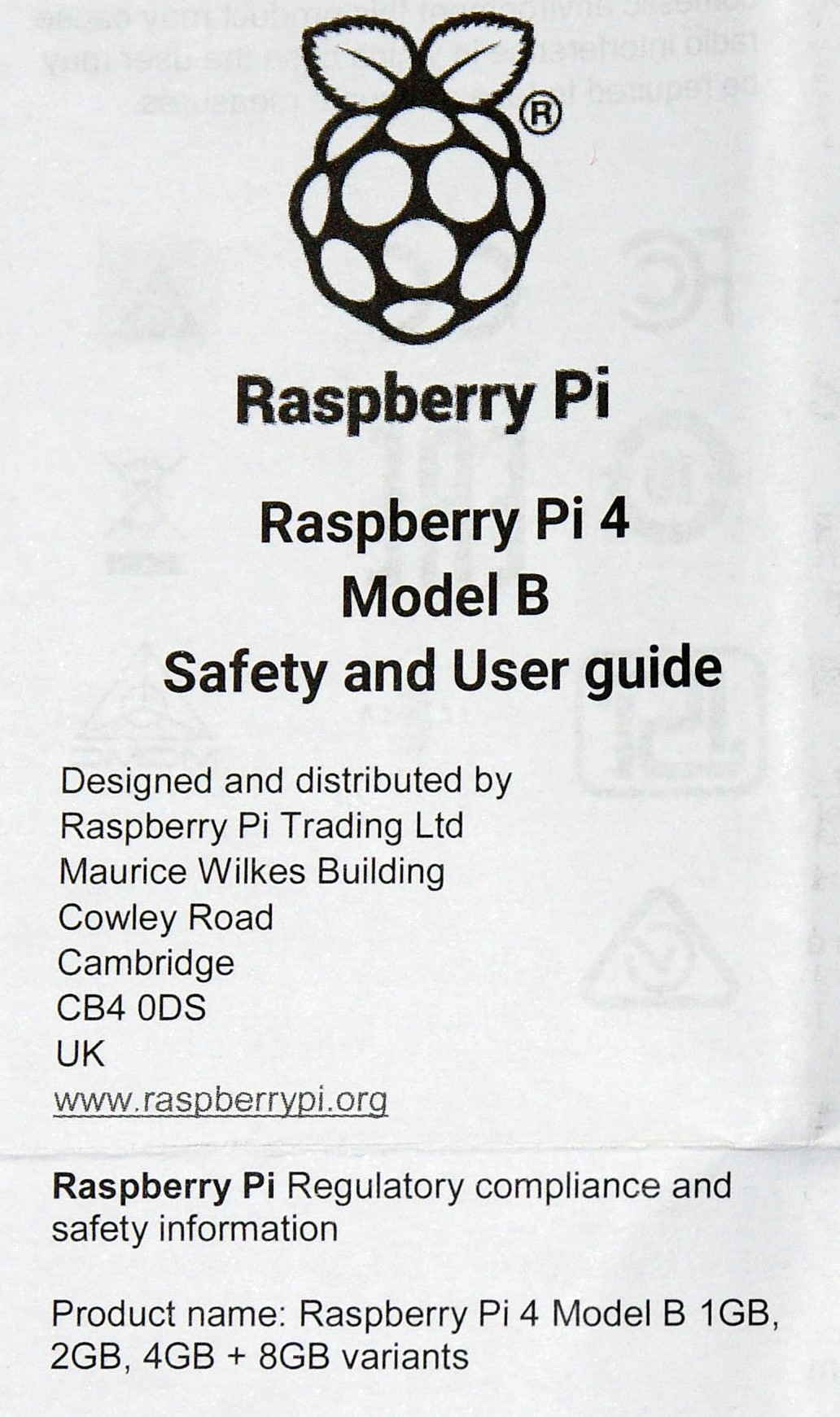
A scan of the Pi 4 user guide, with a tantalising 8GB at the bottom.

You open the box, pull out the Pi, and get busy. The instruction leaflet flutters to the floor, ignored and forgotten. If you’re our tipster [Eric van Zandvoort] though, you read it, notice something unexpected, and send a scan to your friends at Hackaday. Because there at the top, in the regulatory compliance information that nobody reads, is the following text:

Product name: Raspberry Pi 4 Model B 1 GB, 2 GB, 4 GB + 8 GB variants.

It’s not the lack of an Oxford comma that caught his eye, but the tantalising mention of an 8 GB Raspberry Pi 4. Could we one day see an extra model in the range with twice the memory? It would be nice to think so.

There are a couple of inevitable reactions when a new product comes out. First, everyone who has just bought the previous one will be upset, and second there will always be a group of people who say “Ah, don’t buy this one, wait for the super-duper upgrade model!” We’d like to suggest to anyone tempted into the latter group that this news should be no reason not to buy a Raspberry Pi 4 at the moment, because the prospect of an 8 GB variant should come as a shock to nobody.

It makes absolute sense that the Pi people will have equipped their SoC with as much address space as they can get into it, and equally as much sense that they will have fitted the final products with whatever memory chips keep it within their target price point. If you cast your mind back you’ll know that this isn’t the first time this has happened, early boards were shipped with 256 MB of RAM but later upgraded to 512 MB as the economics made it possible. Those with extreme knowledge of Pi trivia will also know that the original Model A was announced with 128 MB and released with 256 MB for the same reason.

There’s another question, would 8 GB make that much difference? The answer depends upon what you are doing with your Pi 4, but it’s worth remembering that this is no high-end workstation but a single-board computer with a stripped-down Linux distro for experimenters. You may be disappointed if you are pushing the limits of computational endeavour, but the majority of users will not be taxing Raspbian on the 4 GB model even if they install Chromium and open up all their favourite bloated social media sites. Perhaps we’ve become conditioned by the excessive demands of Windows on an x86 platform and forgotten just how powerful our computers really are. After all, as the apocryphal Bill Gates quote has it, “640k should be enough for anyone“, right?

We can look forward to an 8 GB Pi 4 then at some point in the future. We’d put our money on next year, since 2020 is a leap year and 2020-02-29 will be the Pi’s 2nd 8th birthday, it wouldn’t stretch the imagination to speculate around that date. But don’t bet on it, save your money for buying a 4 GB Pi 4 right now.

Small Lightsail Will Propel Cubesat

If you read science fiction, you are probably familiar with the idea of a light or solar sail. A very large and lightweight sail catches solar “wind” that accelerates a payload connected to the sail. Some schemes replace the sun with a laser. Like most things, sails have pros and cons. They don’t require you to carry fuel, but they are also maddeningly slow to accelerate and require huge sails since there isn’t much pressure produced by a star at a distance. So far not many real spacecraft have used the technique, IKAROS was the first back in 2010. However, this month should see the launch of a crowdfunded cubesat that will use a solar sail to move to a higher orbit.

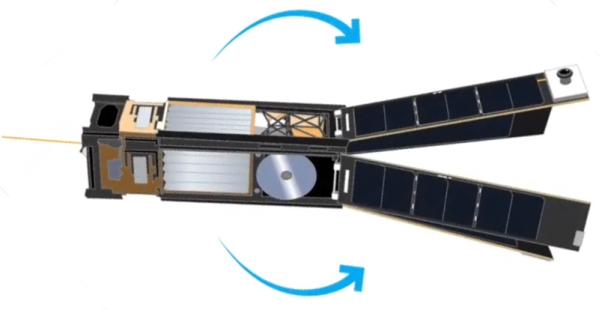
The 5 kg satellite built by Georgia Tech students is about the size of a loaf of bread. Once in orbit, it will deploy solar panels and a square solar sail nearly 20 feet long on each side. Despite the nearly 350 square feet of area, the sail is less than 5 microns thick. You can see more details about the mission in the video below.

Continue reading “Small Lightsail Will Propel Cubesat”

Raspberry Pi 4 Just Released: Faster CPU, More Memory, Dual HDMI Ports

The Raspberry Pi 4 was just released. This is the newest version of the Raspberry Pi and offers a better CPU and more memory than the Raspberry Pi 3, dual HDMI outputs, better USB and Ethernet performance, and will remain in production until January, 2026.

There are three varieties of the Raspberry Pi 4 — one with 1GB of RAM, one with 2GB, and one with 4GB of RAM — available for $35, $45, and $55, respectively. There’s a video for this Raspberry Pi launch, and all of the details are on the Raspberry Pi 4 website.

A Better CPU, Better Graphics, and More Memory

The CPU on the new and improved Raspberry Pi 4 is a significant upgrade. While the Raspberry Pi 3 featured a Broadcom BCM2837 SoC (4× ARM Cortex-A53 running at 1.2GHz) the new board has a Broadcom BCM2711 SoC (a quad-core Cortex-A72 running at 1.5GHz). The press literature says this provides desktop performance comparable to entry-level x86 systems.

Of note, the new Raspberry Pi 4 features not one but two HDMI ports, albeit in a micro HDMI format. This allows for dual-display support at up to 4k60p. Graphics power includes H.265 4k60 decode, H.264 1080p60 decode, 1080p30 encode, with support for OpenGL ES, 3.0 graphics. As with all Raspberry Pis, there’s a component  composite video port as well tucked inside the audio port. The 2-lane MIPI DSI display port and 2-lane MIPI CSI camera port remain from the Raspberry Pi 3.

Continue reading “Raspberry Pi 4 Just Released: Faster CPU, More Memory, Dual HDMI Ports”

Home Made Gears Save This Shredder

It’s very likely that a majority of readers will have had a gear fail in a piece of equipment, causing it to be unrepairable. This is a problem particularly with plastic gears, which shed teeth faster than a child who has discovered the financial returns of the Tooth Fairy.

[BcastLar] has a shredder with a gear that has, well, shredded. He’s posted a video series over three parts that while ostensibly about fixing his shredder, is in reality a three-part tutorial on how to create custom gears using FreeCAD. While the principles of a gear are readily apparent to most observers their intricacies hide significant complexity which he does a great job of explaining. How to measure the parameters of a given gear, explaining mysteries such as pitch angle or beta, he breaks everything down in easy to understand steps.

His tool of choice is FreeCAD, and while he explains that FreeCAD has the ability to make gears from scratch the tool employed in the videos is the Gear Workbench plugin. He shows how this software removes the complexity of creating a gear, and shows the process on his screen as he creates the custom shredder part.

Finally, the process of 3D printing the gear is explained. You might ask why not machine it, to which he responds that tooling for non-standard gear profiles is prohibitively expensive. We’ve placed all three videos below the break, and we think you might want to make yourself a cup of tea or something and work through them.

Thanks [Andy Pugh] for the tip.

Continue reading “Home Made Gears Save This Shredder”