Featured Image

Giving A Camera Mount A Little (Magnetic) Attractiveness

It’s probably safe to say that most hackers and makers don’t really want to fuss around with the details of making video documentation of their work. They would rather spend their time and energy on the actual project at hand…you know — the fun stuff.

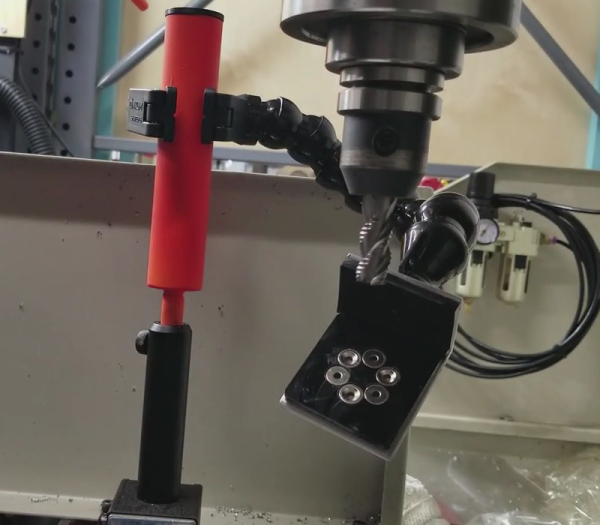
[Daniel Reetz] has been wanting more mounting options for his camera mount to make it easier and quicker to set up.  One end of his existing camera mount is a clamp. This has been working for [Daniel] so far, but he wanted more options. Realizing that he has plenty of ferrous metal surfaces around his shop, he had an idea — make a magnetic base add-on for his camera mount.

In the video, [Daniel] walks us through the process of creating this magnetic camera mount add-on, starting with the actual base. It is called a switchable magnetic base (or mag-base as he calls it) and looks like a handy little device. This was surely the most expensive part of the build, but looks like it should last a very long time. Basically, it’s a metal box with magnets on the inside and a rotating switch on the outside. When the switch is in one position, the box’s bottom is magnetic. Rotate the switch to the other position, and the bottom is no longer magnetic. These switchable magnetic bases come with a stud on top for attaching other things to it, which it looks like [Daniel] has already done. From there on out though, he explains and shows the rest of the build.

Some mild steel rod was cut and modified to slip into the pipe. The rod is held in place by a set screw which allows for easy adjustment of the mount’s height. Then he welds the rod to a washer which is, in turn, welded to a tube. After the welding, he takes the whole thing to a deburring wheel to clean it up. After that, the final touches are made with some spray paint and a custom 3D printed cap.

Sprinkled throughout the video are some useful tips, one of them being how he strips the zinc off of the washer with acid prior to welding. The reason for this is that you don’t want to weld over zinc because it produces neurotoxins.

Now [Daniel] can attach his camera mount quickly just about anywhere in his shop with the help of his new magnetic base.

There’s no shortage of camera mount hacks that we’ve covered. Here’s another one involving a magnet, but also has an automatic panning feature. Do you need a sliding camera mount? How about a motorized sliding camera mount — enjoy.

Continue reading “Giving A Camera Mount A Little (Magnetic) Attractiveness”

Raspberry Pi Malware Mines BitCoin

According to Russian security site [Dr.Web], there’s a new malware called Linux.MulDrop.14 striking Raspberry Pi computers. In a separate posting, the site examines two different Pi-based trojans including Linux.MulDrop.14. That trojan uses your Pi to mine BitCoins some form of cryptocurrency. The other trojan sets up a proxy server.

According to the site:

Linux Trojan that is a bash script containing a mining program, which is compressed with gzip and encrypted with base64. Once launched, the script shuts down several processes and installs libraries required for its operation. It also installs zmap and sshpass.

It changes the password of the user “pi” to “\$6\$U1Nu9qCp\$FhPuo8s5PsQlH6lwUdTwFcAUPNzmr0pWCdNJj.p6l4Mzi8S867YLmc7BspmEH95POvxPQ3PzP029yT1L3yi6K1”.

In addition, the malware searches for network machines with open port 22 and tries to log in using the default Raspberry Pi credentials to spread itself.

Embedded systems are a particularly inviting target for hackers. Sometimes it is for the value of the physical system they monitor or control. In others, it is just the compute power which can be used for denial of service attacks on others, spam, or — in the case — BitCoin mining. We wonder how large does your Raspberry Pi botnet needs to be to compete in the mining realm?

We hope you haven’t kept the default passwords on your Pi. In fact, we hope you’ve taken our previous advice and set up two factor authentication. You can do other things too, like change the ssh port, run fail2ban, or implement port knocking. Of course, if you use Samba to share Windows files and printers, you ought to read about that vulnerability, as well.

Amazon Gets A Patent For Parachute Labels

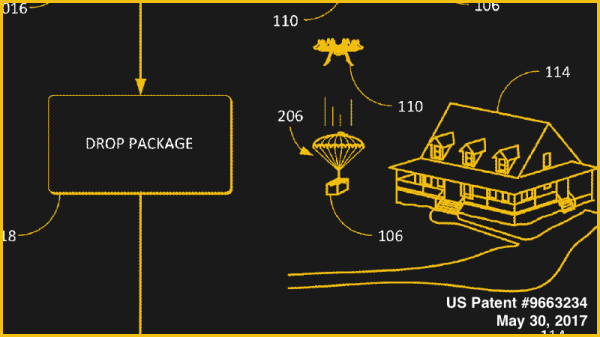
Delivery by drone is a reality and Amazon has been pursuing better and faster methods of autonomous package delivery. The US Patent and Trademark Office just issued a patent to Amazon for a shipping label that has an embedded parachute to ensure soft landings for future deliveries.

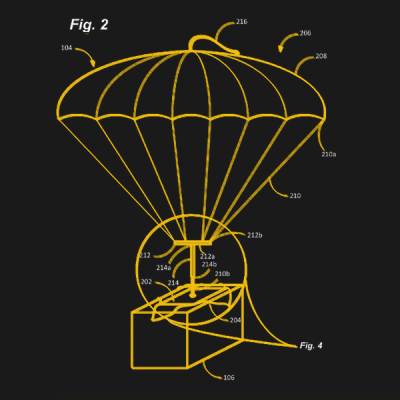
The patent itself indicates the construction consisting of a set of cords and a harness and the parachute itself is concealed within the label. The label will come in various shapes and sizes depending upon the size of the package and is designed to “enable the workflow process of shipping and handling to remain substantially unchanged”. This means they are designed to look and be used just like a normal printed label.

The objective is to paradrop your next delivery and by the looks of the patent images, they plan to use it for everything from eggs to the kitchen sink. Long packages will employ multiple labels with parachutes which will then be monitored using the camera and other sensors on the drone itself to monitor descent.

The system will reduce the time taken per delivery since the drone will no longer have to land and take off. Coupled with other UAV delivery patents, Amazon may be looking at more advanced delivery techniques. With paradrops, the drone need not be a multi rotor design and the next patent may very well be a mini trajectory correction system for packages.

If they come to fruition we wonder how easy it will be to get your hands on the labels. Materials and manufacture should both be quite cheap — this has already been proven by the model rocket crowd, and to make the system viable for Amazon it would have to be put into widespread use which brings to bear an economy of scale. We want to slap them on the side of beer cans as an upgrade to the catapult fridge.

Formlabs Announces A Desktop SLS 3D Printer

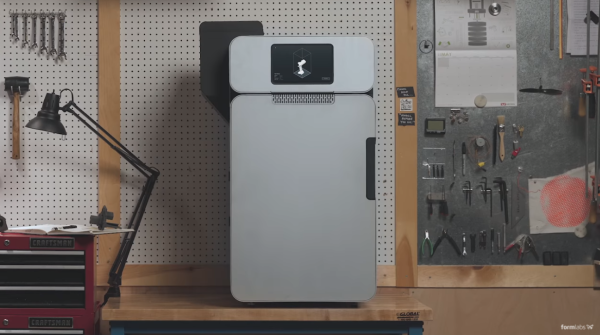
Formlabs have just announced the Fuse 1 — a selective laser sintering (SLS) 3D printer that creates parts out of nylon. Formlabs is best known for their Form series of resin-based SLA 3D printers, and this represents a very different direction.

SLS printers, which use a laser to sinter together models out of a powder-based material, are not new but have so far remained the domain of Serious Commercial Use. To our knowledge, this is the first time an actual SLS printer is being made available to the prosumer market. At just under 10k USD it’s definitely the upper end of the prosumer market, but it’s certainly cheaper than the alternatives.

The announcement is pretty light on details, but they are reserving units for a $1000 deposit. A few things we can throw in about the benefits of SLS: it’s powder which is nicer to clean up than resin printers, and parts should not require any kind of curing. The process also requires no support material as the uncured powder will support any layers being cured above it. The Fuse 1’s build chamber is 165 x 165 x 320 mm, and can be packed full of parts to make full use of the volume.

In the past we saw a detailed teardown of the Form 2 which revealed excellent workmanship and attention to detail. Let’s hope the same remains true of Formlabs’ newest offering.

Impression Products V. Lexmark International: A Victory For Common Sense

A few months ago we reported on a case coming before the United States Supreme Court that concerned recycled printer cartridges. Battling it out were Impression Products, a printer cartridge recycling company, and Lexmark, the printer manufacturer. At issue was a shrinkwrap licence on inkjet cartridges — a legal agreement deemed to have been activated by the customer opening the cartridge packaging — that tied a discounted price to a restriction on the cartridge’s reuse.

It was of concern to us because of the consequences it could have had for the rest of the hardware world, setting a potential precedent such that any piece of hardware could have conditions still attached to it when it has passed through more than one owner, without the original purchaser being aware of agreeing to any legal agreement. This would inevitably have a significant effect on the work of most Hackaday readers, and probably prohibit many of the projects we feature.

We are therefore very pleased to see that a few days ago the Supremes made their decision, and as the EFF reports, it went in favor of Impression Products, and us, the consumer.  In their words, when a patent owner:

…chooses to sell an item, that product is no longer within the limits of the monopoly and instead becomes the private individual property of the purchaser, with the rights and benefits that come along with ownership.

In other words, when you buy a printer cartridge or any other piece of hardware, it is yours to do with as you wish. Continue reading “Impression Products V. Lexmark International: A Victory For Common Sense”

Hijacking The Sonoff OTA Mechanism

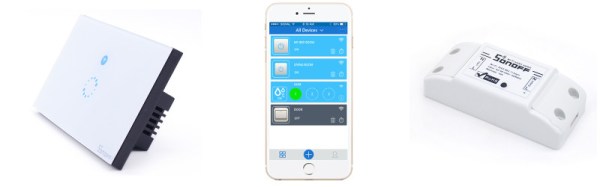
ITEAD’s Sonoff line is a range of Internet-of-Things devices based around the ESP8266. This makes them popular for hacking due to their accessibility. Past projects have figured out how to reflash the Sonoff devices, but for [mirko], that wasn’t enough – it was time to reverse engineer the Sonoff Over-The-Air update protocol.

[mirko]’s motivation is simple enough – a desire for IoT devices that don’t need to phone home to the corporate mothership, combined with wanting to avoid the labor of cracking open every Sonoff device to reflash it with wires like a Neanderthal. The first step involved connecting the Sonoff device to WiFi and capturing the traffic. This quickly turned up an SSL connection to a remote URL. This was easily intercepted as the device doesn’t do any certificate validation – but a lack of security is sadly never a surprise on the Internet of Things.

After capturing the network traffic, [mirko] set about piecing together the protocol used to execute the OTA updates. After a basic handshake between client and server, the server can ask the client to take various actions – such as downloading an updated firmware image.  After determining the messaging format, [mirko] sought to create a webserver in Python to replicate this behaviour.

There are some pitfalls – firmware images need to be formatted slightly differently for OTA updates versus the usual serial upload method, as this process leaves the stock bootloader intact. There’s also the split-partition flash storage system to deal with, which [mirko] is still working on.

Nevertheless, it’s great to see hackers doing what they do best – taking control over hardware and software to serve their own purposes. To learn more, why not check out how to flash your Sonoff devices over serial? They’re just an ESP8266 inside, after all.

Microchip’s PIC32MZ DA — The Microcontroller With A GPU

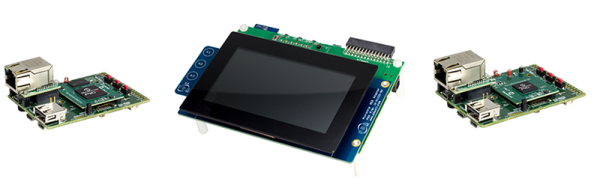
When it comes to displays, there is a gap between a traditional microcontroller and a Linux system-on-a-chip (SoC). The SoC that lives in a smartphone will always have enough RAM for a framebuffer and usually has a few pins dedicated to an LCD interface. Today, Microchip has announced a microcontroller that blurs the lines between what can be done with an SoC and what can be done with a microcontroller. The PIC32MZ ‘DA’ family of microcontrollers is designed for graphics applications and comes with a boatload of RAM and a dedicated GPU.

The key feature for this chip is a boatload of RAM for a framebuffer and a 2D GPU. The PIC32MZ DA family includes packages with 32 MB of integrated DRAM designed to be used as framebuffers. Support for 24-bit color on SXGA (1280 x 1024) panels is included. There’s also a 2D GPU in there with support for sprites, blitting, alpha blending, line drawing, and filling rectangles. No, it can’t play Crysis — just to get that meme out of the way — but it is an excellent platform for GUIs.

Continue reading “Microchip’s PIC32MZ DA — The Microcontroller With A GPU”