An Amiga computer at NASA

Retrotechtacular: Amiga Pips The PC For Mission-Critical Computing At NASA

In 1986, a group of NASA engineers faced a difficult choice in solving their data processing woes: continue tolerating the poor performance of PC architecture, or pony up the cash for exotic workstations. It turns out that the Commodore Amiga was an intriguing third choice, except for the fact that, paradoxically, it didn’t cost enough. Oh, and Apple wanted nothing to do with any of it.

Steeped in history, NASA’s Hangar AE is a hub for launch vehicle telemetry and other mission communications, primarily during prelaunch phases for launches at Cape Canaveral. Throughout the late 20th century, Hangar AE supported NASA launch vehicles in all shapes and sizes, from the Atlas-Centaur evolutions to the mighty Titan family. It even supported user data from the Space Shuttle program. Telemetry from these missions was processed at Hangar AE before being sent out to other NASA boffins, and even transmitted worldwide to other participating space agencies.

Coming down from decades of astronomical levels of funding, the 1980s was all about tightening the belt, and NASA needed budget solutions that didn’t skimp on mission safety. The Commodore Amiga turned out to be the right choice for processing launch vehicle telemetry. And so it was still, when cameras from the Amiga Atlanta group were granted permission to film inside Hangar AE.

Continue reading “Retrotechtacular: Amiga Pips The PC For Mission-Critical Computing At NASA”

The Faux-Vintage Becomes Vintage

For those who might have missed it, there was a brief period in the mid-00s where gamers everywhere eschewed consoles and PCs in favor of simple Flash-based games to be played in a browser. Among these was the game Peasant’s Quest, created by the folks at Homestar Runner and modeled after video games from the 80s. [deater] was a fan of this game and wondered if it would actually be possible to play this retro-styled game on actual retro hardware.

For the experiment he decided on using an Apple II since this computer is featured as a prop rather often by the developers at Videlectrix. It turns out that with some determination it’s actually possible to run this game on the late 80s hardware with very little modifications. Squeezing the sprites into the required space was a challenge, as well as getting the sound tracks to play properly, but in the end the game runs within the hardware’s 280×192 resolution with 6 colors. There are also detailed notes on how the complicated graphics system on the Apple works for those willing to take a deep dive. There’s a lot going on here, but surprisingly few compromises needed to be made to get this to work.

The game itself is available on the project’s webpage for anyone who still has an Apple II kicking around, or for anyone who is willing to try it out in an emulator. Of course you could always play the original Flash version but that’s missing a certain charm that decades old retrocomputers have with games. We certainly aren’t seeing video game controllers like those built for the Apple II anymore, for example.

Continue reading “The Faux-Vintage Becomes Vintage”

Yo Dawg, We Heard You Like Retrocomputers

The idea of having software translation programs around to do things like emulate a Super Nintendo on your $3000 gaming computer or, more practically, run x86 software on a new M1 Mac, seems pretty modern since it is so prevalent in the computer world today. The idea of using software like this is in fact much older and easily traces back into the 80s during the era of Commodore and Atari personal computers. Their hardware was actually not too dissimilar, and with a little bit of patience and know-how it’s possible to compile the Commodore 64 kernel on an Atari, with some limitations.

This project comes to us from [unbibium] and was inspired by a recent video he saw where the original Apple computer was emulated on Commodore 64. He took it in a different direction for this build though. The first step was to reformat the C64 code so it would compile on the Atari, which was largely accomplished with a Python script and some manual tweaking. From there he started working on making sure the ROMs would actually run. The memory setups of these two machines are remarkably similar which made this slightly easier, but he needed a few workarounds for a few speed bumps. Finally the cursor and HMIs were configured, and once a few other things were straightened out he has a working system running C64 software on an 8-bit Atari.

Unsurprisingly, there are a few things that aren’t working. There’s no IO besides the keyboard and mouse, and saving and loading programs is not yet possible. However, [unbibium] has made all of his code available on his GitHub page if anyone wants to expand on his work and may also improve upon this project in future builds. If you’re looking for a much easier point-of-entry for emulating Commodore software in the modern era, though, there is a project available to run a C64 from a Raspberry Pi.

Thanks to [Cprossu] for the tip!

Audio Cassette Tape Data Retrospective

It has been a long time since we stored software and computer data on audiotape. But it used to be the de facto standard for hobby computers and [Noel] has a great video about the Amstrad’s system (embedded below) which was pretty typical and how the process could be sped up since today, you have perfect audio reproduction, especially compared to consumer-grade audiotape.

The cassette tapes suffered from several problems. The tape had an inherently low bandwidth, there was quite a bit of noise present from the analog circuitry and heads, and the transport speed wasn’t necessarily constant. However, you can easily digitally synthesize relatively noise-free sound at high fidelity and rock-solid frequency. So basically a microcontroller, like an Arduino, can look like an extremely high-quality tape drive.

Continue reading “Audio Cassette Tape Data Retrospective”

Homebrew ROM Reader Saves Data From A Vintage Minicomputer

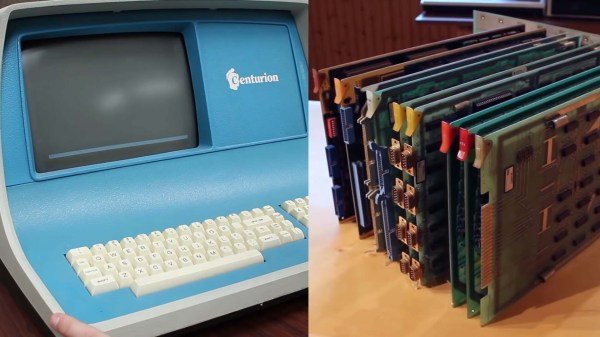
Have you ever heard of a Centurion minicomputer? If not, don’t feel bad — we hadn’t either, until [David Lovett] stumbled upon a semi-complete version of the 1980-ish mini in all its wood-trimmed, dust-encased glory. And what does a hacker do with such an acquisition but attempt to get it going again?

Of course, getting a machine from the Reagan administration running is not without its risks, including the chance of losing whatever is on the machine’s many ROM chips forever. When finding a commercial ROM reader supporting the various chips proved difficult, [David] decided to build his own. The work was eased considerably by the fact that he had managed to read one chip in a commercial reader, giving him a baseline to compare his circuit against. The hardware is straightforward — a 12-bit counter built from a trio of cascaded 74LS161s to step through addresses, plus an Arduino Nano to provide clock pulses and to read the data out to the serial port.

The circuit gave the same results as the known good read, meaning results would be valid for the rest of the chips. The breadboard setup made supporting multiple ROM pinouts easy, even for the chips that take -9 volts. What exactly the data on the ROMs mean, if anything, remains a mystery, but at least it’s backed up now.

Before anyone notes the obvious, yes, [David] could have used a 555 to clock the reader — perhaps even this one. We’d actually have loved that, but we get it — sometimes you just need to throw an Arduino at a job and be done with it.

Continue reading “Homebrew ROM Reader Saves Data From A Vintage Minicomputer”

Taking A Walk Down [Computer] Memory Lane

There’s nothing quite like going to a museum and being given a tour by a docent who really knows their way around the exhibits. When that docent has first hand experience in the subject matter, the experience is enhanced even further. So you can imagine our excitement when hacker, maker, and former DEC mainframe memory engineer [Ned Utzig] published a tour of what he calls “Memories of Weird Memories of Computers Past.” [Ned] expertly guides us through each technology, adding flavor and nuance to an already fascinating subject.

The tour begins with early storage media such as IBM punch cards, and then walks us through time to the paper tape, vacuum tubes, and even complex vats of mercury — all used for the sake of storing data either permanently or temporarily.

Next in the exhibit is an impressive CRT hack that isn’t unlike modern DRAM. The tour continues on to ferrite core memory such as that used on mainframes, minicomputers, and even the Apollo Guidance Computer. Each type is examined for its strengths and weaknesses and its place in computing history.

We really appreciated the imaginative question posed toward the end of the article. We won’t give it away here- it’s worth it to go give The Mad Ned Memo a read.

Is obsolete technology your cup of tea? Perhaps an Arduino based experiment with core memory will scratch the itch, or maybe storing data in thin air will bring back memories of computers gone by.

This Old Mouse: Building A USB Adapter For A Vintage Depraz Mouse

When [John Floren] obtained a vintage Depraz mouse, he started out being content to just have such a great piece of history in his possession. But if you’re like him, you know it’s not enough to just have something. What would it be like to use it?

To find out, [John] embarked on a mission to build a USB adapter for his not so new peripheral.
Originally used in very early terminals with a Unix GUI, the Depraz mouse utilizes an unusual male DE9 connector rather than the more familiar female DB9 used in RS232 serial mice. Further deviating from the norm, he found that the quadrature encoders were connected directly to the DE9 connector.

Armed with an Arduino Pro Mini Micro and some buggy sample code, he got to work. The aforementioned buggy code was scrapped and a fresh sketch for the Arduino Pro Mini Micro gave the Depraz mouse the USB interface it lacked. [John] also found that he wasn’t the first hardware hacker to have modified the mouse for their use. Be sure to read to the end the article to find out about the vintage surprise lurking in the mouse shell itself! A demonstration of the mouse in action can be seen in the video below the break.

Looking for a fun mouse hack? Perhaps you’d like to use your more modern USB mouse on a retro computer, or try your hand at recreating an early Apple mouse for use in modern computers.

Continue reading “This Old Mouse: Building A USB Adapter For A Vintage Depraz Mouse”