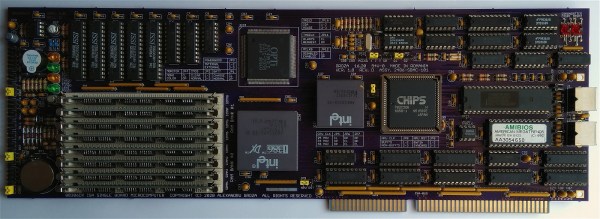
CRISS CP/M Provides Modern Hardware For A Classic OS

Today you might choose run Windows, Linux, MacOS or some other OS on your computer. Back in the 1980s however, you generally had little choice: a certain home computer came with a certain OS, and that was it. If yours was based on a Z80 processor, chances are it ran CP/M. While differences in hardware often made direct data exchange difficult, CP/M provided at least a basic level of software compatibility between various Z80-based computers. Although eventually supplanted by MS-DOS (which initially aimed to be compatible with CP/M), enthusiasts kept the classic OS running on old hardware throughout the 90s and even beyond.

[Igor] decided to make a 21st-century CP/M machine by designing the CRISS, a single-board computer based mainly on AVR microcontrollers. The CPU is a 20 MHz ATMEGA1284P, which imitates a 4 MHz Z80 through machine-code emulation. A pair of ATMEGA328s run the peripheral controller and a VGA output, so the CRISS can be used with modern monitors. True to its heritage however, the image is monochrome green-on-black, looking instantly familiar to users of Kaypros, Osbornes and other contemporary CP/M machines.

Software is loaded through an SD card that holds floppy images. The CRISS can directly run programs written for the Kaypro II and Robotron 1715 computers, although other platforms can be supported as well with a software upgrade. [Igor] shows it running programs ranging from the Turbo Pascal compiler to games like Xonix and Tetris.

Housed in a neat little case, the CRISS can communicate with standard PS/2 keyboards and serial printers. Even an Ethernet port is provided for those willing to experiment with network connectivity (a rare feature in the 1980s).

We love seeing modern retro builds like this; similar projects we’ve covered before include the compact ZZ80MB and the huge Z20X. Others have used different ways of running CP/M on modern hardware, such as booting it directly on a Raspberry Pi or emulating an Altair on an ESP32.

DEC microVAX with tape drive

Bake It To ReMake It: Cooking Old Magnetic Tape To Recover Data

Those of us old enough may remember the heyday of the text adventure game genre from the first time around. London-based Magnetic Scrolls was an early pioneering company producing titles for the first Amiga and Atari ST platforms. Fast-forward to 2017 and [Hugh Steers], the original co-founder and core developer for Magnetic Scrolls has formed an initiative to revive and re-release the original games on modern platforms. Since the 1980s-era DEC MicroVAX used originally for development is not particularly rare in retro computing circles, and media containing source code was found in someone’s loft space, reviving the games was not a tall order.

First, he needed to recover a copy of the original source code from the backup tapes. But there was a problem, it turns out that the decaying tapes used a unstable polyurethane-based binder to stick the oxide material (which is what stores the data) to the backing tape, and this binder can absorb water over the years.

Not much happens until you try to read the tape, then you trip over the so-called sticky-shed syndrome. Secondly you may find that a small amount of the oxide layer sheds from the tape, coating the read head, rollers and guides inside the complicated tape mechanism. This quickly results in it gumming up, and jamming, potentially chewing up the tape and destroying it permanently.

This was further exacerbated by the behaviour of the DEC TK50Z tape drive, which needed to shuttle the whole length of the tape as part of its normal operation.

A temporary solution was to bake the tape in an oven to drive out the moisture and reduce the stickiness enough to run it through the drive safely. Then only the oxide-shedding problem remained. The TK50Z drive was swapped for a TZ30 which shuttles the tape less, but also critically with a simple hack, would allow the heads to be cleaned with IPA between read passes. This was enough to keep the gumming up at bay and allow enough data to be read from the tapes to recover several games worth of code, ready for the re-releasing process.

The video after the break shows [Rob Jarratt] working through the process of the data recovery.

Continue reading “Bake It To ReMake It: Cooking Old Magnetic Tape To Recover Data”

A computer green screen image of an IRC message of the day

IRC Server For MS-DOS

The recent flurry of projects based around Internet Relay Chat (IRC) should be a fair indication that the beloved protocol is not going anywhere. Now, thanks to [Mike Chambers], you can add to the IRC ecosystem by hosting your very own MS-DOS based IRC server.

This port of ngIRCd (Next Generation IRC Daemon) has already been spun up on 8088-based PCs running at just 4.77MHz, but you’ll still need at least 640KB of RAM. If your vintage IRC server takes off, you might want to think about dropping in an 10MHz V20 for a bit of a performance boost. Even so, it’s impressive that this server can get up on the 40-year-old IBM 5150, and should absolutely scream on an AT-class system.

The limitations of the 16-bit platform means that SSL and ZLIB are unsupported, and Mike has capped total connections at 50 in his port (however, this limitation can be adjusted by rebuilding from source, should you want to find out how far 640KB of RAM can take you). You’ll also need a few other things to get your server up and running, such as a packet driver for your network card and an mTCP configuration file.

Setting up your own IRC server is arguably a right rite of passage for most hackers and tinkerers, but getting this up and running on a decades-old beige box would make for a fun weekend project. [Mike] has all the juicy details on GitHub, and you can check out a test server running the latest build over at irc.xtulator.com.

Also, don’t forget to visit the #hackaday IRC channel over on irc.libera.chat.

[Thanks Sudos for the hot tip]

Apple II computer on a workbench

Simple Fan Controller Helps Apple II To Beat The Heat

In its day, the Apple II computer didn’t typically require active cooling. However, the increasing scarcity of replacement hardware convinced [Joshua Coleman] to come up with a more robust active cooling solution for his Apple II+, increasing the likelihood that it will keep on crunching numbers for decades to come.

Joshua mentions that he recorded temperatures inside his Apple II+ peaking at 110 Fahrenheit (over 43 Celsius). This isn’t totally unexpected for a fully-loaded Apple II system, and components were built to handle this – the original datasheet for the 6500 microprocessor family reveals that the CPU can handle temperatures as high as 158 Fahrenheit (70 Celsius). Unfortunately, we’re not dealing with brand new components anymore. Decades-old microprocessors don’t necessarily have the same thermal tolerance as they once did. All components will eventually wear out, and heat can certainly accelerate the aging process.

In the interests of maintaining his system, Joshua cobbled together an Arduino-based cooling system for his Apple II+. A temperature/humidity sensor continuously monitors the heat situation inside the case – when things get too toasty, a 12V fan powers up to draw fresh air over the logic board and expansion cards. A simple cooling curve reduces wear on the fan motor and relay.

This is hardly the first active cooling system for the Apple II line – in the 1980s, Kensington produced a popular (if not stupendously ugly) ‘System Saver’ accessory, an external bolt-on fan that kept things running cool. These were often deployed in schools and by power users looking for added reliability when maxing out the Apple II expansion slots, a configuration that could increase temperatures due to the extra power requirements and reduced airflow.

Continue reading “Simple Fan Controller Helps Apple II To Beat The Heat”

Psion Organiser with a Pico memory pack.

Proto-PDA Regains Its Memory With The Help Of A Raspberry Pi Pico

Remember the Psion Organiser? If you do, chances are you were an early adopter, as the 8-bit pocket computer had its heyday in the mid-1980s. Things have come a long way since then, of course, but just how far is illustrated nicely by the fact that a Raspberry Pi Pico can stand in for the Psion’s original memory packs.

Like many of the early attempts at putting a computer in your pocket, the Psion II had removable modules, which were dubbed “Datapaks”. The earliest versions of the Datapaks were little more than an EPROM chip on a small PCB, and the technical limitations of the day plus the quirky way of addressing the memory made it possible for [Amen] to mimic a Datapak using a modern microcontroller.

The first version was a breakout board that extended out of the Datapak slot significantly, with a Pico, OLED display, SD card slot, and a bunch of pushbuttons. That prototype proved that the Pico was indeed fast enough to fool the Psion into thinking a legit Datapak was plugged in. [Amen] later refined the design by making a board that stuffs everything into the Datapak slot, with the exception of the OLED which still dangles out where it can be seen. He puts the faux memory to the test in the video below.

It’s great to see groundbreaking tech of yesteryear like the Psion being taken care of and returned to use. We’ve seen others try before; here’s a hack that uses a Pi to connect a Psion Organiser to the internet through its RS-232 serial port.

Continue reading “Proto-PDA Regains Its Memory With The Help Of A Raspberry Pi Pico”

Interactive Musical Art Installation Mixes Vintage, Modern, Lasers, And…Bubbles? Bubbles.

Acorn BBC Master. Apple IIe. Ampex 270 Terminal. Vectrex game console. You’d be hard pressed to find a more diverse hardware collection in the average hacker’s lab. When you add seven Raspberry Pi’s, five CRT monitors, an analog oscilloscope and an LED wall to the mix, one starts to wonder at the menagerie of current and retro hardware. What kind of connoisseur would have such a miscellaneous collection? That’s when you spot smoke and fog machines sitting next to an RGB Laser.

Finally, you learn that all of this disparate paraphernalia is networked together. It is then that you realize that you’re not just dealing with a multi-talented hacker- you’re dealing with a meticulous maestro who’s spent lockdown finishing a project he started nearly twenty years ago!

AUVERN comes alive in a show of light and sound whenever someone enters its view.

The machine is called AUVERN and it’s the product of the creative mind of [Owen]. Taking advantage of advances in technology (and copious amounts of free time), [Owen] laboriously put his collection of older rigs to work.

A Python script uses a Kinect sensor’s input to control a Mac Mini running Digital Audio Workstation software. The operator’s location, poses and movements are used to alter the music, lights, and multimedia experience as a whole. MIDI, Ethernet, and serial communications tie the hardware together through Raspberry Pi’s, vintage MIDI interfaces, and more. Watch the video below the break for the technical explanation, but don’t miss the videos on [Owen]’s website for a mesmerizing demonstration of AUVERN in full swing.

AUVERN makes use of the Vectrex32 upgrade which we have previously covered, and we are unavoidably reminded of another pandemic inspired bubble machine. Don’t forget to send us your hacks, projects, and creations through the Tip Line!

Continue reading “Interactive Musical Art Installation Mixes Vintage, Modern, Lasers, And…Bubbles? Bubbles.”

David Murray and Kevin Williams with an early X16 prototype

Commander X16: A Dreamy 8 Bit Computer Comes Closer To Reality

Imagine the ultimate homage to 1980s 8-bit home computers. It might  look like [David Murray] aka The 8-Bit Guy’s Commander X16.

As a core group of geeks, hackers, and developers age, we yearn for the computers of our youth. VIC-20s, Commodore Pets, 64s, 128s, Ataris, Apple IIes, and the list goes on and on. For many of us, our first hands on experience with a computer was with such a machine that is now called “retro”. Sadly, many of these relics are getting more expensive as demand increases and supplies dwindle. Working examples are harder to find, and even those can break down. Original monitors, peripherals, and accessories are also getting scarcer. This is all quite understandable when we consider that some of these classics are over 40 years old.

What was it that we loved about these old rigs that makes them so attractive? [David] decided to distil what makes a classic a classic, and then turn that list into a spec list for what he calls his “Dream Computer”. He found that things like a printed and spiral bound manual were a big part of the charm and utility of these early home computers. Booting directly to a prompt and being able to directly control the hardware was another highly desirable trait.

[David] also took the time to determine what people don’t like about these retro machines: Wacky keyboard layouts, composite video output, and glacially slow storage. Swapping multiple floppies to load a program or respooling a cassette tape is just as undesirable in 2021 as it was in 1981. Who knew?

X16 Prototype #3
The X16’s’ prototyping is still in progress.

The result of [David]’s research is the Commander X16. Inspired by the VIC-20, it’s a fresh take on the retrocomputer that only uses parts that are currently available. You can see the first video in a series about the development of the X16 below the break. Be aware that a lot of progress has been made since the video came out in 2019, but it still provides an excellent starting point for learning about the project.

The X16’s specifications read like dream list made in the mid 80s: 256 color VGA, up to 2MB memory, an 8 MHz 6502, plenty of expansion ports, and even ports for SNES style controllers.  And what else will this dream machine include? You guessed it: A spiral bound manual!

It’s not possible to list all of the great features of the X16 in this space, so check out the Commander X16 FAQ for all the details. If this project makes your heart go pitter patter, you may be interested to know that they need help with software development! An emulator is available for development. The goal is to have a healthy software ecosystem in place when the X16 launches.

You may also enjoy reading about other 6502 retrocomputer reports such as this “Brain in a vat” 6502 computer, or a guided tour of the birthplace of the 6502 and the Commodore 64 with our very own Bil Herd.

Thank you to [Truth] for bringing us a report of this fine project via the Tip Line. Keep those tips coming!

Continue reading “Commander X16: A Dreamy 8 Bit Computer Comes Closer To Reality”