A Look Inside The Space Shuttle’s First Printer

There was even a day not too long ago when printers appeared to be going the way of the dodo; remember the “paperless office” craze? But then, printer manufacturers invented printers so cheap they could give them away while charging $12,000 a gallon for the ink, and the paperless office suddenly suffered an extinction-level event of its own. You’d think space would be the one place where computer users would be spared the travails of printing, but as [Ken Shirriff] outlines, there were printers aboard the Space Shuttle, and the story behind them is fascinating.

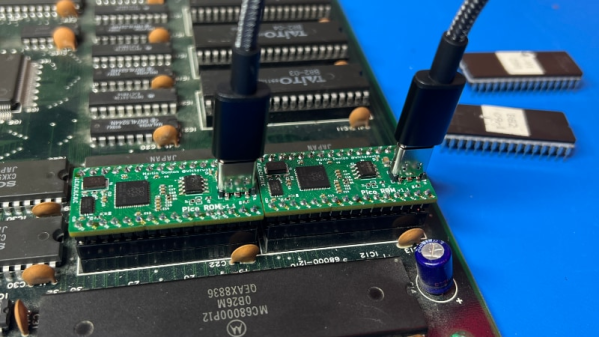
The push for printers in space came from the combined forces of NASA’s love for checklists and the need for astronauts in the early programs to tediously copy them to paper; Apollo 13, anyone? According to [Ken], NASA had always planned for the ability to print on the Shuttle, but when their fancy fax machine wasn’t ready in time, they kludged together an interim solution from a US military teleprinter, the AN/UG-74C. [Ken] got a hold of one of these beasts for a look inside, and it holds some wonders. Based on a Motorola MC6800, the teleprinter sported both a keyboard, a current loop digital interface, and even a rudimentary word processor, none of which were of much use aboard the Shuttle. All that stuff was stripped out, leaving mostly just the spinning 80-character-wide print drum and the array of 80 solenoid-powered hammers, to bang out complete lines of text at a time. To make the printer Shuttle-worthy, a 600-baud frequency-shift keying (FSK) interface was added, which patched into the spaceplane’s comms system.

[Ken] does his usual meticulous analysis of the engineering of this wonderful bit of retro space gear, which you can read all about in the linked article. We hope this portends a video by his merry band of Apollo-centric collaborators, for a look at some delicious 1970s space hardware.

Serve Your Next Website With QuickBasic

You can only imagine that when they made Star Trek back in the 1960s, they would have laughed if anyone suggested they’d still be making the show nearly six decades later. If you told [John Kemeny] at Dartmouth back in 1964 that people would be serving websites in Basic in the year 2024, he’d probably be amazed after you explained what a website was. But that’s what [Jamonholmgren] is doing.

[Jamon] wrote his first Basic program when he was 12, which was a common thing to do. Recently, he decided to build and deploy a website using Basic, and so this project, qub (pronounced like cube), was born. The web server is modified from an existing source but adds features and many new features are planned.

Continue reading “Serve Your Next Website With QuickBasic”

At Last, Chumby Is Ready

It has been two years, but the slow and steady progress that [Doug Brown] has been making towards bringing a modern Linux kernel to the Chumby has approached the point that it could be called done. In his final blog post of the series, [Doug] walks through the highs and lows of the whole process.

Many of the changes [Doug] and others have made are already upstream in the Linux mainline. However, some will likely remain in private branches for a few reasons that [Doug] gets into. The blog post covers every commit needed to turn a Chumby or other Marvell ARMADA-powered widget into a working device. At the end of the day, what does [Doug] have to show? He can turn it on, see a boot logo, and then see an indefinite white screen. While underwhelming to most of the world, an X server is coming up, Wi-fi is online, the time syncs from an NTP server, and the touchscreen is ready to be tapped. A white screen, yes, but a white screen of potential. [Doug] has to decide what to launch after boot.

However, the future of the Chumby and other older devices is still on the chopping block of progress. Compiler writers want to drop support for platforms that nobody uses anymore, and the Chumby is ARMv5. With many changes destined to languish, [Doug] still considers it a huge success, and we do too. The whole series represents a journey with beautiful lessons about the power of the Linux device tree, making the dark and scary world of Linux kernel drivers seem a little more approachable.

We’ve covered the first post and when graphics started coming along. We salute the mighty Chumby and the idea it stood for. Of course, the idea of a handy screen displaying information is still alive and well. This handy e-paper HomeAssistant display is just one of many examples.

Apollo Computer: The Forgotten Workstations

Ever heard of Apollo Computer, Inc.? They were one of the first graphical workstation vendors in the 1980s, and at the time were competitors to Sun Microsystems.

But that’s enough dry historical context. Feast your eyes on this full-color, 26-page product brochure straight from 1988 for the Series 10000 “Personal Supercomputer” featuring multiple processors and more! It’s loaded with information about their hardware and design architecture, giving a unique glimpse into just how Apollo was positioning their offerings, and the markets they were targeting with their products.

Apollo produced their own hardware and software, which meant much of it was proprietary. Whatever happened to Apollo? They were acquired by Hewlett-Packard in 1989 and eventually shuttered over the following decade or so. Find yourself intrigued? [Jim Rees] of The Apollo Archive should be your next stop for everything Apollo-oriented.

Vintage computing has a real charm of its own, but no hardware lasts forever. Who knows? Perhaps we might someday see an Apollo workstation brought to life in VR, like we have with the Commodore 64 or the BBC Micro (which even went so far as to sample the sound of authentic keystrokes. Now that’s dedication.)

Pixel Art And The Myth Of The CRT Effect

The ‘CRT Effect’ myth says that the reason why pixel art of old games looked so much better is due to the smoothing and blending effects of cathode-ray tube (CRT) displays, which were everywhere until the early 2000s. In fits of mistaken nostalgia this has led both to modern-day extreme cubism pixel art and video game ‘CRT’ filters that respectively fail to approach what pixel art was about, or why old games looked the way they did back with our NES and SNES game consoles. This is a point which [Carl Svensson] vehemently argues from a position of experience, and one which is likely shared by quite a few of our readers.

Although there is some possible color bleed and other artefacts with CRTs due to the shadow mask (or Sony’s Trinitron aperture grille), there was no extreme separation between pixels or massive bleed-over into nearby pixels to create some built-in anti-aliasing as is often claimed unless you were using a very old/cheap or dying CRT TV. Where such effects did happen was mostly in the signal being fed into the CRT, which ranged from the horrid (RF, composite) to the not-so-terrible (S-Video, component) to the sublime (SCART RGB), with RGB video (SCART or VGA) especially busting the CRT effect myth.

Where the pixel art of yester-year shines is in its careful use of dithering and anti-aliasing to work around limited color palettes and other hardware limitations. Although back in the Atari 2600 days this led to the extreme cubism which we’re seeing again in modern ‘retro pixel art’ games, yesterday’s artists worked with the hardware limitations to create stunning works of arts, which looked great on high-end CRTs connected via RGB and decent via composite on the kids’ second-hand 14″ color set with misaligned electron guns.

An odd looking apparatus for cleaning floppy disks. A neon green disk tray is suspended on metal linear rails in a vertical orientation. It can move back and forth through a set of cleaning heads and a set of drying fans. There are some control buttons on the font as well as a string of addressable LEDs and two speakers.

Rube Goldberg Floppy Disk Cleaner

Floppies were once the standard method of information exchange, but decades of storage can render them unreadable, especially if mold sets in. [Rob Smith] wanted to clean some floppies in style and made a Disco Rube Goldberg-Style device for the job.

Starting with a disk caddy on linear rails, [Smith] has a track for the floppy to follow. First it goes through a set of pads with cleaning solution on them, and is then dried off with heating elements. To make it more fun, the device has LEDs and a set of speakers at the bottom to treat the disk to a more complete car wash-esque experience.

Cotton swabs and a cleaning solution are all you really need to do the job by hand, but if you have a lot of floppies, that can get tedious quickly. [Smith] compares his machine’s performance to doing it by hand with both IPA and a dish soap solution showing that his machine does indeed clean the disks and usually makes them more readable than they were before. He cautions that it might be best to make multiple copies of the disk during the cleaning process as it isn’t always constructive though.

Thinking about archiving that stack of floppies under your workbench? While Linux doesn’t support the drives anymore, we’ve covered a couple different methods in the past and the importance of reading the flux.

Continue reading “Rube Goldberg Floppy Disk Cleaner”

A Look Inside The Super Nintendo Cartridges And Video System

Despite being effectively sold as a toy in the 1990s, the Super Nintendo Entertainment System (SNES) was pretty bleeding-edge as far its computing chops were concerned. This was especially apparent with its cartridges, such as in this excellent summary article by [Fabien Sanglard].

In addition to the mask ROM that stored the game data and (optionally) battery-backed SRAM to store save data, a wide range of enhancement processors existed that upgraded the base SNES system with additional processors for more CPU performance, enhanced graphics and so on. Imagine sticking a game cartridge in a PlayStation 4 today that boosted CPU speed by 5x and gave it a much better GPU, this was the world of SNES games.

On the other side of the video game cartridges was the video output system, which seems easy enough in today’s world of digital HDMI and DisplayPort output. In the 90s video output did however mean NTSC and SECAM/PAL, which means playing nice with frequencies, different resolutions (lines) and squeezing as much as possible into a single frame in a way that works with the game console’s rendering pipeline. As a result of this the PAL version of Super Mario World has a larger vertical resolution than the NTSC version (240 vs 224 lines), even if it’s still squashed into the same 4:3 format. For the physical video output side, European gamers were spoiled with an AV connector to (RGB) SCART output, while the rest of the world dealt with some variety of RF composite or S-video.

Although the SNES’s successor in the form of the N64 would not take cartridges to the same extremes, it was this flexible architecture that gave the SNES such an amazing game library.