Uber Keyboard Hides Security Tools In Plain Sight

uber_keyboard

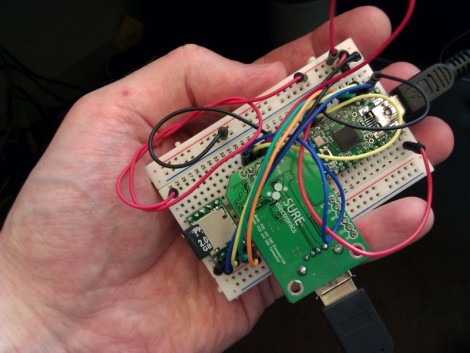
[EverestX] works in the Security industry and is often required to recover or penetrate various systems for a variety of reasons. He wanted to create an all-in-one tool that he could easily carry from job to job which would provide him with several essential functions. He required that the device house a bootable operating system through which he can perform his work, have an Internet connection capable of injection, and have enough storage capacity to back up passwords, images, etc.

He decided to build the system inside an old IBM M-type keyboard, which provides a solid typing experience and plenty of real estate for his various components. After converting the keyboard from PS/2 to USB, he installed a USB hub along with his flash drive and WiFi card.

Once he gets everything reassembled, it should prove to be a pretty stealthy and useful piece of equipment. A word to the wise – if you happen to see someone sneaking around your office with a 20-year old Type-M keyboard, be wary.

RFID Smart Card Reader

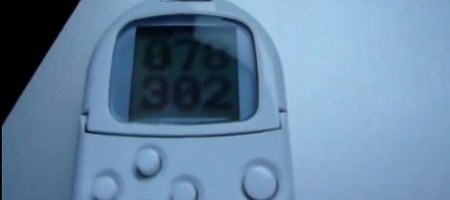
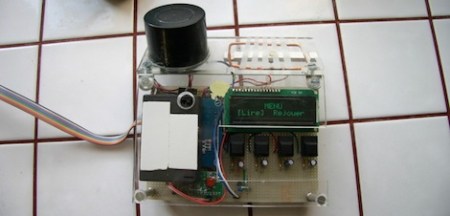
[Navic] wrote in to show us his latest project. This is a portable smart card reader with a nice LCD display. he just happened to have a Basic Stamp 2px, smart card reader, and smart card reader/writer sitting around waiting to be used. What better use than a hand held smart card reader?  Tossing the bits together in a nice project enclosure, [Navic] scoured the code available to him and pieced together what he needed. Now, when you slide in a card, you get a nice readout of the data on that pretty blue screen. Unfortunately, if you pull the card before the read is finished, everything just freezes.

You can see the final video after the break, and you can also see some in-progress videos linked in youtube. He asks if he should add the ability to write, and we say YES. Store that data, then write (duplicate) to another device.

Continue reading “RFID Smart Card Reader”

Cheap And Reliable Portable Face Recognition System

faceaccess_portable_facial_recognition

For their senior ECE 4760 project, engineering students [Brian Harding and Cat Jubinski] put together a pretty impressive portable face recognition system called FaceAccess. The system relies on the eigenface method to help distinguish one user from another, a process that the pair carried out using MatLab.

They say that the system only needs to be hooked up to a computer once, during the training period. It is during this period that faces are scanned and processed in MatLab to create the eigenface set, which is then uploaded to the scanner.

Once programmed, the scanner operates independently of the computer, powered by its own ATmega644 micro controller. Users enroll their face by pressing one button on the system, storing their identity as a combination of eigenfaces in the onboard flash chip. Once an individual has been enrolled, a second button can be pressed to gain access to whatever resources the face recognition system is protecting.

The students say that their system is accurate 88% of the time, with zero false positives – that’s pretty impressive considering the system’s portability and cost.

Stick around to see a quick demo video of their FaceAccess system in action.

Continue reading “Cheap And Reliable Portable Face Recognition System”

Modular Security System Is Portable Too

diy_security_system

Hackaday reader [Oneironaut] wrote in to share a modular, portable security system he built for himself.

He likes visiting the Caribbean, but his favorite vacation spot is apparently rife with cat burglars. He enjoys sleeping with the windows open and wanted to find a way to scare off ne’er do wells. At home, there are a few different buildings on the property he owns, and he was looking to keep curious trespassers away.

The alarm system was built using a matrix keypad that interfaces with an ATMega88 micro controller. The micro controller handles all the logic for the system, triggering an attached “pocket alarm” when ever the sensor is tripped. Like most household alarms, it is armed and disarmed via the keypad, giving the user 60 seconds to enter the disarm code if the alarm has been mistakenly tripped. A wide array of trigger methods can be used, from mercury switches to motion detectors, since his alarm uses a simple plug interface that accepts any two-wire sensor.

Now, no one is claiming that this is high security by any means – the alarm addresses a couple of specific scenarios that apply to [Oneironaut], which may also be applicable to others out there. At the end of the day, the alarm is more meant to scare an intruder into fleeing than anything else, and in that respect, it works perfectly.

Continue reading to see a quick video demonstration of his alarm system in action.

Continue reading “Modular Security System Is Portable Too”

HDD Unlocking On The Mitsubishi Multi-Communication System

It’s a few years old, but [Brian360’s] method of unlocking the hard drive on his Mitsubishi Multi-Communication System is quite interesting. Mitsubishi describes their MMCS as a human-vehicle communication tool. It’s basically an in-dash screen and controls to display navigation maps and play music. [Brian] found that the hard drive for the MMCS in his 2008 Lancer was locked, and could not be cloned and swapped out for a larger drive. Sound familiar to anyone? Hard drive locking has been used in many systems, including the original Xbox, which we’ll get back to in a minute.

The setup seen above was used to grab the hard drive password from the system itself. A custom adapter card was built and plugged in between the hard drive and the MMCS hardware, with test points for each of the data line. [Brian] attached a digital storage oscilloscope, and after a bit of poking around, found a way to trigger the scope when the password was requested. He explains the process of converting the captured data into an ASCII string password.

With that in hand how would you unlock the drive? The favorite tool for this is hdparm, a tool which was used with early Xbox unlocking but which is still in use with other hardware today. Now brian has a disk image backup and the ability to swap out for larger hardware.

[Thanks Traitorous8]

IDE Bus Sniffing And Hard Drive Password Recovery

hdd_password_recovery

shackspace member [@dop3j0e] found himself in a real bind when trying to recover some data after his ThinkPad’s fingerprint scanner died. You see, he stored his hard drive password in the scanner, and over time completely forgot what it was. Once the scanner stopped working, he had no way to get at his data.

He brainstormed, trying to figure out the best way to recover his data. He considered reverse engineering the BIOS, which was an interesting exercise, but it did not yield any password data. He also thought about swapping the hard drive’s logic board with that of a similar drive, but it turns out that the password is stored on the platters, not the PCB.

With his options quickly running out, he turned to a piece of open-source hardware we’ve covered here in the past, the OpenBench Logic Sniffer. The IDE bus contains 16 data pins, and lucky for [@dop3j0e] the OpenBench has 16 5v pins as well – a perfect match. He wired the sniffer up to the laptop and booted the computer, watching SUMP for the unlock command to be issued. Sure enough he captured the password with ease, after which he unlocked and permanently removed it using hdparm.

Be sure to check out [@dop3j0e’s] presentation on the subject if you are interested in learning more about how the recovery was done.

Location Tracking? ‘Droid Does

i_spy

Last week, the Internet was alight with stories of iPhone location tracking. While this wasn’t exactly breaking news in security circles, it was new information to many people out there. Lots of blogs were full of commentary on the situation, including ours, with many Android users chiming in saying, “Android doesn’t do that”.

Well, that’s not entirely true – the playing field is far more level than most people would like to admit.

Android does have the same tracking capability, as do Windows Mobile phones for that matter. Both companies also monitor the cell towers you have connected to, as well as which Wi-Fi hotspots you have passed by. All three companies anonymize the data, though they do assign a unique ID to your location details in order to tell you apart from other users.

Where things really differ is in regards to how much information is stored. Microsoft claims that they only store the most recent location entry, while Andriod systems store the 200 most recent Wi-Fi hotspot locations as well as the most recent 50 cell towers.

At the end of the day each vendor does allow you to opt out of the tracking services, and if you are seriously concerned about the data they are tracking, you can always periodically wipe the information from your handset, should you desire.

[Image via TheTelecomBlog]