Bitcoin Price Ticker

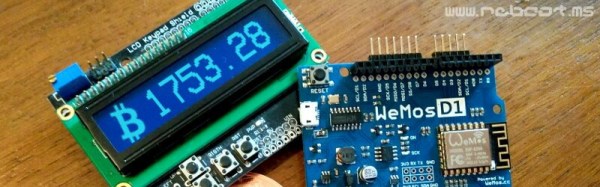
Are you a Bitcoin miner or trader, but find yourself lacking the compulsive need to check exchange rates like the drug-fuelled daytraders of Wall Street? Fear not – you too can adorn your home or office with a Bitcoin Price Ticker! The post is in Italian but you can read a translated version here.

It’s a straightforward enough build – an Arduino compatible board with an onboard ESP8266 is hooked up with an HD44780-compatible LCD. It’s then a simple matter of scraping the Bitcoin price from the web and displaying it on the LCD. It’s a combination of all the maker staples, tied together with some off-the-shelf libraries – it’s quick, and it works.

[Ed: Oh boo!  The images of the LCD were photoshopped.  Please ignore the next paragraph.]

What makes the build extra nice is the use of custom characters on the LCD. The HD44780 is a character based display, and this project appears to use a screen with two lines of sixteen characters each. However, a custom character set has been implemented in the display which uses several “characters” on the screen to create a single number. It’s a great way to make the display more legible from a distance, as the numbers are much larger, and the Bitcoin logo has been faithfully recreated as well. It’s small touches like this that can really set a project apart. We’d love to see this expanded to display other financial market information and finished off in a nice case.

If you’re wondering what you can actually do with Bitcoin, check out the exploits of this robotic darknet shopper. Oh, and Microsoft will take them, too.
Dis-Integrated 6502 Running Programs; Acting Like Computer

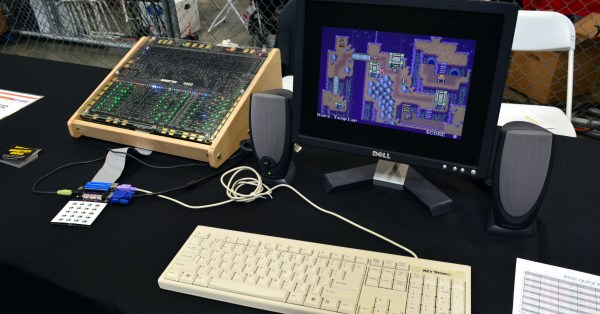
[Eric Schlaepfer] tends to turn up to Maker Faire with projects you simply don’t want to miss. This year is no different. Twelve months ago we delighted in seeing his 6502 processor built from an enormous reel of discrete MOSFETs. At the time it was freshly built and running random code to happily blink the LEDs reflecting activity in the registers. This year he’s given that blinking meaning and is running real programs on his Monster 6502 processor.

Continue reading “Dis-Integrated 6502 Running Programs; Acting Like Computer”

Arduino Cinque – The RISC-V, ESP32, WiFi, Bluetooth Arduino

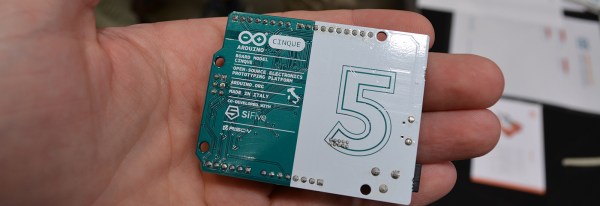
This weekend at the Bay Area Maker Faire, Arduino in conjunction with SiFive, a fabless provider of the Open Source RISC-V micros, introduced the Arduino Cinque. This is a board running one of the fastest microcontrollers available, and as an added bonus, this board includes Espressif’s ESP32, another wonderchip that features WiFi and Bluetooth alongside a very, very powerful SoC.

Details on the Arduino Cinque are slim at the moment, but from what we’ve seen so far, the Cinque is an impressively powerful board featuring the RISC-V FE310 SoC from SiFive, an ESP32, and an STM32F103. The STM32 appears to be dedicated to providing the board with USB to UART translation, something the first RISC-V compatible Arduino solved with an FTDI chip. Using an FTDI chip is, of course, a questionable design decision when building a capital ‘O’ Open microcontroller platform, and we’re glad SiFive and Arduino found a better solution. It’s unknown if this STM32 can be used alongside the FE310 and ESP32 at this point.

We’ve taken a look at SiFive’s FE310 SoC, and it is an extremely capable chip. It was released first at the HiFive1, and our hands-on testing revealed this is a chip that outperforms the current performance champ of the Arduino world, the Teensy 3.6. Of course, with any new architecture, there will be a few problems porting the vast number of libraries over to the FE310, but SiFive has included an Arduino compatible SDK. It’s promising, and we can’t wait to see SiFive’s work in more boards.

FAA’s Drone Registration System Struck Down For Hobbyists

The US Court of Appeals for the D.C. Circuit has struck down a rule requiring recreational drone users and model aircraft pilots to register their drones with the FAA.

This began when [John Taylor], an RC hobbyist and attorney, filed suit against the FAA questioning the legitimacy of the FAA’s drone registration program. This drone registration began early last year, with the FAA requiring nearly all drones and model aircraft to be registered in a new online system. This registration system caused much consternation; the FAA Modernization And Reform Act of 2012 states, ““…Federal Aviation Administration may not promulgate any rule or regulation regarding a model aircraft…”, defining model aircraft as any unmanned aircraft flown within visual line of sight for hobby or recreational purposes. Despite this mandate from Congress, the FAA saw fit to require registration for every model aircraft weighing between 0.55 and 55 pounds, regardless of the purpose of its flight.

In our coverage of the FAA’s drone registration program, we couldn’t make heads or tails of the reasons behind this regulation. In addition to the questionable legality of this regulation, there are questions over the FAA’s mandate to regulate anything flying under the 400 foot ceiling cited in the FAA’s rules. The question of safety is also open — a 2 kg drone is likely to cause injury to a passenger on a commercial flight only once every 187 million years of operation. In short, the FAA might not have the mandate of managing the air traffic, certification, and safety of the nation’s airspace when it comes to model aircraft.

While the Circuit court struck down the rule for registration concerning model aircraft, this still only applies to small (under 55 pounds) planes and quads flown within line of sight. Commercial drone operators still fall under the purview of the FAA, and for them the drone registration system will stand.

KiCAD Best Practices: Library Management

One common complaint we hear from most new KiCAD users relates to schematic and footprint libraries. The trick is to use just one schematic symbol and footprint library each with your project. This way any changes to the default schematic libraries will not affect your project and it will be easy to share your project with others without breaking it. I’ve spent some time refining this technique and I’ll walk you through the process in this article.

We have covered KiCAD (as well as other) Electronic Design Automation (EDA) tools several times in the past. [Brian Benchoff] did a whole series on building a project from start to finish using all the various EDA packages he could lay his hands on. No CAD or EDA software is perfect, and a user has to learn to get to grips with the idiosyncrasies of whichever program they decide to use. This usually leads to a lot of cussing and hair pulling during the initial stages when one can’t figure out “How the hell do I do that?”, especially from new converts who are used to doing things differently.

Read on to learn the best practices to use when using KiCAD and its library management.

Continue reading “KiCAD Best Practices: Library Management”

Monoprice Releases Their Mini Delta Printer (On Indiegogo)

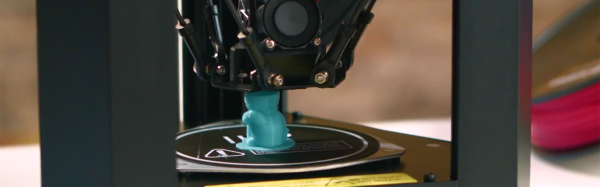
Around this time last year, Monoprice quietly unveiled a small, $200 3D printer. At the time, a fully functioning printer at this price point wasn’t unheard of. A good 3D printer at this price point was. It turned out this printer was actually fantastic and completely changed the value proposition of desktop 3D printers.

In the year since the release of the MP Select Mini printer, Monoprice has been hard at work bringing costs down, reworking designs, and creating an even less expensive printer. Now, it’s out. It’s available for pre-order on Indiegogo right now. Is this still a $150 printer? Not quite: the ‘early bird’ price is $159 with free shipping and August delivery, and a regular price of $169 plus $10 shipping with September or October delivery. There’s also a bundle for $279 that includes the printer, 2kg of filament, and a software package.

The first time we saw this tiny printer was way back in January at CES. It looked to be an extremely capable printer; the only question was if Monoprice could produce it and get it out the door. This would be a tall order; this printer comes with NEMA 17 stepper motors, a heated bed, a 32-bit controller board, and has WiFi enabled.

Here’s what we know about the capabilities of this printer. It’s a fairly standard delta printer with Bowden extruder and a heated bed. PLA and ABS is supported. The printer has auto bed leveling that measures the bed by ‘tapping’ the nozzle against the bed in about a dozen places before printing. From what we saw at CES, the hot end appears similar to the first revision of the $200 MP Select Mini — possibly opening up the door to E3D hot end installations.

Is this printer worth it? Every 3D printer released on a crowdfunding platform should come with the standard warnings, but Monoprice says this machine is in production right now. This raises the question: why release it on Indiegogo when Monoprice already has the whole ‘taking orders for products online’ thing in the bag? I suspect this crowdfunding campaign is just building a buffer; a year ago, the MP Select Mini was perpetually out of stock, and demand far outstripped supply. The same thing will happen with a 3D printer that’s even deeper into impulse buy territory.

In any event, the printer we’ve all been waiting for has been ‘released’, for varying values of ‘released’. The first units will start making their way onto desktops this summer, and we’re going to pick one up and put it through its paces. You can check out Monoprice’s video of this printer below.

Continue reading “Monoprice Releases Their Mini Delta Printer (On Indiegogo)”

If The I And Q Of Software Defined Radio Are Your Nemesis, Read On

For those of us whose interests lie in radio, encountering our first software defined radio must have universally seemed like a miracle. Here is a surprisingly simple device, essentially a clever mixer and a set of analogue-to-digital or digital-to-analogue converters, that can import all the complex and tricky-to-set-up parts of a traditional radio to a computer, in which all signal procession can be done using software.

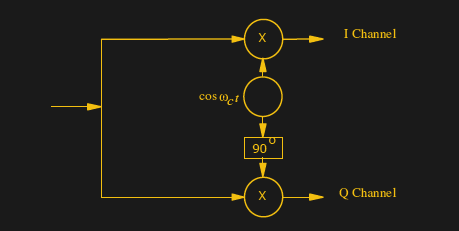
A quadrature mixer. Jugandi (Public domain).

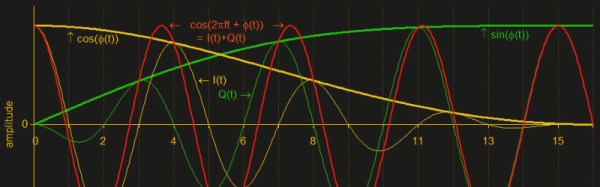
When your curiosity gets the better of you and you start to peer into the workings of a software defined radio though, you encounter something you won’t have seen before in a traditional radio. There are two mixers fed by a two local oscillators on the same frequency but with a 90 degree phase shift, and in a receiver the resulting mixer products are fed into two separate ADCs. You encounter the letters I and Q in relation to these two signal paths, and wonder what on earth all that means.

Continue reading “If The I And Q Of Software Defined Radio Are Your Nemesis, Read On”