Open-V, The First Open Source RISC-V Microcontroller

Open Source software has been around for decades. Over these decades, Open Source software has been the driving force behind most of the Internet, and all of the top-500 supercomputers. The product of the Open Source software movement is perhaps more important than Gutenberg’s press. But hardware has not yet fully embraced this super-charging effect of openness. Being able to simply buy an open source CPU, free of all proprietary bits and NDAs is impossible.

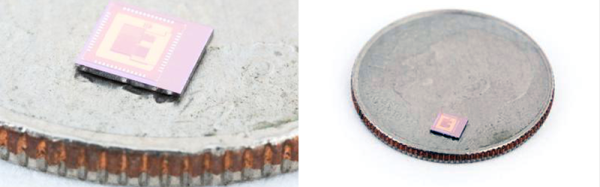
Now, this is finally changing. OnChip, a startup from a group of doctoral students at the Universidad Industrial de Santander in Colombia, have been working on mRISC-V, an open 32-bit microcontroller based on the RISC-V instruction set. It’s now a crowdfunding campaign, and yes, you can simply buy an open source chip.

We’ve taken a look at onchip’s Open microcontroller project before. The team has made significant progress of moving from something that can run on an FPGA to the tapeout of a real, physical chip. The onchip twitter timeline is a flurry of activity, with real silicon and a prediction that 50% of low-end microcontrollers will be running RISC-V in a decade.
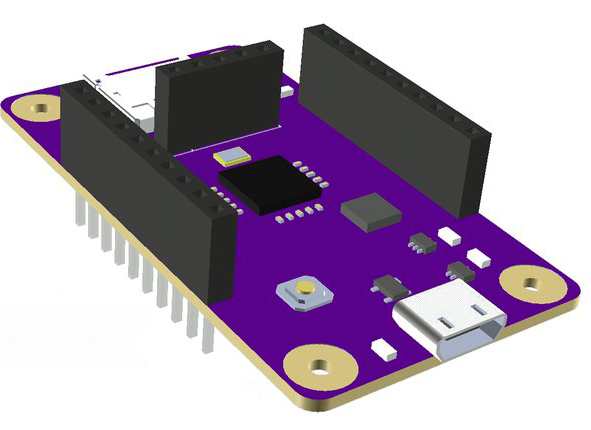
A render of the Open-V dev board

If you want to get your hands on one of these open microcontrollers, the Crowd Supply campaign is actually fairly reasonable, considering this is custom silicon. $49 USD gets you a first-run mRISC-V in a QFN-32 package. $99 gets you the mRISC-V dev board with an SD card slot, USB, regulators, and of course the micro itself.

This chip’s capabilities are almost on par with a low-power ARM Cortex M0. The chip itself runs at 160MHz, has SPI, I2C, SDIO, and JTAG, as well as a 10-bit 10MS/s ADC and a 12-bit DAC. There are 16 GPIO pins on mRISC-V. You won’t be able to build a smartphone or laptop with this chip, but you will be able to build an Internet of Things gizmo.

While OnChip’s efforts won’t result in a completely open source smartphone, there are other projects in the works that will bring an Open Source core to more powerful devices. lowRISC is a project to bring a Linux-capable System on Chip to production, and various people smarter than us have brought GCC, LLVM, and QEMU to the architecture.

Most of the efforts to bring the RISC-V architecture, and indeed most Open Source processors, have focused on the big chips — full CPUs and SoCs. Onchip’s mRISC-V goes the other direction to create a small, open microcontroller. If you’re looking to create an ecosystem of Open processors, this makes a lot of sense; there are more Honda Civics on the road than Lamborghinis, and Microchip and TI ship far more microcontrollers every year than Intel ships CPUs.
Iron Tips: Soldering Headphones And Enamel Wire

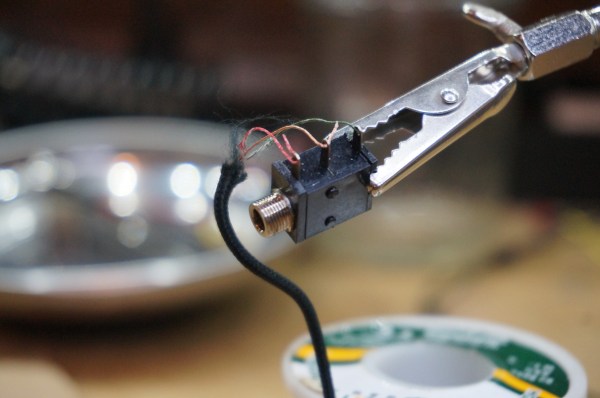
We’ve all had that treasured pair of headphones fail us. One moment we’re jamming out to our favorite song, then, betrayal. The right ear goes out. No wait. It’s back. No, damn, it’s gone. It works for a while and then no jiggling of the wire will bring it back. So we think to ourselves, we’ve soldered before. This is nothing. We’ll just splice the wire together.

So we open it up only to be faced with the worst imaginable configuration: little strands of copper enamel wire intertwined with nylon for some reason. How does a mortal solder this? First you try to untwine the nylon from the strands. It kind of works, but now the strands are all mangled and weird. Huh. Okay. well, you kind of twist them together and give a go at soldering. No dice. Next comes sandpaper, torches, and all sorts of work-a-rounds. None of them seem to work. The best you manage is sound in one ear. It’s time to give up.

Soldering this stuff is actually pretty easy. It just takes a bit of knowledge about how assembly line workers do it. Let’s take a look.

Continue reading “Iron Tips: Soldering Headphones And Enamel Wire”

IP Over QR Codes

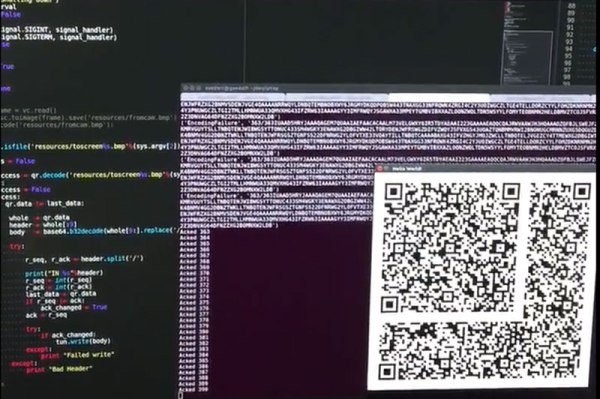
We’ve seen networks built over some interesting mediums, but QR codes has to be a new one. [Eric Seifert] decided to try to use QR codes to make an IP connection. He used these visual codes to create a bi-directional connection between two camera-equipped computers. He’s a persistent chap, because it works: in one of his videos, he shows an SSH connection between two devices.

He faced a number of challenges on the way. Although there is plenty of code to read QR codes, the data that can be encoded and read from them is limited. There is a binary mode that can be used with QR codes, but it is really inefficient. [Eric] decided to use base32 coding instead, packing the data into each frame as alphanumeric text. Each QR code image that is created and received is numbered, so the system can keep track and request any lost images. He also had some problems with keeping the data consistent between the encoded and decoded versions, so he had to add some packing to the data before it would work.  It uses Python-pytun to create a TUN/TAP device that carries the data.

The speed of the connection is rather slow: in his demo video, the two computers take over a minute to exchange keys for an SSH connection, and [Eric] measured the speed of the connection at about 100 bits per second. But even getting something like this working at all is a significant achievement. He has published his code on GitHub.

We’ve featured the work of [Eric] before: he created a data connection using an iPod FM transmitter.

Continue reading “IP Over QR Codes”

Step Up To The 1 KB Challenge

1 kilobyte. Today it sounds like an infinitesimally small number. Computers come with tens of gigabytes of ram, and multiple terabytes of storage space. You can buy a Linux computer with 1 gig of RAM and secondary storage as big as the SD card you throw at it. Even microcontrollers have stepped up their game, with megabytes of flash often available for program storage.

Rapidly growing memory and storage are a great testament to technology marching forward to the beat of Moore’s law. But, we should be careful not to forget the techniques of past hackers who didn’t have so much breathing room. Those were the days when code was written in assembly. Debugging was accomplished with an expensive ICE (an In Circuit Emulator… if you were working for a big company), or a few LEDs if you were hacking away in your basement.

To keep these skills and techniques in play, we’ve created The 1 kB Challenge, a contest where the only limit is what you can do with 1 kB of program memory. Many Hackaday contests are rather loose with constraints — anyone can enter and at least make the judging rounds. This time 1 kB is a hard limit. If your program doesn’t fit, you’re disqualified, and that is a challenge worth stepping up to.

That said, this is Hackaday, we want people to be creative and work around the rules. The important thing to remember is the spirit of the design constraints: this is about doing all you can with 1 kB of program space. Search out the old and wise tricks, like compressing your code and including a decompression program in your 1 kB. Crafty hacks to squeeze more into less is fine. Using the 1 kB as a bootloader to load more code from an SD card is not fine.

Prizes

Any Hackaday contest needs some awesome prizes, and this one is no different.

Continue reading “Step Up To The 1 KB Challenge”

A Rebel Alliance For Internet Of Things Standards

Back when the original Internet, the digital one, was being brought together there was a vicious standards war. The fallout from the war fundamentally underpins how we use the Internet today, and what’s surprising is that things didn’t work out how everyone expected. The rebel alliance won, and when it comes to standards, it turns out that’s a lot more common than you might think.

Looking back the history of the Internet could have been very different. In the mid eighties the OSI standards were the obvious choice. In 1988 the Department of Commerce issued a mandate that all computers purchased by government agencies should be OSI compatible starting from the middle of 1990, and yet two years later the battle was already over, and the OSI standards had already lost.

In fact by the early nineties the dominance of TCP/IP was almost complete. In January of 1991 the British academic backbone network, called JANET (which was based around X.25 colored book protocols), established a pilot project to host IP traffic on the network. Within ten months the IP traffic had exceeded the levels of X.25 traffic, and IP support became official in November.

“Twenty five years ago a much smaller crowd was fighting about open versus proprietary, and Internet versus OSI. In the end, ‘rough consensus and running code’ decided the matter: open won and Internet won,”

Marshall Rose, chair of several IETF Working Groups during the period

This of course wasn’t the first standards battle, history is littered with innumerable standards that have won or lost. It also wasn’t the last the Internet was to see. By the mid noughties SOAP and XML were seen as the obvious way to build out the distributed services we all, at that point, already saw coming. Yet by the end of the decade SOAP and XML were in heavy retreat. RESTful services and JSON, far more lightweight and developer friendly than their heavyweight counterparts, had won.

“JSON appeared at a time when developers felt drowned by misguided overcomplicated XML-based web services, and JSON let them just get the job done,”

“Because it came from JavaScript, and pretty much anybody could do it, JSON was free of XML’s fondness for design by committee. It also looked more familiar to programmers.”

Simon St. Laurent, content manager at LinkedIn and O’Reilly author

Yet, depending on which standards body you want to listen to, ECMA or the IETF, JSON only became a standard in 2013, or 2014, respectively and while the IETF RFC talks about semantics and security, the ECMA standard covers only the syntax. Despite that it’s unlikely many people have actually read the standards, and this includes the developers using the standard and even those implementing the libraries those developers depend on.

We have reached the point where standardization bodies no longer create standards, they formalize them, and the way we build the Internet of Things is going to be fundamentally influenced by that new reality.

Continue reading “A Rebel Alliance For Internet Of Things Standards”

Sinclair I/O Board Completed Over 30 Years Later

In the early 1980s when the 8-bit microcomputer boom was well under way, [Alan Faulds] was a student, and an owner of a Sinclair ZX81. He had ambitions to use it, in his words, “to control the world“, but since the Sinclair lacked an I/O port he was thwarted. He bought an expander board and a couple of I/O card PCBs from the British electronic supplier Maplin in the days when they were a mail order parts stockist rather than a chain of stores chasing Radio Shack’s vacated retail position.

Sadly for [Alan], he didn’t have the cash to buy all the parts to populate the boards, then the pressures of a final year at university intervened, and he never built those Maplin kits. They sat forgotten in their padded envelope for over three decades until a chance conversation with a friend reminded him of his unfinished student project. He sought it out, and set about recreating the board.

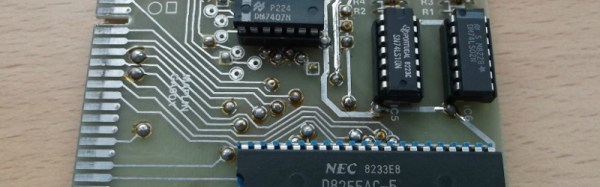
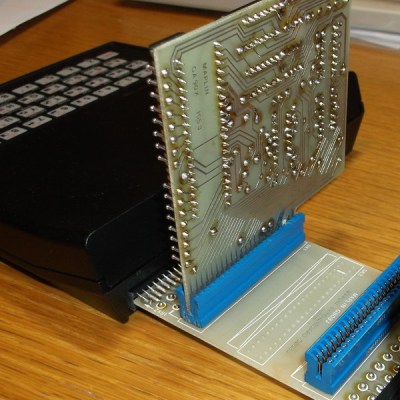
zx-io-thumbnailThe ZX81 had a single port: a PCB edge connector at its rear that exposed all the Z80 processor’s lines. It was notorious for unreliability, as the tiniest vibration when a peripheral was connected would crash the machine. Maplin’s expansion system featured a backplane with a series of edge connector sockets, and cards with bare PCB edge connectors. Back in the 1980s it was easy to find edge connectors of the right size with the appropriate key installed, but not these days. [Alan] had to make one himself for his build.
The I/O card with its 8255 and brace of 74 series chips was a double-sided affair with vias made through the use of little snap-off hand-soldered pins. [Alan] put his ICs in sockets, a sensible choice given that when he powered it up he found he’d put a couple of the 74 chips in the wrong positions. With that error rectified the board worked exactly as it should, giving the little ZX three I/O ports, albeit with one of them a buffered output.

We haven’t featured the little Sinclair micro as often as we should have here at Hackaday, it seems to have been overshadowed by its ZX Spectrum successor. We did show you a VGA ZX81 emulated on an mbed though, and a rather neat color video hack for its Brazilian cousin.

Five-Watt SDR Transceiver For Hams

The availability of cheap SDR hardware created a flourishing ecosystem for SDR software, but a lot of the hardware driving the revolution was still “cheap”. In the last few years, we’ve seen quality gear replacing the TV dongles in many setups, and down-converters designed for them to allow them to work on the ham bands.

But something that’s purpose-built might be a better option if ham radio, particularly the shortwave portion thereof, is your goal. First off, you might want to transmit, which none of the TV dongles allow. Then, you might want a bit of power. Finally, if you’re serious about short-wave, you care more about the audio quality than you do immense bandwidth, so you’re going to want some good filters on the receiving end to help you pull the signal out of all the noise.

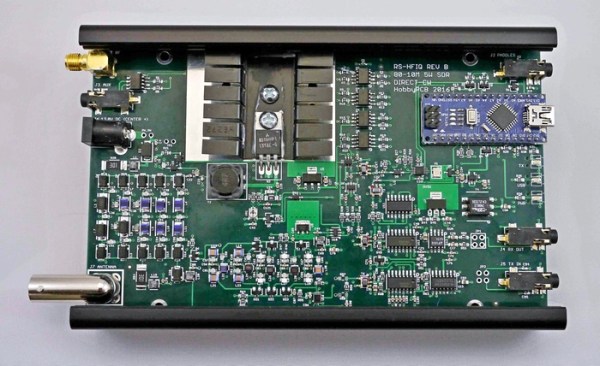
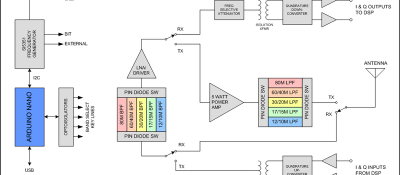
rs-hfiq_block_diagram_featuredThe RS-HFIQ 5 W SDR transceiver might be for you. It’s up on Kickstarter right now, and it’s worth looking at if you want a fully open source (schematics, firmware, and software) shortwave SDR rig. It’s also compatible with various open frontends.

The single-board radio isn’t really a full SDR in our mind — it demodulates the radio signal and sends a 96 kHz IQ signal across to your computer’s soundcard where it gets sampled and fully decoded. The advantage of this is that purpose-built audio rate DACs have comparatively high resolution for the money, but the disadvantage is that you’re limited to 96 kHz of spectrum into the computer. That’s great for voice and code transmissions, but won’t cut it for high-bandwidth data or frequency hopping applications. But that’s a reasonable design tradeoff for a shortwave.

Still, an SDR like this is a far cry from how simple a shortwave radio can be. But if you’re looking to build up your own SDR-based shortwave setup, and you’d like to hack on the controls more than on the radio itself, this looks like a good start.