Curing A Parrot’s Amnesia With BLEAH

[Dandu] recently wrote in to tell us how he managed to revive his Parrot Flower Power after the manufacturer told him it couldn’t be repaired. To save you the trouble of opening Google in another tab, the Parrot Flower Power is a Bluetooth Low Energy (BLE) “smart” device for your flower pot. Because of course that’s a thing.

A healthy Flower Power connected

When [Dandu] noticed his Flower Power was no longer being detected by his iOS devices, he contacted support who told him that sadly this was a hardware failure and that he should just throw it away. But he had his doubts about this diagnosis as other devices such as his Raspberry Pi could still communicate with it. Upon closer inspection, he realized that the Flower Power didn’t have a name, and could only be contacted by its MAC address directly. Reasoning the lack of a name might be upsetting the “It Just Works” sensibility of his iGadget, [Dandu] started researching if there was some way to get the device to take a new name remotely.

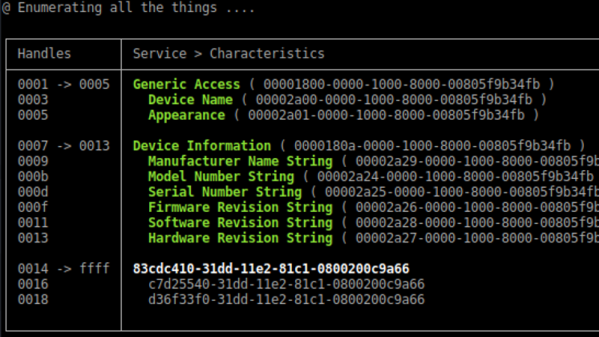
Luckily for our hero, BLE is kind of broken. Searching for a solution to his problem brought him to a blog post by the creator of BLEAH which demonstrated exactly what [Dandu] was looking to do. Following along, it took only a single command to push a new name to the Flower Power’s BLE configuration. With that, his “broken” device was brought back to life. Why the device lost its name, or how to prevent it from happening in the future are questions for another day. [Dandu] will take the win.

If you’re interested in the popular new technology that’s compromising our security in the name of convenience and improved battery life, the rabbit hole starts here.
ESP8266 Broadcasts Memorial WiFi Spam

John Perry Barlow, founding member of the Electronic Frontier Foundation and Freedom of the Press Foundation, died on February 7th, 2018. To say that he left his mark on the Internet, and by extension modern culture, is something of an understatement. He may not be a household name, but between this activism (online and off), lectures, written work, and various entrepreneurial projects, his 70 years of life were surely not wasted. Barlow was once quoted as saying “I want to be a good ancestor”, and by pretty much any metric it would seem he made good on that goal.

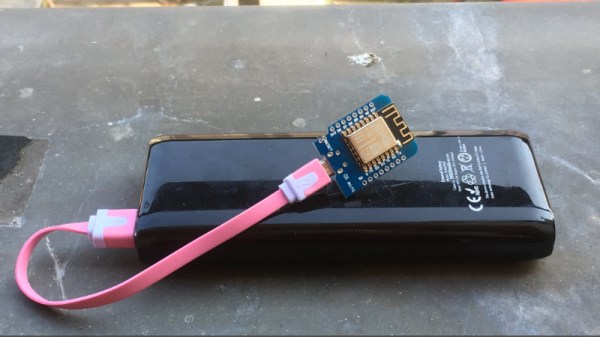
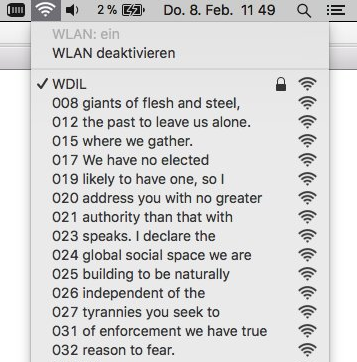
To mark his passing, [Moritz Metz] came up with a rather unusual memorial. Using a bit of code on an ESP8266 board, he created a device that would broadcast out Barlow’s “A Declaration of the Independence of Cyberspace” line-by-line in the form of 228 WiFi SSIDs. Perhaps not the most effective way to get Barlow’s words out to the people, but we’ll give him extra points for style.

The code itself is based on FakeBeaconESP8266, which as the name implies, allows the user to create fake WiFi networks. to broadcast the manifesto of your choosing, you need only add in the appropriate sendBeacon() lines at the bottom of the code. It would appear that prefixing each line with a number is required to make devices scanning for networks show the lines of text in proper sequence. At least on the devices demoed, anyway.

Just to be clear: you should definitely not do this. Jamming up the local environment with a bunch of fake networks is a pretty terrible idea. But as a memorial for a man who occasionally claimed to be an anarchist, you could do worse. Plus we have to admit “Giants of Flesh and Steel” is an awesome name for a network.

Continue reading “ESP8266 Broadcasts Memorial WiFi Spam” →

A Wrencher On Your Oscilloscope

We like oscilloscope art here at Hackaday, so it was natural to recently feature a Javascript based oscilloscope art generator on these pages, along with its companion clock. Open a web page, scribble on the screen, see it on the ‘scope.

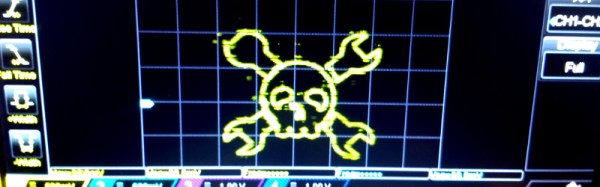
As part of our coverage we laid down the challenge: “If any of you would like to take this further and make a Javascript oscilloscope Wrencher, we’d love to make it famous“. Which of course someone immediately did, and that someone was [Ted] with this JSFiddle. Hook up your soundcard’s left and right to X and Y respectively, press the “logo” button in the bottom right hand pane, fiddle with your voltages and trigger levels for a bit, and you should see a Wrencher on the screen. We’re as good as our word, so here we are making the code famous. Thanks, [Ted]!

It’s not an entirely perfect Wrencher generator, as it has a lot of points to draw in the time available, resulting in a flickery Wrencher. (Update: take a look at the comments below, where he has posted an improved JSFiddle and advice on getting a better screen grab.) Thus the screen shot is an imperfect photograph rather than the usual grab to disk, for some reason the Rigol 1054z doesn’t allow the persistence to be turned up in X-Y mode so each grab only had a small part of the whole. But it draws a Wrencher on the screen, so we’re pretty impressed.

The piece that inspired this Wrencher can be found here. If you think you can draw one with a faster refresh rate, get coding and put it in the comments. We can’t promise individual coverage for each effort though, we’re Hackaday rather than Yet-another-scope-Wrencher-aday.

Oscilloscope Art From Your Browser

Oscilloscope art is a fascinating pursuit in which waveforms are generated for the X an Y channels of an oscilloscope to draw pictures on its screen. It’s somewhat distinct from vector computer graphics of the type you might see in older arcade machines or the Vectrex console, in that while it uses a similar approach to creating a display it has a very different purpose. Sometimes these works can be breathtakingly beautiful animations, and other times maybe not so much.

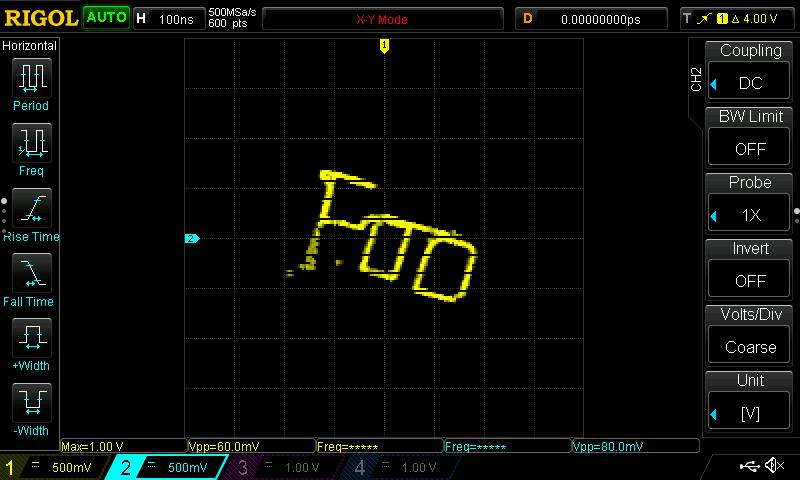
If you’d like to explore the topic as a mild diversion, then maybe this Javascript oscilloscope art generator from [Neil Fraser] might be of interest. In around a hundred lines of code he’s created an in-browser scratchpad upon which a waveform can be drawn which will then be created as an audio signal on your computer’s soundcard. Hook up left and right to X and Y of your oscilloscope, and what you scribbled on the pad should pop up on the screen.

Draw it, see it on screen. Magic!

It’s an impressive piece of work that you can see in the video below or try for yourself, and your scribe’s Rigol was pressed into service to give it a go. After a bit of tweaking to find the right voltages and selecting slope triggering rather than edge triggering, we too were making squiggles appear on the screen.

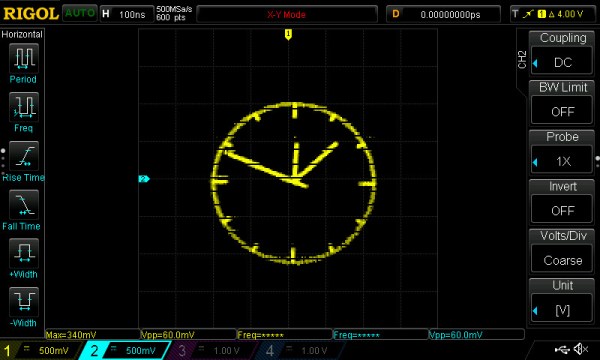
It’s rather funny, he’s saved the best for last. As an afterthought, he also provides a link to another piece of his work, an oscilloscope clock in Javascript. If any of you would like to take this further and make a Javascript oscilloscope Wrencher, we’d love to make it famous.

Continue reading “Oscilloscope Art From Your Browser” →

Making The Case For Slackware In 2018

If you started using GNU/Linux in the last 10 years or so, there’s a very good chance your first distribution was Ubuntu. But despite what you may have heard on some of the elitist Linux message boards and communities out there, there’s nothing wrong with that. The most important thing is simply that you’re using Free and Open Source Software (FOSS). The how and why is less critical, and in the end really boils down to personal preference. If you would rather take the “easy” route, who is anyone else to judge?

Having said that, such options have not always been available. When I first started using Linux full time, the big news was that the kernel was about to get support for USB Mass Storage devices. I don’t mean like a particular Mass Storage device either, I mean the actual concept of it. Before that point, USB on Linux was mainly just used for mice and keyboards. So while I might not be able to claim the same Linux Greybeard status as the folks who installed via floppies on an i386, it’s safe to say I missed the era of “easy” Linux by a wide margin.

But I don’t envy those who made the switch under slightly rosier circumstances. Quite the opposite. I believe my understanding of the core Unix/Linux philosophy is much stronger because I had to “tough it” through the early days. When pursuits such as mastering your init system and compiling a vanilla kernel from source weren’t considered nerdy extravagance but necessary aspects of running a reliable system.

So what should you do if you’re looking for the “classic” Linux experience? Where automatic configuration is a dirty word, and every aspect of your system can be manipulated with nothing more exotic than a text editor? It just so happens there is a distribution of Linux that has largely gone unchanged for the last couple of decades: Slackware. Let’s take a look at its origins, and what I think is a very bright future.

Continue reading “Making The Case For Slackware In 2018” →

Looking Back At Microsoft Bob

Every industry has at least one. Automobiles had the Edsel. PC Hardware had the IBM PCJr and the Microchannel bus. In the software world, there’s Bob. If you don’t remember him, Bob was Microsoft’s 1995 answer to why computers were so darn hard to use. [LGR] gives us a nostalgic look back at Bob and concludes that we hardly knew him.

Bob altered your desktop to be a house instead of a desk. He also had helpers including the infamous talking paper clip that suffered slings and arrows inside Microsoft Office long after Bob had been put to rest.

Continue reading “Looking Back At Microsoft Bob” →

Amazing Mechanical Linkages And The Software To Design Them

Most of us are more bits-and-bytes than nuts-and-bolts, but we have the deepest appreciation for the combination of the two. So, apparently, does [rectorsquid]. Check out the design and flow of his rolling ball sculpture (YouTube, embedded below) to see what we mean. See how the arms hesitate just a bit as the ball is transferred? See how the upper arm gently places it on the ramp with a slight downward gesture? See how it’s done with one motor? There’s no way [rectorsquid] designed this on paper, right?

Of course he didn’t (YouTube). Instead, he wrote a simulator that lets him try out various custom linkages in real time. It’s a Windows-only application (sigh), but it’s free to use, while the video guides (more YouTube) look very comprehensive and give you a quick tour of the tool. Of special note is that [rectorsquid]’s software allows for sliding linkages, which he makes very good use of in the rolling ball sculpture shown here.

We’ve actually secretly featured [rectorsquid]’s Linkage software before, in this writeup of some amazing cosplay animatronic wings that used the program for their design. But we really don’t want you to miss out if you’re doing mechanical design and need something like this, or just want to play around.

If you’d like to study up on your nuts and bolts, check out our primer on the ubiquitous four-bar linkage, or pore through Hackaday looking for other great linkage-powered examples, like this automatic hacksaw or a pantograph PCB probe for shaky hands.

Anyone know of an open-source linkage simulator that can also output STL files for 3D printing? Or in any format that could be easily transformed into OpenSCAD? Asking for a “friend”.

Continue reading “Amazing Mechanical Linkages And The Software To Design Them” →