Exploring Turn Of The Century RAF Avionics

The second hand market is a wonderful thing; you never know what you might find selling for pennies on the dollar simply because it’s a few years behind the curve. You might even be able to scrounge up some electronics pulled out of a military aircraft during its last refit. That seems to be how [Adrian Smith] got his hands on a Control Display Unit (CDU) originally installed in a Royal Air Force AgustaWestland AW101 “Merlin” helicopter. Not content to just toss it up on a shelf, he decided to take a look inside of the heavy-duty cockpit module and see if he couldn’t make some sense out of how it works.

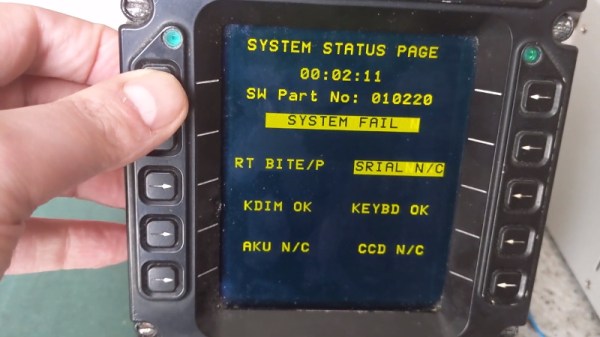
Unsurprisingly, [Adrian] wasn’t able to find much information on this device on the public Internet. The military are kind of funny like that. But a close look at the burn-in on the CDU’s orange-on-black plasma display seems to indicate it had something to do with the helicopter’s communication systems. Interestingly, even if the device isn’t strictly functional when outside of the aircraft, it does have a pretty comprehensive self-test and diagnostic system on-board. As you can see in the video after the break, there were several menus and test functions he was able to mess around with once it was powered up on the bench.

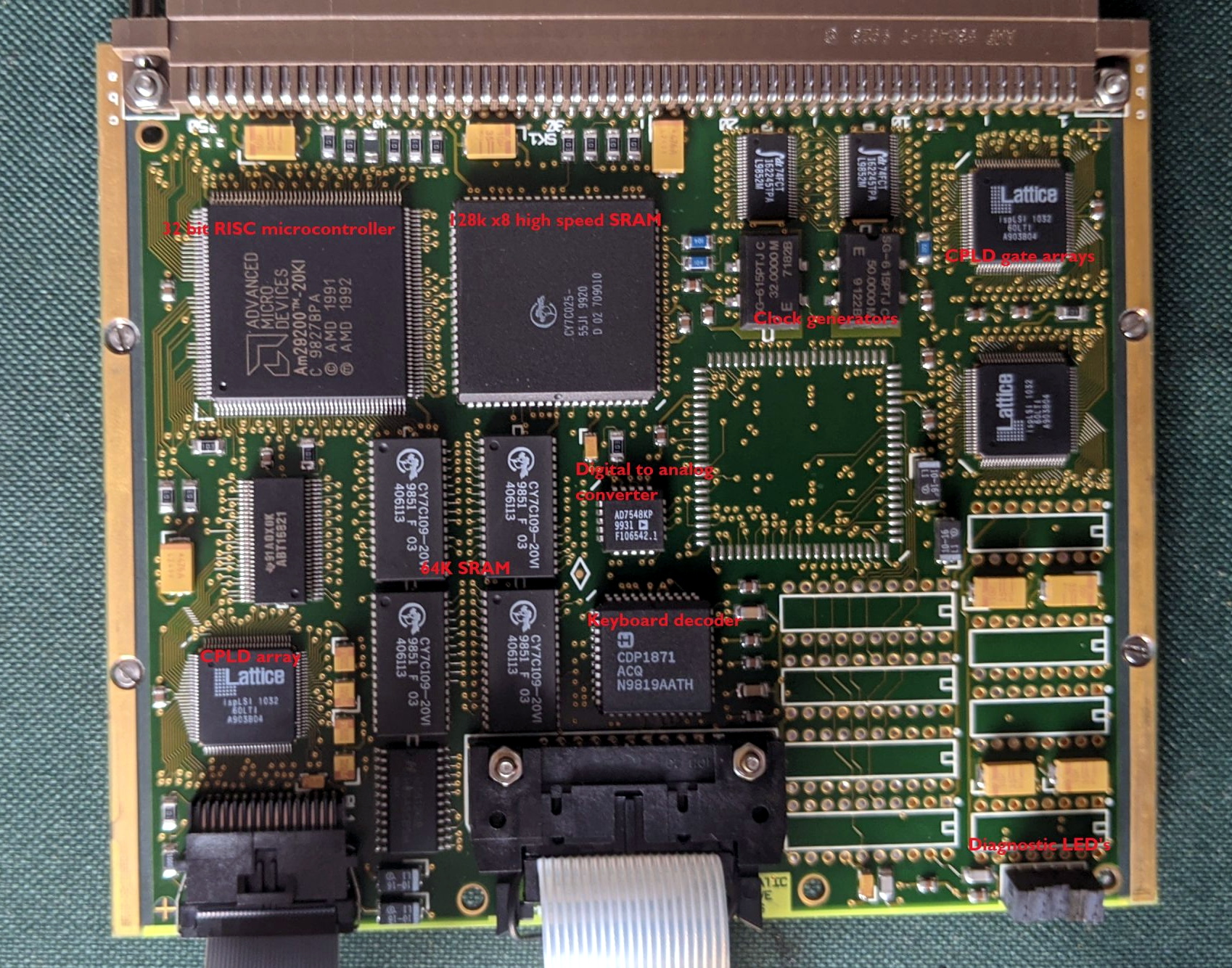
With the case cracked open, [Adrian] found three separate PCBs in addition to the display and keyboard panel on the face of the CDU. The first board is likely responsible for communicating with the helicopter’s internal systems, as it features a MIL-STD-1553B interface module, UART chips, and several RS-232/RS-485 transceivers. The second PCB has a 32-bit AMD microcontroller and appears to serve as the keyboard and display controller, possibly also providing the on-board user interface. The last board looks to be the brains of the operation, with a 25 MHz Motorola 68EC020 CPU and 1Mb of flash.

All of the hardware inside the CDU is pretty generic, but that’s probably the point. [Adrian] theorizes that the device serves as something of a generic pilot interface module, and when installed in the Merlin, could take on various functions based on whatever software was loaded onto it. He’s found pictures online that seem to show as many as three identical CDUs in the cockpit, all presumably running a different system.

[Adrian] has uncovered some interesting diagnostic information being dumped to the CDU’s rear connectors, but he’s still a long way off from actually putting the device to any sort of practical use. If any Hackaday readers have some inside information on this sort of hardware, we’re sure like to hear about it.

Continue reading “Exploring Turn Of The Century RAF Avionics”

Literally Tearing Apart A SpaceX Starlink Antenna

While SpaceX’s constellation of Starlink satellites is nowhere near its projected final size, the company has enough of the birds zipping around in low Earth orbit to start a limited testing period they call the Better Than Nothing Beta. If you’re lucky enough to get selected, you have to cough up $500 for the hardware and another $100 a month for the service. Despite the fairly high bar for getting your hands on one, [Kenneth Keiter] decided to sacrifice his Starlink dish to the teardown Gods.

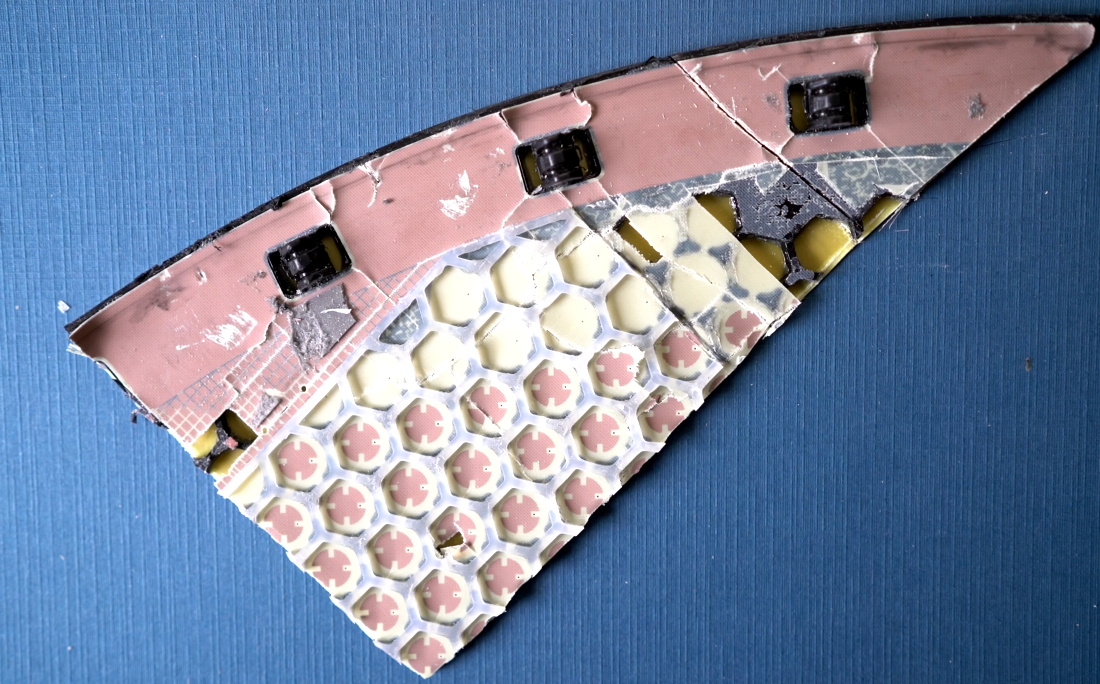
We say sacrifice because [Kenneth] had to literally destroy the dish to get a look inside. It doesn’t appear that you can realistically get into the exceptionally thin antenna array without pulling it all apart, thanks in part to preposterous amount of adhesive that holds the structural back plate onto the PCB. The sky-facing side of the phased array, the key element that allows the antenna to track the rapidly moving Starlink satellites as they pass overhead, is also laminated to a stack-up comprised of plastic hexagonal mesh layers, passive antenna elements, and the outer fiberglass skin. In short, there are definitely no user-serviceable parts inside.

The dish hides many secrets under its skin.

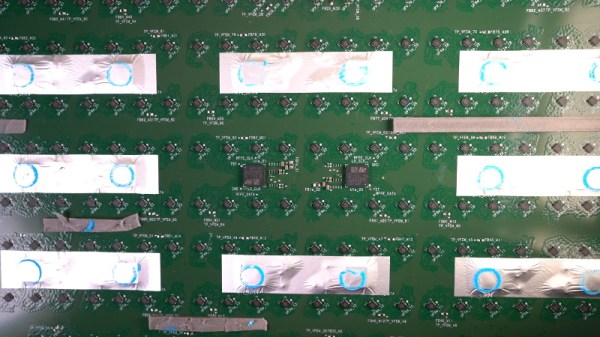
Beyond attempting to analyze the RF magic that’s happening inside the antenna, [Kenneth] also takes viewers through a tour of some of the more recognizable components of the PCB; picking out things like the Power over Ethernet magnetics, a GPS receiver, some flash storage, and the H-Bridge drivers used to control the pan and tilt motors in the base of the dish.

It also appears that the antenna is a self-contained computer of sorts, complete with ARM processor and RAM to run the software that aims the phased array. Speaking of which, it should come as no surprise to find that not only are the ICs that drive the dizzying array of antenna elements the most numerous components on the PCB, but that they appear to be some kind of custom silicon designed specifically for SpaceX.

In short, there’s still plenty we don’t know about how this high-tech receiver actually works. While [Kenneth] does a respectable job of trying to make sense of it all, and we admire the dedication required to rip apart such a rare and expensive piece of kit, it’s still going to be awhile before the hacker community truly masters the tech that SpaceX is putting into their ambitions global Internet service.

Continue reading “Literally Tearing Apart A SpaceX Starlink Antenna”

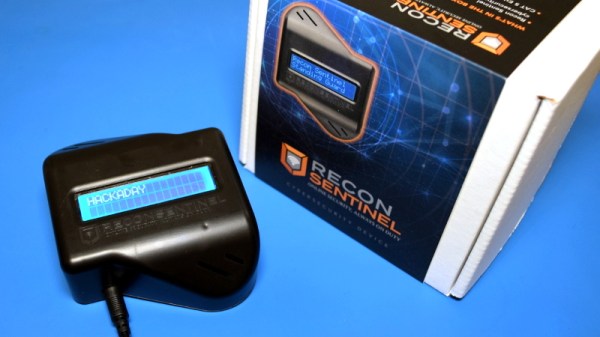
Teardown: Recon Sentinel

It might be hard to imagine now, but there was a time when the average home had only a single Internet connected device in it. This beige box, known as a “desktop computer” in those olden days, was a hub of information and productivity for the whole family. There was a good chance you might even need to wait for your turn to use it, since it’s not like you had a personal device in your pocket that let you log on from the bathroom whatever room you might be in at the time. Which is just as well, since even if you had broadband back then, you certainly weren’t shooting it around the house with the Magic Internet Beams that we take for granted now.

Things are a lot more complicated today. Your computer(s) are only part of the equation. Now there’s mobile phones and tablets sharing your Internet connection, in addition to whatever smart gadgets you’ve brought into the mix. When your doorbell and half the light bulbs in the house have their own IP address, it takes more than a fresh copy of Norton AntiVirus to keep everything secure.

Which is precisely what Cigent Technology says the Recon Sentinel was designed for. Rather than protecting a single computer or device, this little gadget is advertised as being able to secure your entire network by sniffing out suspicious activity and providing instant notifications when new hardware is connected. According to the official whitepaper, it also runs a honeypot service Cigent calls a “cyber deception engine” and is capable of deploying “Active Defense Countermeasures” to confuse malicious devices that attempt to attack it.

It certainly sounds impressive. But for $149.99 plus an annual subscription fee, it better. If you’re hoping this teardown will tell you if it’s worth springing for the $899.99 Lifetime Subscription package, don’t get too excited. This isn’t a review, we’re only interested in cracking this thing open and seeing what makes it tick.

Continue reading “Teardown: Recon Sentinel”

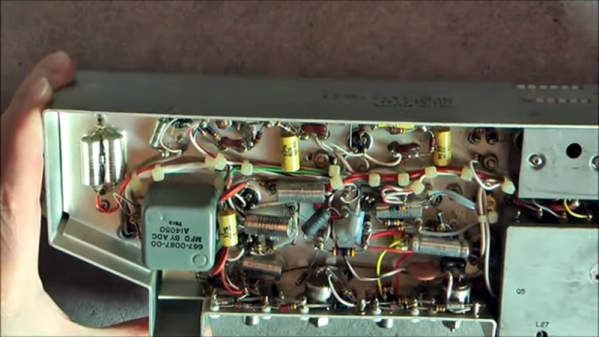
Aircraft Radio Bares All

There is a certain charm to older electronics gear. Heavy metal chassis and obviously hand-wired harness can be a work of art even if they would be economically impractical for most modern gear. Watching [msylvain59’s] tear down of a Collins 51R VOR receiver is a good example of that. The construction looks so solid.

If you aren’t familiar with VOR, it stands for VHF omnidirectional range and allows airplanes to tune into a fixed ground-based beacon and determine its heading in relation to the beacon. In some cases, it can also calculate distance.

Continue reading “Aircraft Radio Bares All”

Xbox Series S Teardown Photo

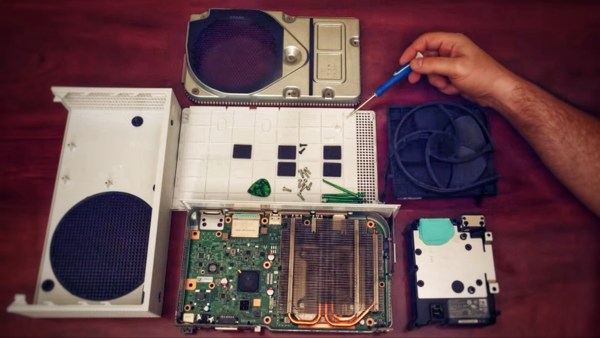
Xbox Series S Teardown Shows A Glimpse At The Future

Console launch season is upon us. A time for billion dollar corporations ingratiate themselves with “Johnny Consumer” by promising the future of entertainment is finally available to one-and-all. The focus of this new generation of consoles has been the battle for 4K supremacy between Xbox Series X and PlayStation 5. Interestingly, Microsoft also created another iteration of their Xbox Series for those satisfied with games in 1080p, and thanks to [Dimitris] we have been able to see the internals of the Xbox Series S (XSS).

Xbox Series S Teardown SSD Photo
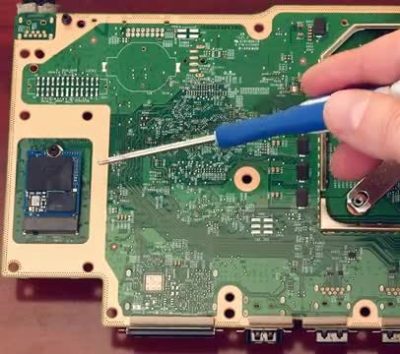
The Xbox Series S features standard m.2 slot that could be used for future storage expansion.

Microsoft’s choice to produce an all-digital console has greatly affected the internal design of the XSS. With the lack of a disc-drive there is only a single cable, the fan cable, tying the components together. The heat sink covering the 197mm² AMD APU takes up nearly 60% of the motherboard surface area. Though the XSS may be diminutive by modern console standards, its cooling fan is huge, somewhere in the 140 mm range. What little space is left by the heat sink and fan assembly is taken up by the internal power supply. As a fun nod, the PSU sports a Master Chief insignia to denote the location of the two-pronged connector beneath.

On the underside of the motherboard lies the biggest surprise of the “little brother” console. The system storage SSD is socketed rather than directly soldered to the board itself. The primary design goal of the XSS was to provide a cheaper alternative for players, but this standard m.2 slot reveals that Microsoft has plans for future expansion. This SSD, while not user-accessible in a traditional sense, will likely provide an alternative method to expanding storage outside of Microsoft’s proprietary external offerings. For a look at the teardown in process, [Dimitris’] video from his Modern Vintage Gamer YouTube channel is below.

Continue reading “Xbox Series S Teardown Shows A Glimpse At The Future”

Rebuilding A Hero (the Robot, Not The Sandwich)

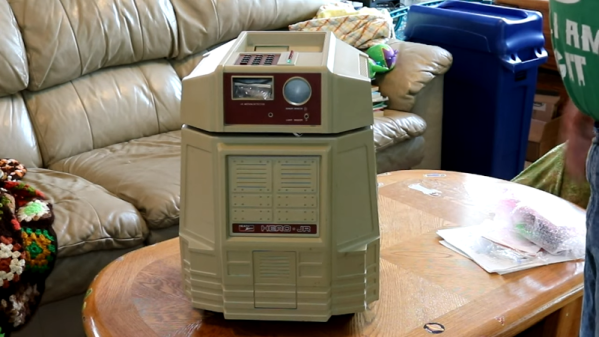
When [Scott Baker] found a Heathkit Hero Junior on eBay, he grabbed it. He had one as a kid, but it was long sold. The robot arrived with no electronics, so the first order of business is to give it some new modern brains including an ATMega328 and a Raspberry Pi. You can see the start of the project in the video below.

So far, you can see a nice teardown of the chassis and what’s left of the little robot’s drive system. This wasn’t the big Hero-1 that you probably remember, but it was still a pretty solid platform, especially for the time it was on the market.

Continue reading “Rebuilding A Hero (the Robot, Not The Sandwich)”

New Raspberry Pi 400 Is A Computer In A Keyboard For $70

The newest Raspberry Pi 400 almost-all-in-one computer is very, very slick. Fitting in the size of a small portable keyboard, it’s got a Pi 4 processor of the 20% speedier 1.8 GHz variety, 4 GB of RAM, wireless, Ethernet, dual HDMI outputs, and even a 40-pin Raspberry Standard IDE-cable style header on the back. For $70 retail, it’s basically a steal, if it’s the kind of thing you’re looking for because it has $55 dollars worth of Raspberry Pi 4 inside.

In some sense, it’s getting dangerously close to fulfilling the Raspberry Pi Dream. (And it’s got one more trick up it’s sleeve in the form of a huge chunk of aluminum heat-sinked to the CPU that makes us think “overclocking”.)

We remember the founding dream of the Raspberry Pi as if it were just about a decade ago: to build a computer cheap enough that it would be within everyone’s reach, so that every school kid could have one, bringing us into a world of global computer literacy. That’s a damn big goal, and while they succeeded on the first count early on, putting together a $35 single-board computer, the gigantic second part of that master plan is still a work in progress. As ubiquitous as the Raspberry Pi is in our circles, it’s still got a ways to go with the general population.

By Gareth Halfacree  CC BY-SA 2.0

The Raspberry Pi Model B wasn’t, and isn’t, exactly something that you’d show to my father-in-law without him asking incredulously “That’s a computer?!”. It was a green PCB, and you had to rig up your own beefy 5 V power supply, figure out some kind of enclosure, scrounge up a keyboard and mouse, add in a monitor, and only then did you have a computer. We’ve asked the question a couple of times, can the newest Raspberry Pi 4B be used as a daily-driver desktop, and answered that in the affirmative, certainly in terms of it having adequate performance.

But powerful doesn’t necessarily mean accessible. If you want to build your own cyberdeck, put together an arcade box, screw a computer into the underside of your workbench, or stack together Pi Hats and mount the whole thing on your autonomous vehicle testbed, the Raspberry Pi is just the ticket. But that’s the computer for the Hackaday crowd, not the computer for everybody. It’s just a little bit too involved.

The Raspberry Pi 400, in contrast, is a sleek piece of design. Sure, you still need a power supply, monitor, and mouse, but it’s a lot more of a stand-alone computer than the Pi Model B. It’s made of high-quality plastic, with a decent keyboard. It’s small, it’s light, and frankly, it’s sexy. It’s the kind of thing that would pass the father-in-law test, and we’d suggest that might go a long way toward actually realizing the dream of cheaply available universal (open source) computing. In some sense, it’s the least Hackaday Raspberry Pi. But that’s not saying that you might not want one to slip into your toolbag.

Continue reading “New Raspberry Pi 400 Is A Computer In A Keyboard For $70”