Electronic Cufflinks For The Discerning Hacker

icufflinks

[Phillip Torrone] gave us a heads up about a project he and [Limor Fried] along with [Mike Doell] have just wrapped up. Their aptly-named “iCufflinks” softly pulsate with light the same way in which you see many Mac products do.

The cufflinks are made from machined aluminum and have the ubiquitous “power symbol” milled into the face. Inside the cufflinks, you will find a small circuit board and a battery, which powers the device for up to 24 hours. The team reverse-engineered the soft LED pulse found in Mac products in order to deliver the exact same visualization in their cufflinks.

Ignoring for a minute, the name and the inspiration for the product, we think they are pretty darn cool. There’s nothing like a set of softly glowing cufflinks to spark conversation at any social gathering.

Like anything else you’ll find on Adafruit.com, the cufflinks are completely open source, so you can feel free to tweak and remix the design any way you’d like.

Continue reading to see a video of the cufflinks in action.

Continue reading “Electronic Cufflinks For The Discerning Hacker”
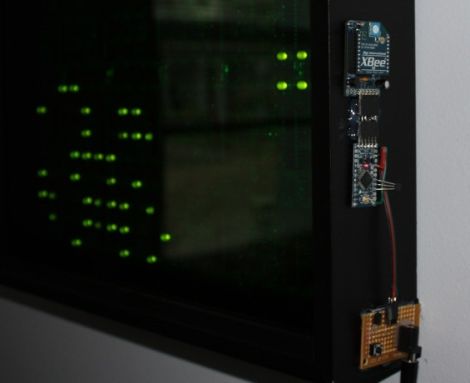
Large Remote-controlled Game Of Life Display

game_of_life

Sometimes it’s just plain fun to over-engineer. [Stephanie] gets a warm fuzzy feeling when she successfully adds way more electronics components to a project than she really needs – just because she can. We can’t really argue with her if that is the intended goal, nor can we find fault with the sweet Game of Life display she put together.

She started off with six Game of Life kits from Adafruit, but she quickly caught the LED bug and her collection grew until she had 20 kits (that’s 320 LEDs for those of you keeping count). After piecing them all together, they were mounted in a wooden frame and placed behind a dark piece of acrylic. It looked great and worked just fine, but it wasn’t overdone enough for her tastes.

In the end, she added a small Arduino and Xbee module to the Game of Life display, which enables it to be controlled by her network-enabled thermostat we featured a few weeks back. The thermostat was fitted with an Xbee unit as well, which allows it to turn the Game of Life on and off at whatever times [Stephanie] specifies.

We’ll take two please.

[via Adafruit Blog]

Zork On The Microtouch

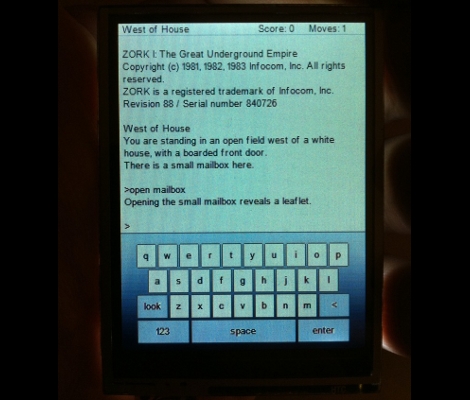
[Rossum] just finished porting Zork over to the Microtouch. This hardware, which he originally designed, is now available for purchase through Adafruit. It’s a tiny 320×240 TFT touchscreen, driven by an AVR ATmega32u4 microcontroller. The device draws power from a lithium battery, and also boast a USB connection and a MicroSD slot.

The hack here is getting Zork to run with the limited resources available on the device. [Rossum] needed to emulate the Z80 processor, but didn’t want to use extra hardware in the way that [Sprite_TM] did when he emulated a Z80 using an AVR. Instead, this is based on a stripped-down implementation of Frotz. The final code is too big to fit on the chip along side of the bootloader. This means you’ll need to use an ISP programmer in order to flash this example to the chip. We’re pretty sure that AVRdude can program the ATmega32u4, so pretty much any ISP (including an Arduino) can be used to do the programming.

Kinect To Get Windows Drivers Months After Open Source Drivers Were Developed

Microsoft is planning to release Windows drivers for the Kinect this spring, months after open source drivers were developed by a motivated hacking community. [Johnny Chung Lee], who worked with the Microsoft team when the hardware was developed, mentions that he had pushed for the giant to develop and release at least basic Windows drivers. That refusal led him to a position as top cheerleader and bounty contributor in Adafruit’s Open Kinect Contest which resulted (quickly we might add) in the availability of open source drivers. If you’ve been following Hackaday or any other tech blogs the last three months you’ll know that an explosion of projects using the Kinect followed, and [Johnny] figures Microsoft’s decision to release Windows drivers is an attempt to ride this wave on their own flagship OS rather than continue to watch from the sidelines.

“Ask An Engineer” Live Streams At Adafruit

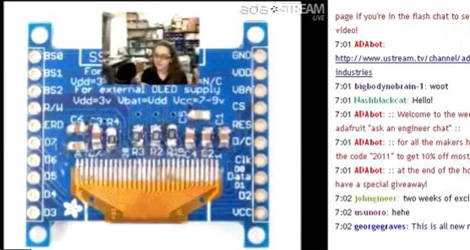
I [Caleb], finally had a chance to catch one of the live chat sessions over at Adafruit.com called “Ask an engineer“. I was pleasantly surprised. Though the show is only an hour long, the amount of information covered was quite amazing. They started out, announcing a new, this really cool looking touch screen system, product and going over the tech specs. This very quickly turned into a question and answer session about how to utilize and modify the device. [Limor], aka [ladyada] was extremely knowledgeable and [rossum], the designer who made it even showed up in the chat to fill in the rare gap. After that, there was a general question and answer period where people were firing off questions so fast I couldn’t watch them all and still follow her answers. It was a lot of fun and quite frankly felt way too short.

Be sure to check it out on Saturday night at 10:00 P.M. ET

Open Source Kinect Contest Has Been Won

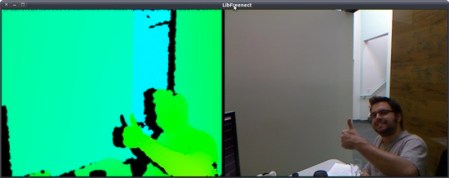
Adafruit Technologies has announced the winner of the Open Source Kinect contest. [Hector], who we mentioned yesterday has won, providing both RGB and depth access to the device.  Some of you were asking at that time, why the contest was not over yet. Well, Adafruit had to verify. The image you see above are of another user[qdot], verifying the drivers on his machine.

What is interesting is how Adafruit has chosen to close this contest. Not only are they giving [Hector] his prize money, they are also donating an additional $2,000 to the EFF who fight for our right to legally hack and reverse engineer our own equipment.

[Hector] is being generous as well, using his prize money to help pay for gadgets to hack with some teams he is involved with, mainly the iPhone Dev Team and the Wii hacker team “Twiizers”

Beginner Concepts: LEDs And Laws

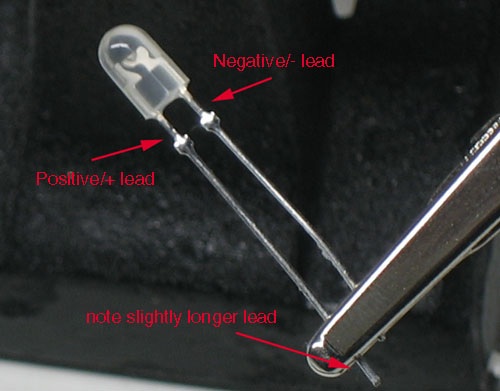
Adafruit has a new LED tutorial for people wanting to get started with electronics. It is full of useful diagrams, pictures, and quizzes to help make sure you are understanding the concepts. This is the real basic stuff here: LEDs, resistors, and the laws from Kirchhoff, and Ohm. It starts out explaining the parts of an LED. Then variations of LEDs: illumination versus indication, clear versus diffused, brightness, color, and size. The mass of the tutorial covers how and why an LED’s brightness can be changed by a resistor and why a resistor is needed to keep an LED from burning out. Such as how Kirchhoff’s Voltage Law works with Ohm’s Law to help you determine the proper resistor for an LED. If you found useful the other beginner concepts posts about Analog Circuits and Electronics basics from the Giz, you should find this tutorial to be useful.