Yet Another Self-Balancing Unicycle

No one has time to hone their balancing skills these days, and if building your own Segway doesn’t generate enough head-turning for you, then the self-balancing unicycle from the guys at [Scitech] should. Their build is chain-driven, using easy-to-find salvaged Razor scooter parts. Throw in a motor controller, 5DOF IMU and some batteries and it’s almost ready to burn up the sidewalks in hipster-tech style.

Some of the previous unicycle builds we’ve seen are a little on the bulky side, but the [Scitech] cycle aims for simplicity with its square tube steel framing and footrests. As always, unicycle builds like these take some effort on behalf of the rider: shifting your weight controls steering and throttle. The [Scitech] gang also discovered that it’s usually best when you don’t accidentally wire the motors up to the controller backwards. We recommend that you find a helmet and watch the video after the break.

Too-cool-for-unicycle hackers can build a dangerously fast e-skateboard instead.

Continue reading “Yet Another Self-Balancing Unicycle”

Learn JTAG By Writing A Bit-banging Programmer

j-tag-flow-chart

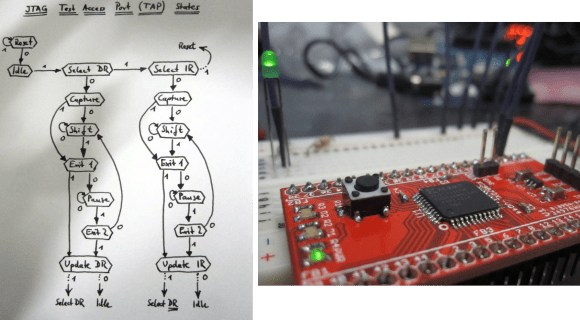
[Pesco] won one of Dangerous Prototypes’ PCB giveaways a few months ago. He opted for a CPLD breakout board. He just needed to put in a parts order and populate the components himself. But then what? He needed a JTAG programmer to work with the chip. Like any good autodidact he choose to make his own rather than buying one. He absorbed the JTAG specification and coded a bit banging programmer using an Arduino.

We’ve used JTAG many times to program ARM chips. But until now we never took the time to figure out how the specification works. If you’ve got an IEEE subscription you can download the whitepaper, but [Pesco] was also able to find one floating around on the interwebs. The flow chart on the left is the cheat sheet he put together based on his readings. From there he wrote the Arduino sketch which implements the programming standard, allowing him to interact with a chip through a minicom terminal window.

[via Dangerous Prototypes]

360° Photography Made Easy

rotate

The graphic above wasn’t painstakingly stitched together by rotating a camera lens on a lazy suzan a tiny bit, taking a picture, and repeating the process fifty times. This is high tech stuff, courtesy of Zcapture, a tool for automated 360 degree photography of small objects.

For the last 15 years, [Jared] has been spending a lot of time on eCommerce and found existing solutions to displaying products online to be very lacking. After playing around with the Basic Stamp eight years ago and most recently the Arduino, [jared] decided he would build something to solve his problem – an automated box that takes pictures of a rotating product.

Inside the Zcapture is an Arduino connected to a motor and the software to control Canon and Nikon DSLRs. Put the Zcapture in a soft box, light it up, set up your camera, and you have a computer-controlled lazy suzan robot that will take pictures of any object, then stitch them together into an animated GIF or a fancy eCommerce rotating image viewer

Building An Ethernet Connected RFID Reader

For the last few years, [Lt_Lemming] was the president of Brisbane’s hackerspace. Until several months ago, access to the local was done using 125KHz RFID tags and an Arduino board with a prototyping shield. As the hackerspace gained members and moved to bigger facilities, [Lt_Lemming] decided to build himself a more compact and advanced platform.

His Simple NetworkAble RFID Controller (SNARC) is a platform which can be connected to an Ethernet network and different RFID readers in order to implement smart access control functionalities. Through hole components were selected so even solder apprentices may assemble it. The PCB was designed using Fritzing, and development can even be done inside the Arduino IDE as ISP and serial headers are available on the board. Finally, an N-channel mosfet controls the door locking mechanism.

The project is open hardware and software, and all the sources can be downloaded from [Lt_Lemming]’s github repo.

Reaction Time Challenge

reactionChallenge

We’re not sure where [Bill Porter] finds all of his free time, but we’re glad he’s put it to such good use by building an exhibit piece for the local science museum: Reaction Time Challenge. It’s likely that we were all inspired to love science as kids in a museum like this, and [Bill’s] contribution is already fascinating its young audience. The challenge lets two participants test how fast they can smack a big red button after a randomly-generated countdown. The time taken for the players to react is translated into the RGB LED strips, measuring how fast they managed to hit the button.

Builds like this one need to clearly communicate how they should be used; you don’t want confused children bamming around on your cabinet. First, [Bill] guts the dim LEDs inside the big plastic buttons and replaces them with some brighter ones. To keep the connections clean, he takes the cannibalized ends of an Ethernet cable and hooks the speaker and buttons to an Ethernet jack. The jack sits snugly in a project box where it connects to an Arduino. Two RGB LED strips run from the opposite end of the box, daisy-chaining from the bottom of the cabinet to the top, then back down again. See it all come together in the video after the break.

[Bill’s] museum must be pretty lucky; he resurrected the “Freeze Frame” exhibit for them just over a year ago and has done a bunch of other projects for them over the years.

Continue reading “Reaction Time Challenge”

The Difference Between Bitcrushers And Sample Rate Reducers

bit

If you look around a few electronic music forums, you’ll see a lot of confusion over the difference between a bitcrusher – a filter that reduces the bit depth of an audio signal – and a sample rate reducer – a filter that does exactly what its name implies. With the popularization of 8-bit and retro synth music, this difference is obviously of grave import of concern to saints and kings alike. [Michael] is more than happy to walk us through the difference with real-time sample and bit rate adjustment with his audio hacker board.

The audio hacker board is an Arduino shield with a 12-bit DAC and a 12-bit ADC. With two 1/8″ jacks and a pair of pots, [Michael] was easily able to whip up a sketch that is able to adjust the sample rate and bit depth of an audio signal in real-time.

Contrary to nearly everyone’s opinion of what ‘8-bit’ music is, it’s actually the sample rate that makes music sound like a cassette deck jury rigged into a Nintendo Entertainment System. Reducing the bitrate just makes any audio source sound louder and worse.

Check out the excellent demo video of the effect of bitcrushers and sample rate reducers below.

Continue reading “The Difference Between Bitcrushers And Sample Rate Reducers”

Browsing The Web One Step At A Time

After modifying his new manual treadmill to fit under his standing desk, [Brian Peiris] found a way to let him stroll all over the internet.

After removing the treadmill’s original time/distance display, [Peiris] reverse engineered the speed sensor to send data to an Arduino and his PC.  We’ve seen a number of projects that interface treadmills with virtual worlds, but what really makes this project stand out is a simple script using the Throxy Python library which allows the treadmill to throttle his machine’s internet connection.

The end result is a browsing experience that reacts to how fast the user runs.  In the demonstration video, you can see Peiris tiptoe through images or jog through YouTube videos.  A minimum bandwidth setting keeps the connection live, so if you can’t make it all the way through that HD Netflix movie, taking a breather won’t time out the connection.

It’s certainly a great way to get in shape, or at the very least, it’ll make your ISP’s bandwidth cap feel a lot bigger.

Video after the jump.

Continue reading “Browsing The Web One Step At A Time”