A.R.T. Sorts Your Recyclables For You

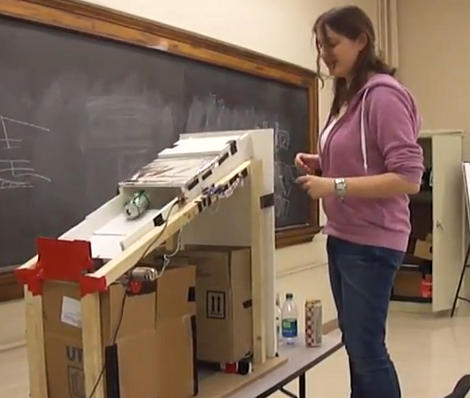
[Yuhin Wu] wrote in to let us know about the Automated Recycling Sorter that was built with a group of classmates at the University of Toronto. They entered it the school’s student design contest and we’re happy to report that it took first place.

The angled sled has been designed to separate glass, plastic, and metal containers. The first sorting happens at the intake area. A set of moment arms are used to weed out the glass bottles. Since there are several of them in a row, a larger and heavier plastic container will not be falsely sorted and the same goes for smaller glass bottles.

With the glass out of the mix the team goes on to separate metal and plastic. An Arduino was used for this purpose. It senses an electrical disturbance caused by a metal can passing through the chute and actuates a trap door to sort it. Plastic has no effect on this sensor and slides past the trap to its own sorting bin.

Don’t miss both demo videos which we’ve included after the break.
Continue reading “A.R.T. Sorts Your Recyclables For You”

office-game-show-buzzer

Office Game Show Buzzer Keeps Things Fair And Square

The sales team in [Chuck’s] office is a pretty competitive bunch as you might expect, and they decided that they wanted a system which would allow them to challenge one another during their weekly meetings. The competition involves answering questions posed by their manager, but hand raising only works for so long – they needed a definitive way to tell who “buzzed in” to answer a question first.

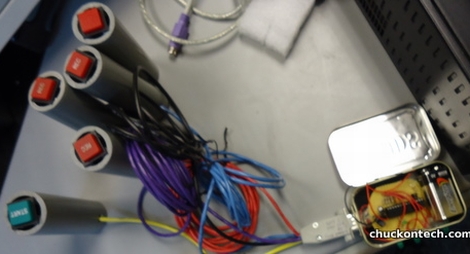
Since [Chuck] only had a short bit of time and a tiny budget to work on, he opted to find the easiest solution to the problem, which was an Arduino-based game show buzzer system. The game display is built from an Arduino, some LEDs and an Altoids tin, while the buzzer pushbuttons were salvaged from an old radio broadcast console.

Now, when a question is posed, the salesman can buzz in to answer, knowing that only the quickest person’s button click will be registered. When it’s time for another question, the host simply clicks his buzzer to reset the console.

While it’s not quite as fancy as this game buzzer system we featured a while back, [Chuck] says it does the job perfectly and was cheap to boot.

Continue reading to see a short video of the office game buzzer system in action.

Continue reading “Office Game Show Buzzer Keeps Things Fair And Square”

Rapid Fire, Remote Controlled Ping Pong Ball Turret

remote-ping-pong-ball-turret

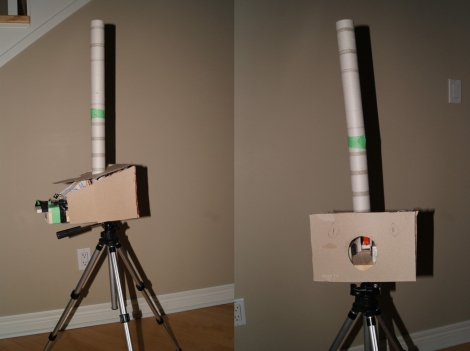
[Andrew] and his brother had some time (and a lot of ping pong balls) on their hands, so they decided to have some fun and built a remote-controlled ping pong ball turret.

Arduino aside, the turret is cheap and easy to build as [Andrew’s] writeup explains. The firing mechanism was constructed using a pair of foam wheels and motors, which is used to launch the ping pong balls much like a baseball pitching machine. The balls are stored above the wheels in a cardboard tube and released by a mechanical flap when triggered.

When [Andrew] is ready to release the turret’s payload, he sends a command to his computer over VNC, which relays the command to the Arduino over a serial connection, triggering the flap. While the control scheme could certainly benefit from direct, wireless phone-to-Arduino communications, it seems to work well enough for [Andrew’s] needs.

Check out the video dramatization below to see [Andrew] “surprise” his brother with a hail of ping pong balls after the jump.

Continue reading “Rapid Fire, Remote Controlled Ping Pong Ball Turret”

Flexible Web Interface Makes The Universal Remote Nearly Perfect

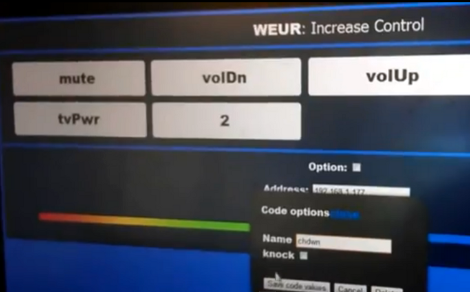
[Fall Deaf] built an Arduino based universal remote control system. It uses a shield which has both an IR receiver and transmitter. This gives it the tools to learn codes from your existing remotes and play them back in order to control the devices. This functionality is really nothing new, but we think the user interface he developed for the system is absolutely fantastic!

Software is web-based. You can simply point a remote at the Arduino and push a button. The receiver will store the code which can later be assigned to a virtual button. The image above shows the channel-up option being created; it will be added to the list once confirmed. From there any web enabled device – smart phone, tablet, netbook, etc – can be used as the remote for the system. The only feature we think is missing is the ability to alter the layout of the buttons, with larger areas for the most frequently used commands.

After the break you can see a demonstration of this system, as well as the one extra feature we haven’t touched on yet. [Fall Deaf] included a Piezo element in the hardware design which lets him knock on his coffee table to use the remote if a smart-device isn’t close at hand.

Continue reading “Flexible Web Interface Makes The Universal Remote Nearly Perfect”

Simulated Dashboard For A Simulated Race

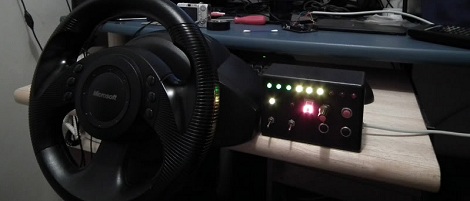
Simulators might have lost their cool for a lot of gamers, but [Fergo] is trying for a comeback. He built an electronic dashboard for a car racing simulator.

[Fergo] spends most of his track time on iRacing, an MMO racing simulator. Possibly due to a little bit of influence from Formula 1 steering wheels, he wanted to add to his dashboard that included Microsoft racing wheel. The dashboard includes RPM lights, a gear indicator, five general buttons, a rotary encoder, and a pit limiter, rev limiter and low fuel indicators.

The build is powered a VB.NET app that connects the iRacing API to an Arduino. To get all those buttons and LEDs talking to the Arduino, [Fergo] used an IO expander that communicates over an I2C bus. It’s a surprisingly simple design that should scale well if [Fergo] ever decides to expand his cockpit. We’re not sure if it could handle controlling a 737, but it would be more than sufficient for a Cessna 172 or Mercury capsule.

Check out [Fergo] tearing around the track with his buttonbox dashboard after the break.

Continue reading “Simulated Dashboard For A Simulated Race”

Very Accurate Clock Can’t Be Read Accurately

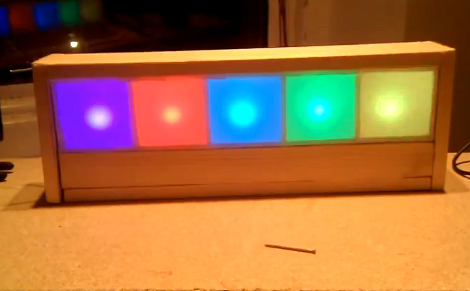
[Martijn] is showing off his new clock which he calls a Light Spectrum Clock. We like to look of it, using RGB LEDs in five squares that remind us of some of those LED coffee table builds. From left to right this shows the week, day, hour, minute, and second. Simple, right?

We had to smile a little bit when looking through his write up. He chose an Arduino nano as a controller, using a TLC5940 chip to drive the LEDs. But it is the inclusion of a DS1307 real-time clock that we find amusing. It will keep quite accurate time (not quite as well as the DS3232 but still respectable) but the fuzzy display technique makes telling the time accurately an impossibility. But like other color-based clocks, that’s part of the fun. The real reason for using an RTC chip is that they usually include battery-backed operation so that you can shut off the LEDs when you’re not around and the clock will continue to tick.

You can watch the seconds pass by as fading colors in the clip after the break.

Continue reading “Very Accurate Clock Can’t Be Read Accurately”

Stop Light Converted To Control Office Foot Traffic

traffic-light

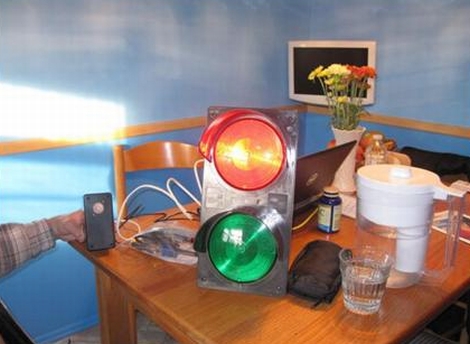
When [Paul Rea] started work with his current employer, he was intrigued by a traffic light that sat unused near the entrance of the “Engineering Loft” where he was stationed. He promised himself that he would get it working one day, but several years passed before he had the chance to take a closer look at it.

He took the light home with him over Thanksgiving weekend last year, and started to dig around inside to see how things were wired up. It turns out the light was a pretty simple contraption, though he discovered it ran on mains voltage, something [Paul] didn’t really want to fiddle with. He swapped out the traffic light’s bulbs for some low-voltage models, which he could easily power with a 12v wall wart.

[Paul] then added an Arduino and PIR sensor to the light fixture in order to detect when someone was leaving the Engineering Loft, warning those who are on their way in. He says that people don’t really pay attention to the light very much, though he is pretty happy with the results.

Continue reading to see a short video of the traffic light in action.

Continue reading “Stop Light Converted To Control Office Foot Traffic”